For my life I cannot find anymore
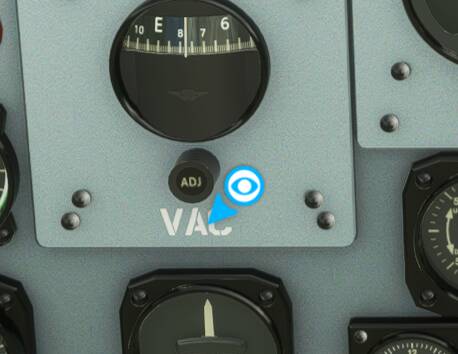
how to switch it off.
They’re annoying aren’t they? I went through the assistance options and made sure everything is off… Navigation Aids… Notifications… and most importantly POI
Unfortunately you still get the blue arrows if you try the Flight Assistant.  it would be better without them.
Also, if you haven’t done already.. you might want to go into general options.. Accessibility tab & change Cockpit Interaction System from Lock to Legacy.
I also have all the tool tips off.
Regards
Steve
Thank you. I have everything switched off except the “Instrument Tool Tips”. And as I found out just now, those also show the blue eye. I want the tool tips because of the dynamic text showing % on levers and such.
Baseless Rumor - MS is buying CBS now too and is just trying viral promotion of their eye logo… 
it’s clearly the illuminati at work
I still can’t seem to remove this eye.
As far as I can tell, this appears when a tooltip is off screen. I want rid of it as well.
Why is the first reply marked as a solution? It’s not possible to remove without disabling tooltips, is it?
Yes, it is. Don’t see it any more.
thanks, guys! 
This topic was automatically closed 30 days after the last reply. New replies are no longer allowed.