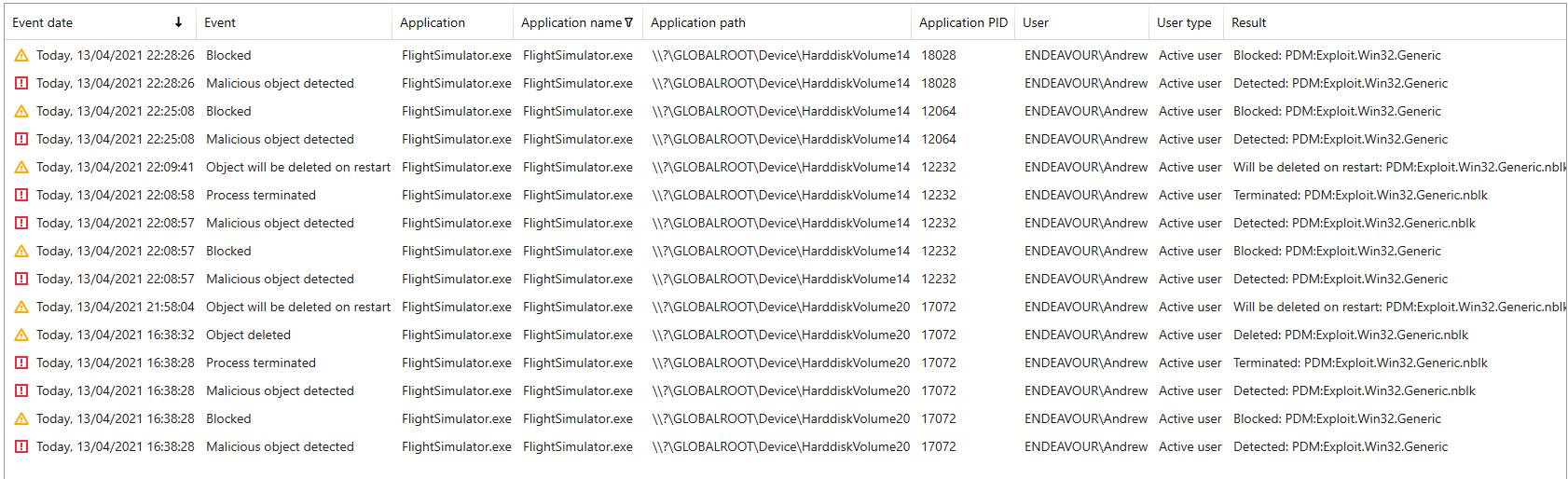
Maybe Kapersky isn’t wrong. Have you thought of that? Maybe there is malicious code that unknowing got placed in the package. I sure hope not.
Do you remember the problem with cccleaner? Could be the same.
I had exactly the same issue. Update went well including WU 4 but it seems impossible to learn to Kaspersky to let MSFS running. After each restart of the PC, Kaspersky wants to delete flight simulator.exe. Nothing worked except to stop Kaspersky.
I also have a problem with Kaspersky. Did you reinstall FS from scratch ?
The excluding of FS folder from Kaspersky scanning does not help because Kaspersky delete flight simulator exe file from temporary folder before the update is installed.
I got the same issue but deactivating Kaspersky didn’t help. So I deinstalled MSFS and now I can’t install it anymore as I get “No Servers available”
Had the same problem while launching the updater. Did it continue to flag the .exe after the update/restart?
holly ■■■■ i thought it was only me i see others have the same problem i managed to update the game by pausing kaspersky and i did add the exe to the excluded list but stupid kaspersky keeps flagging it again just don’t disinfect your pc just click ignore from inside kaspersky from details list that’s only way to play msfs is tp pause kaspersky and game works fine ■■■■ knows what’s going on
I confirm. Kaspersky killed my sim. Not scary for me, of course. I already decided to reinstall Windows.
But this is a fact. Now I do not know whether to install Kaspersky again.
Things like this are the very reason that I have a tested backup/restore system in place. I want to avoid having to re-install MSFS from scratch. With a proven backup/restore routine, I can reinstall MSFS from scratch in about 5 minutes.
Word to the wise: Have a tested backup/recovery plan. One day, you will be super happy you took the time.
Please share your backup method for MSFS. I would love to know this fast track method.
This could be a real pain in the bum. Sincere thank you all for posting the problem so quickly and pre warning me before I try to update tomorrow.
The question now remains for me.
After a clean installation of MSFS, is it possible to install Kaspersky or will it kill my sim again?
Wundermann,
I use Macrium reflect backup system.
To recover MSFS , I start the MSFS Install process for a minute and then stop it.
Then, I start up my backup system and recover the Official folder (or any others that I need) from my backup file and restart the MSFS install process.
The install process quickly discovers that all of the needed files are there and completes the install in just a couple of minutes. The 124 Gig download is avoided.
Hope that helps
If you just need to recover the “Official” folder, just start a recovery process and recover that one folder from your backup.
Added: Just remember that you have to use a backup system that will allow you to recover at a folder level and not just the entire OS or disk.
just a tip for anyone do not disinfect your pc it will kill your game when kaspersky flags it just open kaspersky click on details and it should show what the problem is just click on ignore from the dropdown list restart your pc and just pause kaspersky and load up msfs should work
I am not gonna lie, but I don’t dare to start MSFS + Kaspersky at this point haha. I think an installation is OK, as long as you don’t start MSFS while Kaspersky is running.
Hopefully, Kaspersky will deploy a fix ASAP.
I’m surprised people still use these unneeded security software products. Haven’t had a virus or spyware in years with standard Windows defender. Maybe a generational thing and people still used to the old days when it was still needed but today these products are basically a scam.
there is nothing much wrong with kaspersky this is the first time it’s not liked msfs just pause kaspersky to play msfs until there is a fix
I got this same thing happen, I have Kaspersky. I just got my heart rate down a few hundred BPMs. I ignored the message, shut down Kaspersky and restarted my PC. Oh goodness!!! Wouldn’t boot into windows. I shut down, pulled power, waited 5 mins. Booted back in. Updating as I type