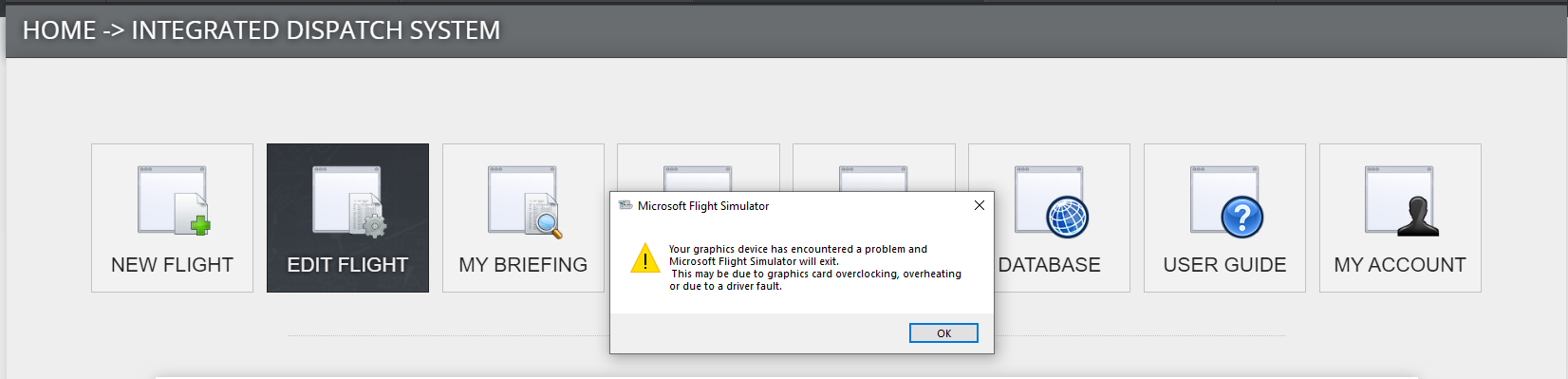
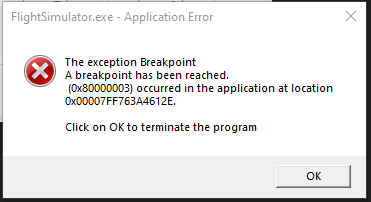
ähmm.. no 
You can do the settings or OC manually.. XMP profiles help with OC, the manufactors choose settings which “should work”. But it still depends on mainboard , cpu, amount of sticks, etc.. ( there are QVL lists )
Of course I recommend to try XMP profiles, you just paid for the speed. But in case users run into trouble, disabling XMP profile, or choose one of the more safe profiles can often be helpfull or is at least a test-run worth to be sure there is no issue from these side.
Well, I have a 3080 ti running with all graphics settings on ultra. The game worked fine, when it works. I could play for hours on end, but as soon as I shut it down and then start it again, it never makes it to the runway without crashing.
Recently I found that I can reinstall the NVIDIA drivers before starting the sim, and it runs every time. The only issues I found is with two very specific scenarios.
- Twice, when turning to Base, looking out the side window, and getting clearance to land from ATC, the sim completely locked up, and about 30 seconds later, shut down.
- Three times, turning while descending caused my keyboard and controls to be completely unresponsive. I was able to eventually recover from this only once after a couple of minutes.
Now this became common on Windows 11 - SU10
wtf is going on with this sim…
Prior to SU10 i never had any problem with CTD´s and this.
This just started happening to me a few days ago. On Thursday, I couldn’t get a flight started in the Longitude after trying a few times then I tried other aircraft and the game loaded fine. Yesterday, I tried the Longitude again and boom it worked and I had a normal flight. This morning, I tried to do a flight in the Longitude and as soon as the game loaded I got the error.
After I downloaded the initial SU 10 when it was released, the game made me download two separate updates pertaining to SU 10 within the last week. When I checked the release notes on both updates, it was all about SU 10. So maybe that could be the issue? It also started after I got FSLTL but I doubt that’s the issue but who knows. I love this game a ton but it has so many bugs I thought about telling my pest control guy about it.
3 Likes
I started a flight and was about 3 h in the air. Then I got the error with the message “Warning: Your graphics device has encountered a problem”.
Any solutions?
Memory consumption cannot be too high on my system. I have 32 GB.
It feels like a lot of people fix this issue for a while by switching some graphic settings but eventually it comes back. Almost like some game files or cache is getting corrupted and changing the settings clears it. Is anyone seeing this issue on windows 10? I feel like most of my problems came after upgrading to 11.
I’m getting close to trying a clean install of windows but it’s going to be so much work backing everything up…. sigh
Im on windows 10 and it crashes right at the menu screen in less then 1 minute. If Im quick enough I can create a flight and fly for 10 mins before it crashes. The game is unplayable for me. Ive tried everything thats been posted on here.
I have already reinstalled Win 11 and MSFS from scratch but that didn’t fix the problem.
1 Like
Solution for me:
Empty the community folder. Start sim, load a flight, close sim. Put your stuff back in community folder and it works.
Idk, makes no sense, didnt even change graphics settings, just did a clean start of the sim once.
1 Like
I’m kind of late to this party, so please forgive me for repeating anything that has already been discussed previously.
Without doing a deep dive, have any of you tried implementing simultaneously all the settings recommended here (linked below)?
I have and I can honestly say that I have experienced 0 issues since SU10. I am also running Win 11, V.22H2.
Just for the record, however, I also recently did a clean install of the nVidia’s latest game ready driver and left everything in it at default… didn’t touch a single setting.
AND my system runs beautifully either with his recommended 30 FPS settings or without any FPS cap at all.
So, worth a try?
Performance Boost Tricks - Flight Simulator Blog
1 Like
Sorry about my subsequent post. Looks like you may have solved your problem already.
There’s no doubt that many of the 3rd party add-ons create challenges for MSFS’s primary developers. There are so many of them, thankfully!
I followed the guys recommendations to a tee in the blog I linked to - even to the extent of removing the world updates. My total installation is only 45GB.
No overclocking, no add-ons, etc. etc. A pretty streamlined installation!
But I am more interested in just smooth flying rather than all the bells and whistles.
1 Like
Ive done a clean install with out anything installed and just the base game and it still crashes on the main menu in less then a minute.
It is very difficult to speculate on what might be causing this without knowing more details about your particular system specs and settings in Windows, NVIDIA, msfs, etc. I presume that you are submitting crash details to the Zendesk so that they can diagnose the problem even though it seems to be very random.
Interesting, the forum seems to be of the opinion that " This topic has been solved" . That is good news indeed!
John
I doubt its been solved for everyone yet with out a patch.
This is the email i got from support on Tuesday.
Support (Microsoft Flight Simulator)
Oct 4, 2022, 10:59 GMT+2
Hi Russell,
Thank you for bringing this matter to our attention. We just want to confirm that this issue has been tracked in our internal bug tracker. Since this issue will need to be addressed in a patch, we are going to close this report.
2 Likes
Well it almost sounds like they have a solution to the issue. Good news indeed!
John.
1 Like
Not yet, but they are working on one, & lets hope it will make the 40th anv. update a slam dunk.
1 Like
I didn’t have any issues last weekend, so I was excited that maybe I could start using MSFS again. Saw Twotonemurphy get multiple CTD with this error during a live stream yesterday. Now I just had it, during my first flight this weekend. After two years, you’d think they could at least make it stable.
2 Likes
99% of us are really pushing our hardware to its limits and with the size of the MSFS userbase there will always be a small percentage with GPUs no longer up to the task. They do have a finite life expectancy before degregation so it’s always worth checking, especially if they’re still in warranty.
3 Likes
Fired up MSFS here and got the same error on loading screen.
Had just turned my PC on after being off all night.
RTX 3090.
Warning: Your graphics device has encountered a problem
Had this constantly today, about 10 ctd’s in total. Such a pain.
Always at the start of the flight.
Hope they find a solution soon.
RTX2060
1080p
2 Likes