I can confirm that with the Nvidia 512.96 studio driver this annoying issue is completely gone. Just try
1 Like
I’m happy to confirm with SU11 and Driver 526.86 that the problem is still there (5800x3d & 3090)…
FYI, I would just like to add this is on a brand new install of MSFS, nothing added in the community folder
Do you have the same issue if you follow the OP’s steps to reproduce it?
Yes
Provide extra information to complete the original description of the issue:
This only started occurring after the latest update. MSFS now starts in windowed mode and the issue occurs when switching to full screen mode. I have always played the game in full screen mode but now I cannot. My graphics settings have not changed and my computer is fairly capable of handling it.
Are you using DX12?
No
Are you using DLSS?
No
PC Specs:
CPU: AMD Ryzen 5 5600X
GPU: AMD Radeon RX 6700 XT
RAM: 32GB
If relevant, provide additional screenshots/video:
Same error message as OP
I just got this for the first time. But in my case I think it’s because I’ve just updated my 3070ti drivers. And when it performs a ‘clean installation’ it’s gotten rid of the fact that I set my control panel profile for 30fps in background and 60fps respectively. I run it on the ‘high end’ preset with resolution at 4K. Never really troubles the GPU (gets to 60 degrees with the memory and hotspot at around 70 degrees each respectively) but I think because there was no frame rate limit the temperature rocketed up. I checked HWinfo64 and the hotspot got to 83.3 degrees, which is when my card will throttle (I don’t OC it at all).
Same issue for me today. Nov 12. I installed the 40th update, and all was fine till I changed the DX settings from 12 beta to DX 11. That bricked it. I’m running the latest Nvidia game ready driver, have reinstalled it multiple times actually, and nothing has worked…
Ive renamed my community folder disabling all of my addons. Ive reinstalled Nvidia driver, and I cannot change ANY game settings because it wont launch. This does not help.
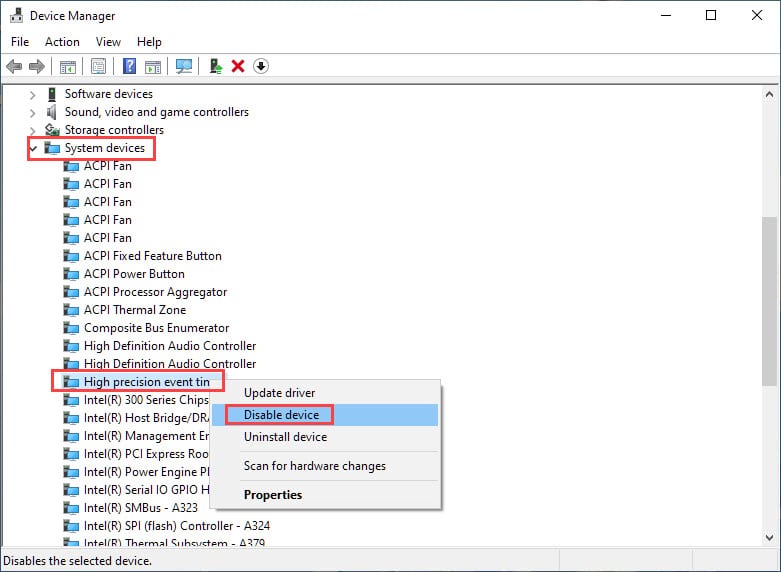
Try disable High Precision Event Timer if not already disabled:
I get this error from time to time, I just shut down the sim or click ‘ok’ to the message, which crashes the sim to desktop, then wait a minute and relaunch MFS and it loads and works fine.
i give it a try.
I have not changed the driver…installed any more addons, changed any settings and just had this crash on a flight I have done many times before with ATC, and real weather on exactly the same route. The only difference is I have installed the new 40th Anniversary Update.
This topic has NOT been solved and MSOBO have caused the problem. I have a high end PC with a GTX 2080TI graphics card an 32M RAM which up to this update has provided smooth graphics with HIGH settings without any problems. Whatever the banner says this is another in a long line of CTDs the blame for which are firmly laid at Asobo’s door.
2 Likes
Just lost my 4th flight in a row to this bug as I was turning for finals at Budapest, inbound from Eindhoven with the Fenix.
This bug has now made this aircraft totally unusable for me. Updating to the latest studio driver hasn’t helped, nor has not running FSDTL.
Again no problems before the SU10 update. Wish they would get a handle on this stuff as it’s very frustrating now.
4 Likes
It just happened again, using DX11.
I’ll switch to DX12 (again) and try once more because it seemed to help last time.
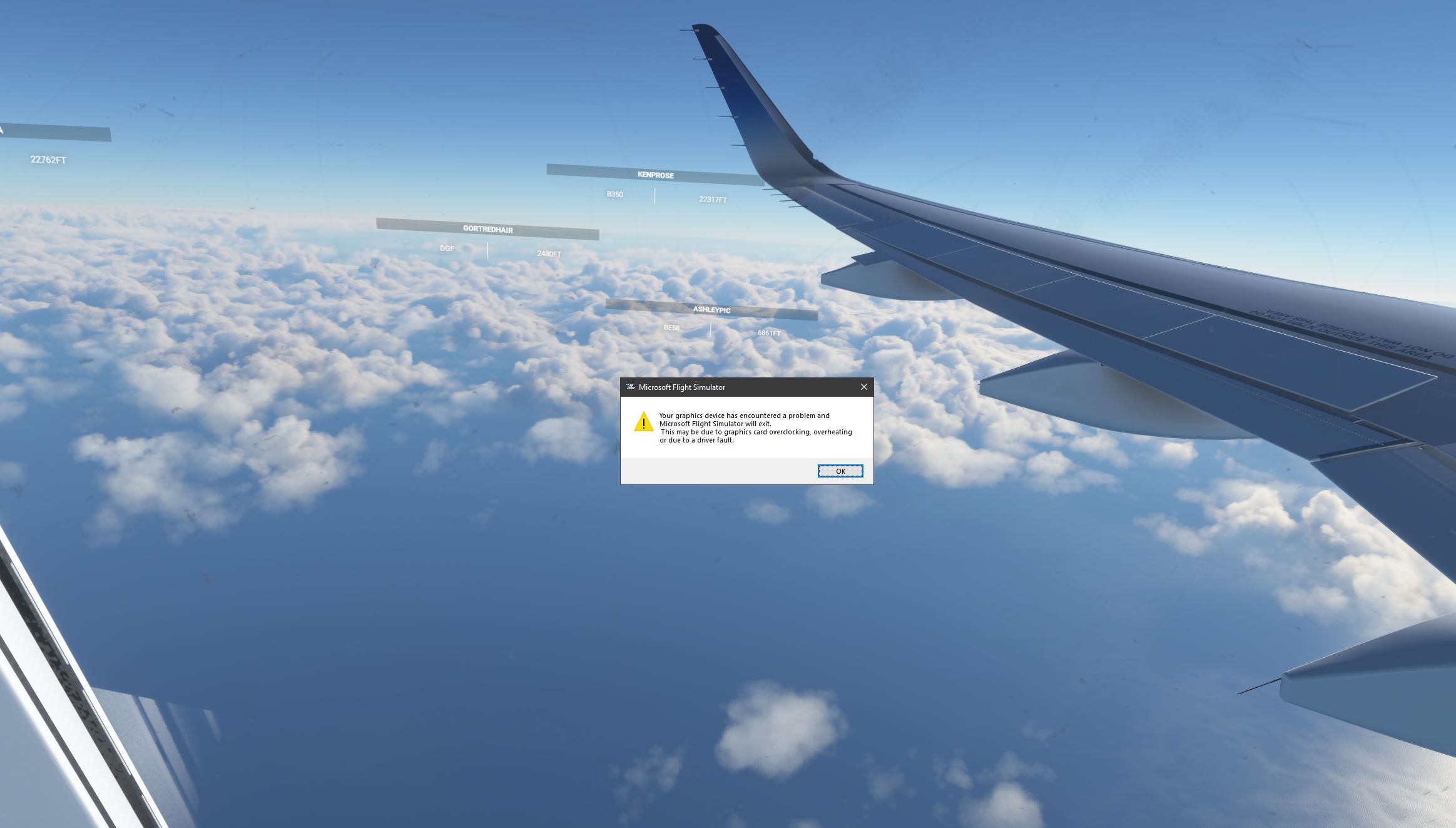
OK, i’ve managed to fix it. This for the Windows Steam version.
I went into Steam, chose uninstall MSFS2020.
Then i went into my Windows 10 user profile folder and deleted the hidden .\AppData\roaming\Microsoft Flight Simulator\ folder completely, as Steam doesn’t seem to get rid of that, and its really large. (i previously had pointed the install to d: drive to try reduce disk usage on my c:, but it also uses c: drive anyway i found, so i deleted that folder from both my c: and d: locations, and just went for c: for the reinstall)
Then i rebooted my PC, went back into Steam, and told it to install MSFS2020 again.
That allowed me to get back into the main program, where it said i had to download the new 40th anniversary edition, which i let it do overnight.
Then when i launched the game from Steam today, everything worked again
- I had no error regarding graphics device encountering a problem,
and also no CTD from the Safe Mode/Normal Mode which i was getting EVERY launch attempt previously. (I’m running 3Kx2K or something crazy similar on my GTX 3070, didnt change any of my previous settings and that resolution was fine)
So far so good, I took off a couple of times and landed a couple of times with the Icon and the C172, all working again.
Also saw in my game settings the DX12(beta) option, so I changed to that , after my initial test flights on my DX11 setting. Havent noticed much difference tbh.
Will update if any of that changes.
(finally able to run the game again for the first time in around 6 months.. knock on wood)
1 Like
A previous post mentioning server load made me think…I have had several online service interruptions this afternoon. I am no expert but this does suggest that the server may be overloaded…with everyone trying out the new updates.
Our computers may well be “upset” by the data stream being interrupted and restarted if the memory management on the server is at fault …???
Yes occasionally I have this bug when loading into a flight. Before and after SU11. With old and latest Nvidia driver. Currently it works (I thought me installing the latest game ready fixed it, but might be coincidental). Beats me.
2070S.
I noticed also during my testing games earlier today i kept getting pop up messages during my flight about network/internet disconnected, try offline mode?
And then it would announce it has returned ok again 5-10 seconds later.
I’m presuming the same thing - their servers aren’t handling the load very well right now. fyi it didn’t stop my game though.
I’ve been getting disconnected every time I fly since SU11. I hope it’s something as simple as overloaded servers, and not another persistent bug. At least I have a workaround for the SU10 issue, so I can live with that for now.
UPDATE: Flew for a few hours today, no disconnects and no CTD! I did get some severe stutters flying very low over NYC, but that’s probably to be expected with any machine, with everything set to Ultra.
It is very Microsoft to think replacing a straight CTD with a CTD that generates a message that is seemingly unrelated to what really went wrong is a useful fix.
2 Likes
Do you have the same issue if you follow the OP’s steps to reproduce it?
Provide extra information to complete the original description of the issue:
Are you using DX12?
Are you using DLSS?
If relevant, provide additional screenshots/video:
thanks for the trick lol. i have changed drivers to 512.96 and was able to do an entire 1h45 flight with the PMDG737. I need to continue locking 30fps in nvidia control but it was relatively smooth and no error message or something. No sur if tomorrow when i will fly again it will not crash but… maybe it’s a workaround working for someones.