For those not monitoring the Discord of WB-SIM C172, here are good news. You can use the WB-SIM C172 in MSFS2024 by enabling the C172 Classic (un-crypted) from you previous MSFS2020 Deluxe version, which disable the same C172 Classic (encrypted) from MSFS2024 and now activate from your Community folder the WB-SIM. All info from the WB-Sim C172 Classic Discord Discord
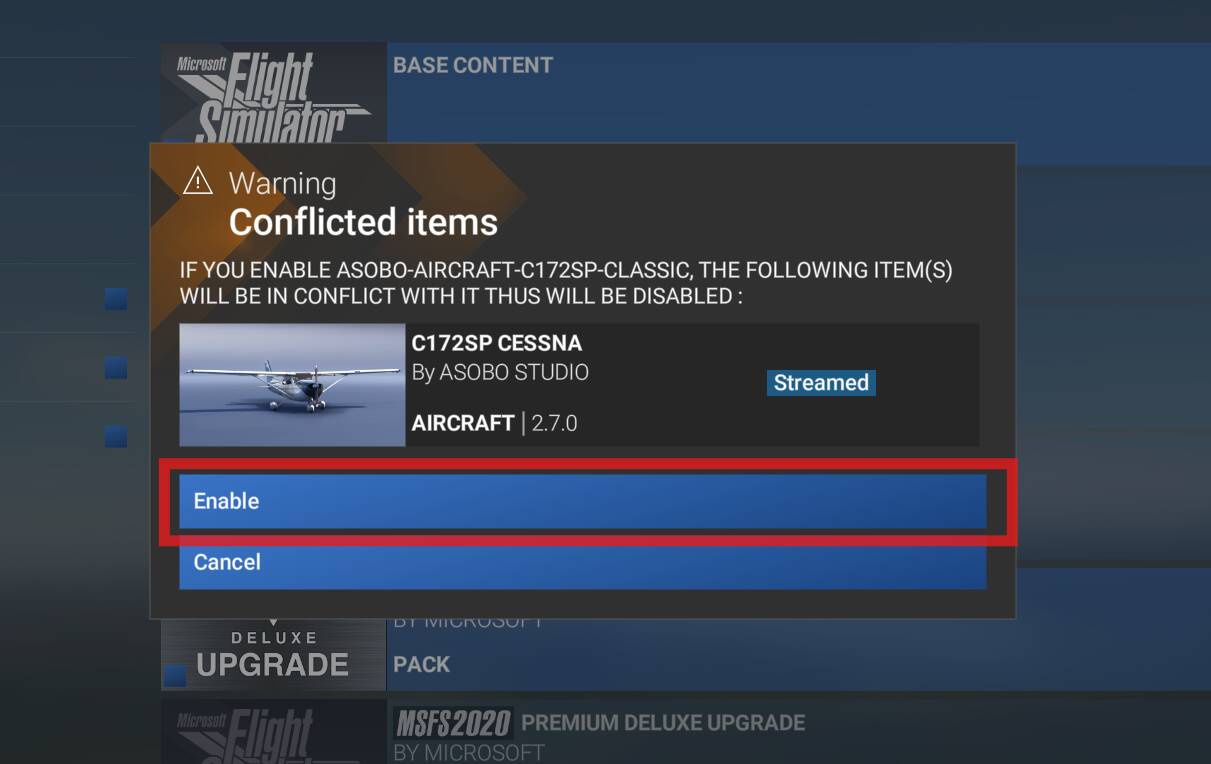
Go to Marketplace, then My Library. Sort the list with 172 for example and Enable the 172 Classic from your MFS2020.
On the warning screen, choose Enable. Then relaunch MSFS.
There’s also a small optional patch from the author to organize the plane better selection menu. Caution this small patch is only for MSFS2024. Do not use on MSFS2020. See Discord
I wasn’t successful to bring back all my WB-SIM C172 textures. Some work, some don’t but at least It’s cool to find the KAP140.
As many MSFS2020 imported aircraft into MSFS2024, there’re some issues: the pilot/passengers are not visible from the external view unable to skip the dynamic registration and the custom liveries
Thanks for this post! It has helped a lot. BTW, is there a link to the WB-Sim Discord that actually works? I cannot get there using the one provided here, and older ones have expired.
Thank you for this information. I fly the WB Sim 172 exclusively in 2020.
I was able to enable to 172 classes per your instructions, but am confused on where to get the WB Sim file from to put in the 2024 Community folder, I did drag/drop, then cry/paste from the 2020 Community folder to the 2024 Com folder, restarted the sim but still do not see WB Sim as a selection, even ifs I search “172” or “WB” in 2024.
Copy the small patch from the author into your MSFS2024 Community folder. This patch aims to better organize the plane selection menu. Caution it’s only for MSFS2024. Do not use on MSFS2020. Direct download (from the author) https://drive.google.com/file/d/1GXqjm72R1URMQDaKnY6ahAUV-UdJhceW/view?usp=sharing
You should have the folder “wbsim-aircraft-c172sp-classic-01_Patch” inside your MSFS2024 Community folder.
Copy your “wbsim-aircraft-c172sp-classic” folder into your MSFS2024 Community folder.
Remark: there’re a lot of issues with liveries. Test first without any custom livery.
Anyone else unable to open the WB 172 discord channel? It won’t even open for me on any platform (web, android app, etc.). Haven’t been able to open it for several days.
Thanks so much for taking the time to reply and post that link.
It’s not working for me, either. It shows the same issue I have been seeing when I try opening the channel. I have been on the WB discord for a long time, and then suddenly can’t access it.
When I use your link or try to view the channel, either way it shows the channel like it’s trying to load the messages/posts but they never show up. The only channel I can see is “#rules.” It shows the acknowledgment banner at the bottom as if I just joined (“Done reading? Check out other channels”). When I click it, the banner doesn’t respond at all. It never displays any other channels. It’s like the banner link isn’t working.
It does the same thing when I’m on the app or using the website version, so it’s not an app problem that would be fixed by re-installing.
The WB discord is the only one that’s doing this. I can access all my other discords fine so it’s not a general account problem.
I hate to impose, but would someone mind copying and pasting this to the WB discord for me? Hoping there is some fix. My user name is irimi_ai.
Hi, Vincent,
I installed WB-Sim C172 with the patch. I don’t know where I read that this plane flies slower. So I tried it. And it does seem to me that it actually flies much slower at the same speed than the Asobo C172. I don’t think it’s a subjective perception (I’ve been into flight simulation since 1987!).
Greetings