I think probably in the next week or the week after…
1 Like
…simply and quick feedback:
Had never a big issue in/with MSFS 2024 and VR. Okay, this biest needs performance and power…better/faster/higher is always possible.
When you least expect it, it often happens :)…happened the last 2 days:
Installed the new SU, installed new Bios udpate, installed new chipset driver, installed new AMD GPU drivers, made a “fresh, not pounding” CPU, GPU and RAM UV/OC. Finally: I never got this performance boost in MSFS 2024. In 99% of the time I have a smooth, unstuttered flightexperience, get my 36 FPS.
7800 X3D UV/OC, 7900 XTX UV/OC, Quest 3, VD, 72 Hz, AWD, Godlike mode.
I’m really happy 
1 Like
SU1 2024:
Every plane is broken in VR.
Every plane I load shows the MFD as a huge projected helmet HUD everywhere I look. What a joke.
No add ons, vanilla SU1.
Update: Suddenly all fine.
2 Likes
…and when I load the Max, it appears to be set at an uphill angle. When I load the 747 my view is positioned a couple of meters outside the cockpit above the aircraft (with the view reset, of course). It looks like nobody has even tested this sim in VR. Vanilla sim (SU1 version).
1 Like
In my niche I’m super happy right now
I only fly the Comanche , interacting 100% with a mixed reality hardware cockpit
, 5800x3d , 4700, 32gb ram , tweaked FOV and passthrough areas
I get really consistent 47 fps without SSW , I never had a similar experience in 2020. clarity and smoothness is the best I’ve ever had.
But leaving the niche some issues pop up like the interaction, efb, toolbar (there’s a keybind for that by the way!)
But I was able to get rid of all this issues by just bypassing them and now I’m having a blast
Hope you’re locking that 47fps to 45 
If not, that will make it even smoother.
I can’t really see a difference between that on my end it’s just buttery smooth without any (serious) stutters . Locking the framerate didn’t gave me an improvement but that seems to depend on the machine you use
I mean if you are getting 47 without issue, there’s no reason not to lock to 45 and use SSW. will feel like 90.
1 Like
The reason is the niche, I need to see my hands for better interaction with the hardware cockpit, but this doesn’t allow SSW.

this is the Hardware cockpit, you can see the interactions in the video below:
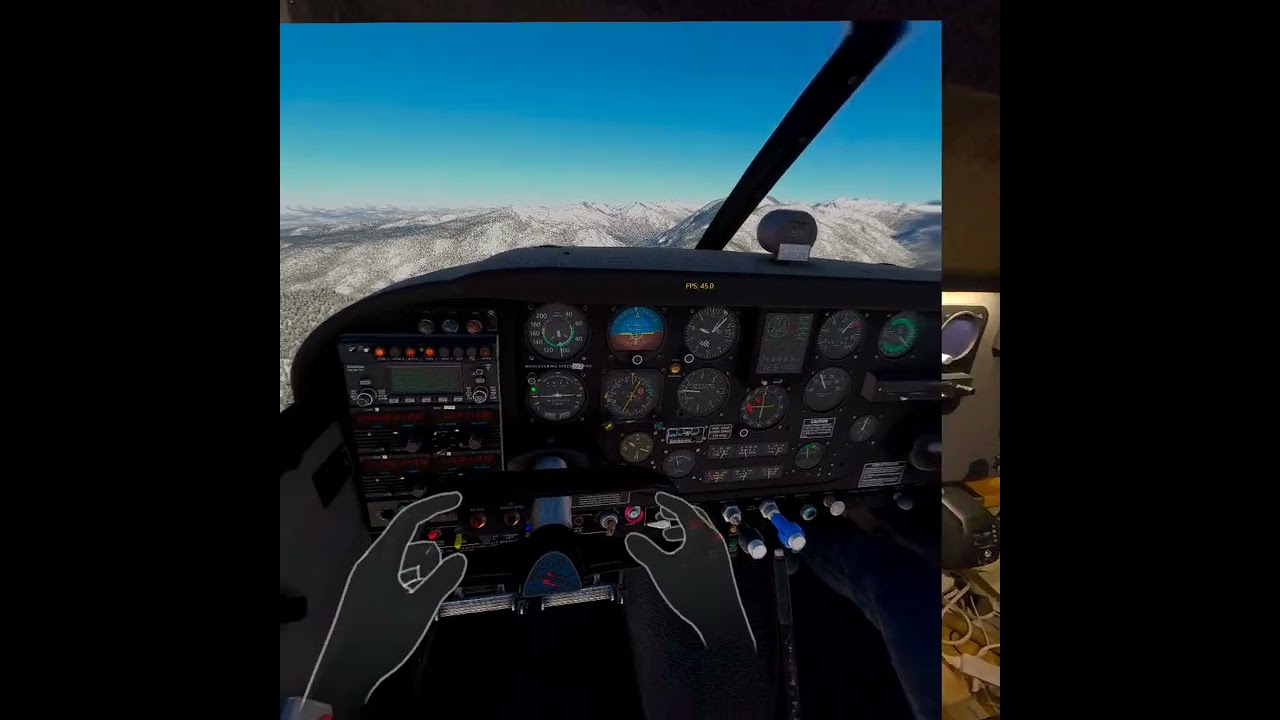
As said I’m totally happy with the actual state , but can’t use SSW wich isn’t much of a problem at the moment
3 Likes
If you’re still seeing stutters at a constant 45fps locked, there’s two possibilities:
-
frame pacing is inconsistent, most likely due to the CPU getting behind. Reducing LODs might help.
-
The stutters are not performance related, but because the frame limiter you are using is not deep down enough in the VR rendering pipeline to properly sync the frames to the refresh rate, and the stutters (they should feel more like judders) are a result of the fps and hz getting out of sync. Using the frame limiter in steamVR can avoid this, it syncs perfectly.
Varjo and Pimax also offer built-in frame limiters that should offer fully-synced smoothness. Rivatuner unfortunately often goes out of sync.
You can absolutely use SSW with hand tracking and passthrough.
Not that way, you only get the ghost hands by opening the quest main menu wich deactivates SSW because VD is in the background, that’s ok , I don’t need SSW and don’t like the side effects and wobble it brings . It also brings more occasional stutter on my system.
The VD handportals are quite useless for my purpose .
and MS store version? Is there a reliable why to get good frames?
I don´t have it, only follow the MSFS pois, almost a straight line, select in options to show them when flying to help.
Here is my own feedback for VR after SIM UPDATE 1:
THIS IS EVEN WORSE THAN BEFORE THE UPDATE !!!
All the VR bugs I had are still there (for exemple, impossible to be in the cockpit of the 747 while in VR, I alway appear ahead of the plane).
BUT, they added more bugs:
While in VR with my QUEST 3, I cannot select anymore any options in the parameters menu, I need to leave VR to change the parameters.
The graphics parameters have no more effects, or they have reverted effect. For exemple, selecting less car traffic will give you more car traffics. And when I try to lower the graphics for the building, ground, trees, etc.., it has no effect. So even when using DLSS SWAPPER to use DLSS 4, the game is more laggy than before the update.
There really is something I DO NOT UNDERSTAND with Asobo/Microsoft : do they try their game ??? I am fed up of still using MSFS 2020 after having bought MSFS 2024 FIVE MONTHS AGO. This game is still not usable in VR, at least horrible to use compared to MSFS 2020.
5 Likes
of course not.
no actor watches his own movies so why should Asobo use their software. there are millions of people reporting any issues instantly and doing test work for free, yes they even pay for it.
I normally fly in VR using Aerofly FS4, since the performance with my i9-14900k/RTX 4080 and Quest 3 goggles is so good. I waited for MSFS 2024 and believed the hype about VR performance being equal to or better than MSFS 2020, but was disappointed. Jetliner screen displays were fuzzy and out of focus, and frame rates were disappointing.
I recently purchased MSFS 2020 when it was on sale to see if there was a difference, and boy, what a difference! It’s so good, that I only go back to Aerofly occasionally. The VR perfomance using TAA is great (DLSS makes the displays too fuzzy). I’m not sure how the supposed multi-threading in MSFS 2024 is helping, because the single-thread 2020 version is so much faster, and the visuals in MSFS 2024 are not any better than in 2020.
Also have a Q3/Air Link and QPro/rtx4090/link cable. For me, dlss/balanced still works best, esp. since dlss 4 came out with the nvidia 572.16 driver a couple months ago.
Enabling dlss4 is pretty easy now. Maybe have a look at this thread for details on how to do this;
The secret, for me, to avoid fuzzy cockpit clarity is to apply some super sampling (= upscaling) beforehand. I add 1.3x pixel density in ODT (actually apply this using OTT).
If you’re happier with TAA, that’s great though imho. Each to their own and all that jazz, lol!
1 Like
There is definitely better MT in 2024. The issue is that this doesn’t matter too much in VR much the GPU load is so much higher in 2024, making everyone much more GPU limited.
1 Like
So, I noticed that now I could choose the preset dirrectly from nvidia app, so i swapped again the original dlss files and tried the preset J , same quality but lot of stutters, i reverted back to preset K from nvidia app but the performance its same worse, should i swapp again the 310.2.1 and choose the preset K ? i don t unterstand this thing anymore .