deleting stuff out of the registry did nothing for me. however removing the files from C:\XboxGames\Microsoft Flight Simulator\Content\Input that have velocityone next to them did remove the dual peddles. Will see how it goes in the long term, for now its fixed.
Do you have steam or ms store version?
I have MS store version
I have TB Velocity One rudder pedals also, and in the last week it is now showing as 2 sets in MSFS. I’m thinking it is a TB issue, but can’t really work out how to fix it either.
Yes TB issue, have you got a pointer in your devices also?
Since it shows twice in Windows calibration menu, have you reported the issue to Turtle Beach ?. Maybe not a MSFS issue then.
Unfortunately turtle beach is a difficult company to deal with. Customer service is there to make you go away.
Sadly you are 100% correct, I bought the Velocity FlightOne yoke and the play on it was terrible, they told me it was normal, wasn’t until I told them I would post video on YT and every forum I am apart of did they offer a refund. The unit was 10 days old. However the pedals are a significant step up in quality
Worth checking game controllers and see what you are seeing in there. Remember on advanced yokes and throttles you can have multple entries that map to different part of the controller, so in my case I have one entry for the yoke+throttle and one for just throttle. So I use the first controls to setup the yoke and the throttle section to setup different throttle profiles for example single engine prop, quad engine jet etc.
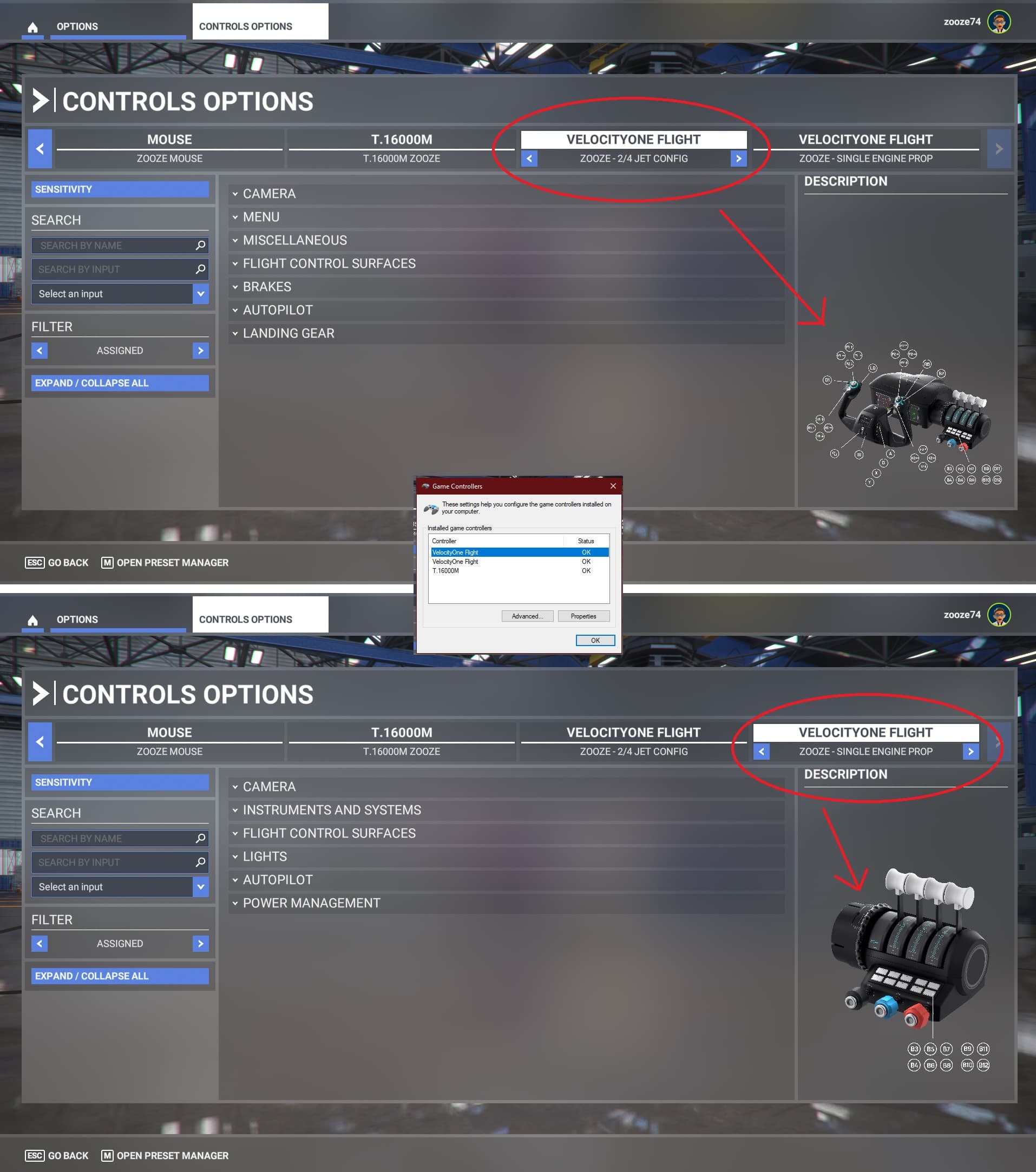
If you want to remove an entry you need to do it from game controllers as MSFS is just following what’s in that.
Cheers Zooze74
This just worked for me, thanks! I found 2 instances of “rudder” in the registry and after deleting the folders for each, then rebooting, I now only have my preferred Rudder device and the Default one disappeared.
Hey nice second option, I didn’t start looking in regedit, but I did find my own solution, which is probably worse.
So far only one solution worked for me, but I didn’t test it ingame, the frustration depleted my excitement.
In Device Manager, in Human Interface Devices, I disabled my 8th “HID-compliant vendor-defined device” and it still shown the rudders’ inputs, but only one of them exists.
I got to this point after clean & safe booting, deleting recent updates, then I started just deleting every driver, not sure what I killed in the process. I did have to reflip my mouse’s wheel to change direction as it was a regedit and I guess deleted it.