Try
In windows search bar type CMD
right click on it and select run as administrator
Copy the command below and paste into CMD
(right click to paste into CMD)
powercfg -duplicatescheme e9a42b02-d5df-448d-aa00-03f14749eb61
Reboot the system.
Go to windows settings > system > power & sleep > additional power settings
Select ultimate performance
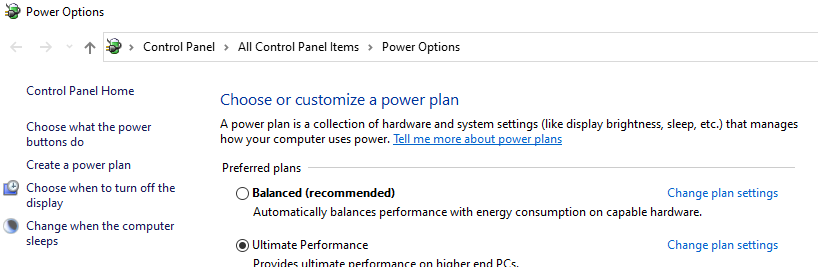
Reboot the system.
Go to > device manager > universal serial bus controllers
Right click on USB Root Hub
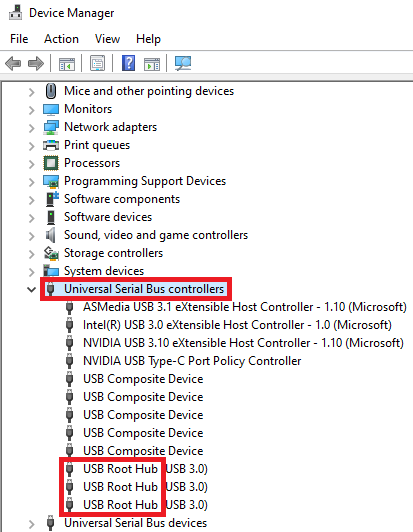
and select properties
Go to power management tab and uncheck “allow the computer …”
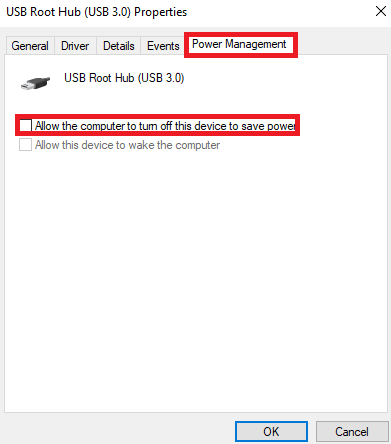
Click Ok and reboot the system.
edit
Also check human interface devices

Source https://forums.flightsimulator.com/t/mouse-clicks-not-recognized-after-some-time/407119/9
Edit
FYI, unfortunately Logitech has long been ignoring customer requests to add an option to disable power saving mode in their G HUB software. Logitech is basically deaf to and neglects its users.
I forgot the most important setting. Have you disabled the low battery mode in Logitech G HUB for your mouse?