Winwing / WINCTRL MCDU, CDU, PFP3N, PFP4/7 - Configuration & Troubleshooting - User-To-User Support Thread

Many different topics already exist on the forum where users ask for help with Winwing/WINCTRL devices or their software.
Scattering this kind of support across multiple, unrelated threads is not ideal, as it often creates off-topic discussions. For example, asking for help with a PFP3N inside a PMDG 737 topic is not really appropriate.

For this reason, among others, I decided to create this thread and make it a main, centralized user-to-user support topic.

As we all know, Winwing is a great example of a company that focuses on price-to-quality ratio. Affordable pricing combined with good build quality makes these devices very popular, which naturally creates the need for a dedicated place for support.

This thread is intended to be a central hub where we can:

  • help each other with Winwing/WINCTRL MCDU, CDU.

  • share configuration tips

  • explain how to properly set up specific aircraft or software
    so that they work correctly with MCDU/CDU, PFP3N, PFP4, PFP7 devices.

If anyone has any tips, tricks, workarounds or useful hints related to these devices, feel free to share them here.


I’ll start with one of the most common issues users run into.
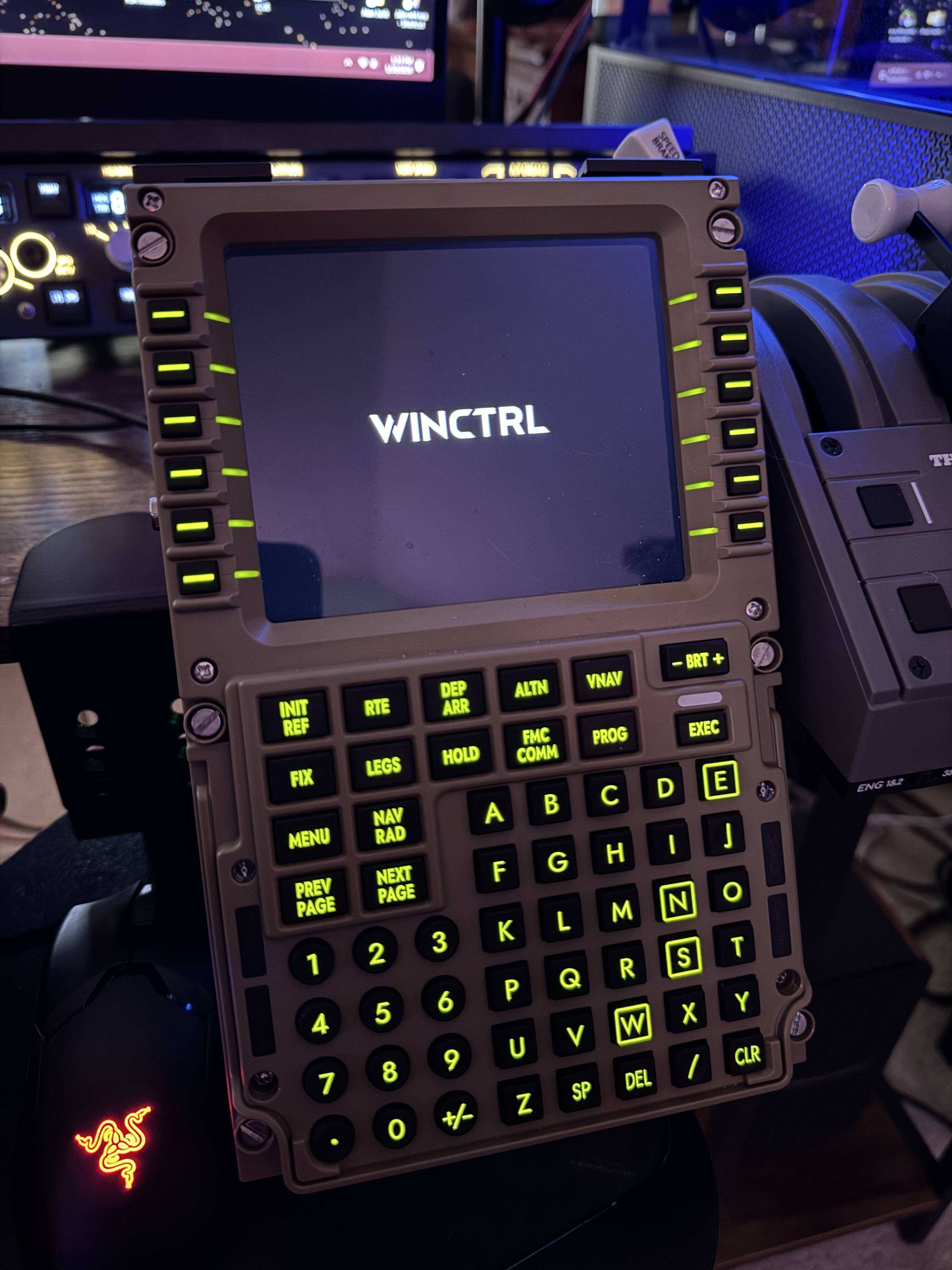
After connecting, for example, PFP3N, many people experience a black PFP3N screen (no display) when selecting the PMDG 737-800.

In this case, the solution is quite simple. You need to edit the 737_Options.ini file, which can be found in the 737 persistent storage folder

For MSFS 2020 this folder is located at (click to expand)

For MSFS 2020 MS Store this folder is located at:
%LOCALAPPDATA%\Packages\Microsoft.FlightSimulator_8wekyb3d8bbwe\LocalState\packages\pmdg-aircraft-737\work

For MSFS 2020 Steam distribution, this folder is located at:
%APPDATA%\Microsoft Flight Simulator\Packages\pmdg-aircraft
737\work

For MSFS 2024 this folder is located at (click to expand)

For MSFS 2024 MS Store, this folder is located at:
%LOCALAPPDATA%\Packages\Microsoft.Limitless_8wekyb3d8bbwe\LocalState\WASM\MSFS2024\pmdg-aircraft-737\work\

For MSFS 2024 Steam, this folder is located at:
%APPDATA%\Roaming\Microsoft Flight Simulator 2024\WASM\MSFS2024\pmdg-aircraft-738\work\

Open the 737_Options.ini file and add the following lines to the bottom of the file:

[SDK]
EnableDataBroadcast=1
EnableCDUBroadcast.0=1
EnableCDUBroadcast.1=1

Save changes.


External devices used with MSFS 2020/2024 should ideally be connected through a powered USB hub. Also, make sure your system power plan is set to High Performance.
Lastly, you should disable power saving for MCDU, PFP3N,7,4. Press Windows + R, then copy and paste this command:

explorer shell:::{A8A91A66-3A7D-4424-8D24-04E180695C7A}

press ENTER.

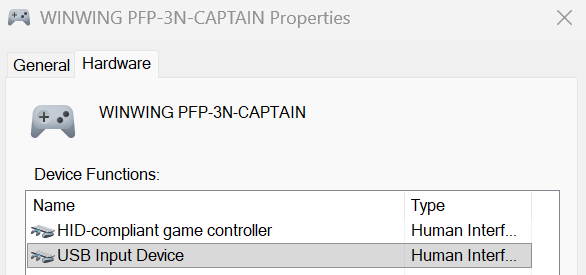
Then, double-click Winwing PFP-3N and in the new window go to the Hardware tab. Select USB Input Device and click Properties.
In the new window, go to the Power Management tab and uncheck “Allow the computer to turn off this device to save power”.
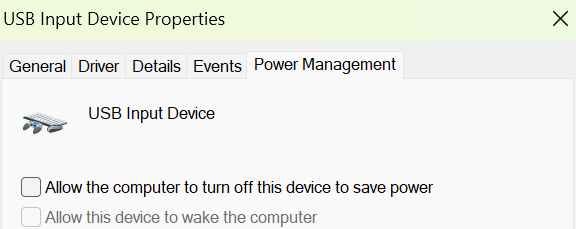
Click OK and restart PC.

Repeat this for all the devices you use with MSFS 2020 and 2024.


Regarding SimApp Pro, you should know that some updates can often break compatibility with MSFS 2020/2024. So it’s a good idea to click cancel if a popup appears about a new update when you start SimApp Pro.
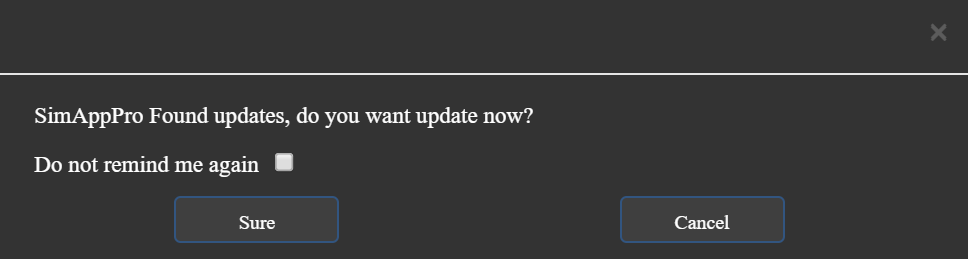

I also recommend checking the forum first to see if other users are reporting any issues - there have been problems in the past, so there could be more in the future.

User @Nikita is up to date with SimApp Pro versions, so I hope he can provide more information in this thread about that application.


Another potential issue can involve SimApp Pro and programs like SPAD.neXt, AAO andr MobiFlight. If you have these programs, make sure to close SimApp Pro, because these other programs should be controlling Winwing devices. Running SimApp Pro alongside, for example, SPAD.neXt, can cause conflicts.


PFP3N and PFP4/7 are mainly purchased for PMDG, while MCDU is for Airbus aircraft. You can test MCDU with Airbus using the free FBW, and I’ve explained how to set that up here. I’ll add that if you don’t have SPAD.neXt, AAO, or MobiFlight, and only have SimApp Pro, that’s enough - but FBW Simbridge also needs to be running in the background.


For now, that’s all - maybe I’ll remember something else later. Feel free to share anything you think might help.
7 Likes

Three flight so far in SimAppPro 1.16.84 in the PMDG 738, 772 & 77L without issues: FMC, MCP and new to me this week EFIS all working as expected in 24 (stopped flying 2020 last December). This update prompted firmware updates where displays now boot up with the Winctrl logotype, again no issues after the firmware updates in these units.

Last I flew the FBW A320, SimAppPro 1.16.83 & 1.16.80 also no issues EFIS, FCU & MCDU. At this time I am not a Fenix or iFly owner. Cheers!

1 Like

Thanks so much for the detailed information! I can safely update SimApp Pro now.

I have four Winwing devices: MCDU, PFP3N, EFIS, and FCU - in the older version of SimApp Pro, it showed that my firmware was up to date.
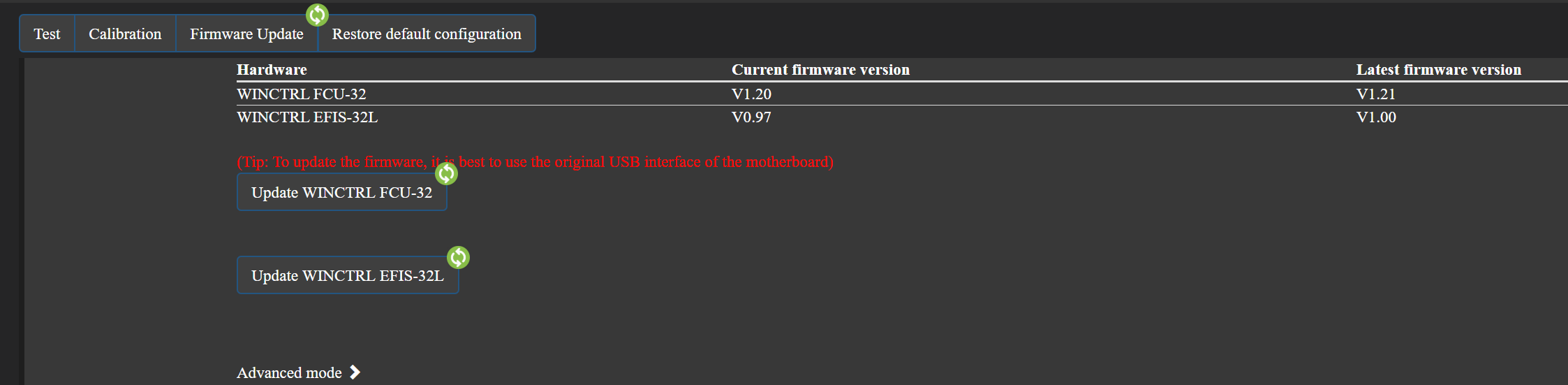
After updating SimApp Pro did it show that my firmware was actually not current and a new version became available.
So, if anyone ever decides not to update SimApp Pro, they won’t get notified about new firmware, which really should be fixed, because firmware updates are important.

A workaround is to download the firmware manually if you don’t want to run the latest version of SimApp Pro.
https://eu.winctrl.com/view/regular.html

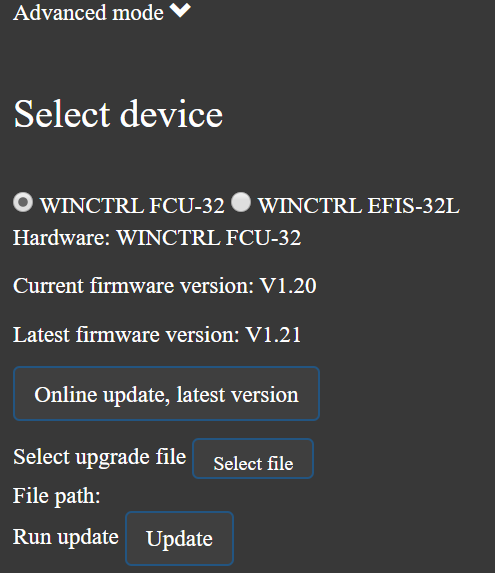
In SimApp Pro, click on the device whose firmware you want to update. Then click on firmware tab and select advanced mode. From there, you will be able to choose the correct firmware file to install.

2 Likes

For what it’s worth, I received the Left EFIS for my MCP today (Winctrl’s obtuse model name is 3N PDC). Once connected, SimAppPro wanted to update its firmware. After that, SimAppPro wanted to update the firmware for my PFP 7 as well. No obvious changes in behavior other than the rebranding:

Also, as of recent updates to SimApp, my PFP 7 and PAP3 now both work out of the box with many more aircraft, no need for Mobiflight or other 3rd party software. Of course, the CDU layout for the 737NG is somewhat different than that of the 777 so my PFP’s VNAV button doesn’t work, and my PFP7 doesn’t have CLB, CRZ or DES buttons, so there are a few workarounds required with the PFP7 and the 737NG.

For some of the out-of-the-box aircraft like the TFDi MD-11, there are a pair of Mobiflight profiles available on FS dot TO for both the PFP7 and PAP3 which can be combined and used together. With the latest version of Mobiflight beta, you don’t even need to manually assign your specific devices to the profile like you used to have to do. A little message pops up and tells you MF has assigned your specific PFP and PAP to the profile and you’re good to go. The CDUs on the MD-11 are non-Boeing like but the FS do TO profile does a good job implementing most of the features of the aircraft CDU in a logical and workable way. Same with the PAP3. The Winctrl unit does not have the push-pull hardware used by the MD-11, but it does have a slew of otherwise unused buttons associated with speed, heading and altitude. The FS dot TO profile reassigns a number of those buttons to use as push or pull for flight control, as well as for other AP functions (e..g, LNAV on the panel is used for NAV on the aircraft, VNAV for PROF; CMD A or B for Autoflight, VOR/LOC or APP for Approach/Landing). All in all, it’s very workable in practice.

2 Likes

Hello. I have worked through this thread as I am having trouble getting the MCDU to work. I am trying to use the FBW Airbus. I have Simbridge installed. But he MCDU just doesn’t work. I have been on support chat all morning with Winwing getting absolutely nowhere with them.

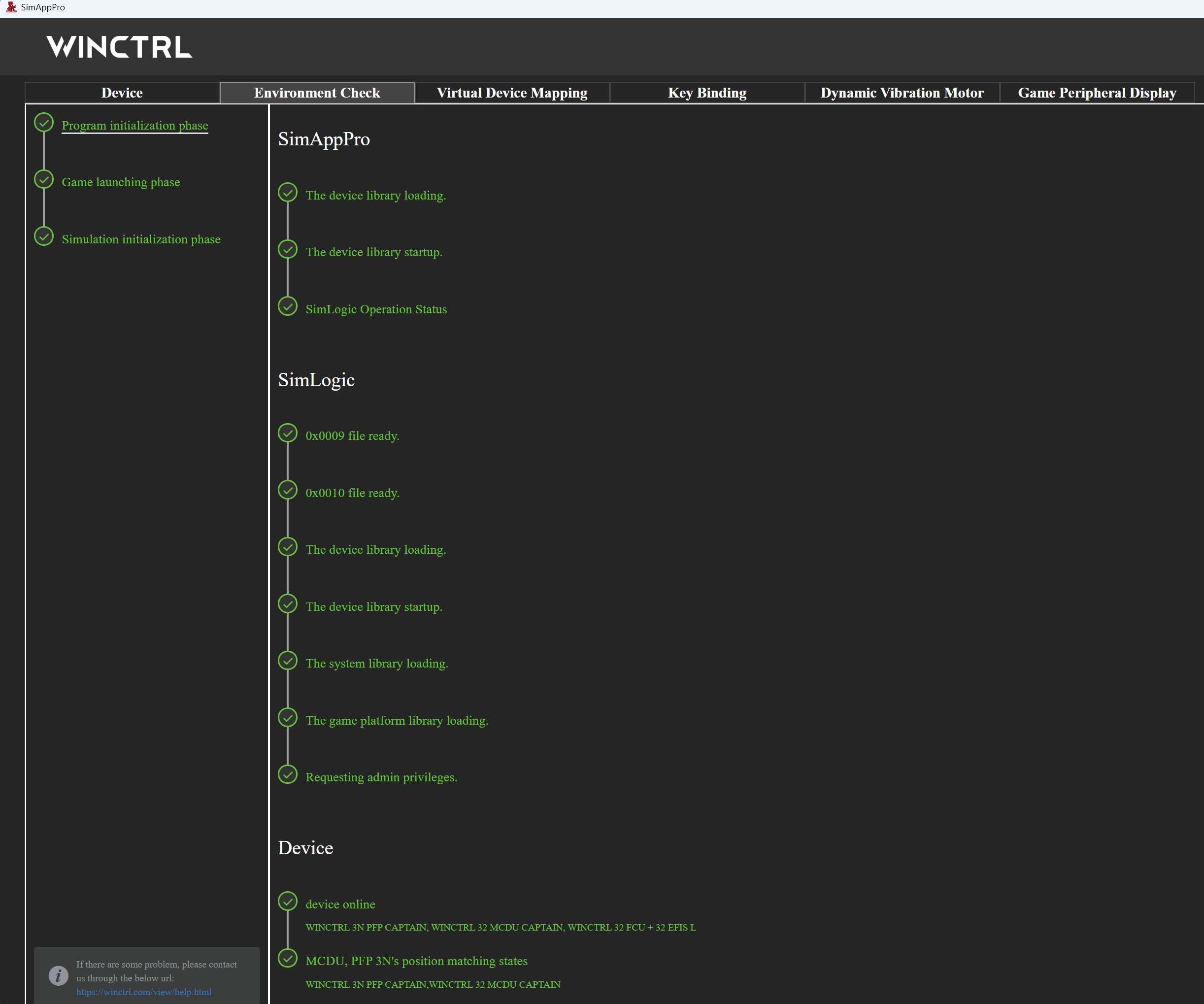
The difference I seem to have compared with your step by step above is that In SimAppPro under Program initialization phase I do not have WWTStream listed at all.

The folder is in my community though. I have tried uninstalling and re-installing SimAppPro but still no joy

Hi. I tested MCDU using the FBW developer version and it works correctly. SimBridge does need to be installed, but it also has to be running in the background when you select and use the FBW Airbus. If SimBridge isn’t running, the MCDU won’t function.

EDIT

I just tested MCDU again with the latest FBW dev version, MSFS 2024 and SimApp Pro version 1.16.85 - MCDU is working properly.

1 Like

Ditto, the latest SimAppPro plus it must execute SimLogic.

As soon as I set SimLogic in SimAppPro the WinCtrl MCDU screen burst into life (Fenix).

Awesome.

1 Like

I’m wondering why you even need SimAppPro if, as far as I know, you have Mobiflight. In SpadNext I just copy the PMDG 738 profile and from that copied profile I create a new one for the new aircraft to speed things up, then add that aircraft to the profile. PMDG don’t differ that much, so the profiles should work with the new PMDG 739 as well.

It’s important to remember that after installing the aircraft, running it once, and then closing MSFS, you need to edit the 737_Options.ini file by adding lines at the end

[SDK]
EnableDataBroadcast=1
EnableCDUBroadcast.0=1
EnableCDUBroadcast.1=1

  • without these lines, PFP3N or 7 won’t work.

Do I remember correctly that you also have SpadNext?

Because I don’t have a MF profile for the PAP3N MAG and would prefer not to spend time/effort creating or adapting one if SimAppPro would work out of the box. If SAP hasn’t been updated by later today or tomorrow, I may tackle that task tomorrow afternoon or Sunday.

I use MobiFlight for non-Boeing 737 aircraft. And like @DrVenkman3876 I prefer to keep it simple and take advantage of the native WinCtrl support for PMDG 737’s.

1 Like

Has anyone used the FCU, EFIS, MCDU on a Boeing plane?

I always update SimAppPro, it seems to just get better.

With tsoftware like SPAD.neXt, AxisAndOhs (AAO), or the free MobiFlight, you can map FCU, EFIS, or MCDU hardware to a Boeing aircraft without much trouble. It mainly depends on having the right profiles and some basic configuration.

I used a similar setup in the past myself: before I had any Winwing hardware, I was flying Airbus aircraft using a Boeing MCP and EFIS from CoreFlight. After proper mapping, everything worked fine.

If I didn’t have the MCP and EFIS from CoreFlight, I’m sure I could use Winwing EFIS and FCU on a Boeing, like the iFly 737 or other add-ons.

1 Like

Cheers for the info.

I think I would reuse the Airbus EFIS+FCU but splash some retirement cash on a WinCtrl Boeing CDU, as the buttons are radically different from a MDCU.

1 Like

I’ve been wracking my brain trying to figure out which version of WinCtrl products to get.
I have an iFly 737 Max 8 and a PMDG 777. I will buy Bluebird’s 757 (and 767) when they are released.

I understand that the 3M PDC is designed for the 737 Max (but can be used with the 737 NG) and the 3N PDC is designed for the NG model. But that’s as far as I’ve gotten. So for maximum ease-of-use and compatibility with my aircraft choices I want the WINCTRL 3 GLARESHIELD MAG combo (3N PAP MAG,3M PDC,3N PDC)

Then we have the other stuff.

I think the MCDU is for Airbus, while the PFP’s are for Boeing, but this is where I get really confused. There are three PFP’s:

PFP 3N
PFP 4
PFP 7

Which one do I want, given that I have a variety of Boeing aircraft?
I use SPAD, and I know that any of those panels can be programmed to work. Assume I want the one that is most like the actual panel found in the 737 Max 8. I’ve seen the PFP 3 mentioned a lot. But what are the other ones (PFP 4, PFP 7) designed to emulate?

Their website is no help. There’s a compatibility section at the bottom of each unit’s page, but here’s what it shows me in every case:

Hi, I’m not a SPADnext user so I’m using SimAppPro and can confirm that the 3N PAP (MCP) and 3M PDC (i have the L version) all work with both the 737NGs and T7 series (all PMDG). Maybe get the 3N PFP (FMC) if you are only going to buy one, but then again since you are using SPAD, you have flexibility that I don’t. If you plan to spend more time in the T7s, then maybe buy that FMC?

1 Like

I have a PFP 7 (777 styled CDU), and a PAP 3 MAG (MCP unit) and P3 N (EFIS panel). These latter two units are styled like 737NG aircraft. With recent versions of SimAppPro, all of them work interchangeably in PMDG Boeings, though I don’t remember if the PFP 7 works in the iFly (been a few months since I’ve spent any time in that plane). However, all of them work with almost any aircraft - subject to some creative button reassignments - using something like Mobiflight or Spad.

1 Like

SimAppPro is great for testing and lighting control and it’s updated frequently. For me with Airbus kit it just works.

I would use Mobiflight to map the Airbus EFIS and FCU to GA or Boeing; configs exist already.

I plan to do light dimming and LEDs with Mobiflight.

1 Like

I use mobiflight, which works ok, but after painstakingly putting in the keybinds for each key, I am still unable to change things such as key backlight, EXEC light, and the screen brightness. Is there a fix to this, or a better app or way to use the pfp 4?

**
s**

I use mobiflight, which works ok, but after painstakingly putting in the keybinds for each key, I am still unable to change things such as key backlight, EXEC light, and the screen brightness. Is there a fix to this, or a better app or way to use the pfp 4?

recently got my hands on the Winwings fcu

The device was plug and play but is it possible to speed to turns up on the knobs ? The altitude one isn’t too bad in the 1000 selection but the likes of speed and heading seem to take an age to turn its 1 degree per click can we make this say 3/4 degree per turn ? By turning sensitivity up or anything ? The app you use for it isn’t exactly the best for being clear

Thanks