Thanks for confirming -confirmations like this are very important, because this can help someone in the future.
Hello I’ve been having issues for a long time with my MCDU and PFP3N, after a couple of minutes in flight or just plugged in running Simapp pro, the screen mimics the MCDU/PFP on aircraft but won’t work if I press the buttons. Nobody so far have been able to figure it out. And this is o frustrating. I’ve tried EVERYTHING and it keeps happening. Any ideas? Thanks 
Check out the recent posts above from @MiniKfall . The issue is identified and a solution is offered.
Hello, thank you for sharing this great post. I’ve been having this issue for months. Is there a step-by-step guide on how to do this with the HidHide software? This is by far the ONLY solution I’ve found that might work and will try later today. Thank you
Install
-
Under “Assets” on the latest release, download the
.exefile. -
Run it, click Next through setup.
-
Reboot your PC.
Block a Device
-
Open HidHide Configuration Client from the Start menu.
-
Click the Devices tab.
-
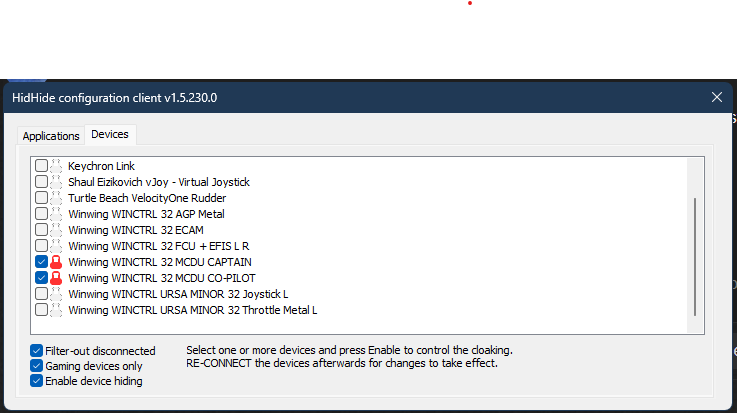
Check the box next to any device you want to block.
-
Make sure the bottom check box of ‘Enable Device Hiding’ is set.
-
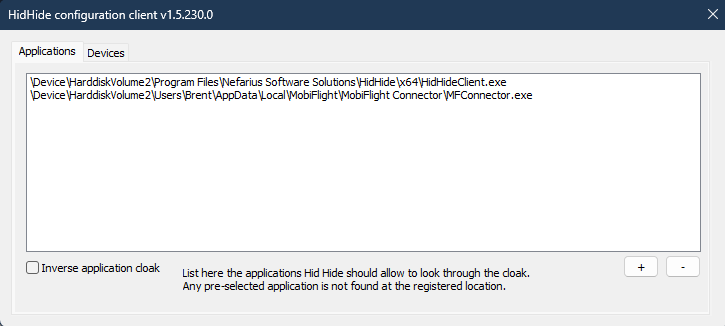
Click the Applications tab → Add → pick any app that should still see the device.
In my case, I want HIDHide to see it along with MFConnector.exe (which is Mobiflight). If you use SimAppPro or something else you’d want to put that there. -
Unplug and re-plug your device.
In short, HIDHide takes the devices you have selected under the device menu and explicitly targets the software you select in the Apps menu as the only software that can view the connected device. All other software is blocked.
Awesome, thanks for the details, I truly appreciate it!!
So I tried, and add the SimAppPro.exe to HidHide and once I’m in the simulator the CDU only shows WINCTRL on the screen. I can see the commands working on the SimAppPro device test window. Basically is not connecting with the simulator because as soon as I remove the LOCK from the device in HidHide it works on the sim. Now, I tried adding the MSFS2024.exe (Store version) to HidHide an it does not let me add it. Is there a work around this or I need to add any other application to Hidhide?
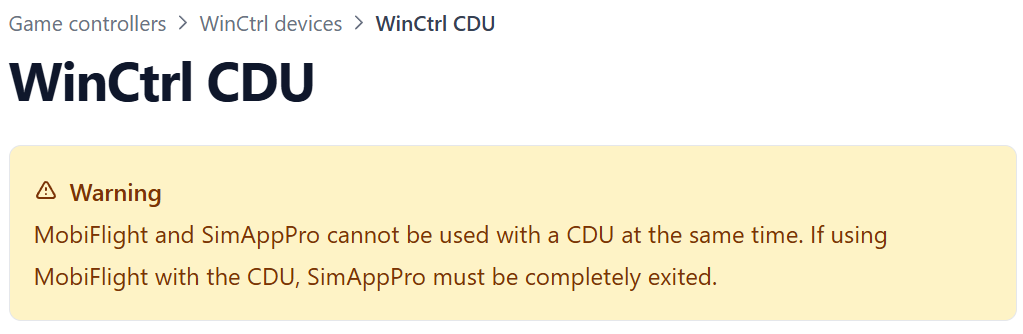
The very latest MF, released a few days ago, says shut down SimAppPro.
There are MF tweaks for PMDG.
First of all, I don’t have any issues with the MCDU itself.
Second, MF and SAP do conflict in certain cases and it’s generally not recommended to have both running the same functions simultaneously.
Yes, there are workarounds. For example, if someone prefers the MCDU to be handled by SimApp Pro instead of Mobiflight, then the proper way is to disable/block the MCDU functions inside Mobiflight settings. That avoids the conflicts.
So yes, you can make them work together, but that doesn’t mean there are no compatibility issues between them. YMMV indeed.
Fair enough and as always YMMV. For me in dozens of different applications I find that MF is essential to making the FCU/EFIS work along side SAP which is driving the MDCU. Different Courses for Different Horses I guess! Blue skies,
-A
Hi guys,
Just got the Winctrl PFP-7 to use with the pmdg’s
With FANS 2B (which mirrors the 777) I don’t get functionalityh as i expect, i.e the buttons lead me to different parts when comparing internally to the pmdg 737.
This is completely fixed by going back to FANS 1A. Is FANS 2.b not supported for the pfp-7???
It work and so far it’s been working great. Thanks a lot for your help.
The latest MF has full support for all WinCtrl hardware. The MF team explicitly state there are problems if SAP runs in parallel.
If interfacing with Arduino switches, LEDs and encoders then Mobiflight is an excellent choice.
Hi everyone,
I’m having an issue getting my WinWing PFP-3N working with MSFS 2020 and I’m running out of ideas.
System/setup:
-
Microsoft Flight Simulator 2020 (Microsoft Store version)
-
PMDG 737-600/700/800
-
WinWing PFP-3N
-
SimAppPro (latest version, reinstalled twice)
-
Running SimAppPro as Administrator
Problem:
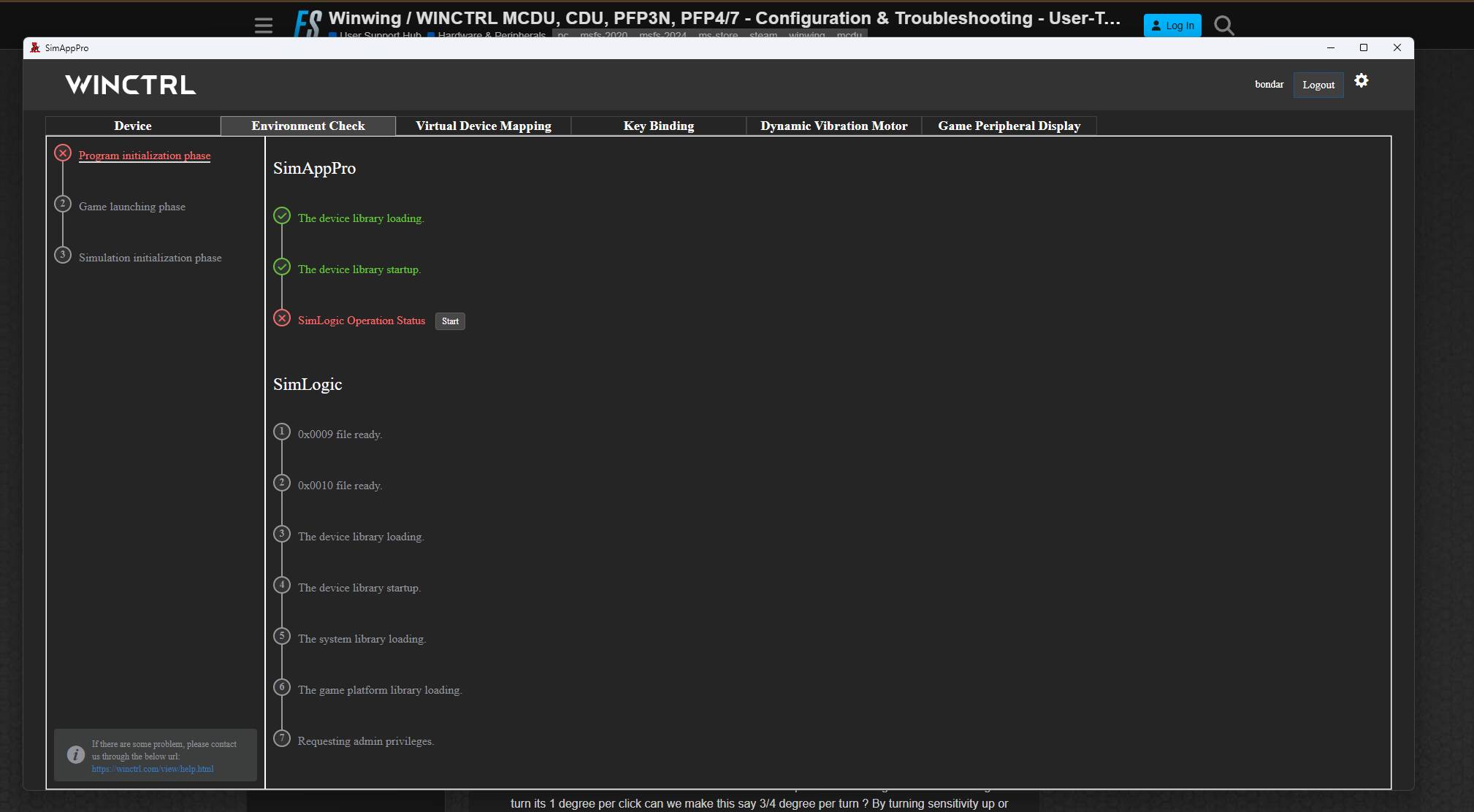
In SimAppPro Environment Check:
-
Device library loading = Green
-
Device library startup = Green
-
Program initialization phase = briefly green then red
-
SimLogic Operation Status = stays red
When SimAppPro starts, SimLogic appears to connect briefly but then fails.
What I’m seeing:
-
SimLogic.exeappears in Task Manager briefly and then disappears -
SimLogic status turns green momentarily and then immediately red
-
I cannot find
WWTStream.exeanywhere in the SimAppPro install folders -
winwing-wwtwasmis present in the MSFS Community folder -
Device is detected correctly in SimAppPro
Keybinding/Profile behaviour:
On startup I get the “Default Key Binding Configuration File” popup.
In SimAppPro:
-
I can see cloud profiles
-
I downloaded them to Local Files
-
Clicking “Run” gives this warning:
“Cannot find binding profile from the game config folder. This device must run with this aircraft in-game and saved in control menu at least one time. Please check in SimAppPro settings the key config folder.”
I have:
-
Loaded into the PMDG 737-600 cockpit
-
Tried both powered and cold & dark states
-
Created/saved a control profile in MSFS
-
Checked WGS and config paths
Things already tried:
-
Reinstalled SimAppPro twice
-
Run as Administrator
-
Restarted PC
-
Checked Windows Defender / Protection History (nothing blocked)
-
Repaired VC++ redistributables
-
Verified
winwing-wwtwasmexists -
Loaded fully into cockpit before Environment Check
Has anyone had SimLogic go green then instantly red like this, or had SimLogic.exe crash immediately after startup?
Any help appreciated.
Fix!!, I had my windows temp folder set to a custom path e.g. X:\temp folder. Moving this back to C:\Users\YOURUSERNAME\AppData\Local\Temp fixed this issues.
I have tried the HidHide fix, but my pfp3n only shows the WINCTRL screen - looks like you had this issue too, how did you get it to work?
EDIT: It is possible WinCTRL has narrowed this down to a hardware issue. Their customer support is garbage and non-communicative as always but they’ve asked me to send it back so they can issue a replacement.
Hi
I unistalled my mcaffee anti virus and everything worked fine. Try removing or pausing anitvirus software
Is this with simapp pro or are you using Spad.next (or something similar?)
Select the 178 seat version for now until WinWing updates SimApp Pro and adds compatibility with the new iFLY 737 MAX 8 SP1.