Thank you, but we don’t have Real Traffic in this version of the simulator, but it is wear…
Yes, is the same… but someone take a picture showing the traffic…above is the picture. wow, it is the same person that told me go to Real traffic.
My friend, you take a picture of your TCAS 16 hours ago showing a traffic, can you share your configuration in the simulator and in the TBM too? Thank you.
Online AI traffic it is supposed to be real traffic. In contrast to AI Offline traffic which is computer generated.
There a new Windows 10 update that fixes FS2020 FPS issue. Try to check for updates.
2 Likes
I updated my Win10… not sure I have more fps after, but game seems more fluid. I used to have some micro-freezes in the game that are gone. I used G300 v0.5 not to change everything at the same time.
I always use the same place for my tests : take-off from Miramar base and head to San Diego. Nice place, and very detailed.
2 Likes
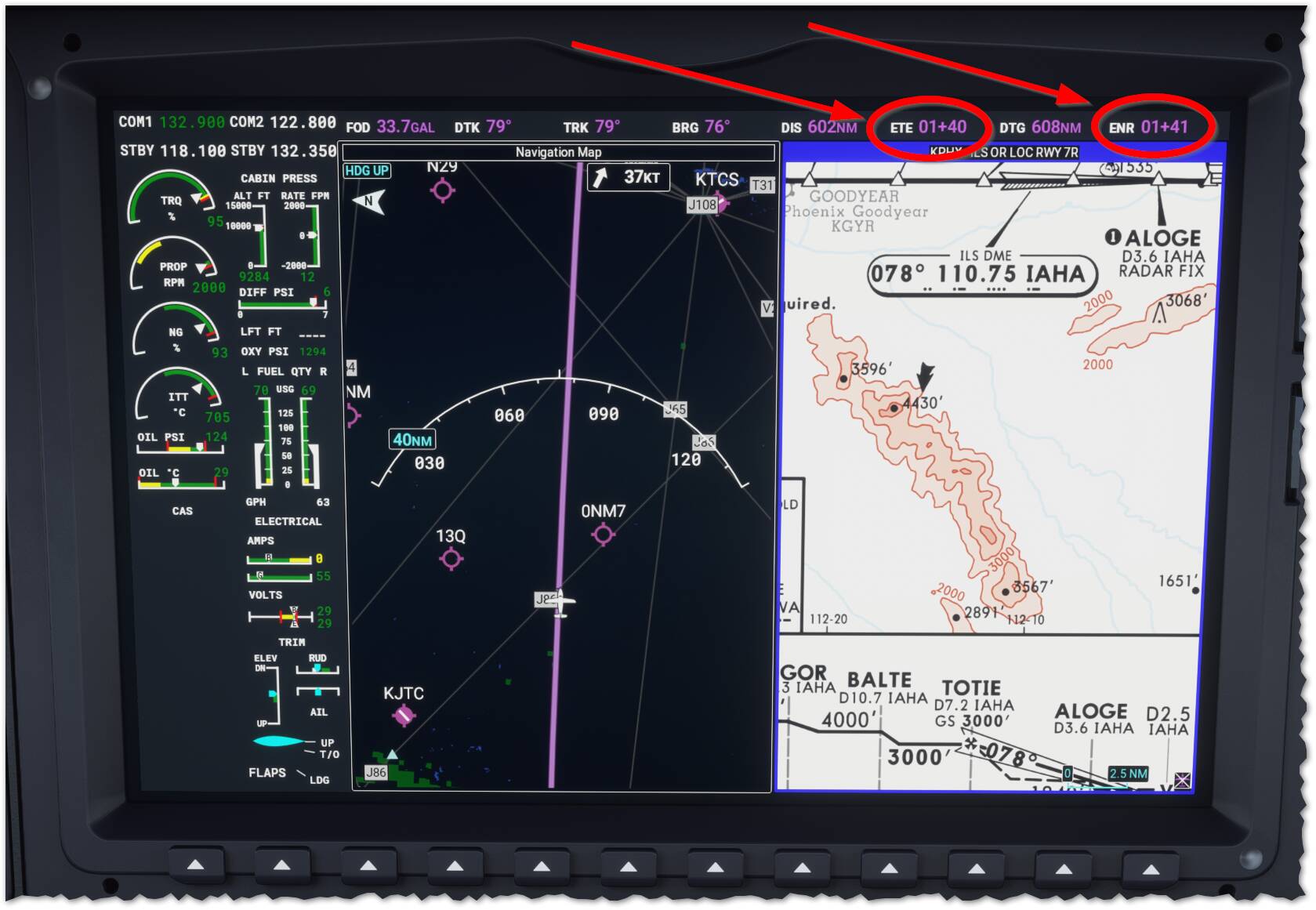
How does one interpret the ETE and ENR values when it is in this format (“+” sign)?
Does this mean 1 hour and 40 minutes for the ETE and 1 hour and 41 minutes for ENR?
#mfd #weirdnotation #lk2prgm #garmin3000
.
.
Yep, Thats exactly what they mean i.e. in your case 1 hr and 40 minutes.
Kev
1 Like
Hi guys,
Amazing work on the G3000, loving it!
In November of last year, it was mentioned that people were working on adding airway ‘compatibility’ to the G3000. However, I haven’t seen or heard any news in regard to this topic. Is there any?
Thanks!
This thread is about these people work. They call their team “Working Title”.
Is that what you’re asking?
Hi, no not quite.
In November 2020 Floater49th asked (Working Title Garmin G3000 Discussion Thread - #207 by Floater49th) if it is possible to use airways with this mod, instead of only DCT’s between waypoints entered in the G3000 Flightplan menu. @aznricepuff answered to this question that people from Working Title are working on adding the use of airways to their G3000 mod (Working Title Garmin G3000 Discussion Thread - #211 by aznricepuff), and I was wondering if there’s any news on that. I’m fully aware what and who the Working Title team is 
Thanks for replying though!
MSFS configuration
Live Player
Live Traffic
Live Weather & time
TBM930 WT G3000 V0.6.1
TBM930 mod improvment NOT LOADED
On another flight 2 TFC display on my TCAS screen
Aha, now you made it more clear. Apologies for the missunderstanding. 
1 Like
Haha no worries mate, English isn’t my native language so I sometimes struggle with expressing myself clearly
hi im wondering if you can help, i have have the latest version of the G3000 mod and fly the tbm 930,
i think im either getting a bug or im doing something wrong but im getting no waypoints showing on the G3000.
the waypoints appear in the touch screen flight plan and its drawing a line but its not showing the individual waypoints along the route on the G3000 screen, can anyone help or shed some light?
ive only got the G3000 mod installed tbm 930 improvement mod and some liveries from the custom livery pack.
can anyone help as its sooo frustrating.
many thanks
Sorry, but I’m not at Home
Left GTC MFD
MAP
MAP Settings
You have a list of different parameters to select to display in the MAP .
I’ think WayPoints name is one of them but …
Thanks , my friend for your help, Now I see the traffic, thanks a lot!
Hello all together,
just a, maybe, dumb question. I´m just flying my first longrange leg with the Longitude. I use the g3000 mod and the longitude performance mod.
I´m missing the OAT on my PFD. Didn´t found anything to activate in the menu. Is that really missing or am i blind a little bit…and should stop flying… 
Greeting from FL420 south of Ho Chi Minh.
@Sunday748, I think I know what you’re talking about here, but I haven’t flown the Longitude in forever, so could you let me (and everybody else) know where to find it? Unfortunately I can’t answer your question, but like you, I suspect that it’s got to be there somewhere. Or, you could just cut a hole in the glass and stick a thermometer out in the breeze to measure it directly. Not going to do much for your pressurization or inside air temp, but it will get you the info that you seek LOL…
Oat is in the middle screen, under all the trim indications, and just above APU %
2 Likes