Aviat Husky does not show that an update is available and CTRL-E does not work. Is it possible that the MOD does not have a base G3000 to update? I can delete everything in the Community folder, load the TBM 930 and both screens are alive with the old version.
Are you following this installation from an earlier post?
Don’t forget something very important…some mod creators package their mods in a sub-folder inside the zip file you download. You must only install the root folder of the mod in this case. Example, workingtitle-g3000-v0.7.4.zip>workingtitle-g3000-v0.7.4>workingtitle-g3000, in this case you only move workingtitle-g3000 into the community folder.
No other mods than the TBM improvement mod and the WT G3000 in the community folder.
Only default liveries, and latest versions of the mods.
Clean install of the game. Decent hardware. No other issues.
Deleted and rebuilt the content.xml file.
Flying in Norway.
It happens every time I switch on the battery first thing from cold and dark (CTD). Though I managed to avoid it a couple times by flipping switches and turning knobs at random before turning on the battery like someone suggested. Very inconsistent.
Since I am not the only one with this issue, Im guessing it has something to do with those two mods together.
Sorry to hear. Can’t tell sometimes these things are a mystery why to works for some and for others it doesn’t.
I think the best bet would be to go to the WT Discord channel. Maybe the developers and experts there can give a hint.
Aparently its already a submitted bug (Aug 10), so I guess I have to just wait and see.
Thanx anyway 
1 Like
Hi,
I have previously downloaded the latest.zip file for WT v0.7.4…zip file size = 23MB
I have also downloaded the .zip file for 0.7.4a…Zip size = 755 MB
Can someone here please explain how/why the difference? There seem to be a few different opinions.
Thanks
= official release for flight simmers and for you.
= source code // not intended for you mate 
Download
workingtitle-g3000-v0.7.4.zipfrom the Github release page. Do not download the Source code files unless you are sure you want those.
https://github.com/Working-Title-MSFS-Mods/fspackages/tree/main/docs/workingtitle-g3000
https://github.com/Working-Title-MSFS-Mods/fspackages/releases
I have only ever used the 0.7.4 file.
So am I correct in saying that 0.7.4 IS the latest WT available ?
And if so, the version 7.4.0a IS NOT an option to upgrade?
So we can delete all reference to 0.7.4a when it comes to installing Working Title im MSFS.
Would it be fair to say that, to eliminate any further confusion?
As you can see on their GitHub both the 7.4 and 7.4a where released at the same time.
As far as I remember there was a MSFS hotfix which broke 7.4 and WT released 7.4a shortly after. However it seems now that both are identical. It is speculation however and only going to WT Discord can clarify.
Anyway, disregard GitHub and the above speculation. Go to the WT webpage and I am sure a working G3000 version will be downloaded.
‘However it seems now that both are identical.’
The files in question are totally different on several levels, irrespective of when they were released. I have disected both files weeks ago.
They are FAR from identical, wouldn’t you now agree?
You compared apples with oranges ie source code and compiled code (as was already stated by my fellow poster further up).
Again. With all the time you spent researching, posting and trying get clarification here, you could have just gone to the source of information as suggested several times above - the WT Discord channel, and be done with it already.
Without going out on a tangent, why don’t you answer my questions?
I did already several times. Look above.
And I just checked again. 7.4a on GitHub is the most recent (working) version available. 7.4 on GitHub only gives you the non-compiled source code (which confused you as it is much larger and of course not working as it is not compiled).
I might just go to Discord myself if you don’t do it given the time I already spent here trying to point you to the correct info.
‘Release g3000-v0.7.4a · Working-Title-MSFS-Mods/fspackages · GitHub’
Do you mean this?
Give me 45 min. I will be home and post screenshots in order to avoid misunderstandings
OK…will check back in several hours… sleep time here
1 Like
I am aware that only the workingtitle-g3000 folder (from the zip file) is to be moved to the Community folder.
Alright once and for all … after that I am out.
WT Discord
Checking WT Discord (their official support channel, as stated twice in my posts. took 30secs and gets you this) - notice 7.4.a is the latest version.
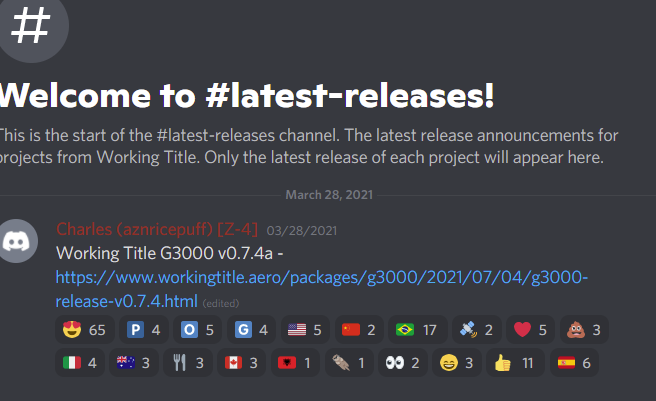
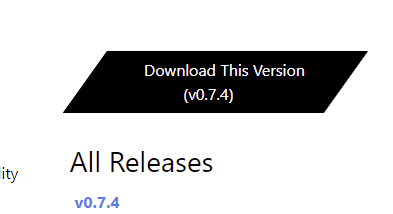
WT Webpage
Checking the WT Webpage links to 7.4.a - see the hyperlink detail (“https://github.com/Working-Title-MSFS-Mods/fspackages/releases/download/g3000-v0.7.4a/workingtitle-g3000-v0.7.4.zip”)
Now GitHub.
GitHub, which contains the original and latest code as WT G3000 is an opensource community project and GitHub makes it easy to manage such projects (e.g. versioning, issues/bugs, release notes, publications, licencing etc.). Provided you know how to use the GitHub user interface.
This will give you Tags · Working-Title-MSFS-Mods/fspackages · GitHub)
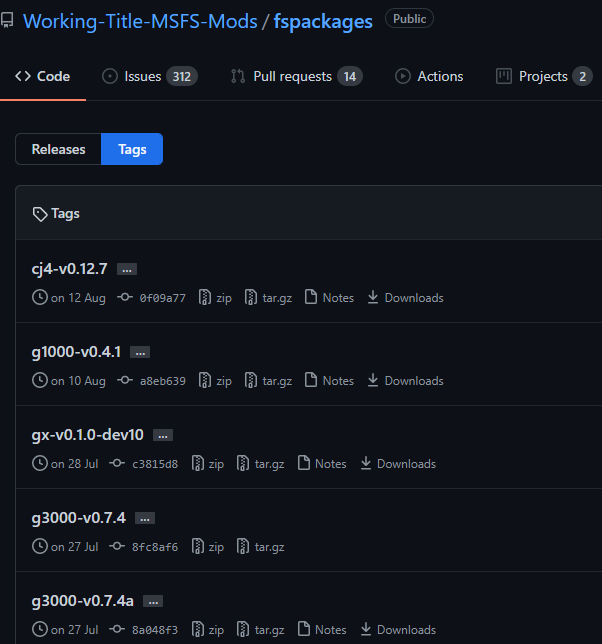
Now click on 7.4.a and scroll all the way down to Assets you will find this:
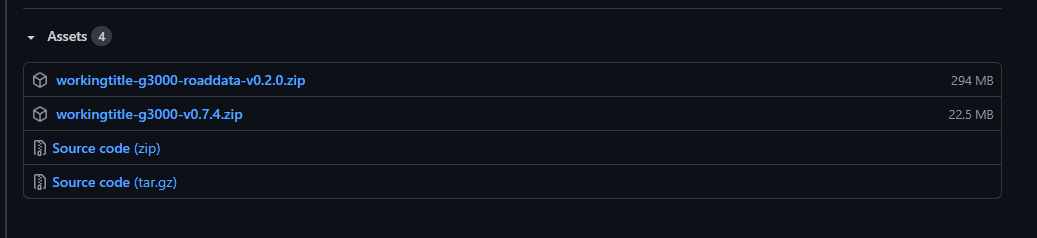
… the file workingtitle-g3000-v0.7.4.zip is the currently lastest version. And although it is named 7.4. it is stored in the GitHub 7.4.a folder, which probably confused you.
Now lets go back and check the 7.4. GitHub folder … you get this
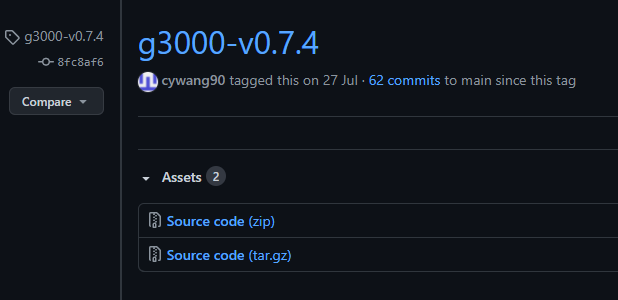
This is only the uncompiled source code, which does not work obviously and is about 730MB vs the compiled 7.4.a version, which is about 23MB in size.
Summary:
7.4.a is the latest version. Go to the WT webpage to download. Unzip the file and copy the folder “workingtitle-g3000” into your MSFS Community folder. If you need help / support, best go to the offical WT support channel ( Discord )
(Only use GitHub if you know what you are doing).
Hello,
A suggestion for the initial issue (crash when cold start) : you may check that your Virtual Memory is turned ON.
Many people who have a SSD just turn it off, and this sometimes causes game(s) crashes.
A friend of mine had the issue with FS2020 (I had him download all my mods before ) and it appeared that turning on virtual memory corrected the issue, although he had 64Gb of physical memory.
Thanks for the explanation…I have to admit 7.4a being a newer version than 7.4 would confuse me as well. ‘a’ for alpha, ‘b’ for beta then the final release version w/o letters is the usual release order of software.
Unless of course the ‘a’ doesn’t stand for alpha…if that being the case then perhaps another suffix designation would prevent some confusion.