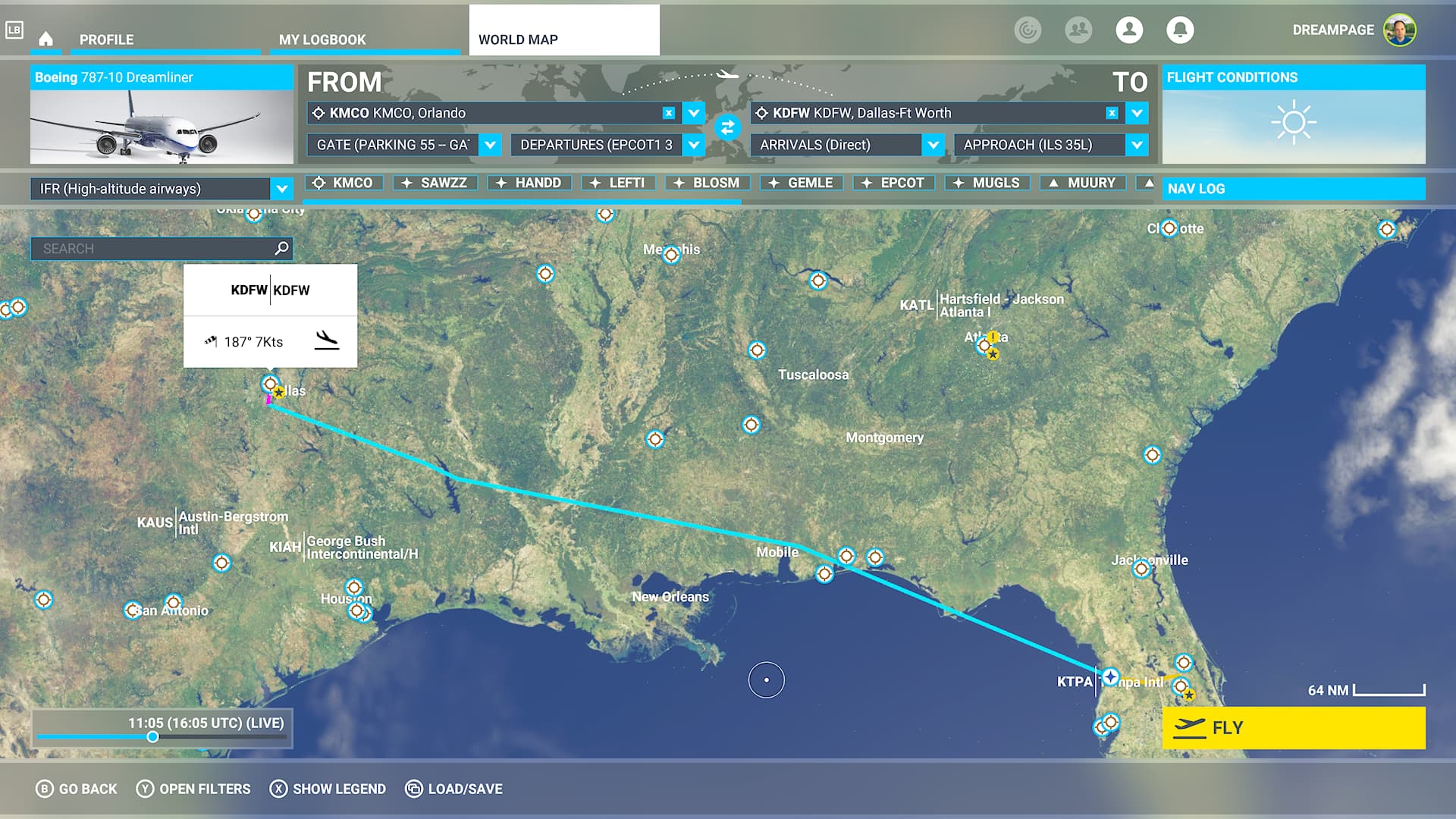
I do think the Xbox (at least the Series X) version of MSFS should run with lower settings or at a lower resolution. The console is simply unable to run the sim properly in its current setup and it leads to CTD (Crash To Dashboard) extremely frequently.
To illustrate the problem, I tried to fly this route during the weekend, and today, no less than four times.
A flight from Orlando to Dallas Ft. Worth with the 787-10. It is downright uncompleteable, 100% reproduceable CTD and I think it’s because of the main cause: performance. Both airports are handmade and extremely big, and the glass cockpit of the 787-10 is also heavier on the hardware. The end result is framerate often in the single digits (I mean, I had to land at Dallas with around 5-6 fps just now), and the inevitable crash. I also had CTD three times before at the following times:
CTD mid-flight, around 54 minutes in
CTD at Orlando just as I was beginning to taxi
CTD during loading in the flight itself
CTD after landing at Dallas
Whenever you are at a big handmade international airport, you can tell that the Xbox Series X just can’t cope with these graphics. Performance is abysmal and it’s no wonder the game just crashes, there’s probably not enough CPU headroom and/or memory to handle all this. I do think the Series X should run this at only 1080p, upscaled to 1440p, instead what it currently tries, rendering at 1440p and upscaling it to 4K. I know it looks better in screenshots and in a Digial Foundry video where they don’t really play the game much, only check out a few discovery flights, but there are serious bottlenecks in the sim which make serious flying barely manageable on console. North American handmade airports are almost out of the question completely, because they burden the console so much that it can’t cope with it. The above route is a prime example of this.
I personally would be comfortable with a lower resolution, or at least a graphics option to lower it, or lower scenery detail at these airports. I do think this is at least one of the causes of the frequent CTDs on console. Not the only cause of course, but it plays a huge part. Either the consoles don’t have enough memory or CPU to handle these graphics. I do hope the developers will enable a lower graphics setting in the option menu, I’d be curious to see how it helps.
While I don’t play it on console I don’t think it’s the graphics that is causing it.
But imagine it that being the case, since the game already had a massive graphics nerf so it can run on consoles and the consoles still can’t handle it
Are you in IFR or VFR with ATC? I found with IFR on XBOX series x the sim slowdowns a lot approaching arrival airport (LAX from San Diego - repeatable). Try VFR and then try with no ATC at all and see what happens on your flight (if you didn’t try already).
I always fly IFR and with ATC because that’s the only way to plan proper flights - VFR flights are just a straight line between the two airports. I may try disabling the ATC to see if it helps but I have my doubts about it. In any case, it’s clear that the consoles can’t really cope with the load in its current form. Thanks for the tip, I’ll continue testing.
I am flying a roundtrip over Europe with VOR. The waypoints are between 20-110 NM and I am flying 2 or 4 waypoints a time and land on the next airport. But the longer I fly or the longer the Sim is in Quick Resume, the more CTDs I have. After a restart of the Sim everything is fine till n-flights.
Therefore I suggest -before flying long trips- to start the Sim from scratch or even restart the console within the preferences. But I have to admit that this kind of low framerate never occured to me and I am starting from and landing on big airports too, and fly over detailed cities (London, Amsterdam, Hamburg).
Not experienced any huge issue myself. Probably a handful of ctd since launch and some drop in frame rates after extended play though there are posts for this issue with PC also. Agree, an option to adjust graphical settings for those that wish to dabble would be good but not a blanket drop in quality.
A LOD slider would be nice. Since the last update with the LOD increased it has killed the smoothness of the sim. Lots of Stutters and frame rate drops. If we could set our own LOD to make the sim run better that would be great.
Lowering render resolution won’t help much, it’s likely the RAM use that causes the crash. Airliner, plus handcrafted airport, plus fixed terrain detail can eat up a lot of RAM.
CPU and GPU are not an issue, I run on a 2.2 Ghz laptop with GTX 1060 6GB. Before I upgraded to 32GB ram I really had to watch what the sim was doing in ‘difficult’ areas and reduce terrain detail to prevent a crash. Windows has the benefit of the pagefile, but the more it’s used, the higher the chance of a CTD. Afaik Series X doesn’t have a page file, so if it runs out of memory, crash is likely.
Are there any settings you can change on Series X? Airport ground traffic is a huge performance drain and setting that to a low value helps a lot on PC. Multiplayer and live traffic also take up resources, maybe the flight is do-able off-line?
I have had CTD every day since last weekend. I always start the sim from scratch (as well as my console), I don’t trust quick resume. It doesn’t make a difference, though.
I do think the fixed graphics settings are one of the factors. CTD happens more frequently in high load areas and aircraft. It’s not the only cause, though - just now my sim crashed with the A320neo at 32000 ft while nothing particular was happening.
Memory is surely one of the issues. The Series X only has 13 GB of memory for games and that’s simply not enough to run the sim reliably at these settings.
I did that flight yesterday and FS2020 had 16 GB allocated at some point. (system ram) I have render resolution at 1440p and a mix of high and ultra settings, terrain detail 200. Live traffic, weather and multiplayer yet limited ground traffic at the airport, flying the FBW A32NX.
So yep, 13GB is very tight for airliners with everything on.
On Xbox S and although I do love the sim it has also been very frustrating with multiple crashes each time I play… It works great on propellers and the smaller planes but I like to fly the A320 and pretty much each time I do I experience crashes which given it is a time consuming sim is a big let down. I use Aerofly on my iPad with a A320 that works great ( graphics of course nothing to compare ) but I also think the Xbox is a much more capable machine and a hope we soon get a more stable sim.