Xbox users only - black screen / ctd discussion

PC is not for me, I’m hopeless with computers. I like the plug and play nature of the sim on Xbox. I really enjoy the console experience. Sure, it ain’t perfect but I think people are perhaps expecting a little TOO much at times and refuse to accept the sim how it is. This is all new territory for Asobo and Microsoft themselves haven’t been in the flight sim game for over a decade. Of course we shouldn’t have to be careful with everything we buy — third-partly content basically endorsed by Microsoft should automatically work without caveats — but that’s just not the reality at the moment and we need to give the development team time to work on the solution (which presumably is next year’s FS2024). I agree that aircraft aren’t really the problem but I think they do compound the memory issue when coupled with highly-detailed, poorly optimised scenery.

I’ll try and do some sort of ‘top 10 airports for Xbox’ later but bear in mind that experiences can vary, even with the same add-ons running on identical hardware. I also wouldn’t advise anyone getting into flight simming to choose the Series S as it just doesn’t have the power to run anything but the vanilla game.

If you’re prepared to make a few sacrifices and learn which airports work flawlessly (and which don’t), simming on console is actually pretty good!

Look, I’ve been simming on console since December 2021 and believe deeply in the promise of having the sim on console to the benefit of end-users and long-run simulator development. I agree with the Microsoft social media Code of Conduct that the using the sim on either PC or console are both valid and fun ways to use the sim, and that the developers should do everything they can to maintain as much parity as possible between the two platforms.

However, it’s not an unreasonable expectation that the sim and third-party products work as intended when we fire up the sim, and it’s totally justified if folks decide to move from Xbox to PC because they are done with the instability. Someone can fiddle enough with aircraft and scenery to create a stable console experience, but that itself is an indictment of the state of the sim on console. It’s not an “entitlement” problem when folks walk away from Xbox; it’s a sim on Xbox problem.

Some folks have brought up the need to deal with settings on PC when simming. This actually isn’t totally true, as @NixonRedgrave has pointed out. You can set your PC settings and then just fly if you are not an FPS chaser, just like with Xbox. The difference is if you do run into performance problems, you can go into the settings as an option.

To emphasize, I am rooting for improved stability on Xbox and there are many reasons why console makes more sense for many folks over PC. But let’s not make the same error in the opposite direction when some folks decide otherwise.

That is a really well stated post, mi amigo.

I’m not suggesting it’s an unreasonable expectation — hence my full justification for the alleged entitlement — however console users currently have three choices: accept the limitations and enjoy the products that DO work flawlessly; jump to a powerful (but very expensive) PC; or abandon the sim completely. Since I (and I’m sure many others) don’t fancy either of the latter two options, I choose to enjoy the sim in a more limited capacity than is perhaps reasonable or fair. It sure beats spending hours moaning here while cutting off my nose to spite my face by neglecting the sim in some sort of futile protest.

If FS2024 fails console simmers, then I think we’ll have reasonable grounds to go on the offensive against Asobo. But my feeling is that they’re acknowledging the current shortfalls simply by creating a successor (that incidentally is being touted as an Xbox title).

As an Xbox simmer with practically zero intention of swapping my console for a PC, I’m all for the sim working as it should — but it’s just not happening right now so I see little point in spending my time complaining about it here. I’d like to think the tech guys at Asobo aren’t stupid — they’re aware of the moaning and I’m confident positive things are happening in the background…

We have really got to give FS2024 a chance to fix what’s irreparably broken in the current iteration.

Right, it makes sense to make the best of the situation unless you are willing to change it by moving to another platform or just stop using the product.

I just push back against claims like “people are expecting a little too much” or they are acting with entitlement (that term is often used as a pejorative, but I take your point on it being justified), as it really is entirely on the developers to make this right. I think you’re right that FS2024 will be the sim to watch that hopefully will resolve the long-standing performance issues on console.

Setting this aside, you are doing great work helping Xbox users identify which add-on airports to prioritize and which to avoid, so thanks again for that! It’s a big value add to the community.

I think people are perhaps expecting a bit too much at this precise moment in the sim’s history. MSFS is over three years old and things have no doubt changed since the summer of 2020 — the current coding clearly can’t handle every improvement and update Asobo planned and so I think their hands are probably tied, at least until FS2024. Whether the expectation is reasonable or not is immaterial if the sim isn’t physically capable of handling the changes and fixes customers are requesting. Personally, I don’t see anything wrong with expecting the sim to work with officially-endorsed DLC but I’m not in a position to comment on the technical complexities of the situation — presumably if a lot of what was promised was fixable, it’d have been done by now. Perhaps the point is actually that Asobo shouldn’t be promising things they cannot deliver, although I imagine their optimism simply got the better of them. I guess it’s likely they couldn’t have foreseen that the sim would reach its limits so quickly.

I also think we must apportion blame to the third-party devs, some of whom want to tap into the Xbox market without doing the necessary optimisation work. IniBuilds’ KLAX and EGHI, Flightbeam’s KMSP, Drzewiecki’s KEWR, MK’s LEMG, FSimStudios’ CYWG… all proof that large and/or very complex airports can work harmoniously on console with high-fidelity airliners such as the PMDG 737, when the right development techniques are employed. It demonstrably can be done so we ideally need the top devs to start better assisting those further down the pecking order. Better communication and co-operation would benefit everyone.

Off topic, I think but when oh when can we see a traffic addon on our consoles. This is what I miss most. Especially when I fly with no traffic whatsoever due to stability issues and I just can’t stand the ugly generic traffic. Man, that isthe upmost immersion killer. I don’t ask much, just a simple traffic addon that replace the generic ones.

Just for this I would consider a PC…

Realistically, I think that’ll be in FS2024. We know they’ve improved the traffic and are working on livery licensing, which presumably will be available on both platforms.

Just Flight have just submitted their FS Traffic product for Xbox to Microsoft for evaluation/testing. This surprised me as I thought they’d wait till the release of FS2024 before attempting such a complex add-on in the current sim but let’s see how things develop…

If it ultimately doesn’t pass will they rework it for the new sim, given that FS2024 apparently has its own traffic? Either way, I think we’ll end up getting a decent enough AI traffic mod.

We’re still missing VDGS too, outside of a very limited number of products offered by a couple of smaller devs (e.g. The Secret Studio). It either doesn’t work too well, or the big boys are completely missing a trick! Curiously, no one ever seems to mention anything about how these custom VDGS systems perform on console…

VDGS is clearly pretty easy to implement (much more so than reliable AI traffic) so why is it still not a common sight at third-party airports for Xbox?

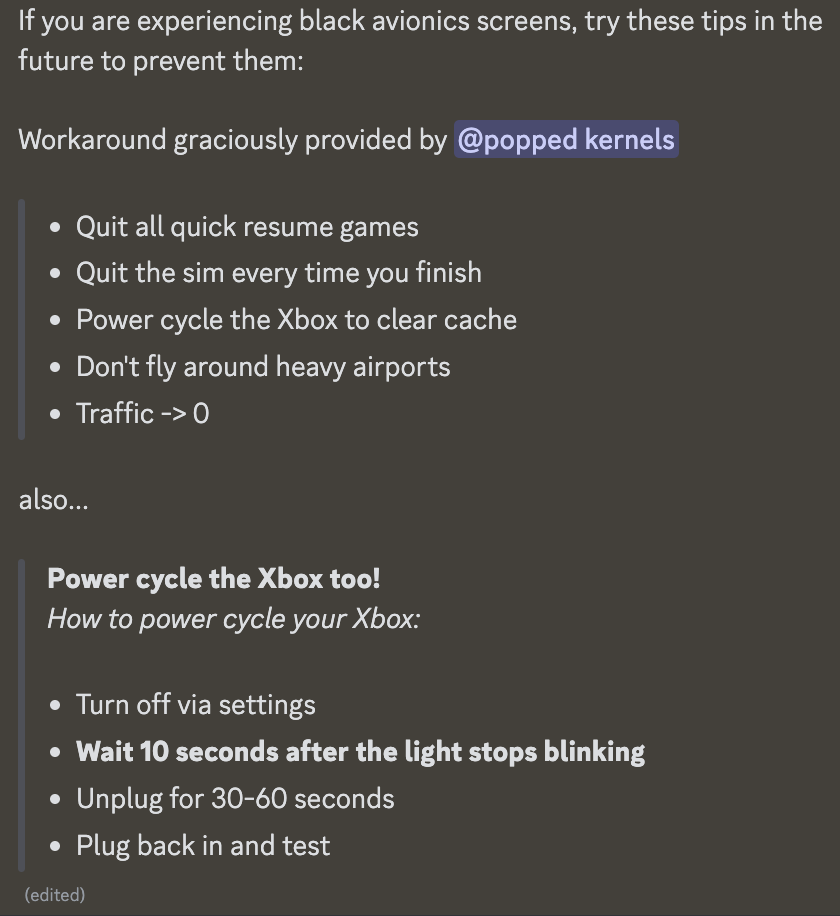
None of those tips prevent them, unfortunately. In fact, most of them act as little more than placebos. “Don’t fly around heavy airports” is a pretty useless recommendation and almost tantamount to an admission that they have no idea what’s happening on Xbox. If they recommend against flying around heavy airports, isn’t the solution simply not to approve/release such airports for the console version of the sim?

There are a number of heavy third-party airports that are just fine — as there are many tiny airfields that cause big problems.

Tell us there’s an optimisation issue… without actually telling us there’s an optimisation issue.

i get what you mean, but its already a feat on its own to have a game as “resource heavy” as this on the series s, only a 300usd console. tbh, only the highest end pcs get good performance without any lag / studdering, some high / mid end systems (5800x3d + 4000 series gpu) get studders too. too bad that us xbox players cant change graphics settings :sob: or else ill drop the graphics to the minimum lol. another issue is the limited ram, the series s only has 8gb useable (2gb for OS), so that is also another issue.

If the add is ok it doesn’t have issues. In Hawaii I have every add on available including all airports, all shipping including ones from airports, global shipping, and Bijan’s, birds, and all aircraft carrier adds from multiple developers. Only one that crashes it is the aptly named PHOG add on.

Washington DC I have kiad/DCA/and Washington DC scenery. All of a sudden the DC scenery became a problem, it does have 5 enhanced airports and a moving train. It all worked with su13. Now the lod on 3rd party is so far out I can see all net 7 airports and the city at the same time. Disabling the DC scenery allows the two airports to run.

Miami I have Hollywood and kmia, cat cay, shipping and no issues. Have to sort out London though something crashes there. I believe it may be orbix downtown. Southern Bahamas have everything available no issues there unless I hang around the animate people with a helicopter or seaplane too long at Juliet. Everything I’ve had to reinstall had some sort of animation, this was a problem in su9, but reinstalling didn’t fix it then.

During beta I had to reinstall birds and global shipping and quiet a few animated add ons. Fine after that even in the channel.

I do get an occasional crash leaving Sedona (red rocks version) when coming into Vegas or southern logistics, from other airports no issues. San Diego occasionally too. Sorting out the culprit after reinstalling all of it, haven’t gotten to it yet. Red rocks is awesome, but the way it’s rendered is about max capability for the xbox. Seems like if you leave from somewhere ‘straining’ the system, any heavy load at a destination is just too much. Like it’s a memory leak or not purging.

Some of the new PG areas in europe have caused me some issues with no add-ons but haven’t had time to fly there much. As soon as I cross the channel into England I have issues, not necessarily London/London city area, need to sort that out. Need to reinstall Orbix landmarks?

Canada and Alaska seems like I can fly anywhere with zero issues(no add-ons except a few small AK airports). The SWS Africa add on spent many hours with in the Wilga, no issues. Someone says Chicago buildings causes issues, will need to try there too, and I haven’t tried my NYC stuff since before beta.

Usually the aircraft doesn’t make much difference, even if it’sa light load on the system like a default Barron. Even 530 equipped aircraft will black out. Personally I think there’s some imbalance with the LOD on 3rd party being too far out, I can see them way further sometimes, including hand drawn Asobo landmarks than before. It’s also reminiscent of the animated item bug of SU9, when you could see by ‘layers’ of LOD draw-in when it was going to happen, so there’s the terminal…the gates… and here comes the Metro train-instant black screen-there it is!

Add in the odd bug where you start out lagged on startup at any airport.
There’s an add on called static aircraft something or other. It places aircraft at the airports. They don’t do anything other than make the airport look busy. Do a search on the marketplace. Doesn’t cause and black screens or CTDs. Great if you’re using AI with limited aircraft.

I have the LVFR static aircraft too. There are a few airports where if I’m staying around there I’ll uninstall because of doubled-up aircraft, but run it when I’m exploring areas I don’t have much DLC so it’s not a ghost town. If you want to see a lot of aircraft try southern logistics, doesn’t cause problems on SX and it’s an amazing amount of aircraft, well over 100 airliners parked close. Can’t actually believe that runs on an XBOX, and smoothly. Great middle of nowhere add on if you fly the SW US a lot.

Also the Asobo graveyard at Davis hasn’t caused me any issues either in SU14. Both of those used to a few SU ago(maybe another SU9 issue?) I know it was right when helicopters came out. Now no problem.

Great thread and thankyou for opening discussion, it really needs to be said
For me it’s the usual suspects scenery add ons that cause CTDs and black screens. I seldom get any fly Tampa stuff to work, I have them uninstalled. Orbx YMML is newish and causes problems. NZAA Auckland is another. I find if there is an airport on top of a local scenery on top of the world update it’s going cause problems. Inibuilds airports are ok but you can tell the console is in the brink at these airports. As for aircraft most are ok with the PMDG being the best. But default A310 and 747 has issues. I can’t even load the A310 landing challenge without a CTD. The 747 is a stuttering mess even at vanilla airports in vanilla Asia or South America. The 747s sound is so poor, the 787 however runs fine and sounds amazing. I’m stoked this page is open and there is a beta build for consoles. I’m going to re install the fly Tampa stuff and have a weekend of CTDs so they can collect the data. We have spent money, these need to work in conjunction with each other or don’t sell them and offer refunds.

There is a bug reporting page for Black Avionics it’s been around for years with many thousands of posts.

Let’s 100% use that for reports but Mods ask that it is for reports only. Hence this thread was created for us to discuss without cluttering the error log bug reporting page.

All we know so far…

We know that even a fresh install with no add-ons may have issues. However it is certain that installing world updates and certain airports or third party scenery will cause excessive events of BA and CTD for some.

I’m particularly motivated to help folks that are finding it unflyable because of the bug. I’ll be happy to spend time and troubleshoot with them all the obvious helps so it becomes usable and BA falls below 5% of flights (less than 1 in 20).

( Btw I have close to zero issues with live traffic, live weather and all the airport vehicles etc set to 100% )

I hope everyone joins the stability Beta. I am and will be installing all of my content and especially the ones that cause CTD. (FlyTampa Vegas I’m looking at you)

Thx, i have it already even the regional static aircraft addon from another developer. But i was looking for a traffic addon, not static replacement addon although that’s working as it supposed too. I guess we have to wait till MSFS 2024…