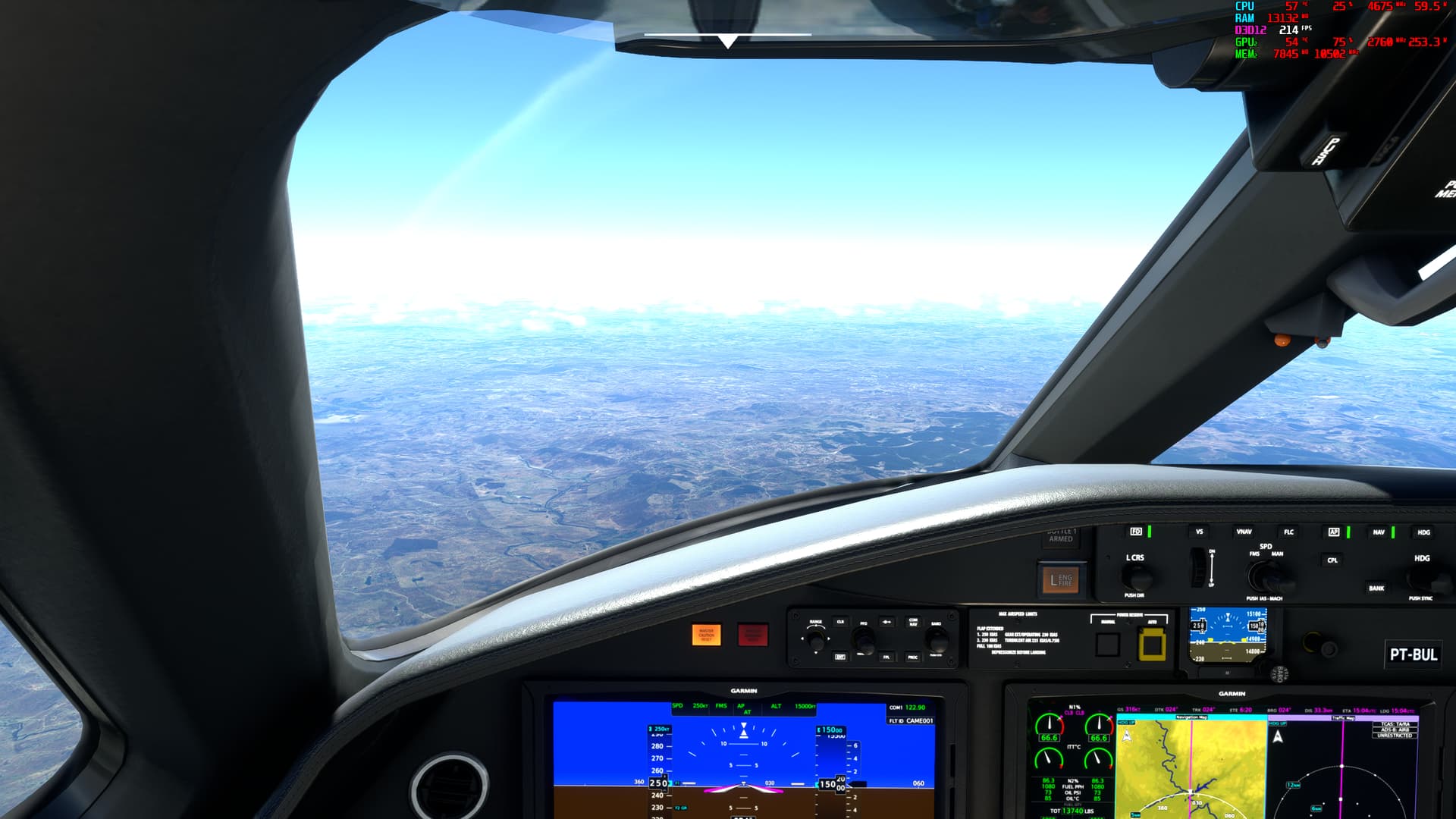
GPU limited is a thing with these CPUs for sure, I top out (or bottom out) in heavy scenery at 41fps with a 7800X3D and a 3080 10gb at least that’s where I’m at for now … away from home for a week and have the new setup “running” but not full gallop I fear.
On the upside got to fly in an A321, extra legroom row 23 is the bomb, I physically could not touch the seat in front of me with my seat belt on.
reading the thread with interest (just building a new PC for MSFS and DCS).
1)will go with the 4090 (as a fly 2d and VR) but just wondering is there any consensus regarding whether the AMD 7800 or 7950 is better for DCS/MSFS? (not don’t mind paying the extra if it will give me better performance across both sims and do tend to run some apps in the background when in sim)
2)also assuming the issue with the Asus motherboards and AMD CPU’s has now been resolved with a firmware update - or is it still worth considering an intel?
7950X3D > 7900X3D > 7800X3D , however:
The benefits of a more expensive chip will depend on your usage patterns.
The more you use lots of background apps, VR, the more higher end chips make sense. For people using vanilla MSFS, 7800X3D is largely sufficient, going higher is futile.
Intel has good products and a Raptor Lake refresh (14th gen, aka Meteor Lake) is currently scheduled to RTM in September.
However, strictly for MSFS, I would argue 3D Vcache rules, and AMD is the better choice.
As to the above mentioned issues, they have been addressed by both AMD and the motherboard vendors. There are options other than Asus that are worth considering too.
thanks for the reply in that case now leaning towards the 7950 - use it for VR (assume it should give a better performance?) and have lots of add ons (apps) running when I run MSFS (its most definitely not stock) - assume it should also give me slightly better performance in DCS(which I think now can be used with MT)?
In this case my only further comment would be to also consider 7900X3D as it has more cache per 3D core than its siblings.
Unless you plan to also use your computer as a workstation for 3D rendering, video editing, etc… in which case a higher core count is always better.
As to DCS, I cannot comment, sorry, I have no experience with it.
My thoughts haven’t really changed on which is better for simming. The 7950X3D may be technically better on paper, but the 7800X3D isn’t going to be fully loaded by the sim anyway, with lots of headroom for other processes on the unused cores. So the question is would the large extra expense for the 7950 version be worth it for a marginal improvement. That’s assuming there’s a noticeable improvement to begin with, because I’ve yet to see any head to head comparisons when using a lot of add-ons. With the vanilla sim, there’s virtually no difference. Personally I just don’t see enough value to justify the extra cost.
For VR, perhaps someone else can answer this better, but my understanding is the sim is still only doing one set of physics calculations. It’s the GPU that has to do double duty with rendering, so I wouldn’t expect the CPU choice to make much difference between standard and VR.
The 7800 x3d is all simmers/gamers need unless they regularly run workstation loads such as rendering, or just want to throw money out of a window. I wouldn’t even consider a 7900 x3d or 7950 x3d for a gaming / simming cpu.
It’s worth noting that ALL modern cpu’s run boost algorithms. By nature they boost clock speeds until they reach a temperature target. The cooler you keep them, the more they boost, and they more heat they will then make. So unless you have a very good cooling system with excess cooling capacity, a user is likely to see high temps and it doesn’t necessarily mean it’s bad.
This is a great point as the 7900x3D is really the middle ground between the 7800x3D which may not have enough cores for other apps being run during MSFS and the higher priced 7950x3D. The 7900x3D in addition has higher clock speeds for its 3D cached cores than the 7800x3D.
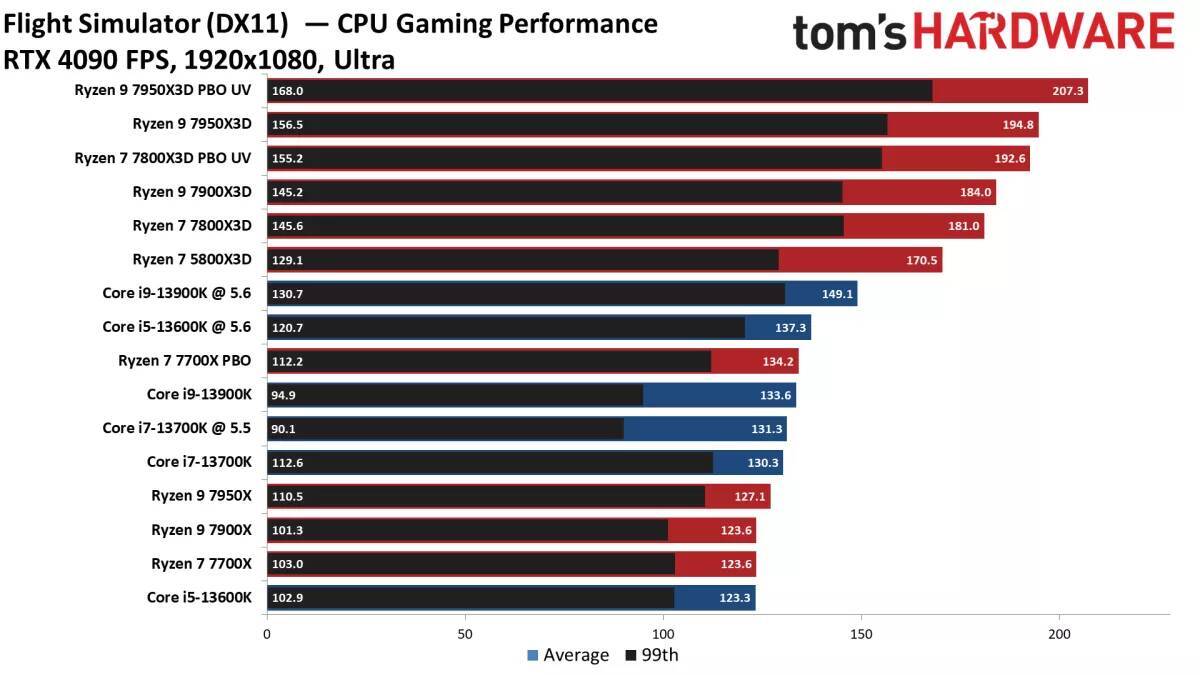
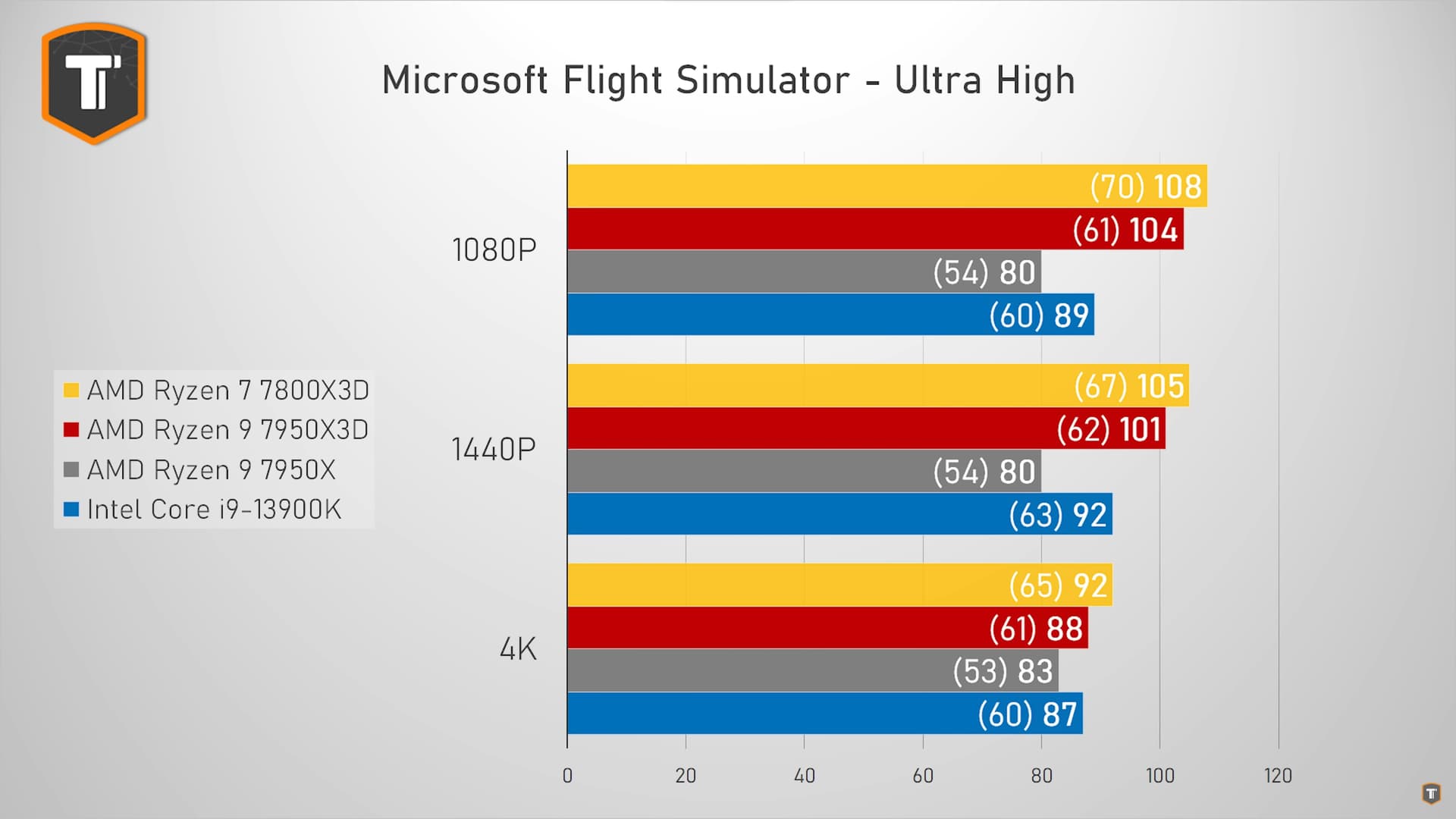
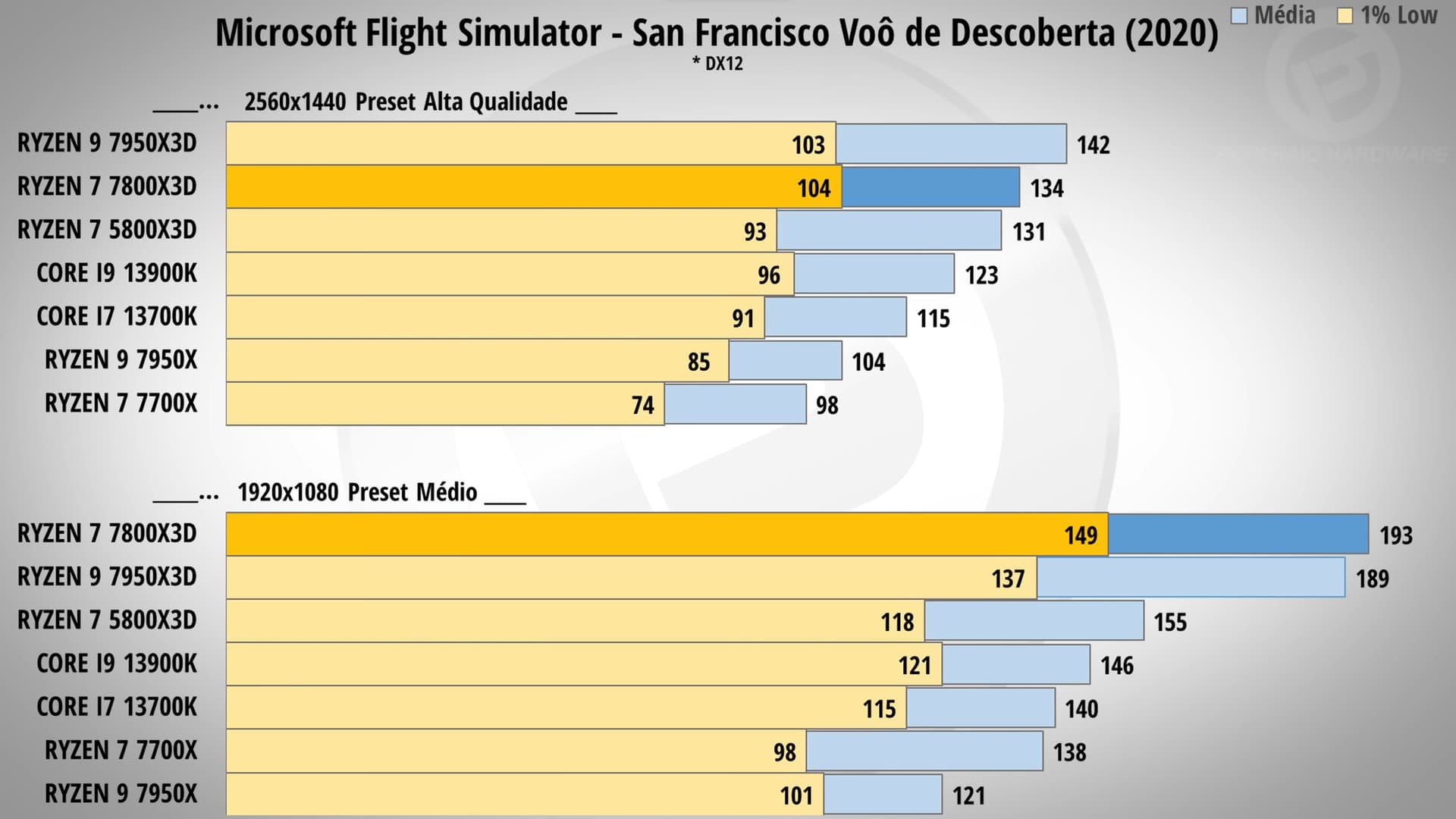
Based on all articles, videos and reviews I’ve seen, the 7800x3d is slightly better than the 7950x3d and the 7900x3d. By performance in games the order would be: 7800x3d > 7950x3d > 7900x3d. I mean, I’ve read and watched a lot of analysis, because I was assessing which cpu should I buy. I opted for the 7800x3d, not because it’s cheaper, but because it performed better.
My advice is, look for the reviews and tests before choosing. Your personal usage might lead to a different choice.
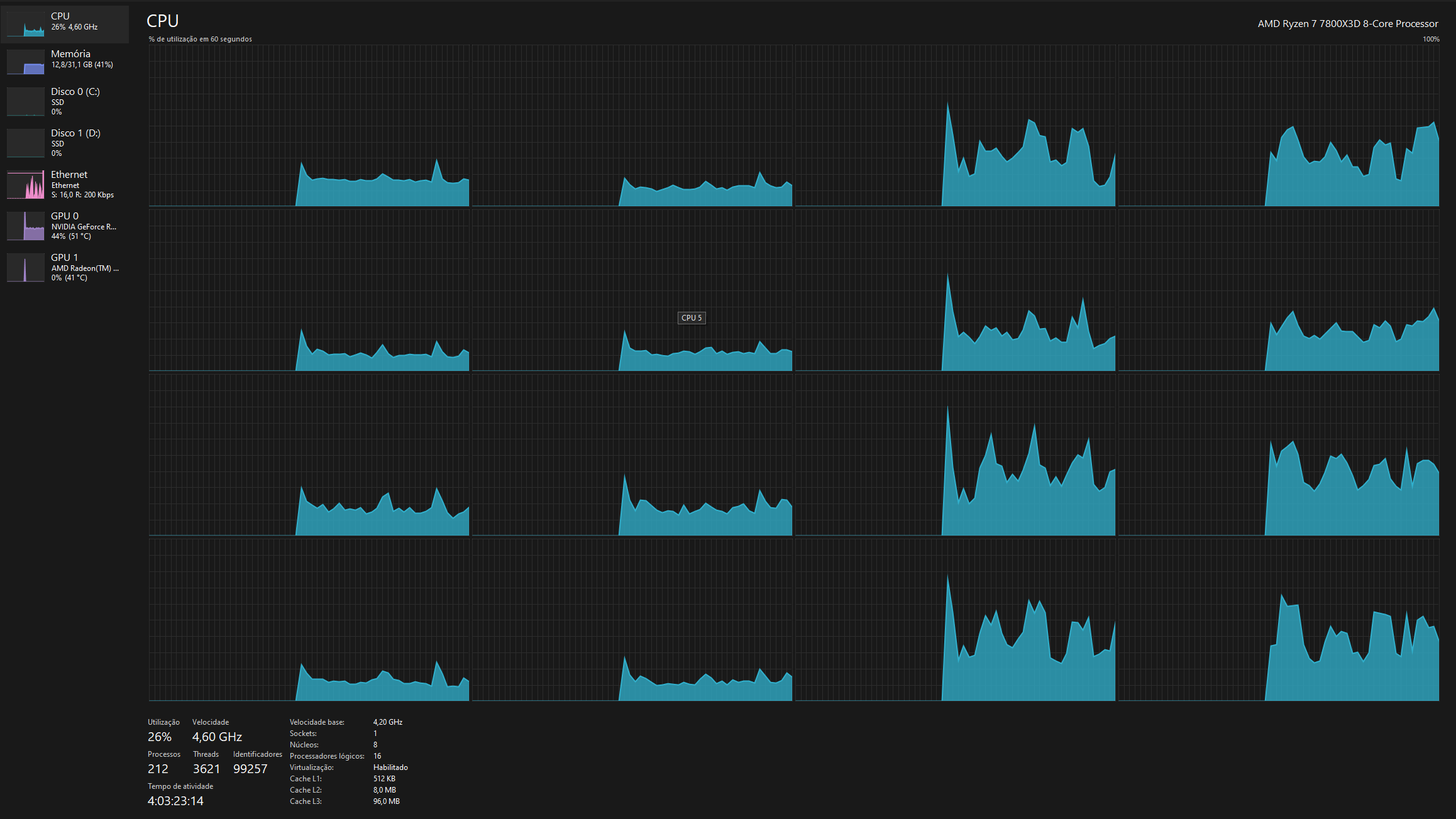
I doubt you will see any 8/16 cpu having problems with insufficient cores/threads, for gaming. Even if you use 3rd party softwares in the background. The 7800x3d usage here never goes above 30% when running MSFS. Using FSLTL, Fseconomy, littlenavmap etc.
I can’t test the three cpus side by side, but you can see all reviews and tests available and the 7800x3d is the best performer between the three. Maybe the reason is it has a single CCD, and this single CCD has 3D cache. On some games the 13900k performs better though.
Below I’ve posted a screen shot of task manager while only running MSFS and it’s using 13 threads. So for an 8 core/16 thread cpu such as the 7800x3D that leaves 3 threads to run other apps. Not a lot of extra capacity for some people to run their browser with multiple tabs open, FSLTL, Little NavMap, etc.
How about a couple of suggestions on the best MB for my new PC. I’m going with the 4080 and the 7800X3D. I’m hoping this will give me good VR performance for a price point I’m comfortable with.
Like I’ve said above, I’m just throwing in more tests and info so people can make informed choices. People should see as much tests, reviews and articles as possible, before buying. Also, they can ask here, of course.
These two pics are already in the first post in this thread. It contains a number of other reviews, including the image from THG I posted above.
I recommend taking a look at it for those who haven’t already and are looking for more numbers.
Also you will find earlier in this thread a fellow simmer actually purchased both 7800X3D and 7950X3D and kindly did a head to head comparison on his setup.
As in most reviews, his test shows that the higher end chips perform better on his setup.
However the benefits depend on actual usage patterns: when lots of companion apps, VR etc… are used, the additional load can take advantage of the higher core count.
For vanilla MSFS, 7800X3D is plenty.