Removed the airrac has suggested and reinstalled, took 3 attempts and amended the Flypad, and I am now flying with a working flight plan. thank you to all who contributed.
How did you remove and reinstall the airrac?
You got the surface from navigraph. There you can delete the actual charts and reinstall after deleting.
O do not have the paid Navigraph and no charts. I just use the free simBrief
Via Navigraph Navdata Centre, you should have a link in one of the nav daya icons on your applications folder or desktop
Hello! I am quite the rookie and have been flying just a handful of times already, so please excuse me if I don’t say things correctly.
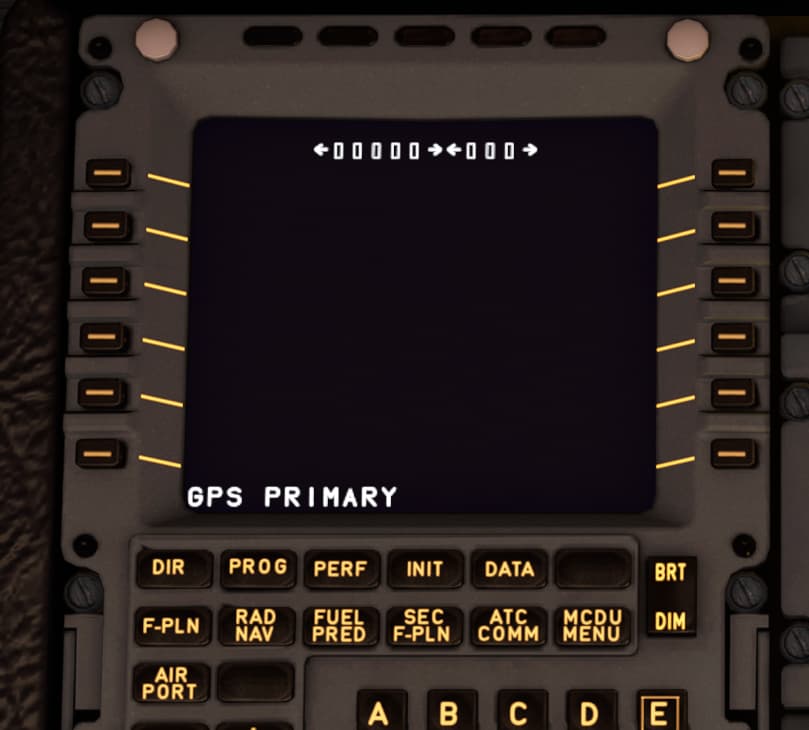
I noticed that my Flight Plan is not getting populated at all. The F-PLN page is empty like in the Scr Shot below - Several empty boxes on the top and two arrows. It doesn’t matter if I set the IRF plan from World Map and choose SID / STAR there or not at all, If I bring it in from flyPad from SimBrief. This is happening on the FBW A320.
I read the topic, I am not using Navigraph app, honestly I don’t even know what is it for yet. I only made an account in SimBrief in order to generate proper flight waypoint and SID/STARs and connected my ID there to the flyPad. I intended to try and enter my waypoints in the MCDU myself, but I expected to see at least the DEP, DECEL and DEST in F-PLN Page there, but nothing.
I am using the current Development version ef4c442.
Any help or advise is appreaciated, thanks!
I got things working earlier today. There were some updates. I noticed an AIRAC update from Navigraph and a FBW A32NX update too (Development). I updated anything remotely related to MSFS on my PC and things settled down.
Are you realy connect to simbrief? First option is to add your simbrief number in the flypad. Simbrief should be opened with the page the flight was calculated. If you now push the green button on the flypad with the little worldmap it should load departure and arrival airports and even the weather. If this does not work you are not correct linked via simbrief.
After that I go to the mcdu menu, right button (AOC I think) and there is INIT left. Push this and then you init by pushing the button right. Should be orange. On AOC you should also go to W/B to unit with the passengers.
Push then Init in the MCDU and there should also be right an orange init field where you push the button. After that also the flightplan was imported. Check it and go on the mcdu to flightplan. Sid and stars and rwys habe to be filled in again.
Hope this helps and sorry for the typos. Its early un the morning and smartphone.
With this old AIRACs you get maybe broken flights, waypoints that does not exist anymore etc. But even if this happened it should work to import it.
After several tries, I have this all working pretty well. And along the way, I documented the required steps (text below). Here is my basic setup … yours may be slightly different:
- MSFS PC Edition (from MS Store)
- Checklist shows keyboard commands to get to desired view in the sim (Example: CTRL-8 for overhead panel)
- Flying the Airbus FBW Development Version
- Using the free simBrief subscription - paid Navigraph subscription not required
- Flypad (CTRL-0) configured to SAVE simBrief flight plan
- Using the “Pop-Out” utility to extract several instrument panels
- Using the MCDU server to run the MCDU on my iPad (cool)
Here is the checklist … give it a try:
Actually I managed to import the flight plan into the MCDU correctly. All information from INIT 1 page got filled in automatically from SimBrief. F-PLN page still is completely empty as in the screenshot I posted. If I click the top-left button(where usually I expect to see the Departure), next page opens up for choosing RUNWAY in departure Airport. SO in the Back-end the Flight Plan gets to the System. I can even see the first waypoints on the PLAN screen on the ND. It is the Front-end bug that is present on my instalation that show the F-PLN page as empty.
What do you suggest I do?
Thanks in advance!
For understanding. If you press the init button on the mcdu everything is empty. There is an orange init button on the right. After pressing the init button (3rd or 4th on the right side) it is filled in with the airports, alternatw airport, your flightnumber, Tropo etc. Does this work? Why at this point the flight plane will be loaded in the mcdu via simbrief.
Exactly. This functionality works as intended. Only the F-PLN Page is remaining empty. I am sure that the Plan itself got loaded onto the MCDU, because INIT page gets populated and I can see the Start of the Route n the ND Screen(PLAN View). But hte F-PLN Page is broken for me. A new Development version appeared for me today in the FlyByWire Installer. Updated - same thing though..
Do you got an older fbw version anywhere installed, from the marketplace for example? Have you deleted all the fbw folders in the community folder and even the fbw folder on the same level? Try to delete evetything and install it completly new. If this does not work you should go to the discord of the fbw team. Very friendly and they are a lot deeper in this material of course.
I don’t use simbrief so I create the flight plan in msfs get all the sids and stars then go to mcdu enter passengers manually via W/B and cargo
Then go to EFB and calculate fuel etc etc.
My question is when I am approaching the end of the SID the next waypoint is not joined up and I have to press fly direct to it, the remaining flight is all fine right to the arrival
Am I doing something wrong , anyone else experiencing this?
After several days of fliying and testing, I came to an idea and I am asking if you think this could be the case. Here it follows:
I do not currently use Navigraph, but I familiarized myself with what it offers and maybe the main point is that the application patches the actual MSFS2020 database with the latest AIRAC. I suppose the FBW A320NX is relying on such data base to be able to work at all as an aircraft and the MSFS original database is in conflict with the mod. Thus I get this empty Flight Plan Page on my MCDU because the Aircraft and the MSFS are not communicating at all. So, if you think this is the reason, then I cimply need to activate a subscription to Navigraph and then I will be set, right?
As for @candykatx 's issue - I experienced this issue with the connction between the last SID point and the 1st waypoint of the Plan on the Asobo A320neo - I do not knwo why it happens, but I start to seriously doubt the MSFS Navigation Data base and consider this Navigraph.
I guess the FBW A320 and Navigraph are interconnected and cannot work if not together?
I don’t think this is what’s happening.
I do not have a Navigraph subscription, but I do have a Simbrief account and do flight planning with the AIRAC cycle included in the free Simbrief/Navigraph account. I think it’s cycle 2003 which is I guess March 2020(?).
I regularly create a flight on Simbrief and import it through the MCDU on the FBW A320NX development version. Other than occasionally cleaning up a discontinuity or two, the plan has always imported.
With the FBW Airbus i do it different.
Plan Flight in Simbrief
Export as MSFS Plan
Import on the World Map
Change starting Point to a gate
Start the Flight
Import Simbrief Via EFB
Import in MCDU
This way i also get the Clearance to climb to Cruise lvl
Sync in EFB is off
Does this work with the dev/Experimental Version? Last Thing I know only stable Version can get ifr clearance if you dont insert flightplan in World map, so I always import simbrief data to World map and make corrections in Fpln after hitting INIT PRES
Simbrief imho is only really useful if you fly vatsim as after importing the flight plan via the map you have to change quite a bit
The constraints on the SID are not recognised by The games ATC , there are minimal STARS in the mcdu so a lot of manual input
The flight plan sometimes doesn’t import completely, s it’s a a case of manually importing the flight plan , bit of a PITA but I think it’s easier to use the in game flight plan
I think FBW are trying to move away from any in game settings such as flight plans as you now have to input the pax , cargo and fuel manually now on the dev version
I only put the Flightplan in the Worldmap for the purpose of ATC.
I also can get IFR Clearance when only choosing departure Airport. But then you will not get any Clearance for climbing except the initial climb.
You have ti ask ATC.
Immersion wise i prefer my way
Using the development version.