Seems like it’s fixed for me. just did a 9ish hour flight from NWWW - RJAA and all was smooth!
2 Likes
Help. It’s still having this issue with offline stuff off ;-; on a flight from Melbourne (Australia) to Cape town (South Africa). Whilst the FPS does go down at a slower rate, it still happens.
1 Like
All sorted for me. 7 hour flight at over 60 fps ultra settings. Asobo bossing it!!! XX
1 Like
Still seeing this issue with no changes, departed for a 850nm flight with 55FPS, landed and flew back without going to the menu, landed on the destination about 4 hours after the inicial departure with 15FPS
2 Likes
Yo, despues de la actualizacion 6 , siguió el mismo problema. al llegar al aeropuerto mis fps bajan a menos de 10 fps. despues vuelven a la normalidad, despues de 20 segundos , es horrible si tienes el avion manual, es injugable
Hi galindinstrong,
According to the Code of Conduct, we kindly ask that you use English when posting on the forums. The two exception are the Find a Friend and Clubs & Groups categories, where you can use any language to help you find users to connect with.
If you cannot read English, the forums provide a handy feature that translates posts into your native language, you can use this feature by clicking the translate button under a post. 
If you need help converting a post from your language to English, try using Bing Translator, the same service used by the forums.
1 Like
try changing traffic to offline then back online. It worked for me on one occasion, not always though.
I, after update 6, followed the same problem. upon arriving at the airport my fps drops to less than 10 fps. then they return to normal, after 20 seconds, it’s horrible if you have the manual plane, it’s unplayable
Same here, 4 hrs flying from MMMX to KJFK and same behavior, staring at 65 fps and landing at 8 fps
1 Like
I don’t use AI traffic at all
Have this 20 mins after the start boom out of the blue 30 fps less. Before simupdate 6 all was fine
2 Likes
Still getting same problem,after flying 3 hour from ZGGG to RJCC,FPS drop from 50 to 17/19.Try everything but still not work.My 1070ti only have 50% usage@50℃.
1 Like
Just completed an 8hr flight LWSK-FMMI A330 Fps was better than normal did not use simrate multiplier. Only issue I had was on runway it stuttered something chronic. All good taxiing and once airborne. But takeoff and landing was a different plane. FPS was in the spectrum from 10 to 50 but not constant -all over the shop. However, that said it was really flyable no impact. Only the runway issue. Will try other planes and/or clear comm folder
At the final of RJCC 01R,My FPS drop to 1 frame/s,thatt horrible.Im lucky enough to save landing in one piece.All up there is try,ai pilot,on and off ai traffic,you name it.Hope Asobo fix it fast,or the big plane like ini310 as330 or FBW A380 just can fly what A320 can fly`s flight.
If someone from Asobo need a video,I just take 4H video record in OBS,it maybe help to find the problem.
I just tried to complete a flight from Liverpool-Alicante and around 1:35 into the flight FPS dropped to around 5. I am running fly by wire a320 and have multiplayer and traffic switched off. Funny enough when I did a shorter flight of say 40 minutes then went back again so roughly same gameplay had no issues. Installed update 6 yesterday.
I am sorry in advance for long text, but there are some serious FPS issues caused by new LOD options:
I have started flight from EGLL to LKPR (salty 747) with LOD of Terrain set to 300. On Heathrow I had around 26 FPS.
Took off and went to stable 31 FPS (quite amazing for my mid-range setup), but after a while (over English Channel, not performance-hit location) FPS started to decreasing, slowly I went from 31 all over to 16.
After FPS degradation I had low FPS even in menu (ESC without ending flight).
But when I have changed LOD of Terrain to 100, FPS came magically back (to 40), then changed to original LOD 300 and FPS linearly dropped to 16 in few seconds.
I have landed with tragic 13 FPS at LKPR. Ended flight and loaded plane directly into LKPR, same weather, time, location - where I have ended with 13 FPS… and boom - stable 30 FPS.
It’s not a Salty 747 issue (I have degradation also with FBW A320), it’s not CPU Throttling, it’s not Live Traffic issue (flight was done with traffic off and even though I have tried to change it on/off).
But what’s the issue? For me it seems like London was loaded for the entire flight, even when I have flew out of it, and new scenery just blocked my memory…
1 Like
But the Problem was also there without the new slider
Update fixed nothing for me. Not sure how this is not #1 priority to fix. It’s going to suck to wait another month for an update that may or may not do anything.
2 Likes
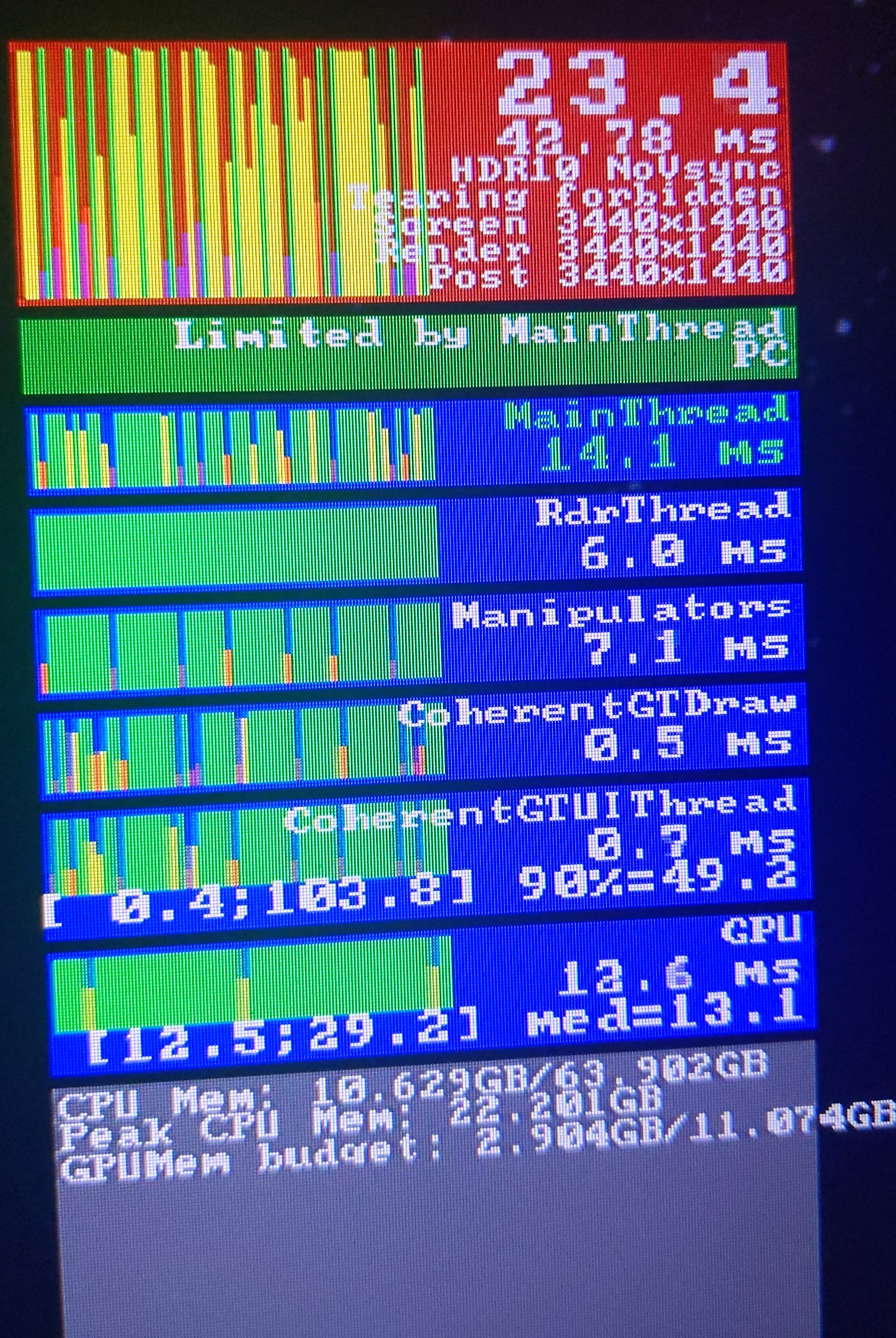
7 hours in, CS 777 Salty mod, no AI, no live wx
My experience is slightly different but troublesome nonetheless. Consistently after 6 hours on my system, FPS starts to destabilise and loads of microstutters are introduced. Dialogue box swaps between MainThread and GPU limited very quickly, every few milliseconds.
Immeasurable disappointment. Didn’t try any workarounds, I just terminated the flight there. Perhaps I’ll try some next time when motivation returns.
2 Likes
Having the same issue.
USed FBW A320 LEIB to EBBR. After 1.5 hours, overflying France with little clouds, performance dropped from 45 steady to 24. Tried deactivating traffic and, set a destination on the AI thingy, but won’t recover form it.
So disappointing!
1 Like