TLOD is not the cause, if TLOD was the cause you wouldn’t gain any FPS when restarting at TFFR. I predict increasing the LOD to 400 would result the same, except more huge drop in FPS and a huge gain in FPS when restarting at TFFR.
1 Like
That’s some fantastic detailed testing thanks! I’m curious what it’s gonna look like with TLOD at 400. I had been running at 400 and reduced to 200. I haven’t done a long flight with it at 200 yet but just loading up at the gate for 5 minutes it was smoother.
And I’m not gonna sit here and nitpick over a drop from 55 to 50 fps over a 4 hour flight. I just want it to be smooth when I land (i.e. not single digit FPS).
2 Likes
@Kidy973 Great work! The flight isn’t logged since you activated developer mode during the flight. That suppresses any logbook entries.
Higher terrain detail taxes memory and can create a runaway memory condition, especially while using rolling cache. If updating the cache falls behind, more and more data needs to stay in RAM, the pagefile gets used more and the, sim falls further behind.
When I used to get FPS drops in flight, lowering terrain detail for a while would recover the fps. (Let the sim catch up with cleaning up) Then I could go back to the detail I had it at before.
1 Like
@Kidy973 important question: during your testing did you start with live weather and live traffic on, or did you have them off prior to loading into your flight, then turned them on once the flight oaded?
But that’s not the case though? Looking at his low resolution screenshots. The one with lower FPS has lower RAM usage. Your explanation suggest it should have higher ram usage but the opposite is true.
Overall his screenshots suggest the same issue we are all having. Its the Main thread issue. And its not WASM or the FBW A32NX being the cause.
You need to look at comitted RAM in the resource monitor. Developer mode only reports active memory, not all the extra stuff the game has allocate and still needs to clean up.
For example here (old test)
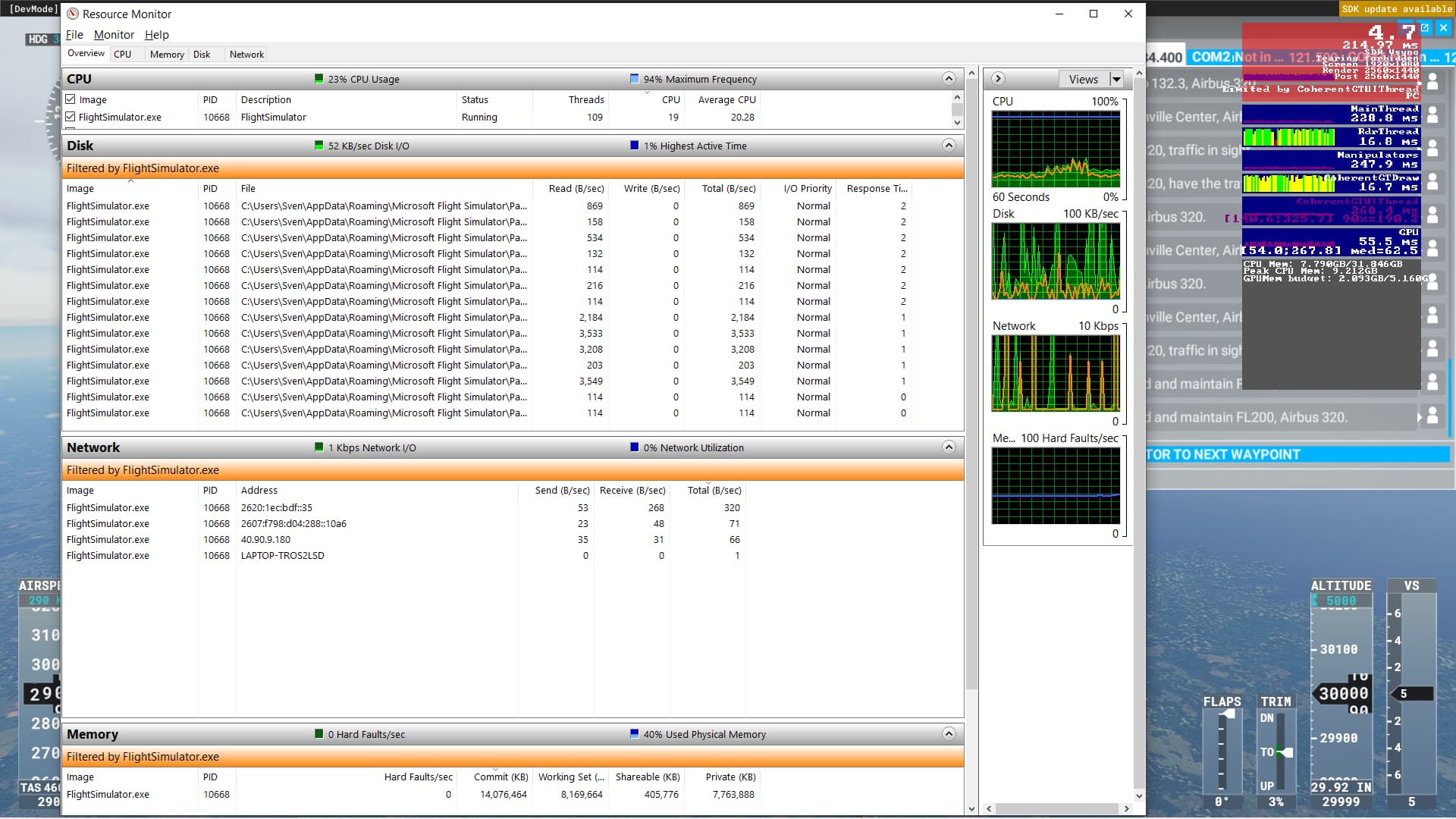
Windows reports the actual memory in use, at the bottom there
When I got those runaway memory propblems (over 20GB comitted) the game still reported the same ish memory in use.
I will take into account committed ram when testing, but I don’t think that’s the issue. I also did a quick search of your post on this thread, some questions I’m wondering is what are your system specs? and you don’t have FPS drops now? What has changed?
If it’s using 8 GB ram actively and 20 GB committed, doesn’t that mean it’s not deallocating memory properly?
Short answer no. If its not deallocating memory properly that’s a memory leak and you can easily tell with task manager.
Just did a 2 hr flight in the CRJ, fps was good the whole time.
To be honest I really only get this issue in the FBW a32x, can anyone disagree?
You don’t care about FPS dropping over time, you just care if the FPS is smooth so what is there to disagree about?
The problem is when you’re at less than 10 frames on final.
1 Like
Yes, because at that point the FPS isn’t smooth.
Did a couple of flights and to be honest my sim is now running smoother than ever. Have LOD on 100 okay, but still. Live wx, not Ai traffic, no HDR, no Yourcontrols.
This is definitely a difference with the beginning of this year.
Huh… as far as I can see @Kidy973 experienced a smooth flight, no FPS drop. This thread is about unacceptable decrease of FPS. There is no significant decrease on his flight.
Have run a couple of tests now with flights up to 2.5 hrs, and issue is gone for me. Main changes:
- Weather fixed by Asobo
- Yourcontrols removed
- HDR off (I will do some tests with HDR on to see if that really makes a difference).
I5-10600K
3070
32GB
1 TB M2 SSD
Sim settings:
FPS capped at 40 FPS (by NVIDIA)
ULTRA
TLOD 250
1 Like
Yes, I"ve (and other users as reported here) had this issue with multiple aircraft, there are a lot of reports on the A32X just because it’s one of the most popular aircraft for flights over 2h
@Jal61714
It can be, cause RAM or cache were purge when I close the flight and after restart, the sim just load the vicinity of Guadeloupe, so less thing to draw so more perf. It just my guess.
@Hebrewbaum
Live weather and trafic are on before I load the flight. I will performe 400 TLOD just for the test but I’ll stay with 250 TLOD after that.
@SvenZ
I didn’t know about logbook and dev mode, thanks for the info
1 Like
I agree. Apparently the problem has been eliminated to some extent! The last 4 days without problems with FPS.
Well definitely some interesting info. I really appreciate this thread and all the testing everyone has done. I was running with an 8GB rolling cache and TLOD at 400 and object LOD at 200. On Friday I’ll try:
Terrain LOD 200
Object LOD 100
Unlimited rolling cache (I have a 2 TB NVME dedicated to MSFS)
Experimental FBW A320
Has anybody noticed low performance on the weekends vs during the week? A lot of this testing was done yesterday. If it’s a server issue, perhaps things would be worse on the weekends when more people are playing.