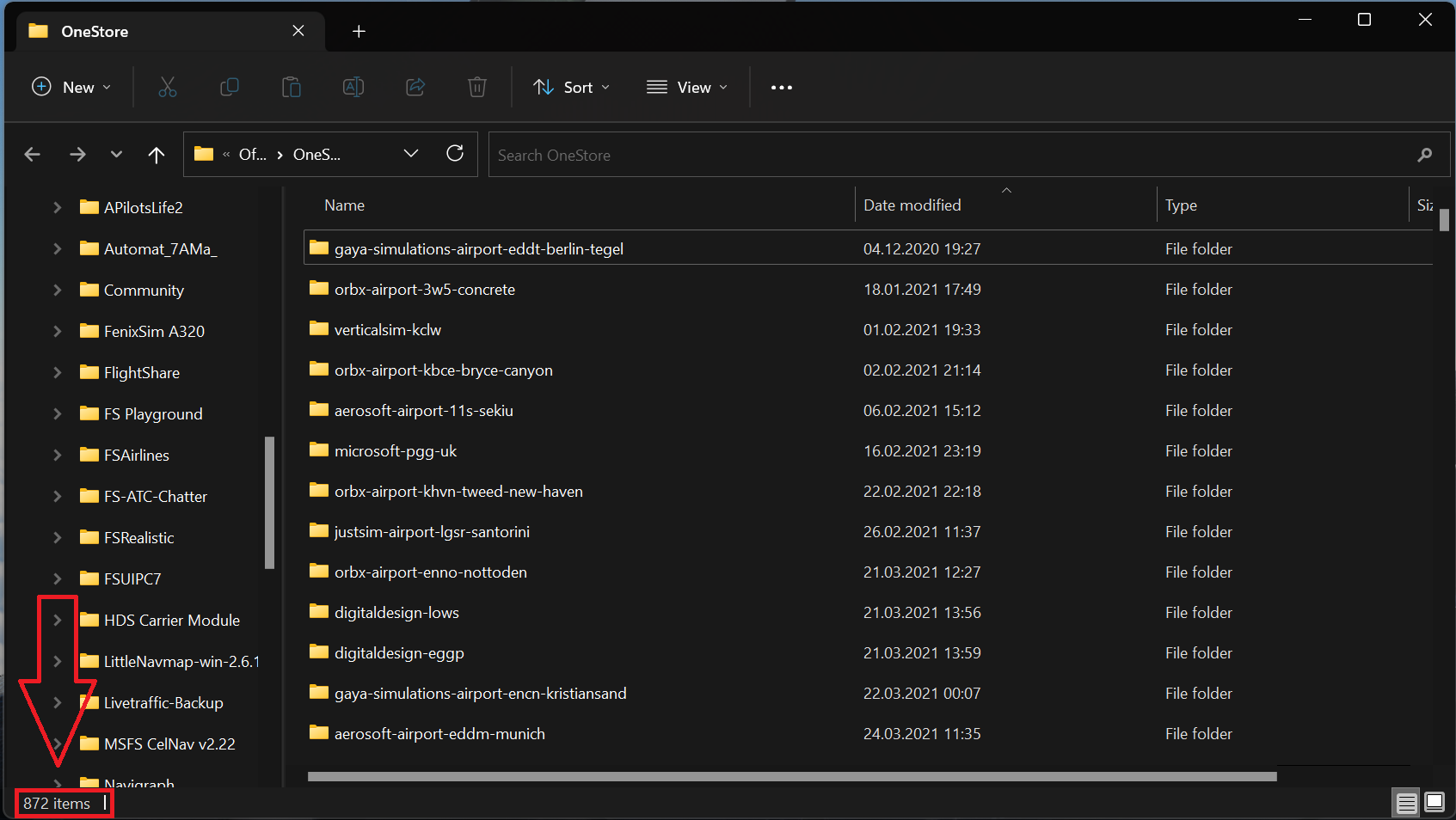
so the sim is limited to 1024 addons (after SU12) when checking for updates?
Anything more and the system will hang - anything less and it works fine.
By disconnecting from the internet - this just stops the checking for updates protocol and the sim loads as normal (however - it wont allow you access the marketplace or content manager)
I was not aware of this limitation but I tested it after discovering other user bug report and it’s reproduced always. However at some cases (1 time every 20 attempts to launch game or so) exactly the same local content does not produce issues and can load in one go, even if you have much more addons than 1025. This definitely needs to be investigated as game does not launch so it’s a serious issue in my opinion.
Today after installing and flying the Osprey and the Raptor. The game stucks at the loading screen on xboxseriesx. I am not able to start the Game.
Never had this Problem.
I have moved both folders “community” and “official” into another folder. So I was able to start the update. But when I move both folders back into the original folder I have the same problem when I start the game - it stucks in the update screen again so I am not able to play the game. Are there any solutions for that problem.
This is really a bad joke…
No solution other than moving out folders so that you stay below the 1025 limit or launch sim 100 times till you are lucky and get one of those random bypasses of the loop that allows game to load normally even if you have more addons installed. I was able to run sim just a couple of times today and then I got a faulty update on marketplace and 5 kb/s download speeds while trying to update content This is one of those epic SUs to forget that deserves a slow clap for its maginificent results.
1025 files or 1025 folders?
My “One Store” folder is about 820GB. It has 425949 files and 19583 folders.
I spent a lot of money on the marketplace and also in hardware during the last 2 years. In the beginning I was fascinated by the game. But I have learned my lesson. For future projects…maybe the next MSFS…this won´t happen again.
I just noticed something that “could” have a bearing on why this is appearing in SU12. I have a lot of addons and have just run into this issue after updating the sim. I do use addonlinker and have activate subfolders of regions when I fly, but for what its worth, on Monday I loaded up the sim fine in my “US_WEST” configuration. After updating, I suddenly ran into the issue without any changes in my addon count.
Of note, when I was updating to SU12 I had a number of CTDs while I was updating my marketplace addons. I was wondering if something got corrupted and was silently causing this new SU12 behavior so I tried an experiment. I renamed my old community and official folders and reinstalled all of the SU12 and marketplace addons fresh. That worked for everything EXCEPT Uk2000’s Luton. I repeatedly got a failed download to go from version 1.2.2 to 1.2.7. I saw an earlier post that they had solved a similar problem pre SU12 by clearing Community, updating and then restoring the community addons. Is it possible this one addon failing to update properly is triggering the sim to search for updates when the program starts? The bug of the 1028 cap would still remain, but its puzzling me why this behavior didnt plague me in SU11. I havent checked when the UK2000 update dropped, but could it be coincidence and that a few issues are all combining at once on this Sim Update?
To be clear, I get the stuck on updates whether UK_Luton has been “deleted” from my marketplace or not.. just curious if an “un-updated” addon in your purchase history could be to blame in triggering MSFS to search for updates in the first place?
I don´t think so. I had the updating loop error just after installing SU12 and before updating Luton. Indeed I have seen the updating loop issue for almost 1 year now as well as many other users because there are old posts about this issue here in the forum, so it´s not directly linked to SU12. It existed in previous versions (maybe even since release) but SU12 has pushed it to the limit and game is barely able to start now. In SU11 you may get the issue but most of the times you could manage to load game after several attempts. Today I launched game and it worked fine for the first time. The second one it took me “hundreds” of attempts to load it using the same set of addons, and in both cases I had not updated Luton yet. I tried to update it on the third launch together with the rest of marketplace addons.
From reading other posts on this forum it is evident that on the xbox, once you have downloaded a certain amount of content from the marketplace, 500GB once that limit is reached, the game will no longer go past the check updates screen even if you have ample free space in your internal and external storage. It’s a major flaw in the xbox program that was identified some time ago but Asobo never bothered to address it. The only fix at present is exit game and delete your reserved space and only reinstall a limited number of your add ons and World updates.
I would like to get my payed addons back for use. It’s impossible atm to all my addons in the community folder.
When we can get a proper solution for this problem?
Any statement or Info would be kind.
Thx in advance.
If they’re in your Community folder it wasn’t Microsoft you paid so why even mention it? Why not do as I do and create a storage folder on your desktop along with a shortcut to your community folder. Then it’s easy to just move over what you need for your flight and ultimately that can save you from any puzzling mod conflicts (not to mention faster load times).
Downloads from marketplace are in the official folder and not in the community folder. So it is microsoft we have paid! This bug has to be solved by microsoft. If not nobody will buy more content from marketplace. Xbox users have the same problem…even worse because you can´t delete every file you want on xbox.
To the eyes of engine everything is a single set of addons, no matter where they are placed. If you copy an addon on Community when game is already at main menu it will appear on content manager for instance but it won’t be loaded. On the other hand compiling an asset on project editor allows you to load the item even if it’s outside Official or Community folders. Overally the addons handling method is a bit bizarre yes. There are many addons which are a single folder instead of being packed in groups too. This needs some rework and we need to get rid of issues like the amount of addons limitation described in this report.
I’m going to go out on a limb here and state that I do not believe it has anything to do with how many items are in your Community folder. I have the same problem with only 434 items in my Community folder. Force the sim closed ungracefully a few times and eventually it’ll get past the “Checking for Updates” loop. This seems to point to a comms issue checking in with the update servers
 This is one of those epic SUs to forget that deserves a slow clap for its maginificent results.