Has it ever occurred to you that I don’t need your advice, that as a non Pimax Super owner, I certainly did not ask for it and that your self proclaimed hatred of pimax leaves you so obviously biased that nobody could possibly take anything you say seriously?
As for the rest of your post.. Simply and very clearly the politics of envy.
Some spend their limited supply of money on takeaways and going out. Others spend it on bringing up their families, others have done all that and now choose to save their money over many years specifically for PC upgrades.
I did own Pimax Crystal Light which should be close enough I guess. Also CV1, Odyssey+, Reverb G2, PSVR, Oculus Go, Quest 1 to 3 and Google Cardboard .
So just trust me when I say I am qualified to give you advice for which I guess you specifically asked for when starting this thread. Don’t like it? Simply ignore me and find out for yourself.
I would not hate on them so much if at least they had a working form of reprojection. But they haven’t for months or years now. You can tick the box in the tool app but it’s not doing anything. Even then I probably still couldn’t stand the lenses.
They are trying to censor my posts here on this thread. Really tells you everything you need to know about them.
Have you tried lowering your graphics to the minimum and setting the headset to 72hz? Also try a simple aircraft like the icon a5 to minimize cpu load.
Just as an elimination process for your troubleshooting. I suspect what you are seeing is indeed a performance related issue. Every headset has some kind of “jittering” to them and that’s simply for anatomic reasons . The sensors are so sensitive that they will pick up even the slightest movements which is essential for a good VR experience. However, when your FPS do not match your refresh rate this effect will be greatly exacerbated.
However, I’ve been at this game a long time, so have tried all the logical combinations of lowered settings, aircraft type, rural locations, plus my room environment and lighting etc. All to no real avail. I have spent the last week going through everything, including reinstalling the sim and various iterations of the Pimax Client, all the while monitoring CPU and GPU loads, as well as such things as setting process priorities and affinities of piserver.exe etc using Task Manager or Process Lasso.
My conclusion at the end of all this is that it is a hardware issue, not solvable by the above. The overall tracking works OK, but there is a persistent random jitter that just won’t go away and is sufficiently noticeable as to be unacceptably intrusive, indeed sick making at times. Likely a dodgy component, dry solder point or whatever that is generating noise or incorrect values.
I have reluctantly decided therefore to ask for a replacement of the headset module only if possible, not the optical engine, as that is perfectly fine, excellent in fact…good lenses and panels with little mura which I have paid for and would like to keep, rather than going through the mura lottery again.
Bummer, as it means I will have to wait again for the otherwise really great experience I have been having with the Crystal Super. Even with the jitter getting in the way, I had a fantastic flight in a glider over the Dolomites of northern Italy tonight that was just breath-taking. The clarity and stereo overlap as I swept over the peaks into the valleys was a real joy to experience. This headset is truly fabulous for flight sims.
Does it happen in other games too? Or in the pimax planet home environment thing or the SteamVR grid void? Those should br easy enough to run to rule out a potential performance bottleneck.
I’m really torn between the wide FOVand the OLED. But the FOV in the OLED is slightly narrower than the OG. With a wide FOV I won’t be getting startled by the copilot.
I’ve read something about all 3 version being interchangeable. Like you can swap the monitors in addition to the lenses? If so that makes the initial decision a little easier.
I had always hesitated about going higher resolution but DFR changes that concern big time.
Yep. If I look at the stars in Pimax home you can see them make tiny shifts randomly. Same in Steam home where the bookcase objects will also shift. It’s just more obvious in MSFS 2020 or 2024, where things like the edge of the windows will shift in relation the the scenery below. Looking at buildings on the ground from say 500 to 1000 feet, you can see they also jitter (not the same as judder from not using motion smoothing or not achieving 72 or 90fps).
In other games it’s not as noticeable, such as Half-Life Alyx, as you are not sitting still in a cockpit gazing around. But it’s a deal breaker in flight sims, hence the need to get a replacement for the main headset module (the optical engine being OK).
So far Ive had my Crystal Super for about 3 weeks now , and with a lot of tweaking, its getting better and better. Much more sharper and clearer than the OG Crystal that i have. I can read the FAA Sectional chart numbers in the EFB mounted on the far right of the C172 Cockpit windshield. FOV is wider than the Crystal.
I had a great flight today with the new Pimax Play. Also eye strain was a lot less than the first few days. I do use the Apache strap which is far more comfortable than the plastic head strap which i took off.
I would say keep tweaking with Pimax Play settings, and the sim graphic option settings.
In the sim, lower the Terrain LOD to 200. Keep Render Scaling at 100 .
Turn off Raymarched Reflections, Contact Shadows.
Specs : 5090
Pimax Crystal Super - IPD Offset +1 [ Left and right]. Image Quality 1.0
Yeah the Super uses the PC for tracking, same as PCL. The headtracking app is piserver.exe, which I have set to high priority in Process Lasso; as far as I can tell now, its not causing the issue.
Embarrassing as it may be, after more messing about today, I think my problem may be me and not so much the Super. I tried the Crystal OG again today in the same spot and glider and it was noticeably more stable in terms of random jitter. Though perhaps not as smooth when panning my head.
But then I thought, what if the Super really is more sensitive to tiny random head movements than the Crystal OG. So I made some videos of my head while trying to hold still looking at the camera lens. Turns out my head does move more than I’m aware of. I then tried another video of me with the headset on, and I could tell it’s not still, reflections from the headset faceplate showed small but detectable wavering, which could well be the cause of the jitter when flying in MSFS.
If this is true, I may need a some sort of sensitivity slider in Pimax Play to dampen down any head shake causing issues. I have tried the prediction damper in the Toolkit, but it didn’t seem to help. Maybe it does nothing on the Super, no idea. I raised this idea with Calvin a few days ago, who passed it on to the engineers, so it could be a cure for persons of a certain age like myself.
First of all this is purely physiological and everybody has it. So no need to worry.
However you shouldn’t notice it in a well functioning VR setup. Imagine putting a ski mask on (or actually do it if you have one) and try to "see the jitter” in real life. I guarantee you won’t, so it’s nothing to do with YOU or the reduced FOV or the “format” of VR in general.
Your headset is most probably NOT defective at all. I am still suspecting a performance issue. You saying that the jitter is less noticeable in the graphically less demanding environments is a clue. What you are experiencing is most probably a result of some kind of frame desync. The one you get from not matching your fps to the refresh rate. Which, again, is very hard to do in a Pimax without a working method of reprojection (motion smoothing/ASW/SSW etc.).
Your top priority should be to maximize your framerate. Ideally you want to match refresh rate and still have 15-20% (GPU) performance headroom account for more demanding transient scenes.
Honest answer is: No way to do that presently with the hardware we can have today. It’s probably going to take another 2 CPU/GPU release cycles to run FS2024 reliably at full framerate and resolution on current pimax headsets. Unless they fix the missing reprojection issue of course.
Now just to rule out a headset defect I would recommend setting it to the highest refresh rate (120?) and adjust the resolution such as to maintain a rock solid FPS matching whatever the refresh rate is and try that again in the pimax or steam home environment. However, and I can’t stress this enough, it is of outmost importance that you actually hit the refresh rate EXACTLY. Meaning in case of 120hz: not 118fps, not 119fps but exactly stable 120fps! Make sure to monitor this with whatever tools you have at hand, I do that with MSI Afterburner. Just for the troubleshooting though because it can at times induce stuttering on some systems.
Also me personally I would not tinker around with process lasso. Chances are you will make matters worse than they were before. The Windows scheduler is usually quite good at making maximum use of your CPU right out of the box. My recommendation is to uninstall it for now. Make a backup of your settings if you want to use it again at a later stage.
Finally, unless you have the highest end PC money can buy I would recommend FS2020 for VR. It still looks great and runs way better.
The downside of MSFS2020 is lack of native Dynamic Foveated Rendering support, this feature allows significant FPS increase in MSFS2024, for the headsets supporting eye tracking.
Thank you for this effort! I actually was noticing this slightly in my OG, but only because you mentioned it. Have you tried adding any counterweights to the back? I have one kind of janky rigged to my OG, janky because the battery pack doesn’t make it easy.
I’m blown away by what eye tracking can do; it is no longer an option for me. I’m surprised MS added the support considering it’s not available in the Quest 3. When I had that eye tracking failure yesterday, I could see how extreme low resolution the peripheral was.
Given how our eyes work, our brains make up most of what we perceive.
Crossed-Eye Visuals? Transitioning from my old HP Reverb G2 to my new Pimax Crystal Super 57PPD, I get incredibly sharp and beautiful visuals out of DCS, and IL-2 looks pretty good, and even the MSFS2024 menus are clear and sharp, but as soo as I am in a plane with VR, my left eye display looks forward (the way my head is facing) but my right eye display looks an estimated 15-20 degrees to the left of my left eye. Why might this be happening? I’ve never had such an effect in any headset nor in any other application? Clearly some setting issue, because everything else looks great everywhere else.
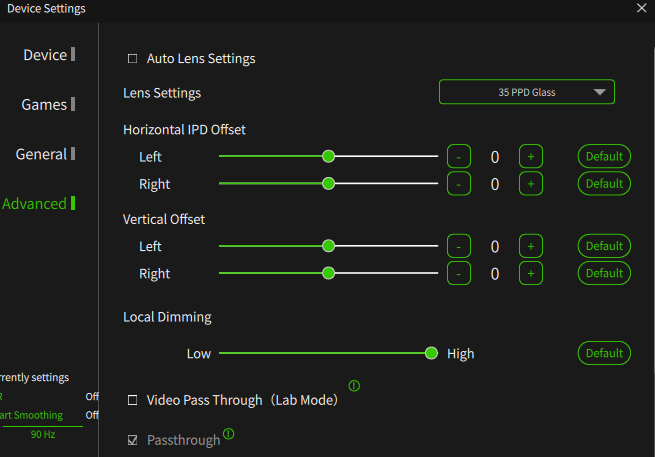
The screen is for Pimax Crystal OG, but should be similar for Super. However this setting is global, so should be affecting all sims the same way.
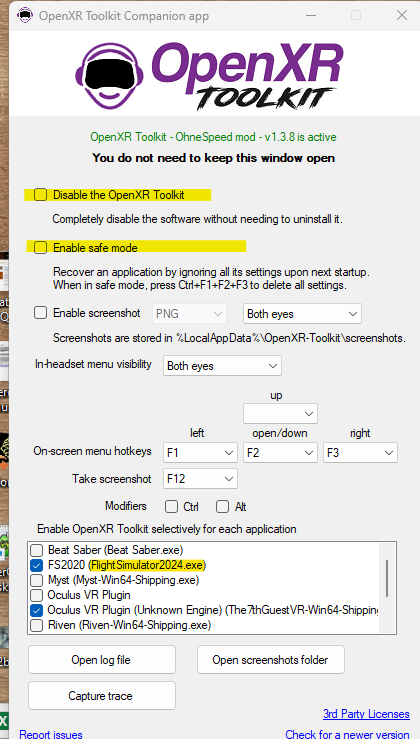
Make sure you are not using OpenXR Toolkit, if you use it (for example for QuadViews in DCS) disable it temporarily for MSFS2024 and/or enable safe mode.
Contrary to DCS, QuadViews (Dynamic Foveated Rendering) in MSFS2024 is implemented natively in the sim, no need to use the Toolkit with MSFS2024 anymore.
I’ll have to check both of these tonight when I get back to the flight sim rig. I had been using OpenXR toolkit with my prior use of the Reverb G2, but, reading that I didn’t need it for the Pimax Crystal, I deleted it and accidentally deleted the Pimax-installed OpenXR application as well (I believe), so then I had to re-install Pimax Play to get anything to use the headset. Perhaps Toolkit is still running and interfering with the use of the Pimax headset with MSFS2024…
Be aware they you no longer need not only the OpenXR Toolkit and it’s companion app for MSFS2024, for this sim you also don’t need the external PimaxXR OpenXR runtime and it’s companion app.
For MSFS2024 you only need the Pimax OpenXR runtime embedded in PimaxPlay. All should work in MSFS2024 with just PimaxPlay, including the native MSFS2024 Dynamic Foveated Rendering/Quad Views.
However, for QuadViews in DCS you may still need additional tools.
 .