I don’t have the CRJ but I have heard the 900/1000 has issues too , I sympathise with you as you have double issues hope you get it sorted like we all do
I only had English United Kingdom installed so I have installed the US one now
As before in msfs my options were only azure or off not offline
Thanks can you keep it in azure and switch or is it best to use offline when you start a flight?
This is from another poster back a couple of months ago , so it’s still an ongoing issue when is this going to be sorted , any news?

I have now installed the US English language pack as only had UK , so thanks for the suggestion, haven’t tried it yet but that’s just a temporary fix to a problem that’s been around for ages
Yeah … however IMO probably not an Asobo bug but Windows (maybe just 11) switching language assignment as I suddenly found my German keyboard had switched to US English. I switched it back and so far so good.
Try turning the volume up. I’ve had times where the volume on at least some avionics will turn itself down to 0. My co-pilot can somehow still hear ATC, but I can’t.
But you really don’t need ATC to do practice approaches, especially if you’re using a GPS with a moving map. They’re not going to give you vectors to final anyway, so self-vector yourself. Just think of it like a VFR pattern, but much bigger, especially the downwind leg because you have to get positioned below the glideslope for a proper intercept when turning inbound anyway.
Or, you can fly the entire approach, with procedure turns, descending holding patterns and all, but that’s effectively what the default ATC is going to have you do anyway.
Interesting , yes I have windows 11 too but only on the odd occasion before this has happened did ATC go offline, going to try the US text to speech as I only had UK but it’s only got worse the last few days, it’s every flight now , it’s definitely an Asobo bug IMO with the servers being overloaded I think especially if you use AIG as the amount of traffic at airports moving around is fantastic and ATC can’t keep up
same here, do not use any addons, except A320NX (has nothing to do with AIG mod) - Azure online, happens more often recently, must have something to do with the connection !
Yes I’m sure it’s nothing to do with AIG just a Asobo bug, my internet is fine 300mbps
It’s not that so much , like today flew from EGCC to EBBR had ATC for about an hour then it cut out, I was 15mins into land on an IFR approach, it’s just that you don’t hear other traffic talking which kills the immersion for me, went to gate after landing fine but it should work all the time , I’ve only been having this for a few days now , I think something is not right with the servers
@candykatx I am still trying to work out, even with the US Language pack installed, why you don’t have the option to use “offline” for ATC and your options are restricted to “Azure” and “Off”. If losing Azure connection it should automatically transfer you to the “offline” text-to-speech version (but this will not be reflected in Options>General Options>sound where it will still indicate Azure as the service. (At least this is what happens for me)
There is also a widely reported bug (since SU5) that once losing Azure sevices connection this remains lost within that session of MSFS and cannot be achieved again without relaunching MSFS. It is reported in this thread.
As a further check, when you lose ATC voices, have you also checked to see if Options>Assistance Options>User Experiences>ATC Voices is still “ON” and hasn’t somehow been toggled to “OFF”.
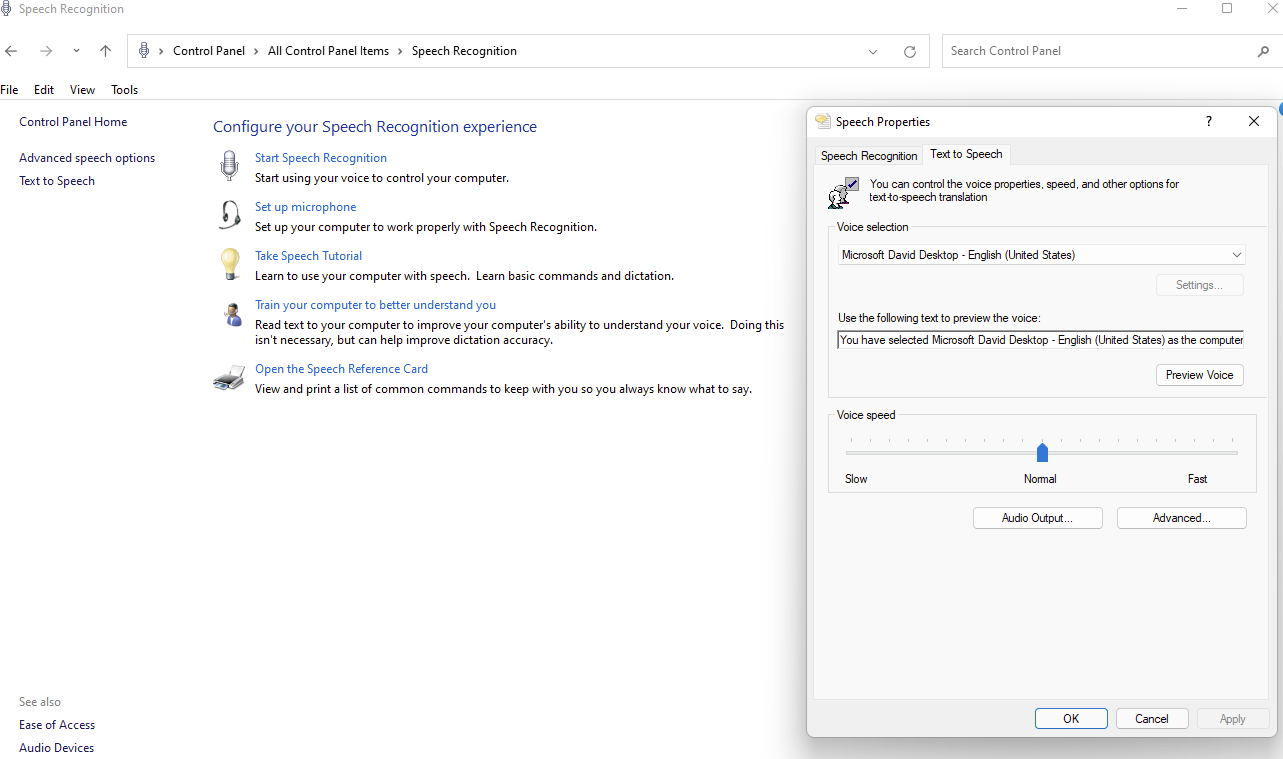
One other thought- Windows may need to be configured slightly to allow for offline text to speech. See this page in control panel and ensure to click the left hand “Text to speech” option to bring up the menu shown. It may or may not be relevant here.
Edit- further update as per this page: https://flightsimulator.zendesk.com/hc/en-us/articles/360017133940-All-versions-How-to-maintain-and-update-Microsoft-Flight-Simulator-
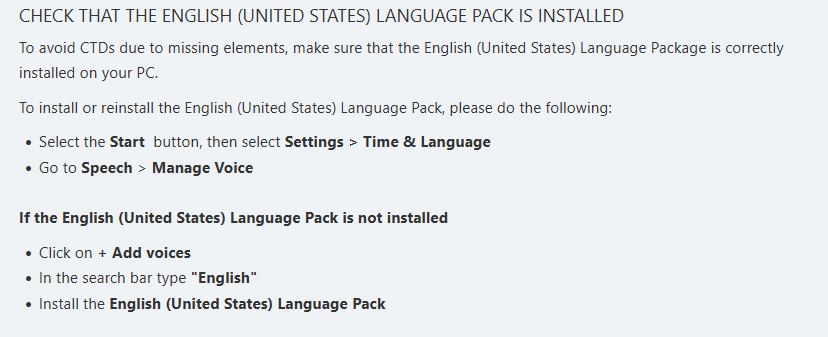
I am pretty sure this is the technique you would have used to install the US language pack… but just making sure.
Thanks for your detailed reply, I have installed ENG US and in the sim I do get the option for offline, off,azure now but once I lose azure, toggling to offline doesn’t do anything for me
I will check the other bits you mentioned, thanks again for trying to help out with this issue but I think it’s been broken since SU5
Everything as it should be , I’m all out of ideas , like you say it’s obviously a bug Asobo need to fix
Thanks anyway
I have notice that in the past, for some reason the servers are unreliable days before an update. Maybe they are doing maintenance on the Azure servers for upcoming sim update? Wonder if anyone else has noticed this? Just my guess🤷♂️
A fellow poster had the same situation, he found a fix, in assistance set it to true to life
It worked for him and I just completed an hour and a half flight with no drop on the ATC , even sat at the gate keeping the app running for half an hour watching and listening to ATC directing other AI traffic , so chuffed
Try it , he has done about 10 flights of 2-3 hour durations so it’s not a one off , only issue is that you have to respond to ATC manually and because of the traffic it takes time to reply, get through to ATC because of all the AIG traffic 
I noticed this started happening to me recently. I already have it set to true to life in the assistance menu, and that’s when it started. It seems that if the ATC is talking and you accidentally click a number button to change frequencies, the controller voices and script disappear. E.g. during a clearance switching to ATIS and then back to clearance seems to break it. And once it’s broken, the only way I can get it back is by exiting and restarting the sim. Anyone else still running into this?
Yes it happens if you use the co pilot to respond to ATC , you have to set it so you reply manually , also install eng -us sound package
That usually works for me
 (Even in two crew aircraft. hahah)

Yes mine was English-uk , so I installed English-US as well and use the US version
Hmmmm. I’ll try removing/reinstalling it to see if it makes a difference. Thanks!
This randomly happens to me too. It seems to be when using the copilot to handle ATC calls and happens after about 20 minutes or so. I have the US language pack installed as well as the UK one.