I think that you may have those buttons set up as toggles on the Behringer device, so they only send an event every other click. Try changing that to “momentary” in the Behringer software.
I can’t check it right now, but it is also possible that the second click sends a different event that you could assign in AAO too.
Please bear in mind that MIDI devices and the protocol weren’t meant for this kind of thing. That is why there are more hoops to jump through than one would like. MIDI is the Musical Instrument Digital Interface, and it is actually sending musical notes, not button clicks…
Interesting Lorby, so it might be possible to use the buttons to do an On/Off then, for the events that have the On/Off function. I will have to check that out but not sure if I will have time today. We are leaving for my daughters when the wife gets up and won’t be back until Saturday or maybe Sunday.
I know that the Behringer wasn’t designed for this but it does work thanks to your software. I had 2 very enjoyable flights yesterday after finally getting it set up. It really made flight level changes much easier at least. My problems with getting it working is that most of what you guys talk about in these threads reads like Greek or Latin to me. I don’t understand and am not in the least familiar with software development terms and at almost 69 tears old, I probably am not going to learn much. All the talk about Events and Scripts, etc and I just get blurry eyed ;).
I went and tried using the buttons for ON/Off and it didn’t work for the 2 events. I did try changing the switches to Momentary and that did get rid of having to double click the buttons so at least there is that.
I have a question about using AAO to map controller functions from my Honeycomb Alpha. You have probably read about the issues in the sim caused by Always On buttons. I have read where you can use FSUIC (sp?) to get around this. IF I cleared all the switches from my Alpha and then remapped them using AAO, would this be the same?
Sorry, don’t have a Honeycomb. But I while ago I posted this:
Hello @ll,
if you experience the “10-degree-jump” problem with MSFS, AxisAndOhs may have a solution for that.
For example the Autopilot Heading adjustment: By using RPN scripts instead of the simulator events (HEADING_BUG_INC / DEC) you can avoid the problem of the “controller acceleration” happening in MSFS:
Script for incrementing the heading bug by 1 degree:
@takahappy6131 You have two options. Either run the automated script as described in the manual and just change the normal heading bug in the simulator.
Or use RPN scripts with PMDG Mouse events to turn the knob itself:
Mouse Wheel Up on MCP Heading knob on the 737NGX:
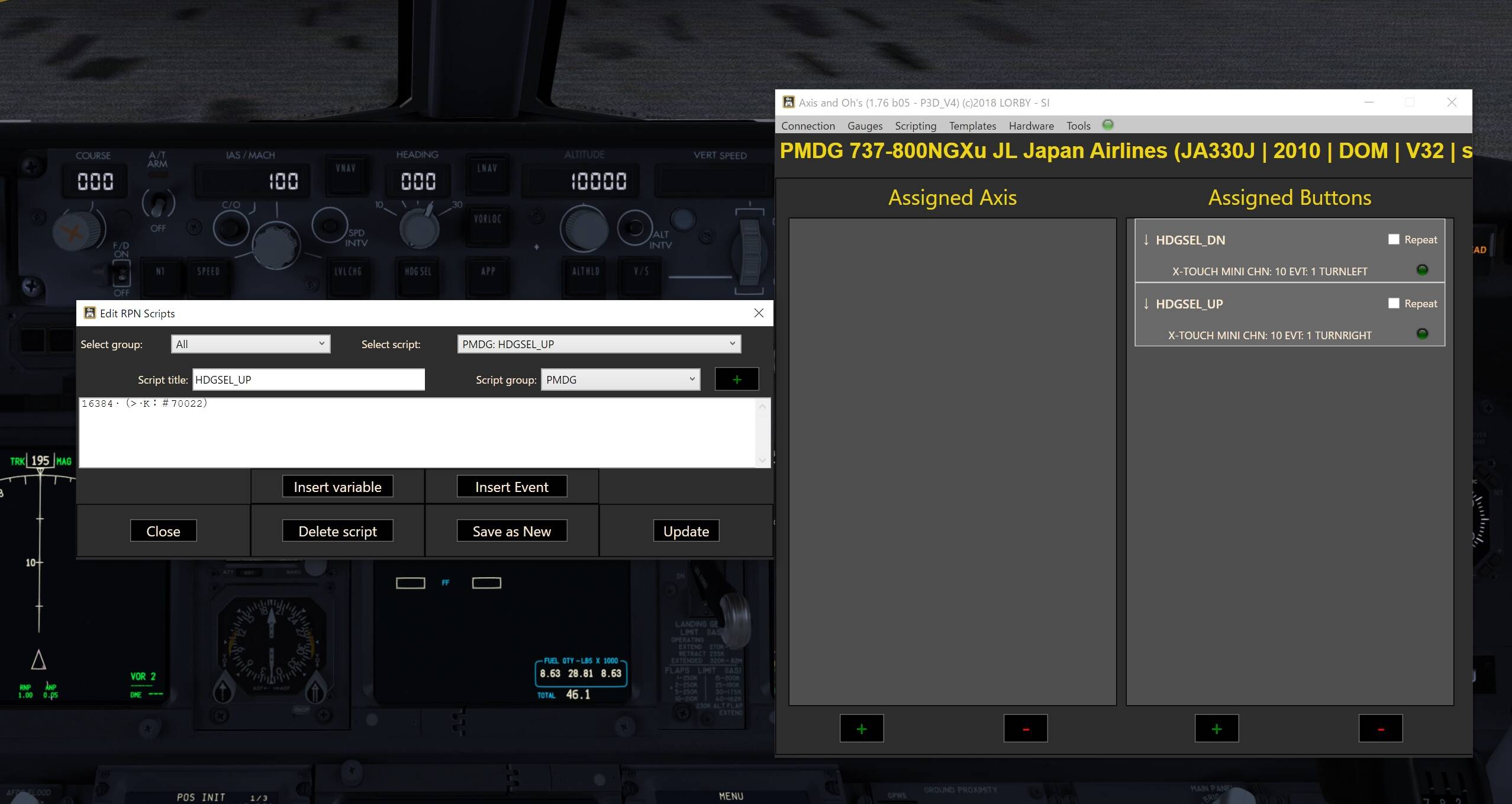
16384 (>K:#70022)
Mouse Wheel Down on MCP Heading knob on the 737NGX:
8192 (>K:#70022)
The numbers to be used are: #70022 for the 737NGX #71812 for the 777 #70198 for the 747
When you create the script, just use the “Insert Event” button and set the filter to search for EVT_MCP_HEADING_SELECTOR. Then doubleclick the required event.
To find the other knobs on the MCP, set the filter to look for _SELECTOR, then scroll down to the EVT_MCP… events. They are different on all PMDG aircraft.
I tried to run the automated script, I could not be assigned to rotary encoder. I was able to assign it to a button, but the number advances by 10.
So, I tried to the other “Mouse events”.
But I could not move my PMDG 737NGX HDG selector.
First, I wrote RPN scrept letters, 16834.
Then, click “Insert Event”, then set the filter to search for EVT_MCP_HEADING_SELECTOR. Then doubleclick the required event.
Also,add Script Title “HDG_SEL_UP”, then push “Save as New”.
Second, add “Assigned Axis” “+” button, then select simulator event as I set it earlier ”HDG_SEL_UP".
Then Move my x touch mini’s rotary encoder, then click “Add”.
I thought it would work, but it doesn’t work.
Please tell me a little more about the setting method. Thank you
Don’t use axis, use buttons with those mouse events. List on the right. Axis are only for flight controls.
And the mouse event scripts must look exactly like I wrote above. Every character, every blank space must be there. You can just copy and paste them from my post.
16384 (>K:#70022)
8192 (>K:#70022)
Create the two scripts with Scripting → Manage RPN scripts.
Click on the “+” below the right list “Assigned Buttons”.
Select the first script as the “Key down event”
Turn the rotary encoder to the right, it will show up on the dialog
Save
Repeat from 2. with the other script, turning the encoder to the left
You have two assignments now, one for left turn, one for right.
The automated script is not assigned to anything. It needs to be run, well, as an automated script - as decribed in the manual (Scripting → Automated scripts). But you only need it when you are NOT using the mouse event scripts. It is one or the other, not both at the same time.
is there a way to find a kind of mapping table for “your” events in the event box to MSFS Commands.
E.g. Cockpit/External View Mode in MSFS assigned to the keyboard END key. How do I find this without try and error. Filter didn’t really help for this command. I’m owner of a Behringer x touch and together with your software and the How to documents found here I would like to change the VJOY / Freepie Method to your method, it’s seems to better customizable specially rotary knobs and the speed here.
These are not “my” events. AxisAndOhs provides the “Event IDs” and “Simulation Variables” that are specified in the MSFS SDK Documentation → Content Configuration → Variable Lists. Likewise you will find those same Event IDs and variables in the SDK documentation of the other ESP sims. They are the means of exchanging data with the sim over SimConnect.
These events apparently do not fully correspond to what is possible in the controller assignment area of MSFS. There are many assignable controls in there that have no match in the simulator event IDs, and the other way around. What is worse, some of those Event IDs from the documentation are non-functional in MSFS, most notably the view/camera controls. They are listed in the spec, they don’t throw an exception, but they also don’t do anything when triggered.
So to answer your question, unless there is an Event ID that sounds reasonably similar to what is on the MSFS controller assignment dialog, don’t bother with hunting for it. Chances are, that it either doesn’t exist or that it has not been documented by Asobo. I found a few undocumented Event IDs by accident and included them in AAO, but nothing so far about the view/camera controls. Many developers are waiting for Asobo to bring them to life - since the start of the Alpha…
people were asking about the mouse events shown above - those are only valid for PMDG aircraft in FSX/P3D. They are not applicable to MSFS.
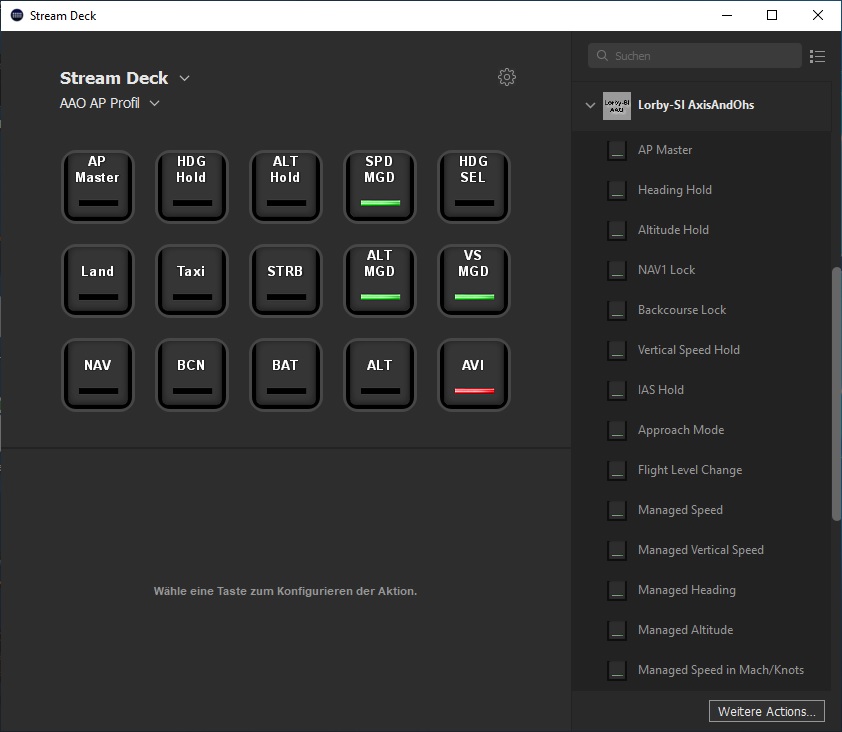
For operating the standard simulator events you usually don’t need any scripts. RPN only becomes relevant when handling special controls (for example the LEDs on the Behringer via MIDI out, or an Elgato Stream Deck via the AAO WebAPI).
AxisAndOhs feature update 1.77 has been uploaded to the shops today. It should be available in your account shortly.
Here are the release notes:
Changes in AxisAndOhs version 1.77
Major change 1: This version changes the naming and sorting convention for assigned button items. This will happen automatically the first time that you run AAO. Before doing this, the app creates a special backup file with your previous database in C:\Users...\AppData\Local\LORBY_SI\LorbyAxisAndOhs
Major change 2: When using MIDI devices, the AAO app did not distinguish between Note and CC messages correctly. This lead to duplicate controller actions when in reality there were none on the hardware. This has been fixed, but it will be required to check and reassign especially rotary encoders again.
Change: option to duplicate button assignments.
Change: Added MSFS events for managed/selected speed, altitude, heading and VS.
Change: Saitek Switchpanel now only processes button events for those buttons that have actually changed
Change: Option to run automated scripts on a global level (=for every aircraft). This will be more convenient when using Elgato StreamDeck or MIDI Out
Change: Add and Change button dialog now have tool tipps on the textboxes that can contain long strings
Change: When assigning a template you have the choice now if it should overwrite the current aircraft config or merge with it. With the latter you can now create partial templates, for example with your MIDI or StreamDeck assignments, that you can merge into any other config without overwriting what is already there.
Bugfix: MIDI “Toggle” type button events fixed for Behringer X-Touch
Bugfix: The MFD instrument did not calculate the waypoint positions correctly (magnetic heading instead of true)
Please make sure to visit axisandohs.weebly.com/downloads to get the advanced sample gauges like the Airbus type PFD and MFD
Elgato StreamDeck
On axisandohs.weebly.com/downloads you will find a sample implementation of an Elgato StreamDeck PlugIn that uses the AAO WebAPI to communicate with the simulator.
This plugin technology is bidirectional (=data can be read from the simulator too, not only sent to it), this makes it possible to use the StreamDeck for annunciations.
First of all, let me congratulate you on the fabulous software you have put at our disposal.
I have a lot of software seen in my life, and yours is one of the ones that have best picked up the needs of flight simulator enthusiasts.
It is certainly not accessible to everyone, because to take advantage of it you need a minimum of skill, but I am sure that in successive versions this will improve. For example, we are all making our own templates, and it would be a breakthrough that these templates could be shared between users of the same device.
I use the X-Touch mini, from which I have purchased two units. By the way, Bheringer should pay you commission, because your software is probably the cause of X Touch being exhausted on many sites. In future versions templates could be included in the program, so that the newest ones can start using the device quickly, and even on their own website there could be a section for users of the same device to exchange templates.
The same goes for scripts. It would be interesting to have a script library, because its creation is already quite complex for the uninitiated, and also a single syntax failure and the script does not work.
I repeat: thank you very much for the progarma, which I hope to enjoy very much.
Hi, many thanks for your kind words. Although it looks to me that people prefer the freeware solutions. It is not like AAO is “flying off the shelves”
About the templates: you can share them. AAO has export/import logic for templates. When you have a template that is working well, you can export it and send the resulting XML file to another person. He would then import it, and the app will present him with the “Change” dialog for each item, so he can just turn/push the associated controller on his hardware (if they aren’t identical).
The same goes for scripts, those can be exported and imported too.
All that is missing is a website where people would be sharing those items. Unfortunately that is not possible on the Lorby site, the provider doesn’t offer that kind of functionality.
I think what happens is that people don’t know the possibilities of this program, and what you can get in exchange for the small investment in the software and on a device like the X Touch mini. Give them some time for the news to reach people. I think it’s a marketing issue.
I installed version 1.77, and I just had to reproach the rotary encoders.
One doubt, what event is to be used to increase or decrease the COURSE on the AP?
I have HEADING ready, but I can’t find the COURSE.