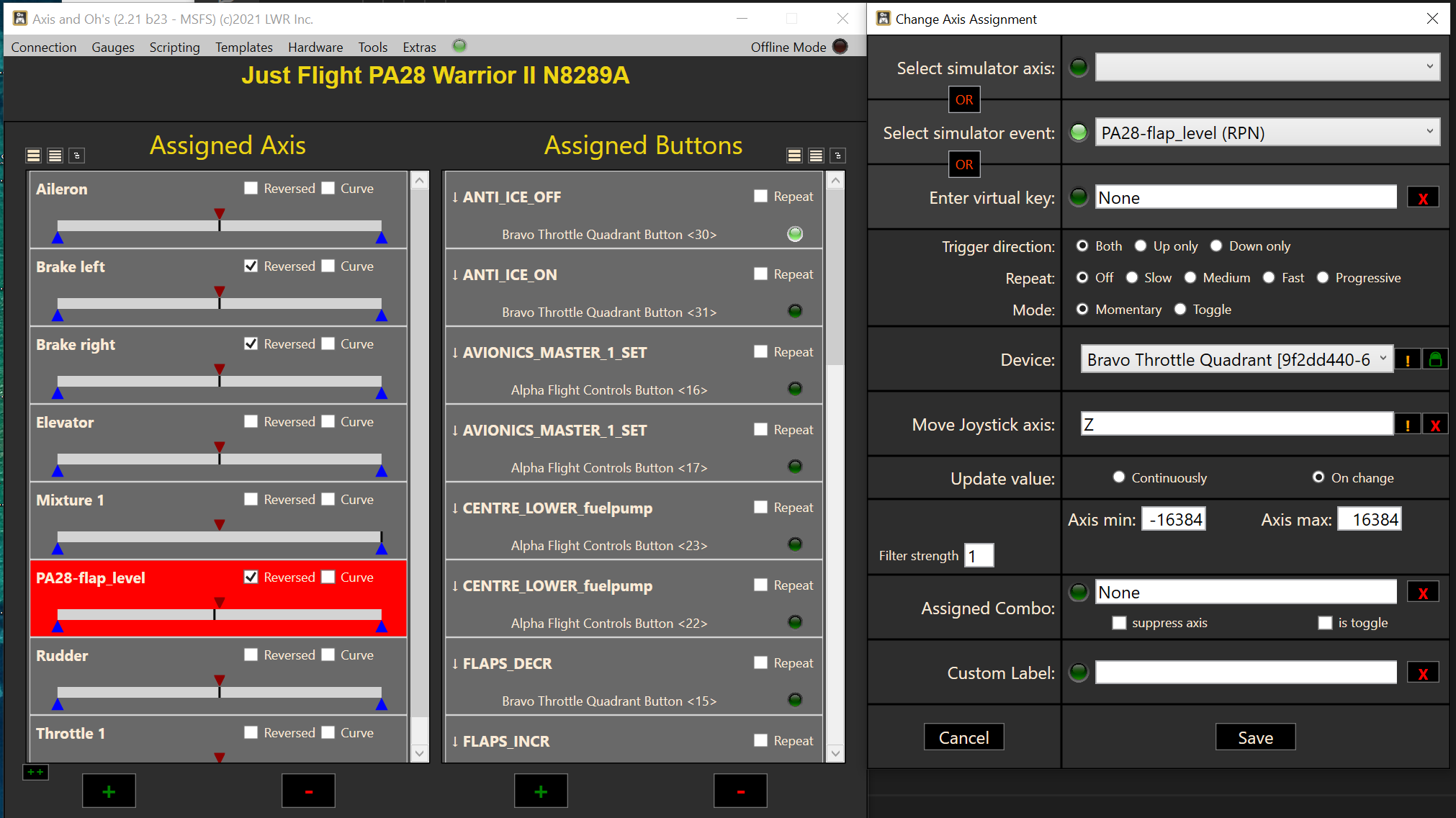
I am new user building scripts with 2.21.b23. I have assigned a script to a Bravo axis with the idea to do flap lever per some of the earlier examples (CRJ700). But my script is not being called when the axis changes. I compared the xml to other sample templates but do not see my mistake. Group and script name are correct but the script is not entered when the axis is moved. I also tried continuous.
How to get the axis to call the script.
I’m probably missing something very obvious, but is there an auto save feature? I keep closing AAO down and forgetting to save changes. For some reason I sort of assume it saves every time I make a change, but obviously it doesn’t.
Is this an option or could it be made an option (to auto save) to save me from myself?
The app is saving the database automatically, at the very latest when you close AAO. But it must be closed properly, if you shoot it down with task manager, changes will be lost. And that seems to work just fine for me? Why would you say that it doesn’t save?
At first I duplicated the math in the CRJ700 sample. But nothing happend. Last test ignored the axis value and just moved the flap lever with script. When I test the script the lever goes up and down. But when I move the axis I see the axis move in the AAO window but no action on the flap lever.
I was assuming it would go up and down quickly as the axis sent events.
My experience is that it doesn’t save changes if I close the app - usually with the “X” top right - I don’t normally close with “Connection>Exit”. You’ve made me doubt myself now though!
The sample I was following did math on the script name
I just tried setting repeat to “Slow” and the script was called repeatably and the lever moved. When repeat is “off” i do not see it called. The update value is “on change”. I think I don’t understand the logic for when the script is called when the axis is changed. I assumed it would call the script on every new axis value.
Should I be running with repeat on and look for a change in the script name value?
That shouldn’t be the case. You are not supposed to have to use the menu to save the database (that would be a really poor design). If the app is not saving automatically for you, something is wrong. Unfortunately nobody else seems to have that problem, so it sounds really tricky.
You somehow ended up in the trigger logic. In this mode the axis is not working as an axis, more like a button. If you move the axis up or down, it will only send a single event - as per the setting in the “Trigger” section. Comparable to the gear shift paddles on a steering wheel. So if there is no “repeat” set, that is all you get - one single event. With repeat, the app will repeat the event, as long as you keep the axis all the way up or down (depending on your setting).
Edit: to be honest, this is starting to look like a bug to me. The assignment dialog is not supposed to enter trigger mode when you assign a script. Very strange. I will look into that tomorrow.
I deleted the axis and recreated (mapped to select the script) and yes, I got exactly one call to the script.
Besides event, all the other dialog values are default.
Based on the sample I studied I was expecting an event (script call) on new axis value when the axis lever is moved.
You can check tomorrow and I will go on to something else.
Yes, the xml patch worked - save template, patch xml, load, apply.
The axis dialog still has extra trigger fields compared to your post above.
But I can proceed with my plans.
Thanks for quick suggestion