Biting the bullet and migrating from Xbox to PC - A Journal

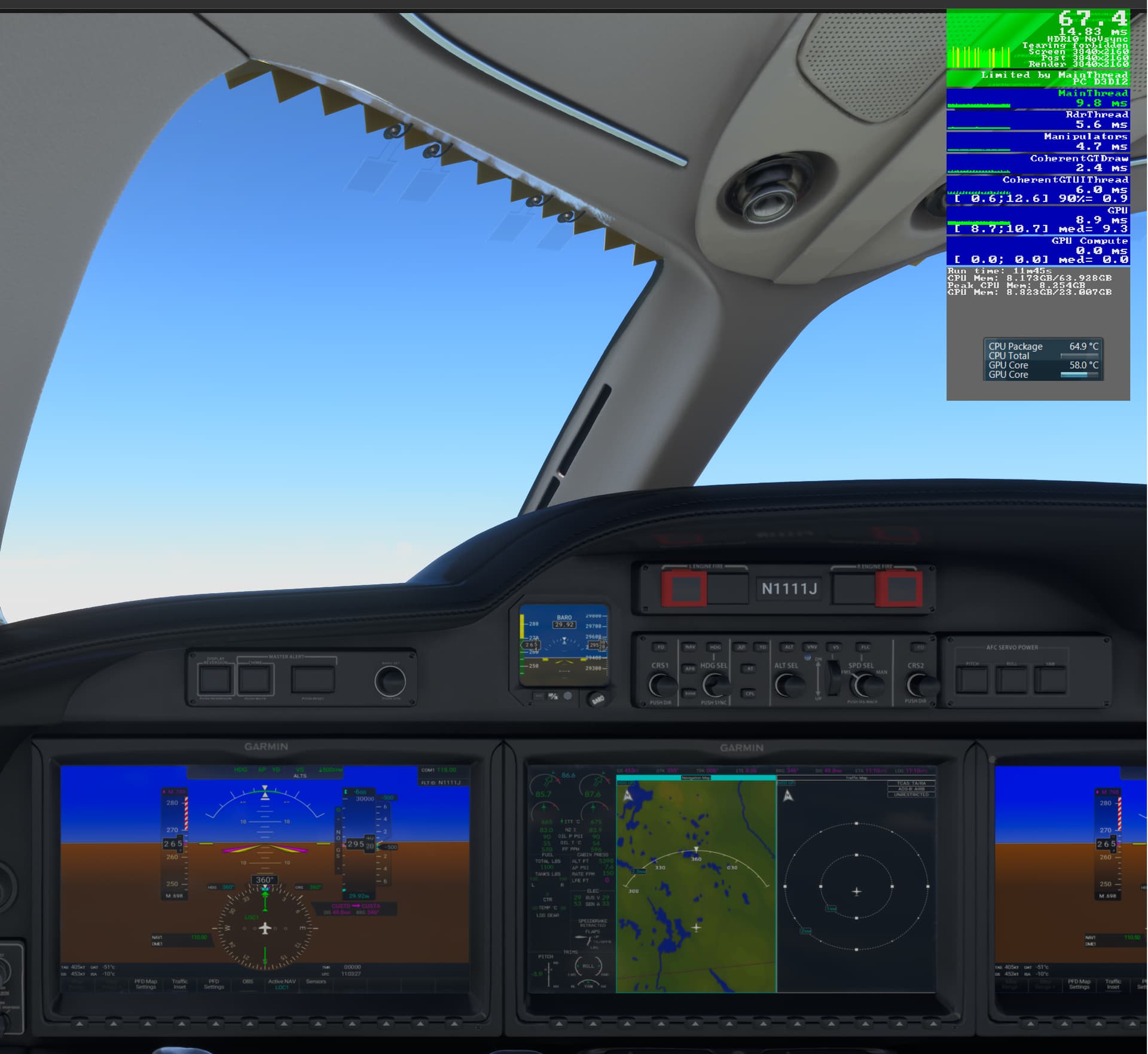
I thought I’d post results from flights over different areas. Results are not unexpected. It certainly seems that Germany stresses the CPU more than other areas. I don’t understand why that occurs at 30,000 ft. with all other parameters being equal, especially with TLOD and LOD being set very low for that altitude.

Sweden, near Hagfors. CPU 10°C cooler than Cologne.

Open Ocean. CPU 20°C cooler than Cologne.

1 Like

Does this not point to some sort of broken code for Germany? Okay, I appreciate that a few large(ish) cities exist in pretty close proximity (Cologne, Dusseldorf, Bonn) but it’s not as densely populated as areas like New York and London.

Speaking of issues that I’ve been noticing more and more lately, some of the PG across the globe looks a lot worse than it did 12 months ago. I’m not imagining it — London’s PG has been awful for ages but I recently took a look at Hobart, Tasmania, and the buildings are pretty featureless. Same in Toronto, close to CYYZ. Perhaps coincidentally(?), these are areas I’ve only just revisited having added to each a third-party airport from the current sale.

I wonder if adding SOME third-party content somehow affects the PG? Or have I perhaps only noticed it due to installing new airports in already infected areas. In my experience, the best PG is in parts of the US, Australia, New Zealand and Spain. Certainly in Spain, I’ve not noticed any change in the PG following the installation of add-on airports.

@BegottenPoet228 What program are you using for the temp display overlay?

Open Hardware Monitor. It’s not as comprehensive as CPU-Z HWMonitor, but it gives you a customizable gadget like the one you see, whereas HWMonitor does not.

1 Like

That’s what I’m thinking.
I did have PG turned ON for all the tests.

Maybe a mod can jump in and let us know if this is at a point you should start a bug report thread since several of us have noticed something going wonky in the region

1 Like

One little caveat to all the doors that open up when moving to PC - all of the expensive addons you purchased via Marketplace back when you were on Xbox…you’re still at the mercy of the Marketplace ingestion process and update cycle while all the others get to enjoy right away. I’ll be envious of all my 146 Professional bros at some point this week :sob::sob:

Ah, thanks for the clarification. I had misremembered that. It may well be that the heat from my 4090 also makes the CPU even hotter. Especially as my Fractal North is a rather compact case.

Many thanks for the good recommendations! I had forgotten Abu Dhabi and Dubai in my list above. However, I had already bought both airports on Friday.

As I wasn’t at home at the weekend, I wasn’t able to test my current purchases. However, I had already taken a first look at Munich and Arlanda yesterday. Munich is good, but even in V2 it no longer looks state of the art. Stockholm looks really great. The weathered and very realistic textures remind me of the Flightbeam airports. In fact, I like Arlanda so much that I immediately bought Gothenburg, Malmö and Bromma from Marcus Nyberg.

I bought Innsbruck yesterday based on your note. The Orbx airports usually have very realistic looking textures. The pictures of Innsbruck convinced me immediately.

I already have a lot of airports from Drzewiecki. I liked them on the Xbox and yes, they look even better on the PC. Of the newer stuff, I can highly recommend Paine Field.

I had already bought Prague from Orbx a few weeks ago. And I’m quite happy with it despite the lack of interiors. But the Tailstrike variant looks really good. Maybe I’ll get them during an upcoming sale.

Maybe this is nonsense, but I feel safer with Marketplace purchases with regard to FS2024. Because Asobo has only guaranteed that you don’t have to buy add-ons again for Marketplace purchases. Or am I wrong?

1 Like

Not sure if that’s explicitly been stated, but that’s the vibe i’ve gotten too. I also prefer the “just go to one place to update everything” method of keeping everything current, rather than trying to keep up with four or five different proprietary launchers. Upsides and downsides to both I guess.

4 Likes

The FAQs for FS2024 clearly state that the vast majority of add-ons are compatible and do not need to be purchased again.

If this hadn’t been confirmed, I certainly wouldn’t be buying as many add-ons as I have recently.

I have the feeling that the quality of the photogrammetry depends heavily on the server load. Photogrammetry cities often look significantly worse at weekends in particular.

1 Like

Asobo is in a position to state that marketplace purchases will carry over, but obviously they have no control over any external stores so it would be nonsensical if they tried to make the same claim about 3rd parties. However that doesn’t in any way imply the same compatibility will be missing for other stores and given the claimed very high compatibility goal I’m sure the market wouldn’t stand for any store that tried to use this as a money making opportunity.

2 Likes

Yes, I feel SW are getting a bit left behind now, and their updates are infrequent. Even their new LEBL had to be significantly and hurriedly upgraded once they realised MK were about to drop it too. Funnily enough, I was looking at EDDM v2 yesterday and thought from the promo material that it didn’t look particularly great. But it is an enormous airport, so it figures that the detail level will be slightly lower. That said, Arlanda isn’t small yet looks amazing!

Yes, they’re on my wishlist too. Both Malmo and Gothenburg have received updates recently (to bring them in line with Arlanda) but Bromma — as nice as it looks — seems to have some very poor ground texturing. I may leave that one and see if it gets a rework… unless you can recommend it? I’m a huge fan of airports with developed approaches and the dev has stated that a big part of this scenery was the enhancing of the approach to RWY30.

Yep, got that yesterday. It’s a functioning hub for AS and SW so there’s substance alongside the novelties. KBFI is incredibly cheap on Contrail but with only the odd UPS scheduled flight (and not with the A300!), I fear it’s a waste of money. Bet the approach is nice, though, over downtown!

I bought MK’s LEZL and BMWorld’s LEVC too, both of which are very nice and have approaches over their respective cities. I’ve always found the PG in Spain excellent, though again, when looking yesterday near LEZL, some of it was featureless. Just blocks with vertical stripes for textures. Anyone else getting this? I don’t know if it happens each time I add a third-party airport to a PG area, or whether most PG areas are now suffering from this?

BMWorld’s LEBB looks nice, following its recent update. A very underrated dev, if you ask me. But I’m not sure I want to fly much in Northern Spain.

One of SW’s Spanish airports that does look very impressive is La Palma (Canarias). They’ve clearly done some extensive terraforming and the custom ortho, while not the crispest close up, does look lovely. I will likely get it — at least it will be indicative of the quality of the rest of their Spanish stuff.

Only other I’m eyeing up is BMW/Amsim’s KMIA. This collaboration seems to be hit and miss at times but they’re pretty good with updates lately. KMIA looks really good and I hear from the Xbox community that it’s performing well on Series X. That bodes well for PC users. It was updated recently, with a few fixes and additions (including the El Dorado furniture store by the 09 threshold, plus animated freight train!).

While the sale’s on, if anyone else has any recommendations, please do shout up.
1 Like

I replaced the thermal paste earlier and applied the high-quality one from Noctua. Unfortunately, this had almost no effect on the temperature. But it was worth a try. In particularly challenging regions, the temperatures at cruising altitude fluctuate between 65 and 89 degrees depending on the fan activity.

I have set all the settings in the bios to default. So that’s not the problem. The Fractal North case is supposed to be good and everything looks correctly installed. Do you have any ideas why my 7800x3d CPU gets so much warmer than others here?

By the way, the idle temperature is completely normal at 43 degrees. And I live in Berlin, which is currently rainy. So it’s not tropically hot here either.

I’m starting to think what you are experiencing is normal. I forgot that the new 7000 series CPU’s are designed to boost until they hit thermal limits, and it’s expected to run as high as 90°C without any harm to the chip. This is a change in how CPU’s are traditionally handled. To give you something to compare to, take a look at the Gamers Nexus review of the 7800x3d.

In their thermal testing, they hit 75°C, which they claim is relatively low, and the 7700x they compared to boosted to 92°C. Their system used the best 360mm AIO cooler at the time, which also uses a special AMD specific offset mounting to center the cold plate over the hottest spot of the CPU. They also locked the fan speed at 100%. I recently found out that Be Quiet! (other brands as well) does not offer AMD offset mounting, which will reduce cooling efficiency, especially on a smaller air cooler like you have, and your fan curves may be playing a roll too.

I know the Dark Rock 4 has a 200W TDP rating, but that isn’t a very reliable comparison because there is no standardized testing methodology for it.

If you haven’t already, I would bring up something like Hardware Monitor to keep an eye on your clock speeds when temps are pushing 90. If they are still at your rated speeds, then I don’t think this is a big problem.

Since you said you reset your BIOS, i would additionally suggest you go back and turn on PBO (Precision Boost Overdrive) and set the core offset to the lowest possible, which is probably going to be -30. This will undervolt the CPU to help reduce temps and/or increase performance. You’ll also want to re-enable XMP for your memory to get your advertised speeds there as well.

1 Like

Here’s where I think I’m going with it

X670E motherboard but gen 4 SSD for now. Could probably hack a couple hundred out of it, but just want quality items and not into RGB stuff. Should be fine with 850w with a 7800x3d/7900XTX I would think. The 670E isn’t much more than a 650E and figure I could plug more new shiny things into it if need be.

Going to be 4K on a 55 with VRR/120 all that good stuff and some sort of tablet/controller/knobster.

Many thanks for the detailed answer! I now also think that my temperatures are normal for my cooler. I will install Hardware Monitor and have a look at the clock speeds. If nothing is regulated down even at 90 degrees, then I’ll probably just have to accept the high temperatures. Even if the fans do get very loud at times. And I could imagine that I might have bigger problems with the temperatures in summer.

By the way, I had saved my BIOS settings before I reset them to default. And since that didn’t change the temperatures, I went straight back to my original settings with EXPO on. But I will lower the PBO mode. Many thanks for this tip!

I’d opt for a cheaper xtx option. That price was a little high for the current market. And based on my last comment, take the savings and consider investing in a higher end cooler.