my bad  I have been searching fast without really checking what it contains
Not true, the GPS is giving an instant fuel flow as reported by the dedicated sim variables.
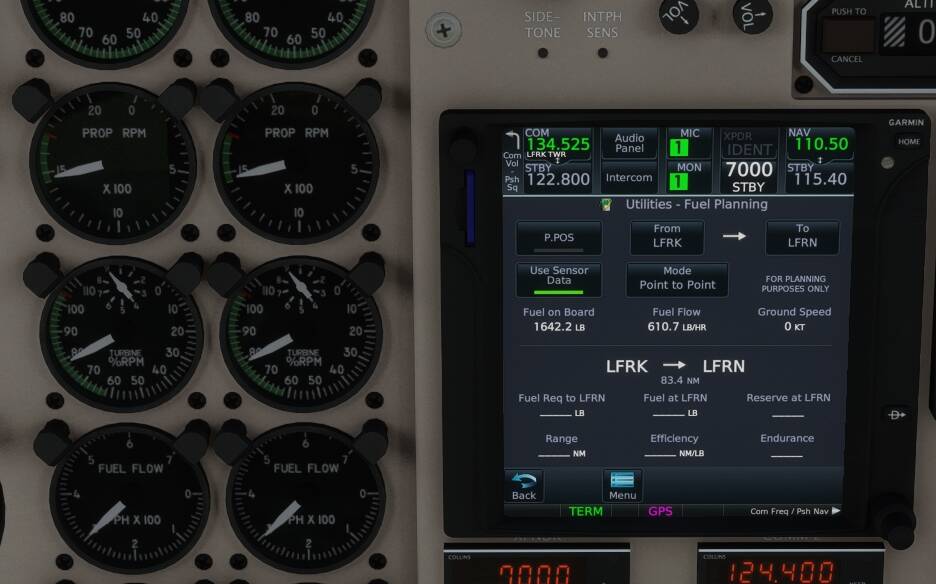
Maybe check the fuel type in the Fuel planning menu. It should be AVGAS.
1 Like
Should it not start to sequence after the LAST enroute WP, before the approach procedure.
You also have the MSFS option to add the first fix on the approach, to the enroute part of the flight plan, and then if the approach is not activated just after the last normal enroute WP, the plane will fly to this new LAST enroute WP,. !!!
It should be AVGAS? Even in a turboprop? Is the Jet A option only for jets?
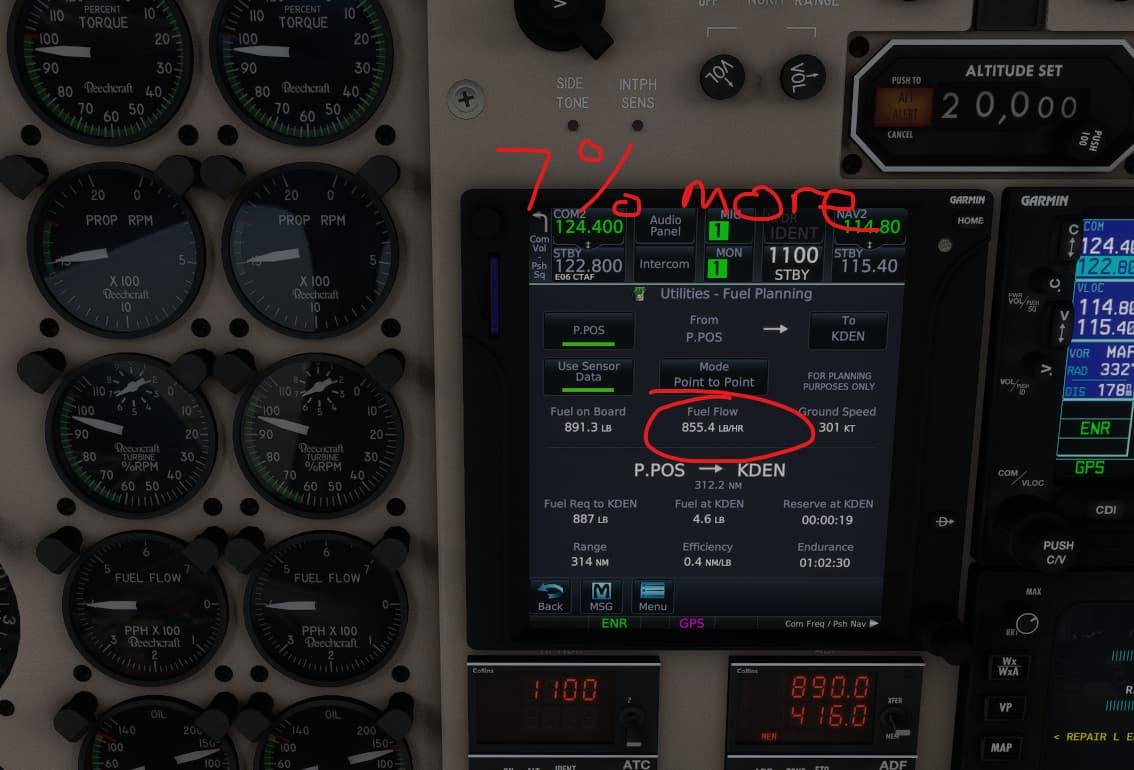
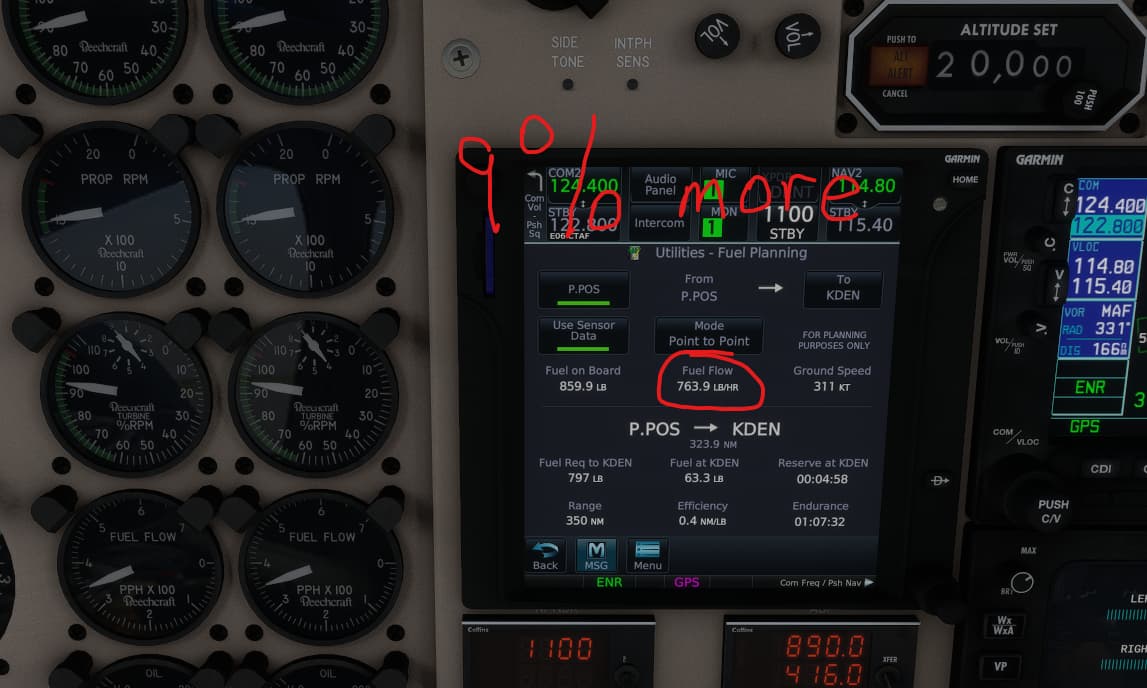
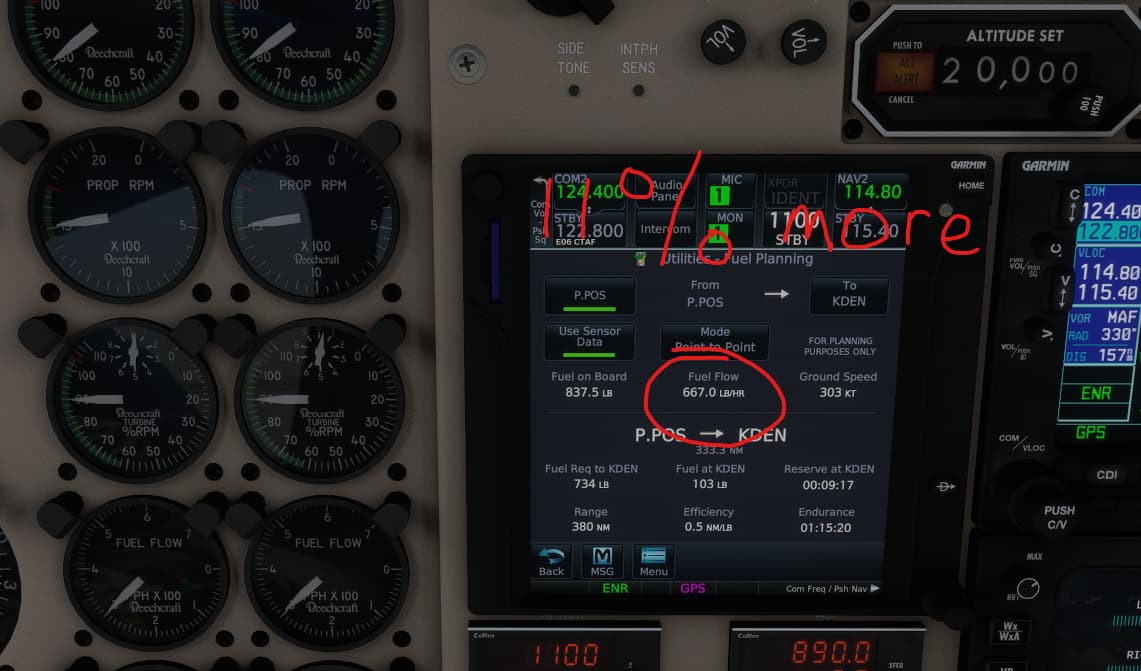
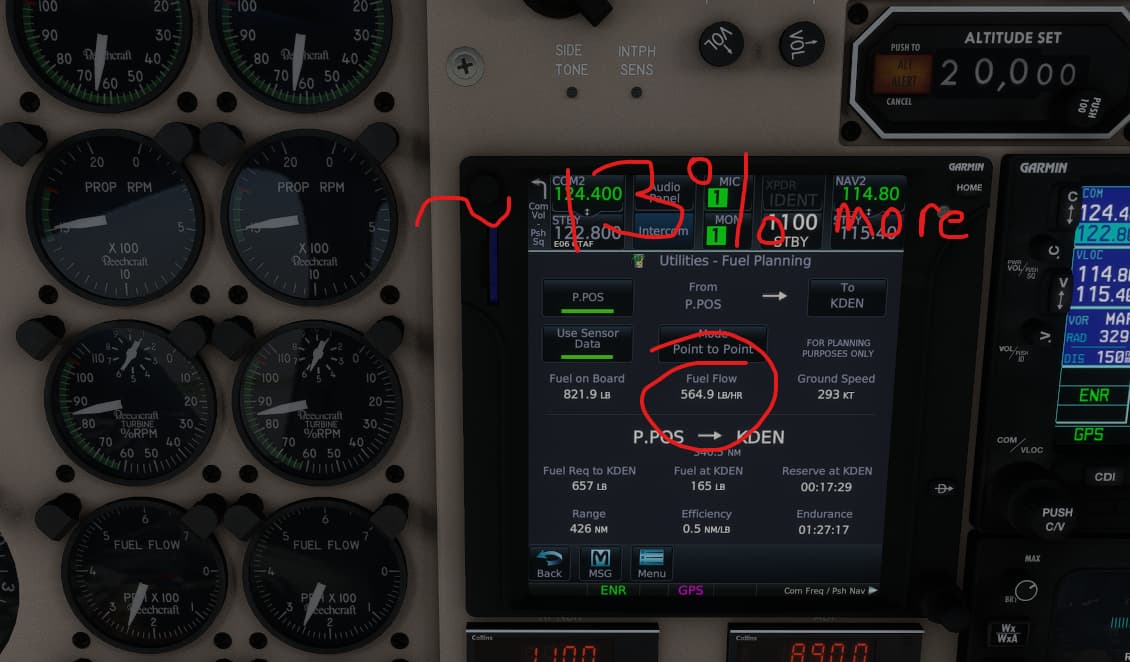
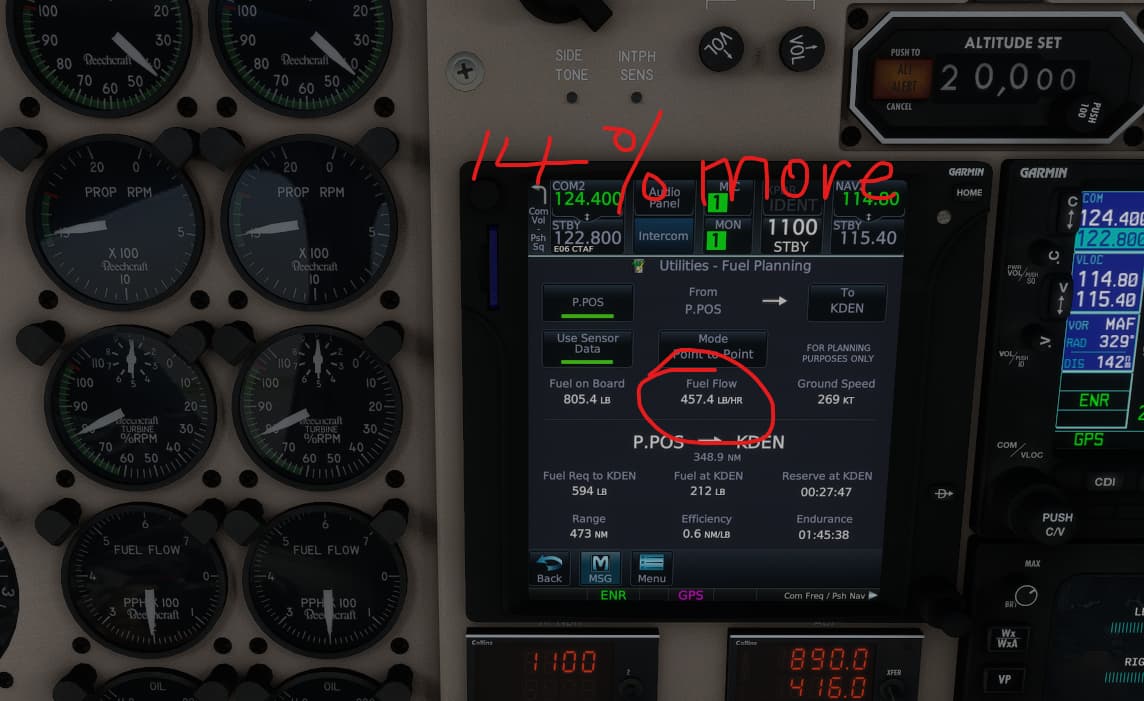
OK, so here’s what I noticed. Earlier I had noticed that the FF did not match up so I decided to test it, get some data and see if others were seeing the same so i started a new flight, in the air and set the FF to 300 pph / engine and got a result very similar to yours with the guages and the GTN750 matching. I couldn’t understand why it was matching now but had not been when I checked it on the previous flight, so I then tried it at a few different altitudes. First I climbed up to FL250 (no weather on), checked it and found that it was a little out, and then descended FL200, FL150, FL010, possibly lower (I can’t remember) checking as I went. I climbed and descended a few times. I then climbed back up to FL200 and found that I was no longer getting them to match as they had at the beginning of the test. Furthermore, the lower the power setting, the greater the difference. This would imply averaging but I could plainly see that the FF on the GTN750 was changing instantaneously with power changes, implying the opposite. So then I stayed level at FL200, set the ff to 800pph, 700,600,500 and 400pph and took the following screenshots in as rapid a succession as I could. Perhaps someone with a better (and less sleep deprived) brain than I could explain it.
It would be Jet-A, not Avgas.
I asked that because I was using the Jet A option and it seemed like an odd suggestion.
I am now tempted to get this… looks like a realistic version of the KA350. With the lack of MilViz KA in MSFS, this may be the next best thing. Perhaps even eliminating the need for that (though their Collins avionics were nicely simulated).
Oh yes sorry, my bad. This is about the King Air here so Fuel type is JET-A.
On the GTN750 the conversion seems correct. 100 gal of JET-A gives 670 lb as expected.
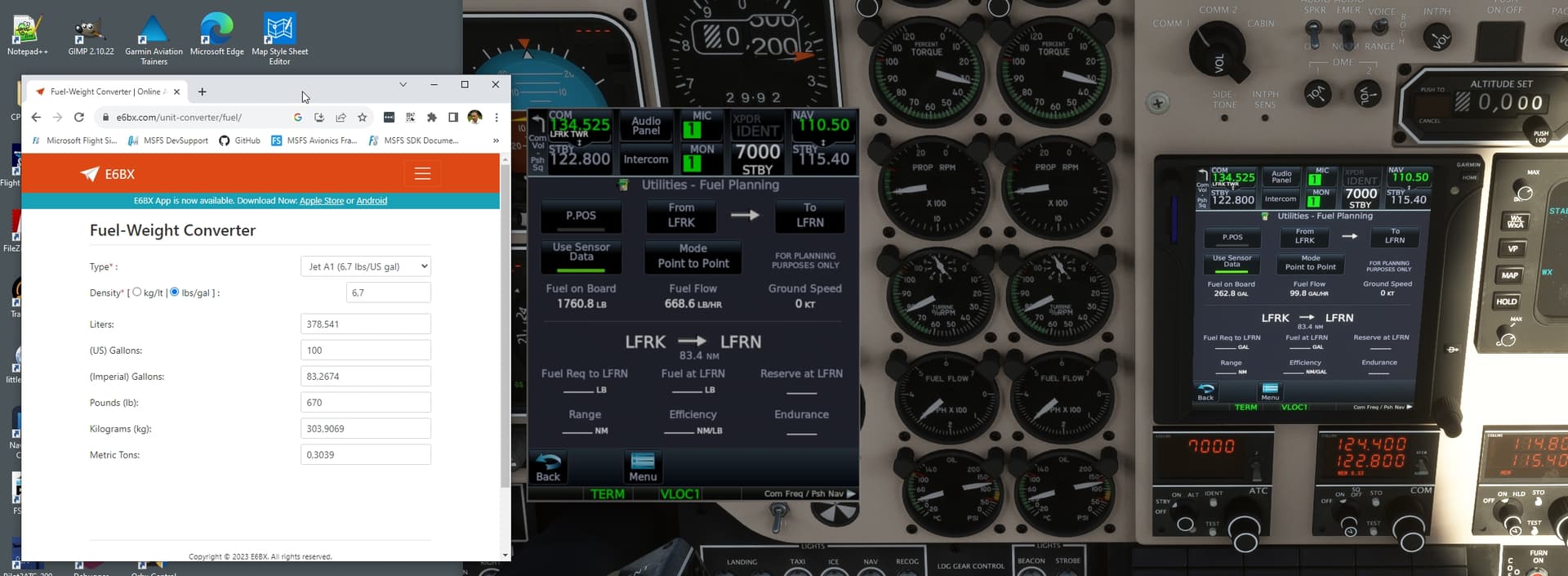
And the sim variables tell us the same thing:
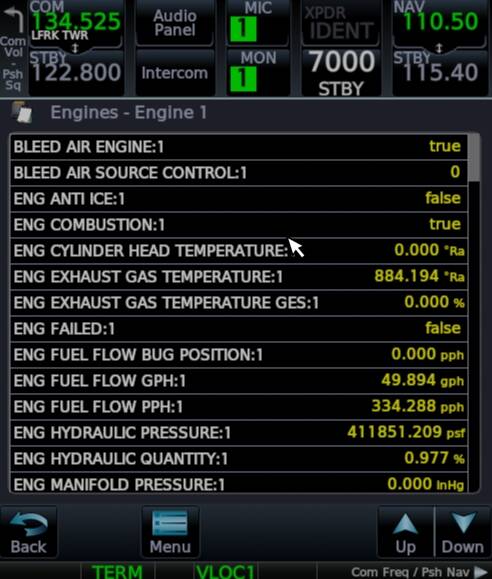
Tested on the ground.
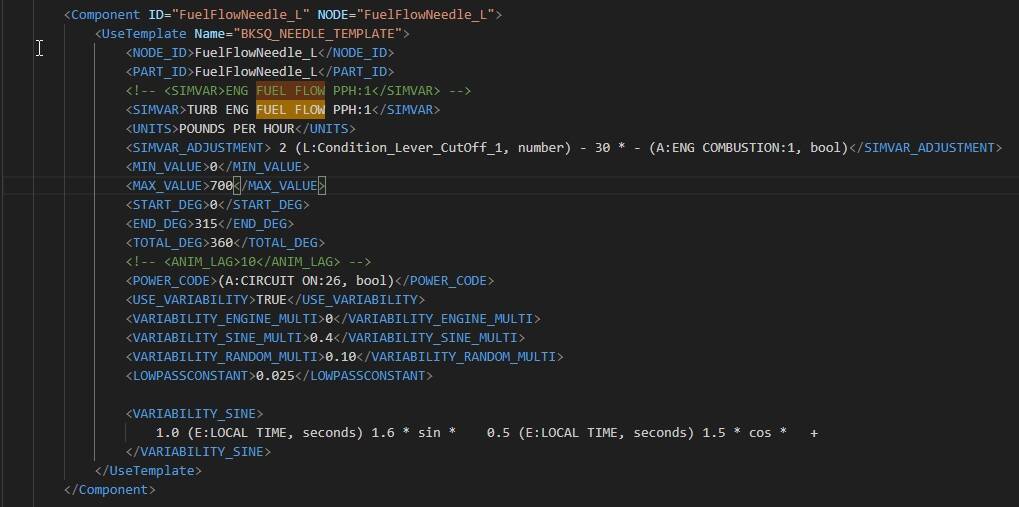
I can see also that Black Square is doing some adjustments to their fuel flow gauge after taking the values from the sim. THat probably explains the difference:
2 Likes
Involving the earlier version of the King Air, I conducted over 120 data recordings of fuel flow across various altitudes and temperature settings. Additionally, I explored different prop and throttle configurations in collaboration with Jaydee. The aim was to compare these figures against the POH FF values. My testing also encompassed a series of flights lasting about 12 minutes each (extrapolated by a factor of 5) to evaluate the gauge accuracy for fuel burn. As a result of these tests, I hold a high level of confidence in the accuracy of the gauges.
could it be possible that the GTN750 is encountering difficulties in interpreting the diverse flight plans that Jaydee established for various altitude layers. Alternatively, variations in air density might also be playing a role in this scenario.
We are basing the calculation on what the sim variables give us.
We request the fuel flow in gallons per hour from the sim and convert it according to the unit and fuel type.
We are using a fixed density of 6.7 lbs/gallon for JET-A. See E6BX | Aviation Calculators.
I don’t know how the sim is evaluating the density on its side and if it’s taking care of the altitude/temperature but it could be checked by calculating it from the sim variables fuel flow in gallons per hour and fuel flow in PPH at different altitudes.
What could be checked too is the amount of fuel burned after one hour of flight at a constant altitude and constant fuel flow (fuel on board difference after one hour).
2 Likes
I will redo today few record to see if everything is still ok, as I don’t own the premium gtn750 I m not able to compare with its data.
right now I remember something Jaydee said about the CL and it s conresponding FF (for high and idle) can’t be fully moddeled due to sim limitation or something like that, resulting that the gauge in CL low may not really reflect the number it should my test were all based in condition lever high …that may explain the little inconsistency of the gauge give me an instant , I will try to refind the post
■■■■! I’m getting old. I totally forgot about this CL story.Meanwhile I was resetting the aircraft and FS20 HUDbar.exe for a test. It just came to my mind that this has already been answered. 
note that has usual I wasn’t really right in my statement concerning the CL effect on FF, for a better understanding better refer to Jaydee explanation as he clearly got a better knowledge than I on this matter
I m wondering if I m not confusing everything, anyway I will make few random capture for 12’ with CL idle low to see if the fuel burn match the gauge.
Ah! Thanks for your replies gents. I do vaguely recall reading that not long after the product came out. In light of what JayDee has said I’ll need dig a little deeper as I have indeed been routinely flying the Kingair with the CL in Low Idle from start to finish of the flight. I apologize for reigniting a discussion that has already taken place. The reason that this has come up for me was because even after I had added a Fuel Factor of +25% in the Kingair profile that I created from the template in Simbrief, I was regularly eating through trip fuel, contingency fuel, extra fuel and sometimes even fixed reserve fuel on relatively short flights (1-2hours). While I understand that there are many different models of Kingairs, to require even more than a +25% fuel factor correction seemed excessive, and hence my looking a little deeper at the numbers. Anyway, I will try again shortly with the CL in High Idle and see it that clears things up a little.
Here are a few results comparing readings from my HUD and the gauge while changing the CL:
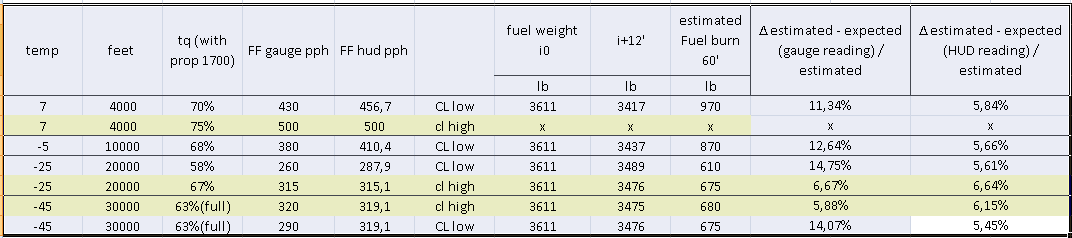
while we can definitely notice that with CL high FF are both matching from HUD to gauge
It’s evident that when the CL is high, the FF values from both the HUD and the gauge match each other.
However, with a low CL, FF values vary between 20pph and 30pph between my two sources.
I took the time to perform the 12’ Fuel burn test multiple times and found that comparing it with my HUD readings yields a fairly consistent 5-6% error margin (mostly attributed to the 12-minute reduced flight time in my opinion; multiplying by 5 might slightly increase the error approximation).
However, this error margin could increase to 11-14% if we consider the gauge reading for CL low (5-6% for CL high). Confirming JayyDee says
Additionally, it’s important to note that gauge readings are not strict values and can be approximate.
For the sake of transparency and understanding, the calculation for
“∆ estimated - expected (gauge reading) / estimated” is derived from:
[(Fuel Burn 60’) - (2*(FF gauge))] / (estimated Fuel Burn 60’)
Where Fuel burn 60’ is simply → [initial value (3611) - (value at +12)] * 5.
12 minutes were reached with sim rate x4 and looking at the yoke timer
Additionally, I must reconsider my thoughts. It’s possible that the GTN750 is indeed providing the most accurate fuel flow data, as it might be sourcing the same data as the FS20HUD. My apologies, @ScorpionFilm422, if my initial hypothesis about an average value was incorrect.
1 Like
Apologies in advance if this has been answered elsewhere
At first, I thought it was just my noobness with the plane that was using engines as if they were a cent a dozen, but yesterday and today I followed the checks and the cruise settings to a T and still broke my engines
Yesterday, I flew from Venezuela to Florida (TNCB to KFIN) at 30000. Engines were reset before the flight
ITT 700 RPM 1500 Condition Levers LOW
That gave me around 60% TQ and 2200 Fuel Flow at 175 IAS. Ended the flight with no issues but when I loaded the plane again, the engines are yellow at about 50%
What am I doing wrong?
I flew again today from KFIN to KGUY (1200 miles) and same result with same settings
could it be related to a too rought ignition ? (high ITT spike at start up wich can break the engine)
also in general like for take off and climb, I usually don’t exceed 90% tq power, never had engine damage doing so
3 Likes
Thank you
I always wait until 20% to introduce fuel. Will keep an eye on the ITT spike and will watch 90% TQ in the climb
1 Like
Also, be careful about torque during takeoff run / initial climb. It’s easy to exceed 100% if you don’t monitor it (one of the tricky things about single pilot operation).
Edit: oops, I see that was already mentioned.
2 Likes
Agreed. Most of the planes I fly you can just mash the throttles to 100%, but not this one (as well as the BKSQ Caravan). Definitely takes some multitasking skills to slowly move the throttle and watch the gauges…oh, and keep it on the centerline. 
2 Likes