…however JayDee’s compatibility mod is easier to use as it only needs to be present in the community folder.
nice screenshot 
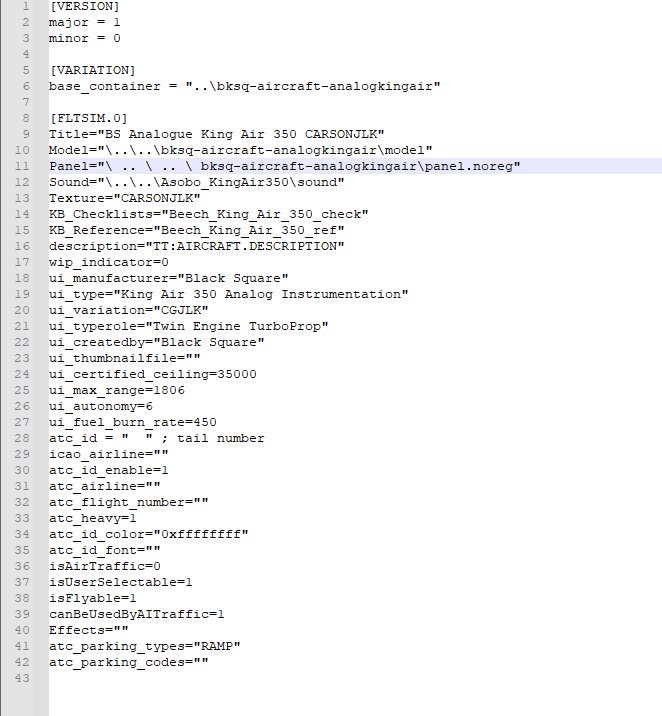

Is a key/button binding to feather the props possible? It doesn’t seem to work for me with “TOGGLE FEATHER SWITCH 1” or 2
with 3rd party software like FSUIPC, Spad, A&O , Yes.
In game binding, no
I have Virpil throttle and stick, which one pf those third party softwares do you recommend?
Unless I’m misunderstanding the issue, try removing all space characters between the dots and backslashes on that line. From the screenshot it looks like you’ve got spaces in between 
any of them should work. I use FSUIPC only because I bought it a few years ago, but the other 2 are more user friendly from what I’ve heard.
What scripting languages do the others use? I love Lua, it’s quite capable.
Never used the others. And not sure what FSUIPC uses, i just use the dropdown menu and choose an action, check parameters for the button i want to use.
I rarely us it. Actually the ONLY thing I use it for (Binding wise) is for prop feather, since Asobo refuses to offer this and continues to turn their back on Complex Prop aircraft. Spending all their time on C172s an A320s… don’t get me started 
Failure Menu Question:
I can’t adjust the settings. Manual says use the RNG key to highlight/edit the setting, but it does nothing… no highlight or anything. Is it locked out during flight or something?
Could developer theoretically do something like "if prop axis < 1% then feather prop " as a workaround?
Does the plane tend to bank left on takeoff? I want to make sure it’s not a hardware issue…
I saw that too. So my mod is not necessary anymore and I guess and hope a similar adjustment will come from FSTIM+ for the analog caravan.
Leave the spaces out. If I copy the string into the text her it gets deformated. So I will show it with a screenshot

Your mod doesn’t require changing/replacing a bunch of files within the analog king air package. I really don’t want to do all that, your mod is just a drop into the community folder and thats it. I like that much more.
Yes it does…even during flight.
To be fair though, a lot of 3rd party planes tend to bank left during manual flight in MSFS. So I dont see it as anything in particular with this plane.
Yeah, when I saw the instructions I just decided to go with JayDee’s mod 
no it s a bug, their is a cursor that doesn’t higlight ,the cursor doesn’t blink on some pc, got the same, you can try changing or page down the screen , it ll scroll down so you will have better idea where cursor is,
personnaly, I start editing a value to get an idea of the actual cursor location
Just wondering, has anyone used this with VATSIM and been able to actually monitor Com 1 & 2 simultaneously? Both in the BS King Air today and the caravan yesterday, the only way I can monitor Com 2 is if I switch to Mic 2, but then I lose monitoring on Com 1. Anyone else experienced this?