I have a question regarding the trim wheel.
It is spinning back and forth very fast all the time in the air.
Is this a normal behaviour?
Thanks
With Autopilot engaged I guess this is normal as Autopilot trims the plane to be leveled all the time.
I had the same problem. but then I found out that you can click on the spot even when the cursor is round and the switch will go to reset… No need to try and make the cursor show ’ up and down’ arrows… I hope this helps…
Yea, I saw that. I went ahead and switched to Locked mode, after installing the mod that removes the blue switch highlights. All good now! 
2 Likes
I can’t find any info on the proper use of the Eng Ant-Ice Actuators “Standby” vs “Main” position. How is it different than “ON” or “OFF” right above it?
Runup Checklist says:
Anti-Ice Actuators - Standby
Engine Anti-Ice - On
then
Anti-Ice Actuators - Main
Then the Before Takeoff checklist says “Engine Ant-Ice - As Required” and never mentions Actuators again. So they stay on Main? So what does “Standby” do?
Checklist calls for selecting Standby as a test to ensure this backup system works as expected.
Any time the EAI in main position fails, an amber L/R ENG ICE FAIL caution message displays on the central annunciator panel. Switching the actuators to STANDBY should fix the problem, removing the message. L/R ENG ANTI ICE green message tells the system is working OK with either set of actuators.
1 Like
So there are two Actuator systems, a Main and a Standby? That’s why I was confused, I thought standby meant setting the Actuator in Standby mode… like “standby-ready to go”.
Yeah, two sets of actuators. MAIN switch position is the normally used unless it fails either because of separator not it proper position (delayed amber message) or loss of electrical power (instant amber message).
1 Like
Ahh. That clears it up then. Makes perfect since now.
Thank you
1 Like
Running though the checklist doesn’t mean a whole lot if you don’t even understand the system you’re checking 
5 Likes
Need help on key binding. How do I bind the starter/ignition. Tried binding starter and switching goes down to starter position only. Kind find a way to make switch go up to both start/ignition state. Please help.
I have done it before using the “Magneto” commands on the original Asobo KA. But it was a long time ago. Tried again on this plane and could not get it even with using FSUIPC
Hi @highzur
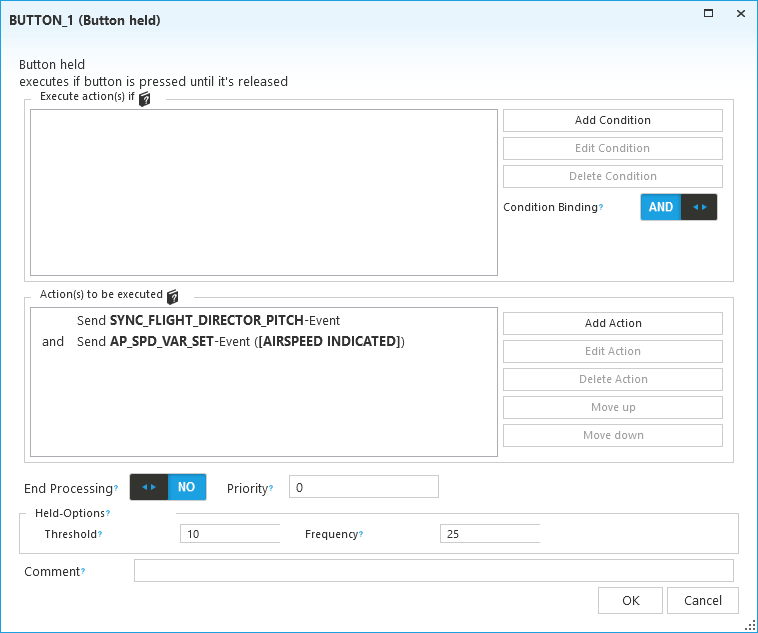
For Pitch Sync I’m using this on a “HELD” event so I can hold it down like CWS (they call it CWS in their code) and it will adjust both the FD pitch bars and the IAS value for the autopilot.
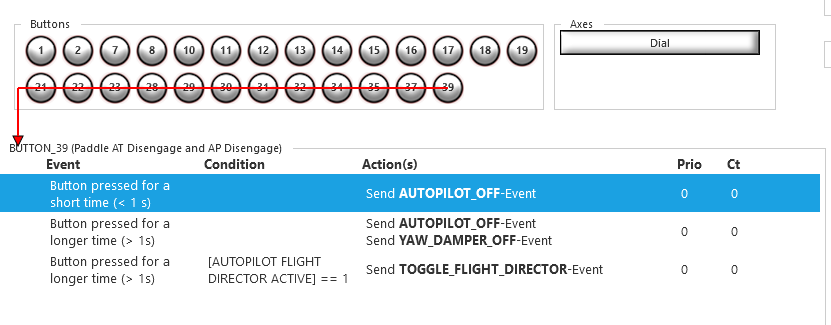
This is my autopilot disconnect, with short press to just disable AP master (matching black square first press), and long press to disable AP, FD, and YD (matching black square second press).
The real aircraft has a 2 stage button so I find short press and long press much more intuitive and you can be 100% sure what you’re triggering.
What is the LVAR that triggers the sound of the button? I’d like to add this part.
Thanks
1 Like
maybe try with L:BKSQ_AUTOPILOT_DISCONNECT_SOUND (I found it in both yoke & autopilot section of the aircraft xml)
1 Like
Here is the first WIP version of my checklist for the Analog King Air. I based this on a original King Air POH, the Black Square Checklists and other King Air Lecture Sources.
5 Likes
Thank you, much improved and appreciated. While the original manual does ok with describing the “what it is”, it could be greatly improved by incorporating more “how to do it.”
The aCaravan and aKingAir are my two favorites (for now  )
)
Fly precise!
Tc
1 Like
Reeeeeallly looking forward to that checklist. Love it 
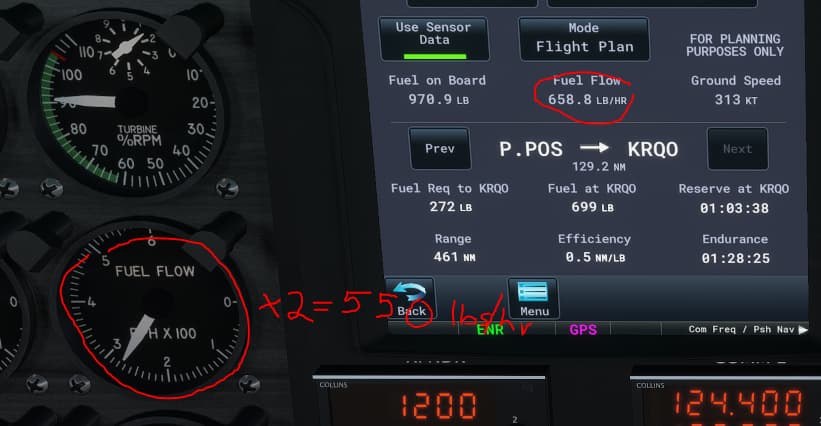
So which one is wrong? Maybe the analog fuel gauge is just inherently inaccurate or it’s not taking into account other fuel use..? or maybe the GTN750 is wrong..?
Little Navmap is right in between at 610 lbs/hr
PMS50 GTN 750 set for type Jet A
1 Like
I have no access to this pms feature, maybe it s not showing the exact FF at instant “t” but an average from start, while gauge show a instant reading, will try tomorow if I have time with an hud to compare exact fuel cosumption on hour flight (doing 12 min * 5 with simrate *8 ) to see if gauge is reliable
on v 1.0 I had noticed a error margin of between from 0 to +5 % (depend on weather condition & Condition Lever) for hud’s FF
thought using idle low will provide a smaller FF in gauge but in fact the plane is consuming same as high idle (not sure, that was the case in previous versions)
edit add
That is very possible, I actually didn’t think of that. Althought at the time of this picture I was about 30 min into the cruise and was more than 100 lbs off. Climbing was approx 950 lbs/hr for about 7 minutes so… ummm. . lets see… umm.. 590lbs/hr average I think
I’m not good at math 