Yes, my progress is being saved correctly again. It will be nice to have something different to do for a change!
Still a bit of an issue with POI. If you leave to main menu and then try to continue the POI are gone again but at least the legs seem to complete
Same problem here. I hoped they solved it with the new update.
Da flieg ich nun, ich armer Tor! Und bin so weit als wie zuvor;
(Oder: „Wer ist der größere Tor? Der Tor, oder der Tor, der ihm folgt?“)
Alles frei nach Goethe und Obi Wan Kenobi.
Hope so much you will fix the bush trips soon. As right now this are bush traps.
Still (maybe) a problem with SU7.
Restarting a trip from scratch is not a solution.
EDIT: Just completed Norway leg 1 and did Next->Continue and route is there on VFRMap. Returned to main menu and went back in, route is there on VFRMap. Exited to desktop and came back, route is there on VFRMap. Can’t reproduce now. Will monitor.
This is NOT about magenta line (current leg) or showing aircraft position on map, it is about the route line disappearing completely.
I understand that Bush Trips are VFR, but you should still have your route plotted on the VFRmap, otherwise you can’t even follow landmarks.
- What are the exact steps you are taking to see this issue happen? Flew first leg and can see route plotted on VFRmap. Exited to menu or desktop and upon return no route plotted on VFRmap.
- Which Bush Trip has this happened to you on, and are there any where it doesn’t happen? Seen on Finland and Nevada but they’re the only ones I’ve tried.
- Is it always the first leg, or does it happen for you on other legs too? Only subsequent legs.
- Are you on Xbox or PC? PC. Steam Edition.
Also just finished Finland and it did not register Bush Trip completion, despite registering Leg completion,
Also, Nevada Leg 22 not registering completion despite stopping exactly at the waypoint marked in the flightplan (nevada.pln). I even resorted to using Little NavMap to triple check.
Also, flight hours, takeoffs and landings are a bit hit/miss in the logbook when flying bush trips. I haven’t narrowed down when/how, but seems to be something to do with selecting Return to Main Menu vs. Continue bush trip.
Prob the same thing happened to me, on the bush trip down thru Croatia, thru Dubrovnik, etc. Haven’t managed to get it back yet, but will remember to start the next leg then exit. Thanks.
I just started my bush trip again after avoiding it since it was bugged. I am on Leg 4 now for the Alaska bush trip, PAKF to PACD, with the legs and lines still appearing. What i did was to ensure i complete each Leg and click continue. Never ever click to main menu. Continue the flight halfway and exit to main menu to save the bush trip. All the POIs airport and lines will still appear on the VFR map and the Navlog will also appear with the POIs. I have saved the game 3 times and keeping my fingers cross, hoping to complete my first bush trip since the launch of msfs 2020. I am on xbox series s.
The problem isn’t solved - the marked solution is a work work around.
Asobo still need to fix this.
Yes Asobo doesn’t even respond to this. The next major update is supposed to just fix bugs. Let’s hope this major bug is included. Coming this month.
Yes you can just click continue but the only problem with this is your time and your takeoff and landings will not be recorded in your log book . But I have found a way for your time and take offs and landings to be recorded in your log book and to get the line in the vfr map to show up so you can use the AP and the Nav button to follow the Flt Plan line in the next leg . It’s a little complicated but it works .
If anyone is interested if you can send me a PM I could maybe try to explain it
Yes you are right, if i fly 2 legs, it does not register the flight duration in the log book. The workaround for me is I will save every single leg around 1-2 miles just before landing. I noticed that the log book will only register from the time i takeoff and the duration registered are after takeoff up till the time i exit to the main menu. Therefore, my logs only has takeoffs and flight duration for bush trips and no landings. I managed to complete the Belkans bush trip to 100%. So far all VFR map lines are working except for the airport image not loading sometimes.
Doing Norway now and when I got up to the leg that ends at ENAL my VFR map route line disappeared and subsequent legs also do not have the VFR route.
There doesn’t seem to be any pattern to this.
And logbook entries seem a bit random too.
Ok Guys hope I can explain this right .
- Do not try to save a leg
- Complete the leg and wait for it to get checked.
3.Click Next . That will register your minutes flown and your take off(s)and landing(s) in your logbook - Now click Back to Main Menu
5.On the WARNING screen click continue . - Click Activities
- Now on either Bush Trips or if 3rd party add ons click Custom Content
- Click on the bush trip you are doing
(Now DON’T click the one your at , instead click on the one you just did.
For example I am at leg 15 but I don’t click on that I click Leg 14
Now click Restart From Wait for it to load and then click Ready To Fly Wait for it to load and the VFR map to come up . You should now see the FLT plan line and the POI’s
9 . Now hit ESC on your keyboard
10 Now on the tabs at the bottom click main menu
On the warning box click continue and then activities
Now Choose the bush trip you are doing
It shows I have not done leg 14 but shows Leg 15 checked Don’t worry about it
Now I click on leg 15 This is the one I want to do - Now click Restart From
Wait for Ready to Fly to come up
You should now have the Flt plan white line and the POI’s on your VFR map and now be able to use your AP and NAV if you want to fly the leg
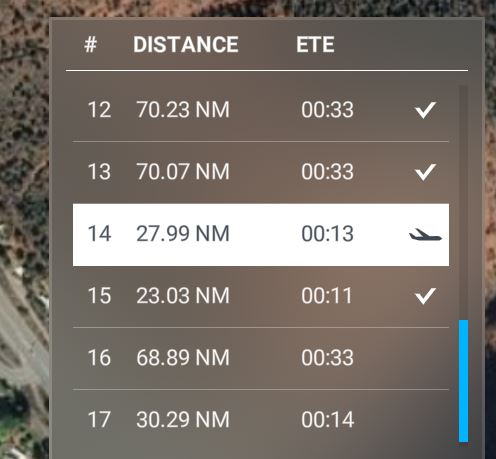
Great! This works for me thanks.
This is fantastic… totally convoluted but it works!! Thank you!!
So I just thought I’d try the Bush Trips again after a few months, since the issue with the disappearing waypoints annoyed me so much.
Started the Germany trip from start (haven’t done this trip before) and after the first leg completion message quit to the main menu with the button shown.
Just re-entered now to fly the 2nd leg, just to find out that the nav waypoints are now missing again.
Is this seriously so difficult to fix with a patch? A core “story” component of the game is just left bugged for months, that’s so frustrating 
The workaround to get the POIs and flight plan line in the VFR map for this is:
- After completing a leg i.e leg 2, click continue and exit to main menu.
- Go to Activities > bush trips menu and fly the previous leg i.e leg 1 instead of leg 2.
Note: always make sure it shows “restart from” when you start a leg. - Once the bush trip is loaded, click ready to fly and exit to main menu.
- Then go back to Activities > bush trips menu and fly the current leg where it will show “restart from” i.e leg 2.
Thanks to sparky0347, i finally get to register all my takeoffs and landings for every bush trip leg and have completed the 3 main bush trips Balkans, Patagonia and Nevada.
yes and i can’t even see the topic in their list of known bugs or fixes coming. There is supposed to be a big bug solving update coming. Lets hope this gets fixed. im not playing them anymore until they are. Can they even put a restart option bush trip option.
Yes I’ve read some of the workarounds that are available thanks to the great and dedicated community here. But this is OK as a quick, short-term solution and not acceptable for such a long time.
The bush trips worked perfectly since the start (at least for me), until they first started to bug the navlog (going empty); after this was fixed, they brought in this losing navpoints bug.
I really enjoyed the bush trips but I’m not willing to mess around for so long… TIME FOR A PATCH!
This is the most useful workaround ever… it always works… I read about it a few weeks ago and it had made bush trips possible and enjoyable again!