

I wish there was a way to turn off photogrammetry all together. Ive removed it from the UK update and London looks amazing with the ORBX landmark pack.
I turned off PG 2 days ago…never looking back. PG is an abomination, unbelievably mixed bag of quality and just kills your FPS for the price of being in i.e. London right after WW2.
Never turning on the PG again…
Guess it depends
Québec city is well done
Responding back to the OP, those images are very focused on a very small radius, go outside that radius of the picture and start moving, and Google 3D melts like there’s no tomorrow… not to mention, those comparisons actually look pretty good to me for Bing, nothing I’d complain about…
What kills me are the cones from 25 mi away as you approach a big city. I’d like to see them improve the algorithm for what buildings look like from far away, make them more rectangular…
Could you provide me a zip code to compare?
Melting when moving is more or less an LOD algorithm issue but here my problem is with the resolution and sharpness of the textures at closest (and to some degree the cleanness of geometries)
I just took the below two near Wilmington DE and as you can see, Bing is still more melted than Google, and the texture seems lower quality. Also if you look closer, it feels like Google has gone an extra mile to denoise the edges and texture, resulting in a much sharper and consistent looks of the buildings
-
Bing (from Maps in Windows 10)
-
Google Earth Pro
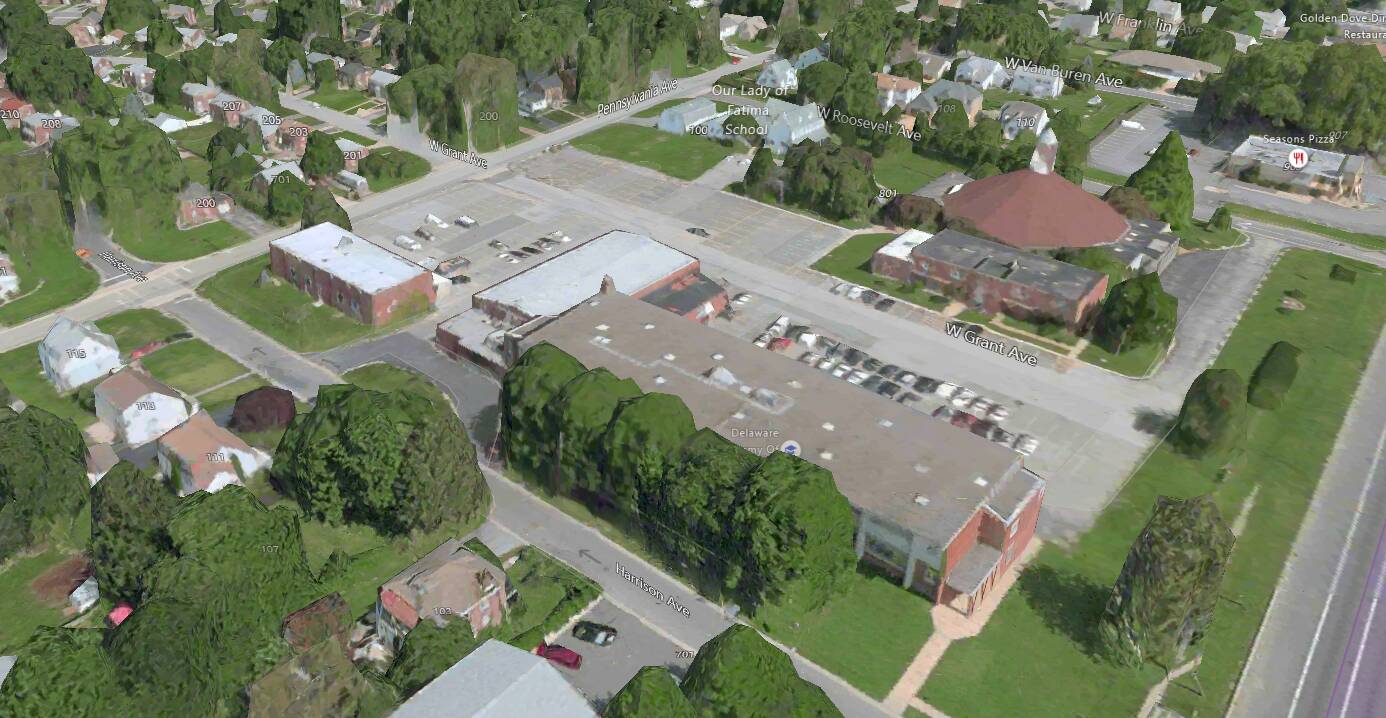
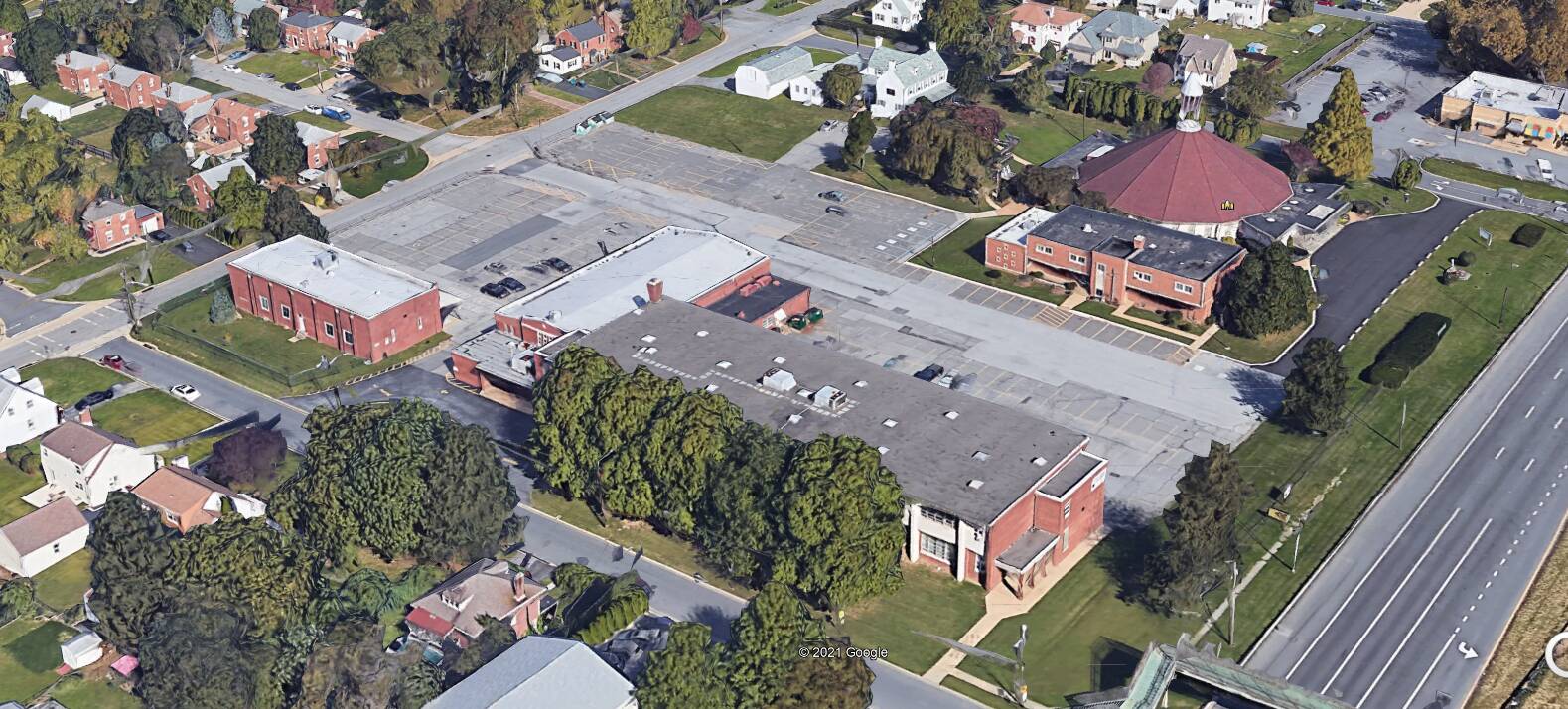
Yes, I definitely see more detail. My issue is, that with Google Earth Pro, in my experience it takes forever to get detail like that. It does not pop up instantaneously. If I zoom in on an area, it’ll take up to a minute for that detail to appear, sometimes even more (I’m not sure what the trigger is to make it better, sometimes it says, “nah, I don’t feel like it”), and, a half mile outside that radius, it’s totally melted, and if I move say a half mile, that detailed area deres’s and it takes a while for the next area to come into detail.
My internet speed is about 350MB/sec max and is pretty steady. I have 16GB of memory and a 2070 Super.
So, from my point of view, comparisons like this are apples and oranges, and doesn’t really apply to flight simulation, where, that level of detail is needed on a 25 mi radius in even a GA flight at 150 knots. Google’s method could never keep up with that in my experience. Everything has a cost, and, here, I imagine that cost is more memory than any CPU could keep filled and piped to the screen as the aircraft moves.
Certainly, I’d love to see this level of detail available in 3 to 5 years, as technology gets better, but I think we’ve got a ways to go yet.
Also, certainly, there’s definitely room for improvement. For instance at a distance of 25 miles, the Empire state building should look like a rectangle, not a cone in a sea of cones.
I agree that the LOD algorithm leaves a lot to be desired. I suspect that it is because the geometry of the full fidelity building is not clean (lousy edges, etc.) which lead to LOD algorithm not being able to reduce edges optimally. I watched a few Google PG conversion videos on Youtube and it is so obvious that these PG meshes are lousy.
My Google Earth Pro seems fine rendering the details in a few seconds (Fios 1Gbps). However, I noticed that there’s a priority list in rendering: buildings get rendered earlier than trees.
Btw, the free Streamable account only allows 524p.
- Google Earth Pro
- Maps in Windows 10
Although photogrammetry is great as a concept, I’d much rather have Asobo getting to use higher res ground textures everywhere with higher LOD range for them than focusing on photogrammetry. This would benefit the sim much more
That being said, getting google photogrammetry inside MSFS has been done countless amounts of time by people producing freeware scenery addons so you can experiment on how better they look albeit without the added workload of streaming the data. They don’t always look so much better in reality in the sim, due to the fact that cranking the LODs to the best of what Google has to offer, where it really makes a big difference, makes the volume of data suddenly rises like crazy (think dozens of Gigabytes) and the FPS falling apart (although not as severely as one may thinks on best hardware).
That looks excellent to me, I mean, what did you expect? This game is bringing the whole world inside a flight sim, it is not GTAV.
Holy cow, google tech has evolved, that looks incredible.
Google have about 10 years more experience and data gathering for their photogrammetry than Bing. Its not surprising that in almost all cases, Google data is just better quality all around.
I get what people are saying, and all opinions are valid for sure. Being someone who started simming with the SubLogic floppy discs, on a Tandy 1000 computer from Radio Shak, I find it hard to complain about the scenery in MFS. 
You know whats interesting, i thought google was leading in the photogrammetry tech untill i saw what simplex have done in Israel
https://simplex-smart3d.com/ces/rehovot/App/?pos=34.8103050,31.8913298,159.338&ori=0,-45.0052651,0
this tech beats google by a long shot, absolutely stunning.
Huh? Then why don‘t you? That option exists since day 1…
I’m sure that the photogrammetry was much better when msfs first launched. We didn’t have melted buildings then did we?
I did here and there, at least from a distance
You can watch the degradation transition of the photogrammetry at the end of my video as I approach closer and land.It goes from high rise condo to “melted white red and green goo glob pillars” upon touch down.
That part really is a turn off🍻
so how do we incorporate this into our sim just…WOW !!!
I actually think photogrammetry is bad in general. I like the idea, but I don’t think it works when you are looking for something that look real.
I think photogrammetry should be used as a more useful base as the satellite imagery to generate building/house models that looks more like it is in real life, without having to rely solely on photogrammetry where everything is washed out.
For example, photogrammetry forest is already converted into flight sim forest area.
However, some parts need to be improved like cars actually driving the good side of the road and following the lines instead of driving in the middle.
Also, place like that should be transformed.
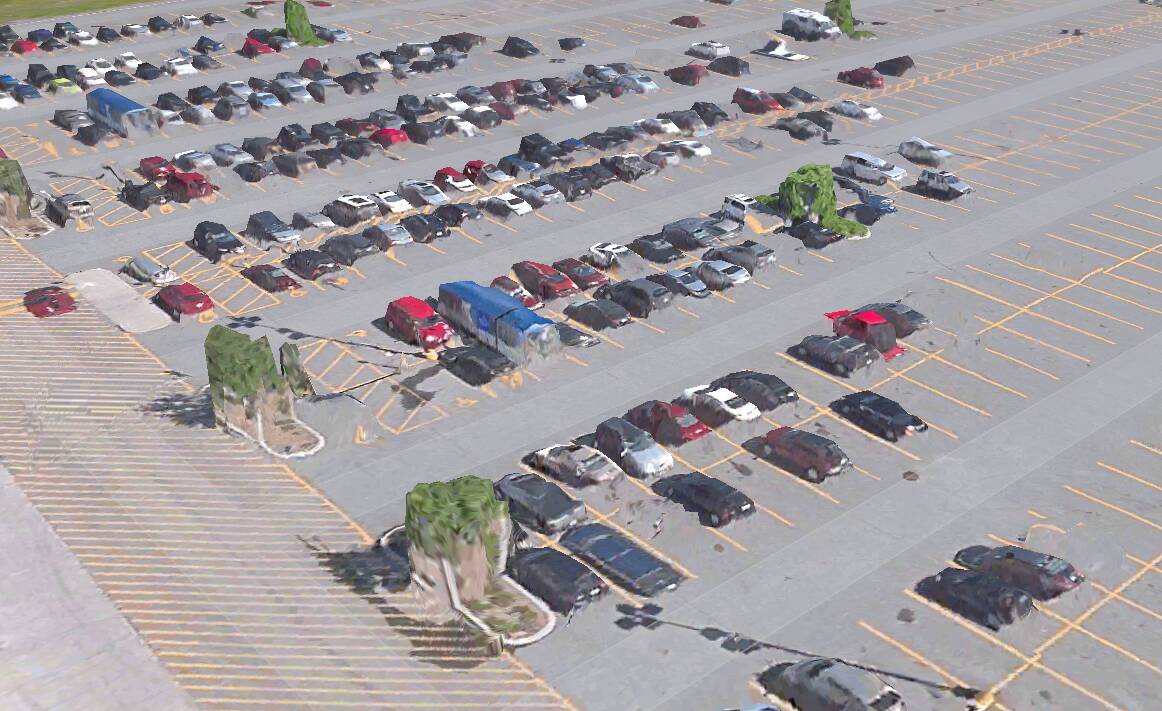
I don’t know if they can convert washed out cars into car model from the sim and trees into tree, but that would need a whole new automated system to clean up the area and re-create the objects.
Or there are some houses like that :
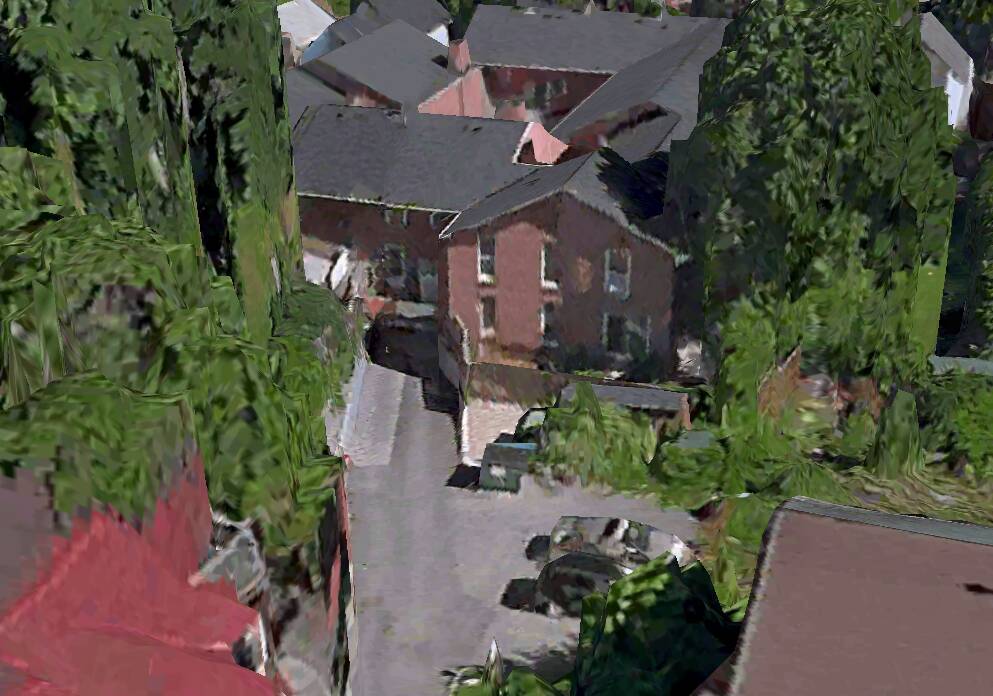
I guess they could figure a system that take the shape of the house and the basic texture/color of the facade and rebuild it… Don’t know if it could work.
Also do we need to talk about the messy bridges it create?
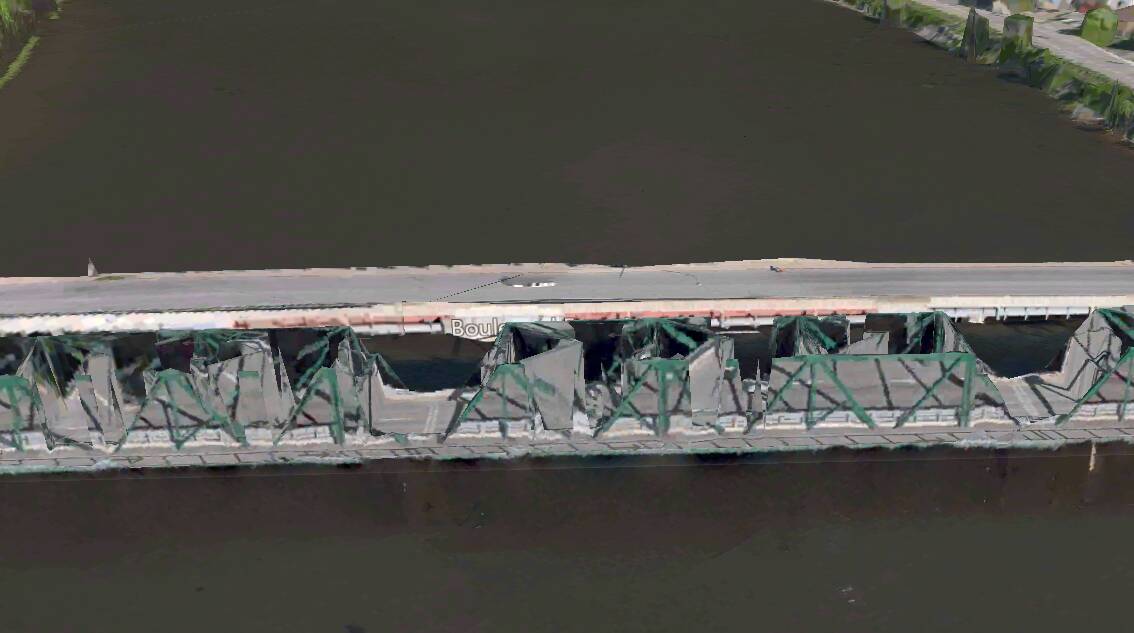
EDIT :
I think with AI they could do a pretty good job to get a semi-photogrammetry.
What I mean is that with photogrammetry, they could retrieve the actual height of a building or house, which kind of surface it has, where are the windows, etc. and from there they could generate an AI building that look similar to the one in real life. For cars, I think they could make the AI remove them like in photoshop and put a generated 3d model at the same place.
Also, for roads, I would love cars to actually drive on the good side of the road and driving in the line instead of the middle or side of the road.
Here is an example taken from W10 Maps app in Canberra.
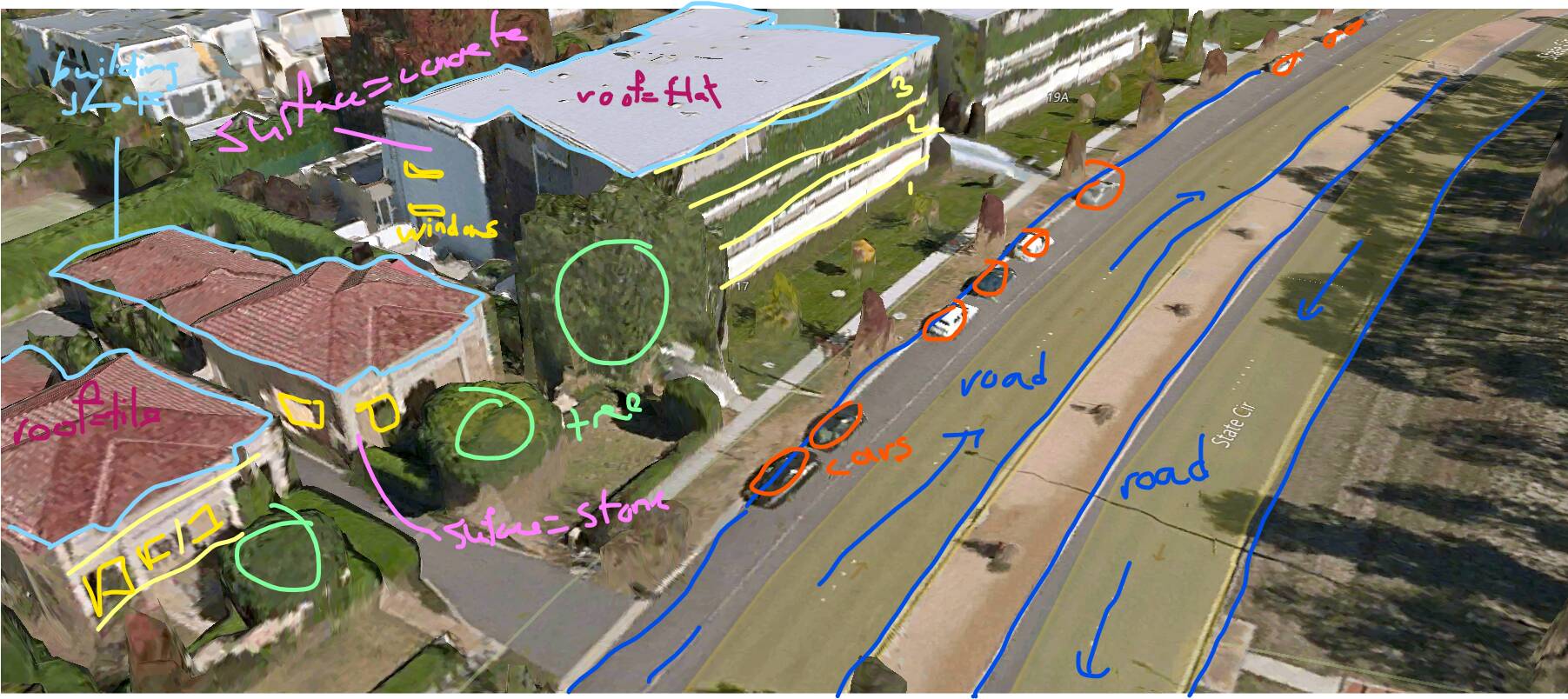
Sorry I’m trying to write with my mouse…