No real probs with SU10 for me except the odd random CTD. Most annoying one when ready to taxi the WT CJ4 and had to set up the route and AC again from scratch. Weather looks good , the clouds in particular. I personally am grateful to Jorg for unlocking the Aircraft config on my favourite Baron. At last I can get rid of that pesky pushback trolley on a GA apron.Hopefully the many remaining ATC issues will continue to be sorted. IFR ATC flights with Real weather can be flown fairly realistically, most of the time. Sometimes, climb, descent and approach ATC instructions (into some airports ) are crazy and have to be ignored. MS are listening to us RW Pilots with realism and usability slowly improving.I fly in Europe and now autumn is here the deteriorating flying weather is well reflected in the Real Weather so I will soon be off to sunnier territory for my winter flying.
Hi there, great job, no problems at all with the update X. The load time of the sim has dramatically improved on PC. It was 4-5 minutes before and is now down to 2-3 minutes. On XBOX it’s unfortunately just a little faster. No CDTs any more, I spent hours without any issues. Multi screens - phantastic - but changing the camera position should only change the window with the present focus to change and not all at the same time. This would be a good improvement.
Well I run at 30 fps.
But… todays 4K TVs … like the QN90 or Oleds… have motion interpolation up to 120hz.
So my sim look as though it’s running at 120 fps.
It is amazing.
The reason it works so well is because the camera isn’t moving quickly.
Many don’t like it for gaming as it can introduce artefacts when moving the camera quickly in FPS games and the like.
…Also it can increase input lag.
But, for simming it’s not an issue … it’s an utter Godsend.
I think more people will move onto these and worrying about ‘only’ getting 30 fps, will be a thing of the past.
Game has been running very nice for me since SU10. That is, with the exception of today. No changes made to my system or settings, yet today I’m at FL450 with fps of only 18. Usually I get a steady 60. The VFR map in my aircraft is playing up too (Default Cessna Longitudinal). The airport and VOR symbols on it keep disappearing and reappearing.
I think it depends on the level you use.
I have 4K native… DLSS Quality renders internally at 1440p and upscales to 4K.
It is very sharp. No blurries. Much better than TAA on both FPS and IQ.
Yes.
You can whack up Shadow quality …especially in the cockpit.
Fps dropped to 10. So I saved the game mid-flight, restarted the game and loaded the saved flight back in. There was some frantic pressing of buttons when the game loaded in as AP and AT had disengaged. But once I got the aircraft settled and back on its flight path, all was well with the fps. Currently sitting at a steady 60fps. 
One day I am having almost no stutters, the next day without changing anything ,my flights are full of stutters. How can this be explained? And unfortunately SU10 did not bring any performance improvement for me. Really frustrated this time. My last hope is the upcoming GRD from nvidia. Currently on latest studio driver.
I think you are already onto the explanation-
It was a different day.
Seriously though, with so many variables I don’t think that anyone can provide a 100% correct answer. OS’s get patched, apps get updated, servers receive configuration changes, ISP providers throttle, etc. and the list goes on.
Well that`s simple, to many people are flying at the same time. That hits the servers and performance went downwards. We should stop searching problems on our systems because problems are serversided
Looks like my issues were mainly down to a mod which for whatever ever reason was fine in beta .20
So glad I got the 12gb 3080 as it’s running between 8.5 and 9.5 gb now consistently just been running 200 ft off the ground at close to Mach 1 in the F104 now glitching or freezing now getting average around 65 - 80 FPS on lod 350 and ultra 
30fps on a 120hz monitor is still 30fps.
You missed that part:
Motion interpolation artificially renders frames inbetween the actual frames being delivered by the source, be it a 24 fps movie or a 30 fps game. So, yeah, while it may not look great it will look like there are more FPS.
No it’s not.
You have to see it.
It’s exactly what DLSS 3 will do … interpolates frames.
It looks great.
As will DLSS 3. Which use exactly tge same methodolgy.
I can choose any degree of smoothibg from 30 to 120.
A balance can be achieved where ut look and feel like 69 but without any smeearing or blurring.
Pkease don’t pontificate about something you haven’t seen for yourself.
I have 2 4K TVs a d a 32" 2K IPS monitor.
I can fky at 30 or 60 fps native… with or without varying degrees of smoothing via the TV.
It’s awesome and I prefer it locked at 30 and use smoothing, than G Sync.
By locking to 30, there are fewer stutters as there is loads of headroom on both cpu and gpu … then the TV interpolates frames.
It’s as slick as baby oil dripping from …
Well… it’s sweet.
It’s mot great for all games as fast movement can causes ghosting… but MSFS is not one of those games. It’s perfect for it.
Try it … and THEN tell me it’s no good.
Hi there, i have the same problem. Did you solve the issue not zooming in and out on the VFR map with the mouse wheel? (GNS 750 and w3000 are updated). A short comment would be perfect.
SU10 has been really great, love how it looks and great performance in VR (DX11, DLSS). Havent seen any multiplayer disappearing, and its great i can see them on the map. Finally mouse scroll wheel on UI sliders! All-around, the best update evar. My only complaint is that is does strange things with loaded .pln files but those are fixable in the G1000 or gtn750 menus by deleting the extra waypoints
Please explain me what 120hz has to do with motion smoothing for 30fps, its’s available on 60hz tv too for a long time already.
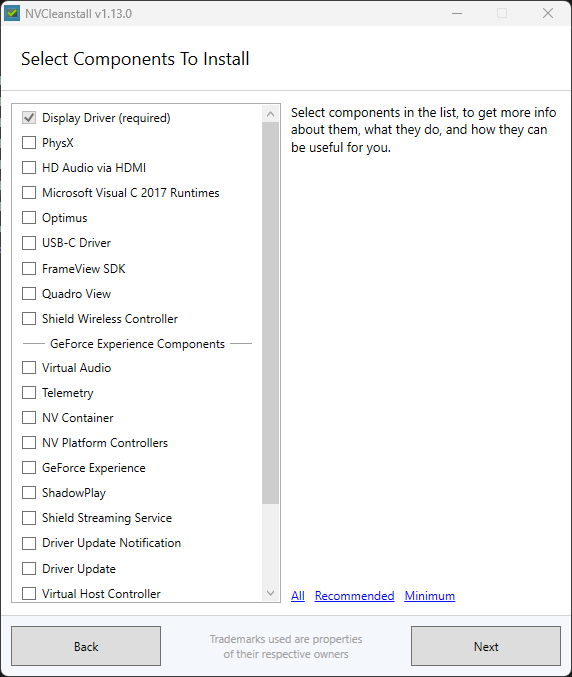
I strongly reccomend installing “pure versions” of Nvidia Drivers instead of “GeForce Experience bundled drivers”…
You can modify your drivers installation by using “NVCleanstall”
( NVCleanstall (v1.13.0) Download | TechPowerUp )
It extracts the selected components out of the standard Nvidia Driver and just installs what you want … no Experience, no telemetry and other useless stuff
Interpolating new intermediate frames is in fact a core feature of the upcoming DLSS3 (which requires new hardware on the RTX 4000 cards, so alas those of us with older hardware won’t see it for a while). The version they’re going to be releasing does a doubling, so eg from 30 to 60 or 60 to 120, and because it has the motion & boundary data from elsewhere in the DLSS pipeline, it “in theory” can do a better job than what TVs can do after the fact from the final video output, at lower latency.
I think there’s a lot of merit to this approach simply in that high frame rates at high resolutions require a LOT of data points, and most of them are nearly the same, so it becomes super wasteful to calculate every pixel individually.  Just like high-res video needs advanced codecs to get the data rates manageable, high-res high-rate rendering can benefit from “smarter” work to make the workload manageable.
But as you note, there are issues with lag and artifacting – and I think moving that closer into the computer and the game engine will help with that, and these techniques will improve over time.