Min. 30 GB
Thanks Saint for so eloquently explaining to me what you think is right and wrong. I just assume you not spend so much time on my education. It’s not welcome or appreciated. How do I block you?
I had to do reboot after update for it to work, but it does work! I also appreciate no power with cold and dark no longer an issue, finally I can see planes parked at airports.
TOO FUNNY .. Thanks, made by day
First it’s “Stop educating me, its not welcome, or appreciated”
Then asks the same person he does not want “educating him” , to be Educated on how to Block him.
@LDSaint echos my own feelings on this. Most of see the same things, and how we react to these experiences, and give that feedback on open forum, differs from person to person.
Constructive criticism seems to be almost the minority, sadly. You only have to look in the bugs group to see that. Angry posts, duplicate posts about the same thing as the search facility is clearly too difficult to use, but hidden in there is the odd gem of a report where an issue has been identified, and a reasoned, coherent response has been made. It may even include discovered workarounds to use while we wait for a fix.
At its simplest, you may find that queries have a better chance of being answered by someone if your post is “Can anyone assist or corroborate?” instead of “Fix this now!!!11”
-
Your comment is only intended to ruffle feathers, and it is not constructive, beneficial, or contributing to the conversation in any way.
-
I’ll answer your question anyway. The co-pilot feature allows the plane to depart from any location to the world, to any destination in the world, with a simulated real-time flight, and you can enjoy the “Showcase” camera angles that are impossible to achieve in real life or watch on YouTube. Also, since I’m not a commercial pilot, I can open the cockpit view and try to learn from what the co-pilot is doing (when it’s working correctly) by watching. And finally, I do like to fly the planes, but sometimes I just like to watch, especially with the stunning graphics.
-
Even real-life airline pilots use autopilot and navigational equipment on flights. So it should work correctly in the sim.
-
There’s no reason to try to put down people for using the sim in the way they want to use it. The co-pilot and camera views are features of the sim, and when they work correctly, there’s no reason why people can’t enjoy the sim in the way they want. So take your negativity somewhere else and stop trolling.
There are many reasons why you see the message “Please insert disc.”
Here’s one solution that worked for me.
- Sign out in the Microsoft Store app
- Reboot PC
- Sign back in the Microsoft Store app*
Hah nope, all I take away is that this sim shouldn’t have been released in its current state. Didn’t even fix the “press any key to start” issue where it say it has 

 and I should add how grateful I am to the community for releasing their own patches/mods etc to fix a lot of issues…
Again, I challenge you to fly around in rural areas looking at farms and hamlets and then find one on Google that also has a 5 story office block.
You realise someone out there is now going to make it their life’s work to prove you wrong, don’t you? 
The worlds a big place, after all.
Heh, yeah there’s bound to be at least one old farm that’s been turned into a technology park for real.
Probably you have the same problem as I had. Skyscrapers everywhere despite the Japan patch. Japan update did not fix anything.
The only thing that really helped me was this:
Try it, maybe it will help you too. 
Look further up the thread. This DOES NOT solve 5 story office blocks all over the countryside.
you might want to comment on tall buildings in the dedicated discussion?
There has been further development since the 1.9.5 release and further discoveries, but first let me assure you v1.9.5 is solving the tall building issue for which a fix was necessary. I know, I’m the author of the fix:
Now there are still places with inaccurate buildings for the place but this is not related to the “tall building” bug. For example another user has posted the modifications to the building definition file in order to make Morocco buildings closer to reality (but with the side effect to lower Cairo’s buildings unfortunately):
And there are other tall buildings caused by 3rd party scenery, like the one explained here:
And corrected when removing the 3rd party scenery:
i had to reinstall the digital ownership from the Microsoft Store. That solved it for me
I’d really suggest you post a screenshot and exact location (LAT/LON) in the aforementioned dedicated discussion, otherwise most you comments which are certainly true might be interpreted as ranting while I believe you’re calling for assistance instead.
That makes sense, as it certainly sounds like a license/DRM issue.
I reported this to zendesk a few weeks ago. It seems specific to certain ATC voices.
It’s not about single buildings in specific places, it’s…for example…about the entire landmass of England. Another fella above said it’s the same in Germany. I’ll go look but I’m fairly confident it’ll be the same in all of the western world. I’ll even go check the 3rd world world but for now, here I am, 5 miles south of EGTF. Every single farm / hamlet has one or more office blocks:
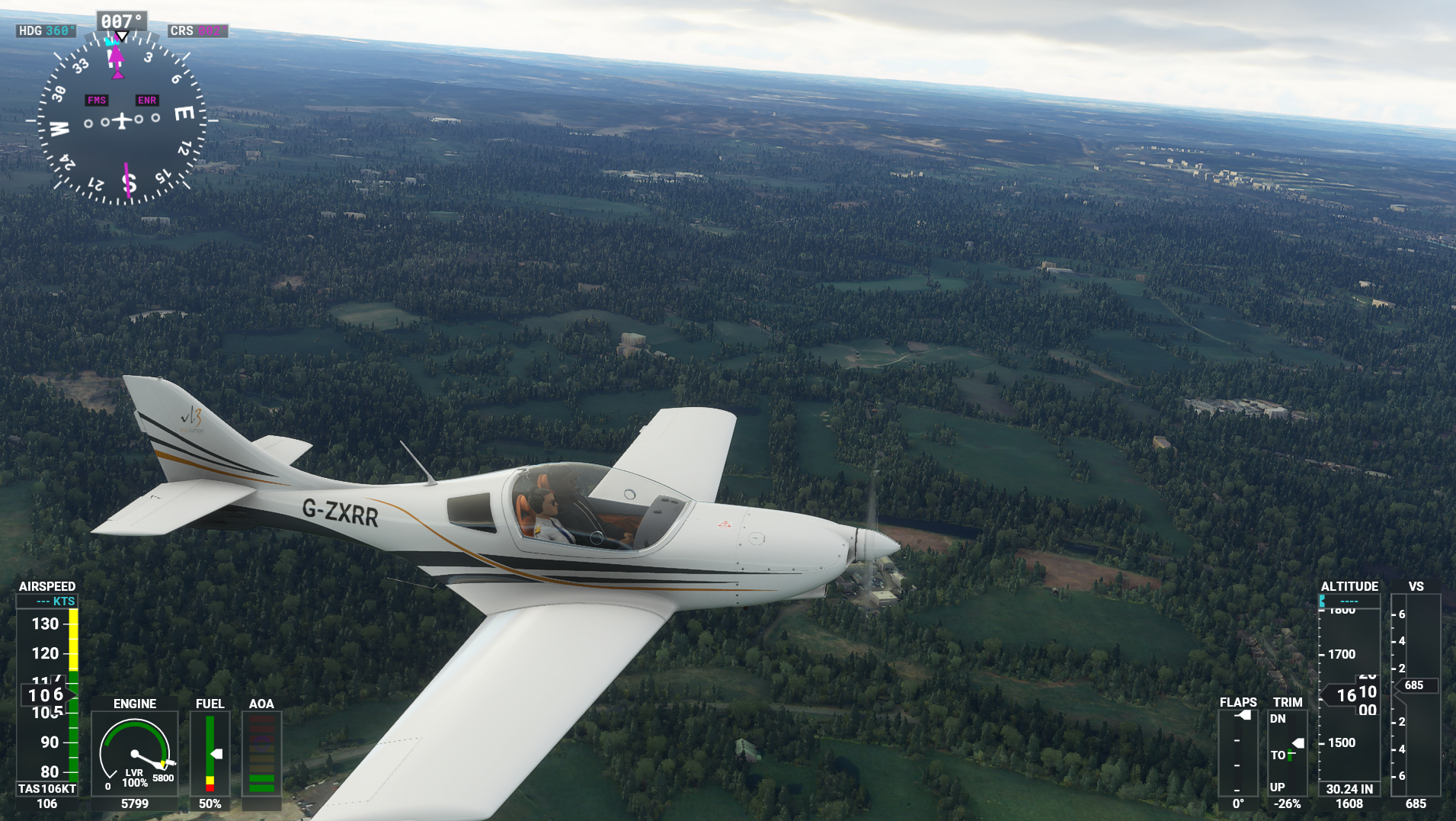
I’ve updated to 1.9.5.0, been to the content manager and updated the two japan modules, deleted and redownloaded the bf-pgg folder.
Edit: Ok, I just looked at a random area of southern France and the office blocks are gone, there’s just 2 story farmhouses. Maybe it’s just England and Germany. Requires further testing, standby.
RNAV/ILS approaches were broken in either patch 2 or 3. ILS seems to be working somewhat, but I haven’t flown much lately.