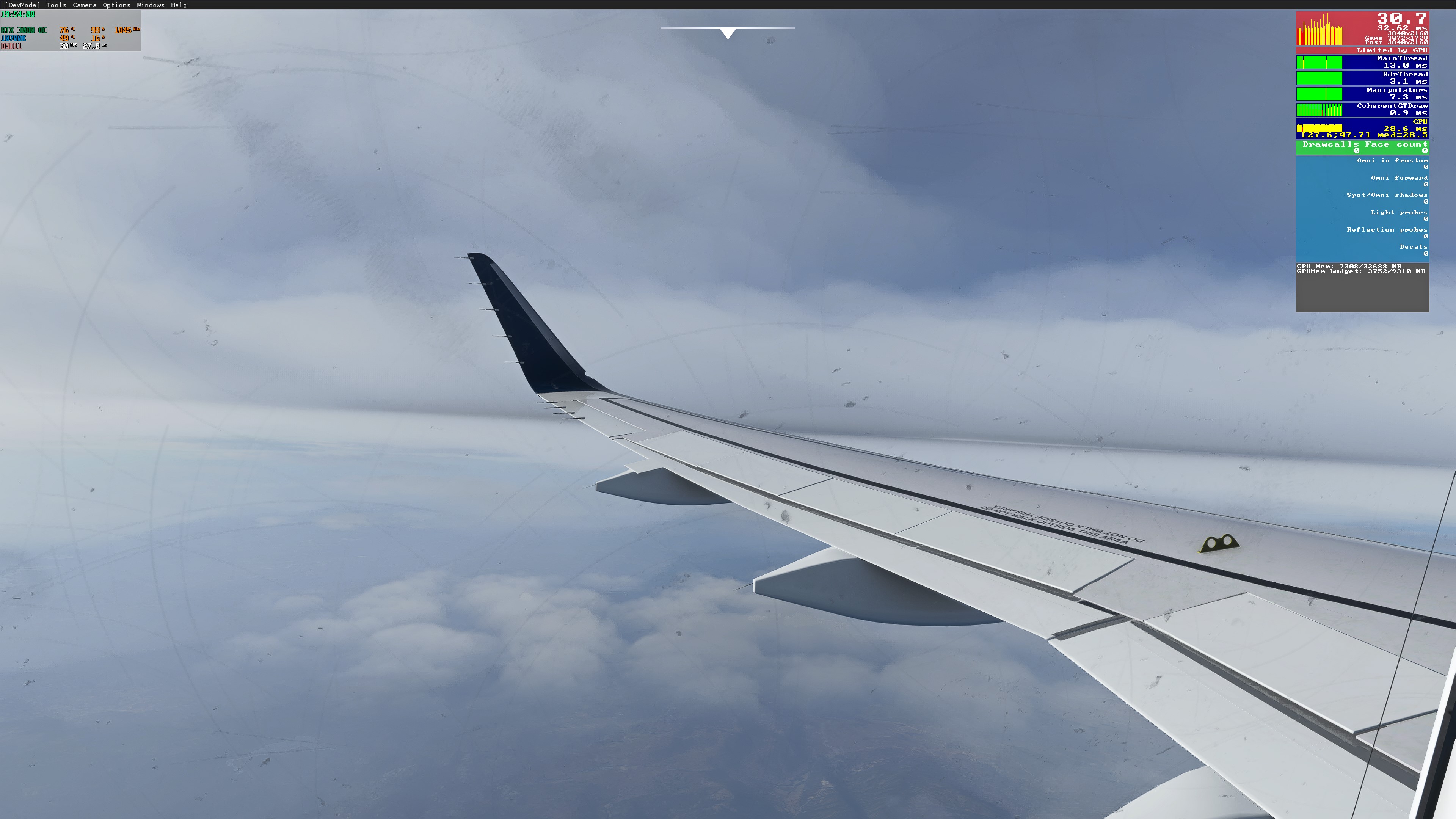
All- wanted to add to this topic as opposed to creating a new one. Specifically, want to make Asobo aware of stuttering, lags, spikes, and drops. I can run solid FPS on 4K in the airliners. Consistently getting above 35 while in the air.
The problem is I look out the right wing and it’s nice and smooth. Out the other direction and it drops a couple FPS but is a stuttering MESS. This needs to be fixed ASAP. Why roll out updates and features when it’s not even a full alpha build?
Why is “CoherentGTdraw” a spiking mess and all over the place? Why is the sim not making use of a powerful GPU?
Seems like the more ■■■■ that is on the screen the less the GPU is used oddly enough lol. At gate at KATL my gpu usage was <50%. At cruise altitude in the middle of nowhere it’s near 100%. Of course the cockpit is always 30%.
Asobo really needs to prioritize this and stop working on non-essential features like VR. I took a break for a week and came back. Performance is still absolutely awful. Stuttering like crazy on a high-end system. Might have to go back to Cyberpunk- it runs very smoothly.
I have made my thought’s known about my horrid experience with MSFS, not just the terrible performance but the purchase and download experience was one of the worst Ive ever had with any product. I have been a flight simmer for over 20 years. Flying mostly the best military aircraft available, but also other high end add ons. I have a very fluid virtually stutter free experience with P3D v5, X-Plane 11.5 and DCS all on med to high settings and with many addons. I have come to the realization that my aged system will never run MSFS without severe stutters and lags. They are so bad that I practically get sick trying to use the game. It doesnt matter what settings I use, low, high, 1080, 2k, 4k, data, no data etc. I cant question others who say they are having a fluid flight experience with MSFS, maybe their expectations are not as high as mine or their systems happen to be just the right setup by the luck of the draw, but I am really doubting that most people are having a fluid experience. Im also perplexed at how the devs seem to keep ignoring the elephant in the room continuing to release update after update with all these new “gaming” features while the game is not even playable for many of us. And some 3rd party devs are ignoring the other sims, racing frantically to get aircraft into MSFS. I get it… they think this will be the cash cow of the future. I truly hope that this game will develop into a sim with optimized great performance, thats what I was hoping, but Im not holding my breath. I dont make New Years Resolutions, but before the clock struck midnight on Dec 31, I deleted MSFS. Maybe I will try it again at some point. All the best in 2021!
(i76950x 4.3OC, 1080 8gb, 32gb ram, 1TB SSD, 30hz 4k)
I get that even after upgrading CPU, I think this is what most ppl experience. It’s probably just loading the scenery at higher level including all the airport stuff. I don’t like it though, sometimes it can take longer.
I’ve generally taken glitches in my stride and tried to be positive. That’s since Alpha 1. But now I’m fuming and angry and have every right to be so.
i9 10850, RTX 3070, 32gb, 1tb ssd. Was getting 35-45 fps at EGLL on default Ultra settings. Butter smooth.
But yesterday it all changed (and no, NOTHING and I mean nothing changed on my rig). Now I’m lucky to get 10fps and it’s unplayable. I reinstalled (took 14 hours to download on a 1gb fiber connection) but still the same.
Hardware benchmarks are normal. Everything up-to-date. As I said, nothing changed on my side.
Reported it to Zendesk but with nearly 1,500 issues in this thread alone, what chance of getting any help?
MSFS is the epitome of a love hate relationship and for this still to be happening is inexcusable.
What angers me more is the hype by Asobo about their snow while core user problems like this go unaddressed. Shameful.
Thank you.
Weirdly today I started having terrible frame rate issues.
Literally spent 6 hours trying to get to the bottom of it but failed miserably.
Nothing changed between me going to bed last night and having smooth motion and this morning/ all day where using the exact same settings and aircraft resulted in an absolute slide show! (19FPS on VR and really stuttery)
Developer mode mostly reported RD thread as the limiting factor.
Really not happy about this, it’s not my configuration that changed in any way.
I have a relatively good system (i7 9700k @5Ghz, 32GB DDR4 @3k, M.2 & SSD, 3080 using an oculus CV1), I just don’t get the inconsistency in between sessions. It has to be something on the server side that affects the client at performance or that latest unwanted unneeded update?
I reinstalled this thing 3 times (14 hours each time on a 1gb fiber connection but let’s ignore that for now!). Reinstalled W10 twice. Updated my BIOS once. The result:- 10fps and unflyable stutters with a 172 or 747. What more can I say except that, “You are not alone.”
Not disagreeing with you at all, but why do you think your performance changed? Something other than new Airac data in the update?
Sometimes I get 45ish fps at EGNM and at other times 29ish with the same settings. Maybe the issue is at my end? Asobo servers? Still can’t work it out really hence my interest in your comment
@Kayembee370
For now, after a week of jumping through countless hoops and hours wasted, I’m up again and for now, OK. What worries me most is that I don’t know what went wrong. And the total absence of anything from Asobo or MS to fix it or to help lower stress levels for their users.
Tomorrow, I have no idea if it will work and if my plan to make some videos, will come to anything. That is not a fair situation for users to be in.
Today FPS is back up in the 45-50 range after yesterday’s 19-25 in 1080p
I rolled back my driver to 457.30 and reset all option in the NCP to default!
Then I selected prefer max performance in power management and texture filtering to high performance gave me 5 extra FPS.
Speed and height I’ve populated areas make a difference in the stutters to me, also in the TBM 930 with the G3000 mod the amount of text displayed on the MFD will lose you >10 FPS! All the waypoints seem to be the killer there.
Disabling the PFD map insert can give me 3 FPS back
For VR I can now again get 30 FPS (solid) using 2.0 SS and asw clock 30.
33ms frame time is now very stable.
Edit:
With regards to the larger stutters it’s the CoherentGT draw that is showing as the culprit in dev mode?
Edit 2:
Flight sim crashed with a faulting module name of CoherentUIGT.dll