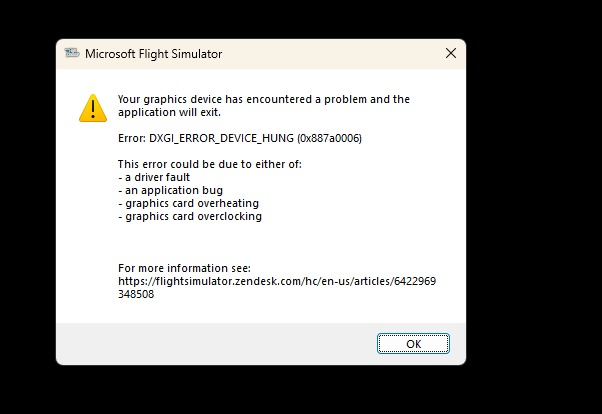
Microsoft has the min requirements for an AMD card as a rx 5700. Is it possible any generations before are not supported. I noticed this year aswell my rx vega 64 is no longer supported on Forza Motorsport, a game that ran fine at 1440p medium just last year.
If its the case that the vega 64 is not supported but a F****** GTX 1050 ti or GTX 970 is microsoft just hates AMD users.
i have a 1070 laying around im so tempted to uninstall the drivers and see if this works if it dose omg i will be ■■■■■■
you know what im going to try it il let you know in 20 min
Well i can say this I uninstalled all my amd gpu drivers threw in a 1070 and magic guess what the game loaded up stright a way "microsoft you are a joke "
Thanks, this is the only solution working for me.
I could not even start the simulator for the first time, installed on a new computer with a clean installation of Windows 11, all driver up to date as well as Windows update.
My configuration:
ASUS ROG STRIX X670E-A GAMING WIFI.
AMD Ryzen 7 7800X3D 4.2 GHz/5 GHz
Gigabyte GeForce RTX 4080 SUPER GAMING OC 16GB GDDR6X DLSS3
Restart the PC here and dont open the MSFS2020, they show an GPU error.
Microsoft in the same month archieve a broken MSFS2024 and MSFS2020 congratulations!
Having the same issue. I found a video on Youtube that may have a fix to work for you.
I can’t add the URL or link the video due to rules for the forum, but if you search
" Msfs2024 Crash fix DXGI_ERROR_DEVICE_HUNG", the video should pop up. It suggests an edit to the registry file for 2 settings. So far it has worked for me. Good luck.
I just had this happen trying to reinstall 2020 with a 4080s. Didn’t think too much about nuking it as far as bringing in 2020 content BEFORE committing to deleting it…
Anyway, make sure your drivers are updated/functional(likely are fine), and just go to your nvidia(or whichever) control panel and reset everything to defaults. Close out any legacy GPU/Mobo performance enhancement apps and see if it gets past that. I was hitting it in 2020 on re-installation it’s the same bug and not specific to 2024 or any other game. You can find that error attached to threads on many other games.
Ironically I had no issues with 2024, just trying to get 2020 back on. What a dunderhead move I did deleting it before the MP management was implemented, 500gb poof in 20 seconds… Trying to install compatible aircraft outside of MP and the installers kept bugging out trying to ‘find’ the 2020 version to update. Back to a slog I never envisioned being back in again. High probability it’s some tiny setting somewhere the sim doesn’t like on initial installation, that’s likely fine once it’s installed.
Putting in an old card probably usurped the setting/capability the modern card has.
Same thing on one of my machines here at the house with a 4090. The other is perfectly fine, but his happens on my home theater PC without fail about 5-10 minutes in.
Same problem here. Ran the sim twice and that was it. First had the 6.7 shader issue, which I resolved, and now this. Went through all the suggested fixes to no avail. Nothing really of value to add to this thread, except to get the Asobo team to notice how many people are affected by this issue. I run out of Bootcamp and never had an issue with 2020. In fact, I am running the sim right now.
I actually found a temporary fix, by deleting the local data folder each time I launch the game (C:\Users[Your Username]\AppData\Local\Packages\Microsoft.Limitless_8wekyb3d8bbwe\LocalCache in my case)
It’s a bit annoying because I have to reconfigure everything each time, but at least it work
I will try to find which file is causing the crash, instead of deleting the complete folder
Didn’t work for me. I don’t think everyone here has the same issue. There seem to be multiple hardware specific issues resulting in the same error message.