Extremely Slow download with 2 Mbit average ! I got a 1G bidirectional internet connection .
3 Likes
Slow slow pmdg updates at 2.0mbits for half hour now what is going on Asobo
3 Likes
Still here in germany 2.0 MBits Download speed. Why the hell this is still not fixed after month??
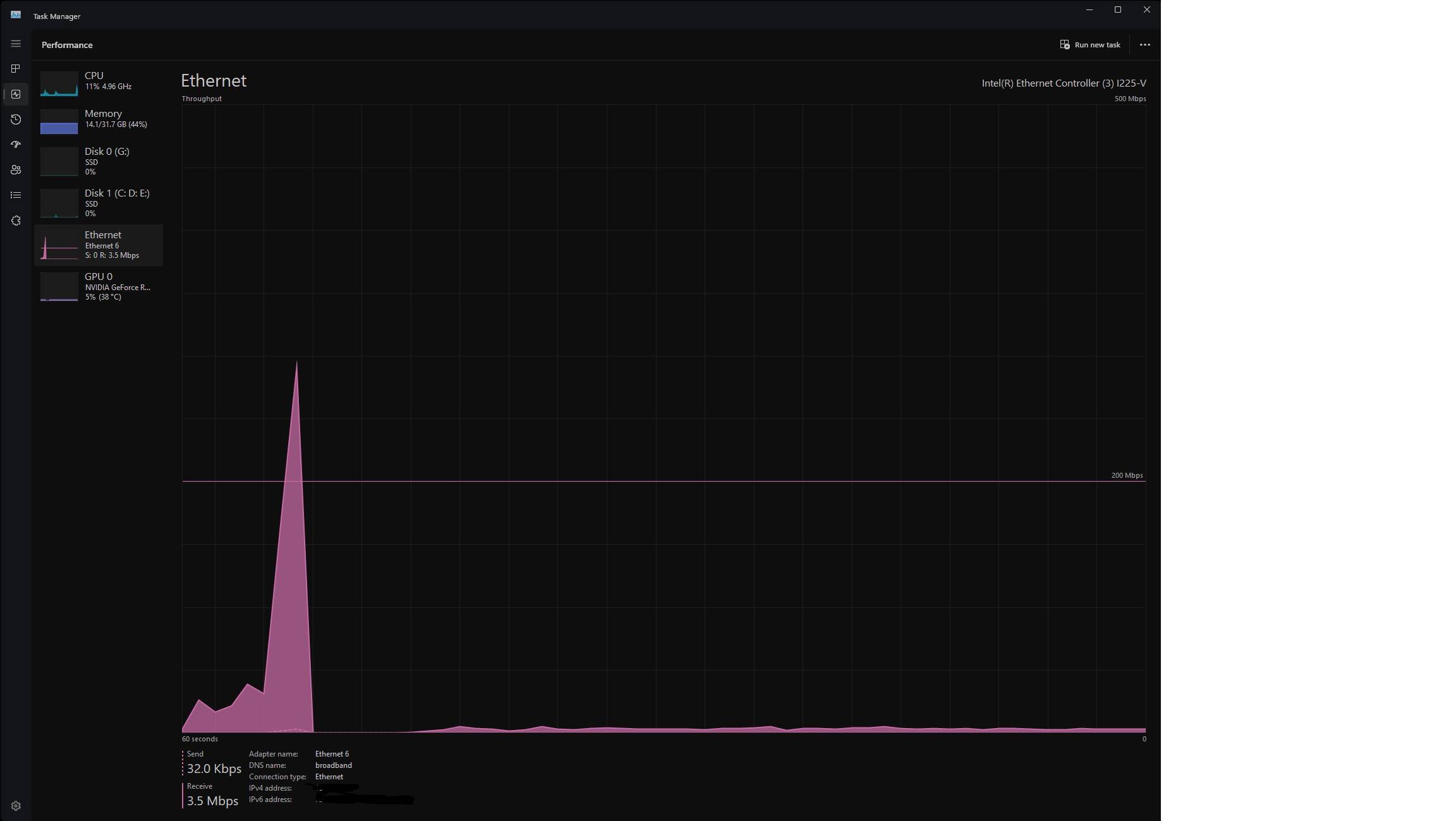
Sometimes the speed goes up to 156 Mbits for 1 Minute then goes back to 2.0 Mbits. Like i would get a dedicated “time window” of a faster download. Really a shame that something like this still really makes downloands such a pain.
7 Likes
Yup, I can get approx. 4 MBit with a VPN to the US right now. Otherwise between 0 and 2 MBit. It is unbelievable.
3 Likes
have you all report this bugg pls do it
4 Likes
Yeah I’m the same on Series X in the UK. Goes up to 250 - 300mb for a moment and then drops back down to 2-4mb. It’s an absolute joke!
My internet speeds are 500mbps
9 Likes
Mines the same. Very slow 2-3mbps
6 Likes
Do you have the same issue if you follow the OP’s steps to reproduce it?
Yes
Provide extra information to complete the original description of the issue:
Several hours for an update, with a 900 Mbps download connection, normally downloading at 2-3 Mbps.
If relevant, provide additional screenshots/video:

3 Likes
Please fix it.. It’s almost impossible to install World Updates or other stuff via Marketplace / Content Manager.
With a 500MBit/s connection, it stays at 2MBit/s download speed for a long time. It seems like there is nothing transfered at all, because the number of data downloaded (on the right side of the bar) doesn’t even change.
Then, all of a sudden the speed “comes back” for a brief time and downloading continues normally, only to slow down again.
I have this problem only with MSFS (every other application / download is working normally), so I’d appreciate if we can get some update about this situation with an expectation when this will be fixed.
I fear the day I have to redownload the whole sim and I’m glad I don’t have to currently. I also tried every possible solution like changing DNS servers etc., nothing helps.
4 Likes
Dont worry the problem is 100% on Microsoft/Asobo side it has nothing to do with our internet connections. I have steady 250 Mbit speed on every other application.
3 Likes
Maybe it’s been throttled for Starfield? I’m getting the same
Seems to have improved today after downloading the latest beta the content updates downloads were back to normal
1 Like
Do you have the same issue if you follow the OP’s steps to reproduce it?
Provide extra information to complete the original description of the issue:
If relevant, provide additional screenshots/video:
On my X Box x having the same issue
You are absolutely correct. Don’t really understand why there has been no acknowledgement of this yet. Has anyone seen anything from MS/Asobo on this issue?
4 Likes
It’s tagged bug logged so they’ve reproduced and acknowledged the problem. Nothing more has been said on the matter as far as I can recall, like some other serious issues affecting many users it’s radio silence on progress towards a fix.
1 Like
Tried that. The update downloaded at usual speeds, but content manager is just as slow for me as before.
1 Like
Unfortunately files are still starting at 2mbps for a long time with spikes/bursts of higher mbps. I’m on PC though. It’s just taken less time to download Starfield than it took for 6Gb of purchases and updates in the marketplace!
2 Likes
I’m currently reinstalling all marketplace content as they have all magically disappeared from my sim at a steady 2mbps jumping up to normal download speeds after about 5 minutes for each item I have selected to install, then dropping back down to 2mbps again for each new item, I’ve been downloading the 63Gb of data needed for all the items for the past 15 minutes and have only managed to install 3 items so far and they were all small sizes. It’s going to take hours at this rate.
1 Like
Oh that’s disappointing - I had thought that perhaps we were seeing an improvement perhaps I was simply lucky as had no issues with the speed of the content updates. Let’s hope this is addressed soon it’s been painful.
1 Like
2.5mbps then jumps to 200mbps to prove nothing wrong with my connection then back down to 3.5mbps. Frustrating given my 500mbps fibre to premises connection and never had problems until about 3 weeks ago.
Nearly 10 minutes to download 1.32gb when it should have taken about 3 minutes - what a waste of energy - so much for Microsoft promising green updates!

6 Likes