Fixed cameras not available anymore by pressing the "toggle drone" key then "cockpit/external view" key

ISSUE DESCRIPTION

Description of the issue:
In MSFS 2020 and MSFS 2024 before SU2 we used to be able to access the “Fixed Camera” views by first pressing the “TOGGLE DRONE” key and then the “COCKPIT/EXTERNAL VIEW MODE” one but in SU2 this shortcut does not work anymore and pressing the “COCKPIT/EXTERNAL VIEW MODE” in the DRONE view makes the sim jump to the COCKPIT VIEW.
The issue had in fact already been reported in the SU2 beta section (cf https://forums.flightsimulator.com/t/bug-fixed-cameras-not-available-anymore-via-assignment/715359) but since the beta is closed I figured it would be best to create another issue

[PC Only] Did you remove all your community mods/add-ons? If yes, are you still experiencing the issue?
No but I don’t see why it would be linked to the mods. In SU1 I had addons but didn’t experience the issue

FREQUENCY OF ISSUE

How often does this occur for you (Example: Just once, every time on sim load, intermittently)?
Every time I try to use the shortcut to go the Fixed Camera view

REPRODUCTION STEPS

Please list clear steps you took in order to help our test team reproduce the same issue:

  1. Assign the following buttons:
  • TOGGLE DRONE
  • COCKPIT / EXTERNAL VIEW MODE
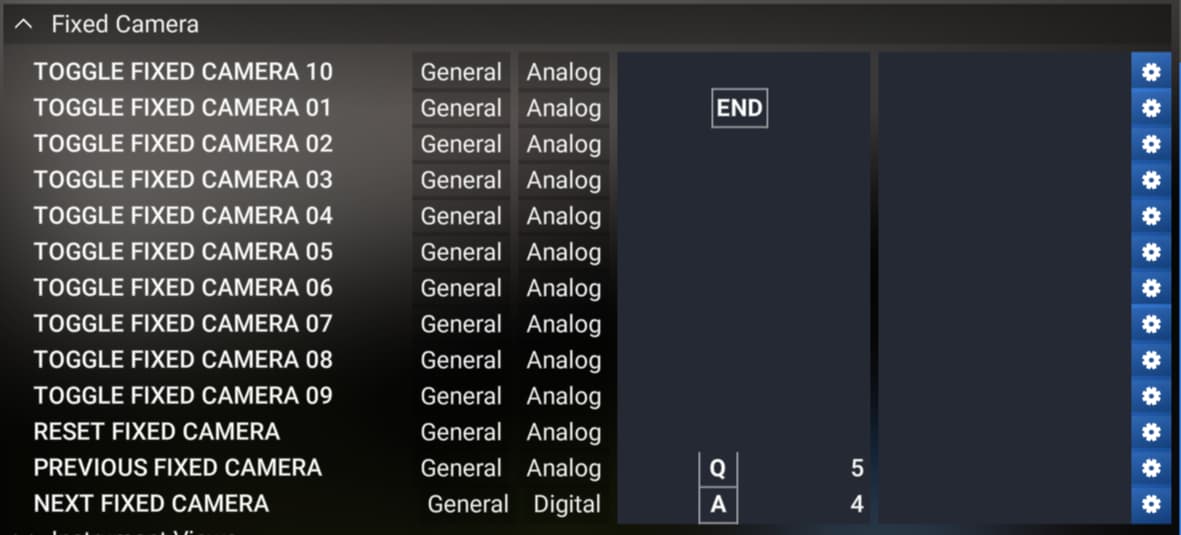
  • NEXT FIXED CAMERA
  • PREVIOUS FIXED CAMERA
  1. Start a free flight
  • Press the button assigned to “TOGGLE DRONE”
  • Press the button assigned to “COCKPIT / EXTERNAL VIEW MODE”
  • Use buttons assigned to “NEXT FIXED CAMERA” and “PREVIOUS FIXED CAMERA” to cycle through fixed camera views

YOUR SETTINGS

If the issue still occurs with no mods and add-ons, please continue to report your issue. If not, please move this post to the User Support Hub.

What peripherals are you using, if relevant:

[PC Only] Are you using Developer Mode or have you made any changes to it? Not in developer mode

[PC, MSFS 2020 Only] Are you using DX11 or DX12?

[PC Only] What GPU (Graphics Card) do you use? NVIDIA RTX 4080 SUPER

[PC Only] What other relevant PC specs can you share?

MEDIA

Please add a screenshot or video of the issue occurring.

[END OF FIRST USER REPORT]


:loudspeaker: For anyone who wants to contribute on this issue, Click on the button below to use this template:

Do you have the same issue if you follow the OP’s steps to reproduce it?

Provide extra information to complete the original description of the issue:

If relevant, provide additional screenshots/video:

Go to the Controls screen for keyboard and enter “fixed” as the search item.
The controls differ for either the FS2020 or FS2024 Transversal presets.

It will show the keys to display the showcase fixed camera views.

The fixed camera views have nothing to do with “Drone” or “Cockpit” or
“External” views.

I dont know what the preivous response has anything to do with your issue, but well some folks are quick to offer help.. :person_shrugging:

I also noticed this as i use the fixed cameras quite often. Asobo also took away the aircraft controls from the fixed camera views which is another bug. :angry:

The workaround for now is to program a button which brings you into, say fixed camera 1 using TOGGLE FIXED CAMERA 01, then you can use “next” and previous" to cycle through the fixed cameras. You will need to hit TOGGLE FIXED CAMERA 01 again to get back out of the fixed cameras again. I found that you have to be in either external view, or drone camera for that toggle to work correctly. Make sense?

Here is the bug for no control on external cameras:

Just trying to understand the views.

There are 3 camera views:

  1. Cockpit
  2. External
  3. Showcase/Drone
    Drone
    Fixed External 1 -9

Only the showcase/drone camera has a subset of Fixed External views.

Keyboard 2020 Transversal Preset

The bindings for fixed external camera views are:
Toggle Fixed Camera 1 through 10 → Ctrl + Shift + 1 through 0
Next Fixed Camera → A

In Cockpit view:
Ctrl + Shift + 1 displays Instrument view 1 because
Toggle Instrument view 1 → Ctrl + 1

In External view:
Ctrl + Shift + 1 displays Toggle Fixed Camera 1
The A key displays the next Fixed Camera view
You have to click any Fixed Camera View key twice to return to External
view.

In Showcase/Drone view:
same as External view

Note:

  1. With the on-screen Camera icon with Fixed Camera External
    1 selected, the Drone view is locked to the Fixed view.
    To get the regular Drone view, the selection needs to be changed to
    Free Camera, Camera Drone.

  2. Toggle Plane Controls is only bound to key C for Drone view.

  3. Fixed external view has no plane control binding.

yes I found the workaround of binding a key to a specific fixed camera as well and cycle the views from here but then the sims ends up in the a weird place when you try to go back to the cockpit view. From a fixed camera view when you click on the “COCKPIT/EXTERNAL VIEW” key you don’t end up in the default cockpit view in a cockpit view with a weird view angle and you have to click a little bit randomly on the “TOGGLE DRONE” and “COCKPIT/EXTERNAL VIEW” keys to go back to the default and correct cockpit view.

are you talking about those bindings?


I know those ones, I’m not referring to them

I’m talking about the “Fixed camera” views in the “Showcase” tab. In the past you could press the “TOGGLE DRONE” key and then the “COCKPIT/EXTERNAL VIEW” one to go to the “External 1” view (or the last one you used after starting the free flight) but that shortcut does not work anymore

This is what I have for the Keyboard 2020 Transversal preset.

Reset Cockpit View & Reset External view → Ctrl + Space

Not sure what you’re talking about, I also have those bindings set but none achieve what I described in the report

Those Reset controls take my display back to the default views.
That is what I was referring to.

Its so annoying hope they fix it

Do you have the same issue if you follow the OP’s steps to reproduce it?
• Yes

Provide extra information to complete the original description of the issue:
• When IN the SHOWCASE view (ie Drone Camera), there is no working key bind to toggle between the Free Look Drone, and the Fixed Camera views. You can assign key bindings to enter Fixed views 1-10, and activate the change that way. Once any of the Fixed Camera views is active, you can use the Next or Previous Fixed view, and even get back to the Free Look Drone view - but then you can’t Toggle back to the Fixed views.

• There is an additional bug here: If you Activate any of the Fixed Camera Views while in Showcase (Drone) Camera mode, it changes the Cockpit Camera to the respective Instrument view, so that when you switch back to Cockpit Camera, you are surprised to be in an Instrument view:

  1. Start in Cockpit Default view
  2. Switch to Showcase Camera
  3. Activate Fixed Camera # 3
  4. Switch back to Cockpit Camera…
  5. Cockpit will have also changed to Instrument View # 3

• And that creates a 3rd bug: Having moved from Showcase Fixed view, to Cockpit Instrument view, if you then try to reset the Cockpit view to Default (Shift Space I think), it switches you BACK TO SHOWCASE view. Disorienting. The logic is broken.

If relevant, provide additional screenshots/video:

Issue still present in SU3

Issue still present in SU4 Beta 1

Do you have the same issue if you follow the OP’s steps to reproduce it?
• Yes

Provide extra information to complete the original description of the issue:

Put simply, the cockpit/exterior button does not work as intended and takes you to the wrong place when pressing it in the showcase drone mode.

Previously, and in 2020, pressing the ‘cockpit/exterior’ button would alternate between drone/fixed views when in showcase mode.
In the SU2 beta and onwards (now as far as SU4 beta), this is not the case, even in drone view the button will revert to the cockpit view. Of course after that when you press it again it swaps you to the exterior view instead. Pressing the cockpit/exterior button while in fixed views WILL take you to drone first, but not the other way. As stated it takes you to the cockpit, despite this not being a showcase view.

(So it goes Fixed Views>Drone>Cockpit>Exterior>Cockpit and loops instead of Fixed Views>Drone>Fixed Views>Drone)

The issue did not exist prior SU2 beta.

The only way I can quickly access fixed views is to open one with the camera UI menu, and then I can use the ‘toggle drone’ button to swap between showcase/normal cameras. However I must avoid the “cockpit/exterior” button as it will take me to drone, and then I won’t be able to return to fixed views as pressing it again will take me to the cockpit.

If you’re familiar with the buttons, you know the logic is wrong. It shouldn’t be that the button only works in one direction.
Using the cockpit/exterior toggle while in showcase mode should never take you back out of showcase mode. Only the toggle drone button should do that.

An easy way to compare is to do the same exact thing in 2020 and 2024. You will achieve different results.

Now into December, this logic issue still remains in the cameras.
For such a well built, professional sim, such a bug like this seems unthinkable, and seeing it still unsolved is really disappointing.
To quickly summarise, the cockpit/exterior button doesn’t behave as it should when in the showcase mode. In showcase drone specifically, pressing it takes you to the flight deck, despite this not being a showcase view. It should take you to fixed views.

Fingers crossed this can be solved soon. Its always a pleasure returning to 2020 for the aircraft on there and being able to use the cameras as normal!

Hi folks,

Can I get an update from you all as to whether you can still consistently reproduce this in Sim Update 4 (or Sim Update 5 Beta), or has this now been addressed and is working correctly for you?

Thanks!

Its been so long i already forgot what we did before… :wink:

Can’t speak to SU5 beta yet since i have decided not to test this time around.
In SU4 though, the COCKPIT/EXTERNAL VIEW MODE binding still does the following:
When in cockpit, pressing the binding takes you to external mode (and back to cockpit)
When in Drone, pressing it takes you to external mode, and then back to cockpit.
Showcase mode at this time, is still not in that sequence as per the OP.
As I had posted in July, the work around is not ideal (as it requires yet another binding to access the fixed cameras, they used to be available in a loop sequence).
At least we do have control over the aircraft again while in fixed views :+1:

Thank you for the bug report.

We have created an internal ticket to see if our team already has this logged, and if not they will attempt to reproduce the issue and create a new bug report. This item is now marked as feedback-logged. If there is an existing bug report or one is created, we will move this thread to bug-logged.