I can only assume you don’t fly that many different aircraft and/or you only have the basics bound and have so far been lucky. There are aircraft that have different controls for many things including some basic stuff like master and avionics switches, landing lights etc. Perhaps your subset and circumstances have led you to this conclusion but It’s nowhere near 99.9% commonality across all the aircraft as you claim.
Yes, maybe I’ve been lucky. And I do know that there are many who have a lot more bindings such as engine or electrical functions that I don’t bother with as far as having them bound to my hardware.
I just purchased this one, oh boy it is a whole lot different: I can’t get it set up properly without some good tutorial but that is exactly what is fun with this privat jet: for once it is different !
This seems to be a great plane!, I just bought it. But one question: the Autopilot controls are so awkward. The Altitude adjustment knob is far below the throttle in the center console. But the VS speed selector is up by the window, where the AP controls are on most jets. Why was the Citation X designed in this way?
Not sure why it was designed that way - maybe works in the real plane as the knobs are close to the pilots’ right or left hand. In the sim it is more difficult so they have put three click spots in front of the captain just under the glareshield where you can adjust heading, altitude and course.
Hover the mouse cursor over the screws around the PDF.
Haha yeah I had the same thoughts at first until I saw a tutorial about the screws with the manual stickers under them, brilliant idea. I am really unsure which one I like the most, phenom or this one, both are great. But it feels great to fly on something else than the garmin suite for a change.
This is one of the best AC on Xbox and career mode, thankyou!!
The turbulence that shakes the camera is an absolute game changer and I’m struggling to fly any other biz jet, which is fine by me
Question for the auto throttle
Do I need to engage the ATS button for takeoff? And does this then apply FMS speed (magenta numbers) and/or manual speed (blue numbers)? I press the TOGA and TO appears on the PFD but unsure if I need to also press ATS button
Also the throttle detents, I notice they have a click and when in the click position the mode is goes green colour on the throttle gauge, like green TO, CLB or CRU, but there is also white colour TO, CLB or CRU modes outside of the “click range”, what is the difference?
The manual is a bit light on info on the auto throttle (ATS), but this is how I use it:
- Before take-off I set the AP mode to HDG/NAV and VNAV and the required ALT I’m cleared for.
- After lining up I set the throttles to IDLE. I don’t touch them until after landing.
- I click on the ATS button. The ATS indicator shows ARMED.
- I click the TOGA button on the throttle … and off you go!
- Once airborne (400 feet or so) I enable the AP. This will activate whatever lateral mode you have set (HDG/NAV) but ATS remains in TO mode and accelerates to 170kts.
- I then go FLAPS 5 and enable FLC for the AP. That will set the ATS to CLB at 210 kts.
- Then FLAPS UP.
The ATS will fly FMS speeds (magenta) if set to FMS on the ATS SPD switch. It will then stick to whatever flightplan restrictions there are.
As for the indicators, I’m not entirely sure what you mean by green and white, but basically you have three indications on how the throttles, the ATS and the FADEC interact:
- There are the detents on the physical throttle controls. They will command the FADEC into a given mode: TO, CLB, CRU
- The FADEC mode that is active is shown on the MFD (middle screen) under the FAN%. It should reflect whatever detents the throttles are in, as white text, again TO, CLB, CRU.
- And the ATS status display, the green LED indicator at the top left of the panel. It shows the current ATS status i use (there are lots of them, listed in the manual).
Keep in mind that the FADEC and ATS modes don’t necessarily have matching indications. I tend to fly at the highest possible cruise speed (the whole point of the X  ), and the ATS will show “SPEED CRU” while the MFD will still say “CLB”.
FlightFX Cessna Citation X V2.1.4 Changelog
GAMEPLAY
New Inertial Immersion System
- Custom-built body and seat inertia effects.
- Simulates rattles, shakes, vibrations, turbulence, windshear, touchdown, stall buffet, ground roll, dirty air, and high-G maneuvers.
- Effects can be configured from the EFB.
Career Compatibility
- Aircraft has been moved to a fully modular setup.
- Now compatible with the VIP Transport specialization.
Walkaround
- Added full native walkaround support.
- Improved timing of pre-flight item clickspots.
- Added Career-compatible interactive covers, chocks, GPU, and doors.
AVIONICS & SYSTEMS
P2000 Lateral Navigation Computer Overhaul
- Major overhaul resolving missed sequencing, instrument desynchronization, and intermittent Direct-To logic issues.
- Improved FMS navigation accuracy.
- Pilot and copilot bearing displays are now independent and correctly follow their respective selector positions.
- Improved airport ID display on the STAR selection page.
- Added ETE and ETA information to the FMS Descent page.
- Added estimated time information for each waypoint on the Flight Plan page.
- Waypoints now display the Zulu time at which they were crossed.
- Corrected color inaccuracies on the Flight Plan page.
- Improved automatic NAV radio tuning from ILS frequencies.
- Automatic NAV tuning will no longer overwrite a manually entered NAV frequency.
Missed Approach Support
- Full missed approach support added to the FMC.
- Published missed approaches are now loaded with the procedure.
- Missed approaches can be armed via MISSED APPR or TOGA.
Flight Performance Prediction Overhaul
- Flight performance predictions are now based on real Citation X performance data.
- Fuel remaining and ETA predictions are calculated for all flight plan waypoints.
- Predictions account for cruise winds, per-waypoint winds, temperatures, aircraft weight, ISA deviation, and ambient conditions.
- Corrected ETA prediction logic on the PROG page.
- Fixed incorrect or NaN fuel predictions while on the ground.
PERF PLAN Page
- Added a new FMC performance planning page powered by the updated performance predictor.
- Supports SimBrief wind imports.
- Provides takeoff and landing performance, V-speeds, and live destination predictions.
- Added cruise wind entry and its effect on performance predictions.
- Updated PERF INIT transition altitude entry to accept values in feet rather than flight levels.
- Added the ability to manually edit V-speeds from the MFD.
Weather Radar
- Added manual and automatic weather radar tilt functionality.
- Corrected weather radar display colors.
Flight Displays
- Added missing MFD Menu Page 2.
- Added PFD HSI ARC mode with weather radar overlay.
- Added DME readout on the MFD.
- Added VOR/DME status display.
- Corrected the direction of the EICAS brightness knob.
- Corrected IAS/Mach crossover logic, including issues preventing manual override.
- Fixed the yoke not reacting visually to autopilot roll commands.
Advisory VNAV
- FMS Flight Plan page now displays predicted Advisory VNAV altitudes for waypoints without specified constraints.
- Advisory VNAV predictions are now aligned with the Vertical Situation Display.
Autothrottle Overhaul
- Autothrottle is now more predictive and less reactive.
- Smoother operation with fewer overreactions to instantaneous changes.
- Improved coordination with Flight Level Change.
- Better speed protection during initial climb.
- Improved descent-rate control during FLC descent.
- Fixed an issue where the autothrottle could command reverse thrust while on the ground or in a Cold and Dark state.
GPWS / EGPWS
- Added EGPWS.
- Added GPWS.
Miscellaneous
- Enabled Marker Mute button functionality on the audio panel.
- Added acceleration to the minimums knob.
- Added missing action for the PASS SAFETY switch.
- Fixed gyro initialization of the standby attitude indicator.
- Added missing CAS messages and Master Warnings for in-flight engine failures.
- Corrected PAC HP valve operation during descent.
- Restored functionality of the Settings page line select keys.
- Fixed various panel labeling typos.
ELECTRONIC FLIGHT BAG (EFB)
General EFB Improvements
- Overhauled and improved the EFB experience.
- Improved persistent saving of EFB options across flights using custom save logic.
- Redesigned the home screen with new icons and background, a live weather panel, and a turbulence EDR graph when the Inertial Immersion System is active.
- Added keyboard input blocking while entering data in the EFB to prevent unintended simulator commands.
- Fixed ground services graphics incorrectly showing covers on static wicks when none were installed.
- Unlinked parking position from external power availability.
SimBrief App
- Added a new EFB app to import flight plans into the FMS with improved logic and failsafes.
- Imports flight plan winds, cruise altitude, and weights.
- Provides detailed Navlog and SimBrief OFP views.
- Allows weight and balance data to be exported directly to the Load Manager.
Moving Map & Charts
- Added OpenStreetMap and Satellite map modes.
- Displays synchronized FMC flight plans in real time.
- Displays the aircraft’s traveled path and altitude.
- Added synchronization between the FMC, MSFS EFB, SimBrief app, and EFB Moving Map.
- Added native Microsoft Flight Simulator LIDO Charts.
- Fixed MSFS 2024 tablet flight plan transfer to the avionics.
Weight & Balance
- Improved look and feel.
- Added seamless SimBrief integration without redundant logins or pilot IDs.
- Weight & Balance now loads and unloads native MSFS 2024 passenger avatars.
- Fixed an issue where EFB payload values could continuously toggle between 0 and -0 when no payload was assigned.
Throttle Calibration
- Improved throttle calibration.
- Added idle detent calibration for hardware setups using reverse thrust on the same throttle axis.
Miscellaneous
- Fixed missing static wicks on the Winglet Edition.
ENGINES & FLIGHT MODEL
Engine & Thrust Logic
- Reworked reverse thrust logic.
- FADEC now allows throttle commands between CRZ, CLB, and TO detents instead of jumping only between the three detents.
Flight Model
- Reduced overpowered spoiler drag.
Wing Flex
- Added a new custom-built wing flex simulation based on spring physics properties.
- Tuned to simulate the Citation X’s stiff, short wings.
- Fully reactive to the Inertial Immersion System.
Visual Improvements
- Major optimizations to textures, artwork, and geometry.
- Retired Lite variants in favor of a single optimized model with improved LODs.
- Added MSFS 2024 windshield scratch textures and iridescence.
- Corrected rain appearing on the inside panes of the windows.
- Fixed red livery geometry clipping through the underlying model.
- Fixed floating geometry near the left wing.
- Added missing VR cockpit yoke interaction.
- Revised values for all cockpit bulbs and emitters.
- Fixed various cockpit bulbs and indicators that were too dim to see.
- Added additional cabin lighting intensity steps.
- Fixed missing animations on MFD 1 softkeys.
SOUND
Cockpit & Aircraft Sounds
- Restored missing sound effects for MFD 1 softkeys and CDI knob 1.
- Added dynamic cockpit sound effects tied to the Inertial Immersion System, aircraft movement, and flight conditions.
12 Likes
I’m confused about why this is news (I’ve also seen posts about the update on social media). Hasn’t this update been released 8 days ago already? Even the marketplace product page seemed to be updated then.
Likely just a bit of a delay due to the official MSFS team being preoccupied with Gamescom travel and responsibilities last week. As this was a featured Marketplace exclusive, MS seems to continue to support and promote it almost as if it’s a first party product, but not quite.
I see, thanks. I wasn’t sure if this was new or if I missed something.
I cant get this update to work. I have the plane installed. The update loads, runs but it still comes up as update available. Should I uninstall and just stream to get this update?
Generally it’s better to leave the aircraft streamed rather than manually manage updates and installations. If you feel like you must install things locally, updates will break if the aircraft being updated is currently selected in Free Flight. Go to Free Flight, select an aircraft other than the Citation X, and then move forward with the download/installation of the update in My Library.
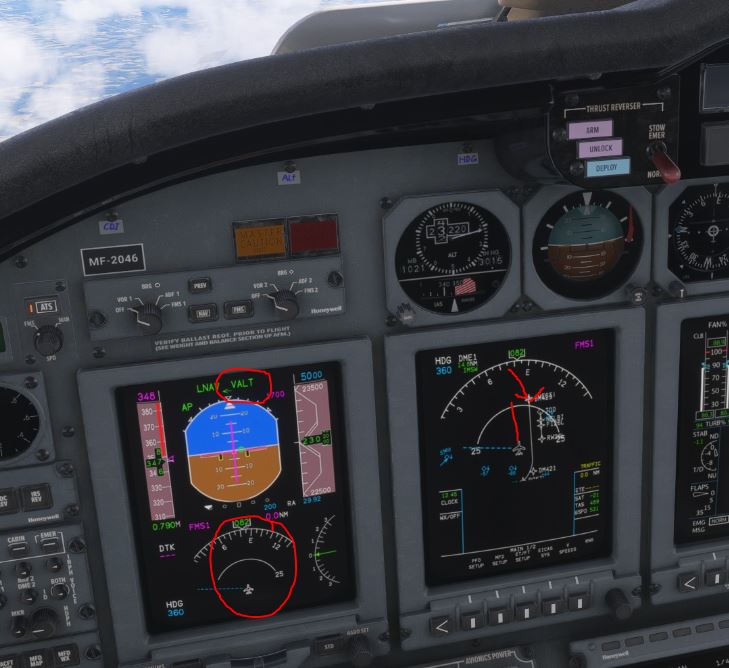
me too, my Cessna is broken since V2
Was it a Simbrief imported flightplan?
There’s a confirmed bug with those, if they contain legs with 0.0NM distance. In those cases you’d have to revert to manual inputs.
The bug affects DIR TO operation as well.
There are some other glitches, like the CDI “screw” not working, or VOR needles not showing, but I won’t consider it unflyable. Had some nice flights with v2, albeit with one or the other workaround.
Latest Marketplace update is BROKE. I downloaded the latest Flight FX Citation X update and the installation did not work. It disabled the file and now it’s been removed from my library. If I enable, I’m into,this “download/install/disabled” loop. The jet is gone and I cannot get it installed back. In Marketplace it shows I own it, but I cannot get the jet installed. I’ve notified FlightFX but have not heard back. I believe this is a Marketplace screwup that Microsoft needs to fix ASAP. So how do we notify Microsoft that MSFS 2024 Marketplace FlightFX update is a mess? I’m using Xbox Series X with MSFS 2024 and have not had any issues with the Citation X and I fly it a lot, but not now. Any suggestions out there?