VORs are fairly old tech and increasingly hard and expensive to maintain. The navigation signals you get from VORs are less accurate than more modern nav systems (like GPS) and increasingly disused by aircraft in favor of the latter. That said, many are still around as a backup for when GPS outages occur and for aircraft that don’t have IFR-certified GPS - see the Minimum Operational Network (MON) in the US, for example.
That said, when VORs are decommissioned, the DME component is often retained. In fact, there are many DME-only stations being added, even as nearby VORs are decomissioned. This is to allow INS units, which drift over time, to use rho-rho triangulation (from two or more DME stations) to update their position. This is actually more accurate than the rho-theta method, which is derived from distance and angular displacement using traditional VOR/DME (or tacan) stations.
Thanks heaps for that mate, so basically most of those dme stations would possibly have been VOR stations as well and when the VOR compartment got decommissioned, the dme part was kept..
You were talking about two or more dme stations being used for location…
How would we use a dme station to find our where we are on a map
Some former VOR/DME or VORTAC stations have been converted in the original location, but some have been outright added in a different location (some of which are nowhere near a formerly extant station).
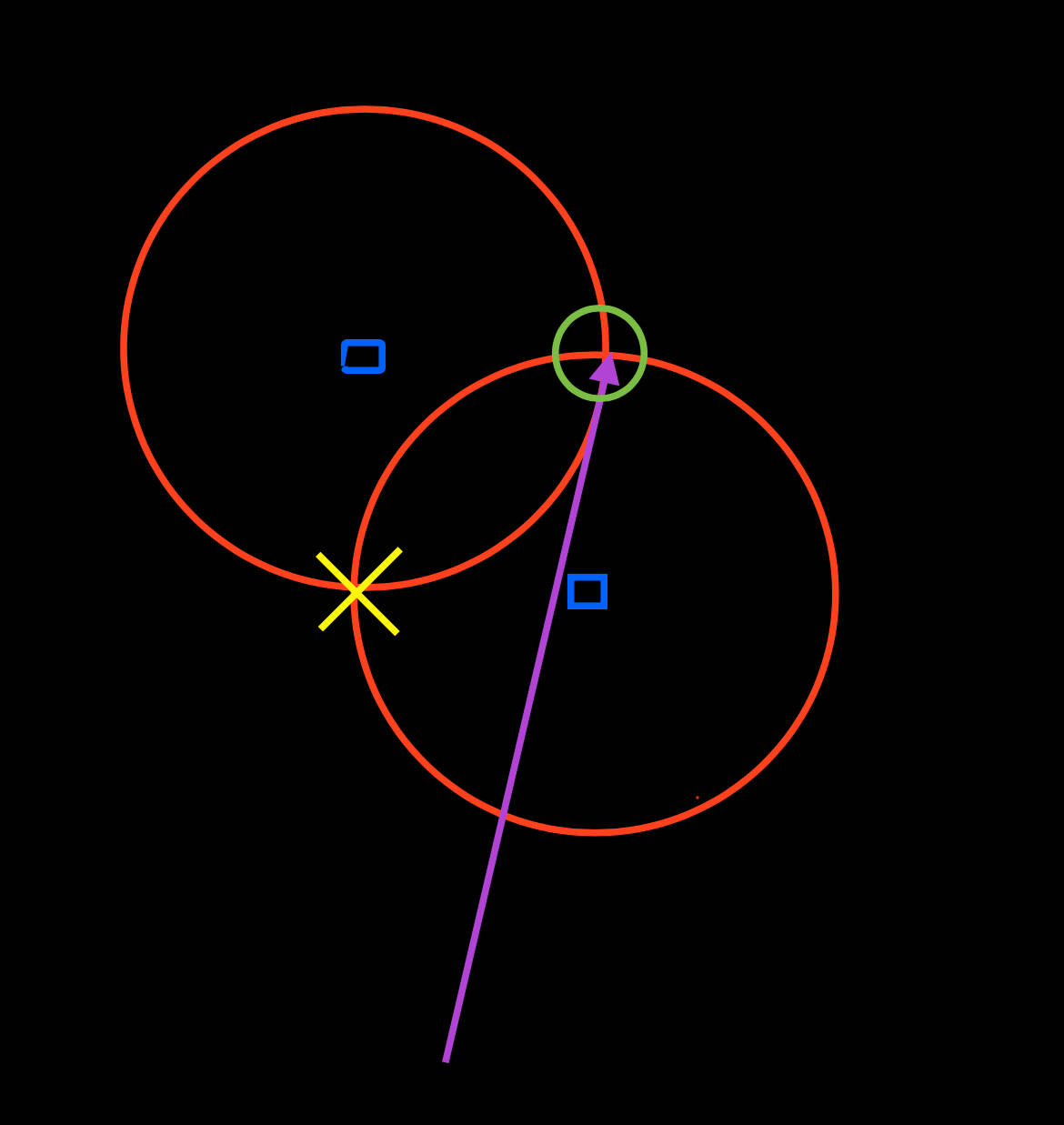
When receiving two DME stations (blue squares), there are two possible locations the aircraft might be. The DME receivers are reading out the distance to both (red circles), and where they overlap is a possible aircraft location. Because the aircraft (at the head of the magenta arrow) kind of already knows where it isn’t (the yellow x), the possible remaining solution is derived (the green circle).
If you were to receive 3 DME stations, it would resolve a two-dimensional location much more precisely. Thus, the additional stations.
I can’t for the life of me figure out these waypoints…??
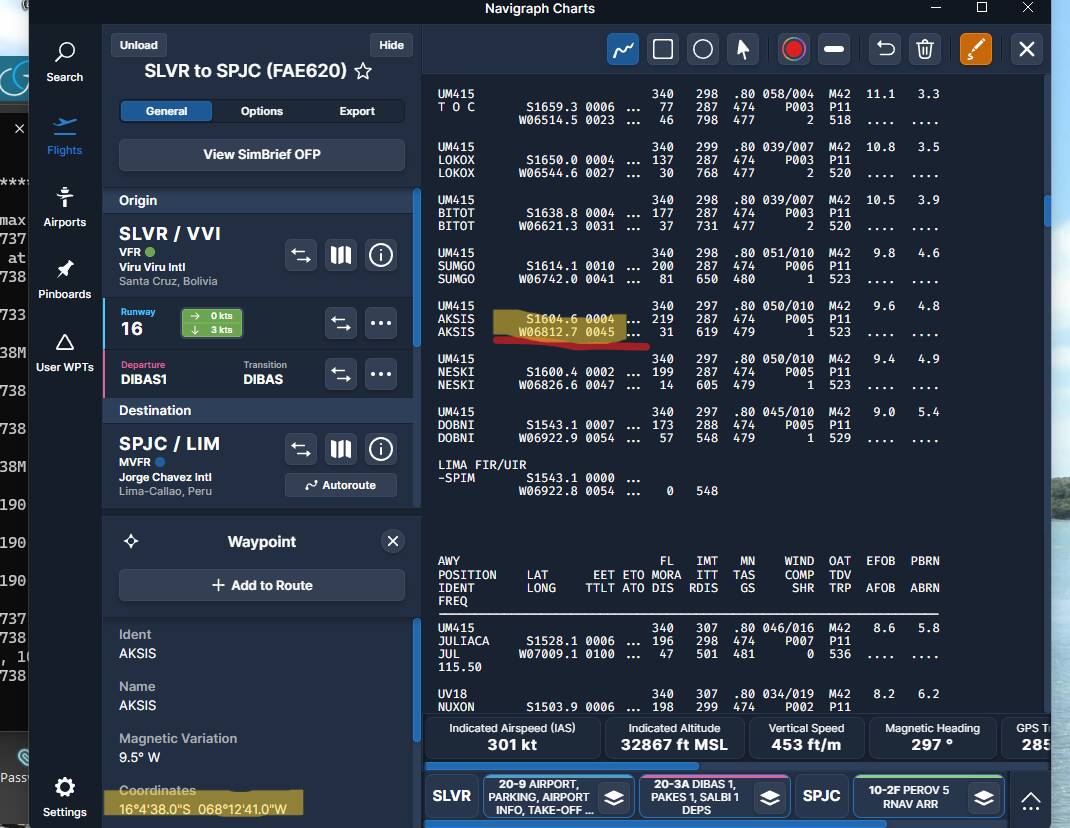
If I was to use the coordinates from clicking on navigraph, why is there such a difference between navigraph and simbrief and how do I figure out how to add the correct coordinates when I am using custom waypoints on navigraph, should I for example… change my STAR and want to add in coordinates that are not on simbrief
Thanks heaps for the replies…
on that note, anyone else having a issue where a binding for the trim up and trim down for my xbox controller, it wont trim down, yet all the other planes in msfs has no issues?? it’s not a unknown bug is it?
Absolutely loving this aircraft, apart from the odd ils capture bug… its so addictive… I hope more INS aircraft make it over to msfs
Those are the same coordinates in both screenshots. They are two different notations. For example,16 degrees 4 minutes 38 seconds is what Navigraph displays it as, but Simbrief and the CIV-A use decimal minutes, so 16 degrees 4.6 minutes (divide 38.0/60). Be very careful in the CIV-A to mind the 04 when entering 4 minutes - 1604.6. It’s easy to accidentally omit the 0 and enter 164.6, especially when referencing Navigraph coordinates.
I’m not going to lie.. When I saw mathematics I did wish I was in a better in school but wow, it’s really fun now I can use basic math’s to work out the coordinates by just clicking on the navigraph charts…
Been absolutely loving this plane and definitely glad to have brought this over the A321/19 pack…
Omfg i just made the point to be in the cabin for that sound, as you mentioned that to me a few weeks ago when I was looking at buying it…
I love the hydraulics sound of the cargo door opening but never heard that amazing marine like metallic clunk/lock until now and wow…
I think from now on, I’m going to have to go to the cabin to hear that more often, also, it was a hot day in central Africa and I had the window open… Never heard the engine start up… I’m going to do that more often…
If you use Little Navmap, there is an option to display GPS coordinates in decimal format. Right click on a location, click more and the decimal location is shown. You can enter those directly in CIV-A.
You need to go to options first and say you want Google decimal coordinates.
Hey folks. I’m enjoying the 727 alot but I’m really struggling with the CIV-A INS realignment process, or position update process as described in the manual. I’ve found that it flat out just doesn’t work if you follow the steps in the FSS online manual which I find highly annoying. I’ve tried it maybe 7 times now. I’ve recently started researching other flight sim addons with an INS and looking through their manuals to see if there are any variations on how it’s done. Some show a few little extra steps that the FSS manual doesn’t such as ‘aided intertial operation’ (Justflight VC10 manual I’m looking at you)
Yea… So I’m totally stumped on how to do a position update in the FSS 727. I’d LOVE to learn how to actually do it, once I’ve got it down I’m going to make a proper video tutorial on youtube because nobody out there has posted any kind of video footage of them successfully updating their position.
EDIT - the noticeable thing for me is that so far I’ve not even managed to get the INS to read DME data from a VOR/DME. even when I’ve got the frequency in both nav boxes just in case and the ado course bar is actively showing directional data as well as the relevant dme readout in miles in front of me, the CIVA ins unit itself refuses to acknowledge there’s a dme out there at all, no range information at all. (After inputting the frequency, altitude and lag/long correctly)
Start ins in standby. Enter initial position with knob in POS setting. Change knob to align. It will align in several minutes or speed up the process by clicking ready button till it turns green. Change selector knob to waypoints and wayppint # to 1 and begin entering waypoint coors. I make sure radio swithches are all on during this process.
I’ve got that annoying bug again where the course knob only goes up and down in 10s … a real annoying thing especially when you are doing some vor flying…
Since The last update I can’t seem to get the aircraft to react to an ILS beacon. Other navaids seem to be working, but no ILS. Have I missed something, or is there a bug?
With the new update are there problems with INS coupled NAV? Manually entering or importing Simbrief plan does not matter. The aircraft will not couple while NAV/GPS switch is in NAV and mode selector is in AUX Nav.
Thanks again for all of this. I bought SpadNext and have tried and tried to work in these variables and even after watching tutorial videos I think I’m lost on how to proceed. It’s confusing in other words. If you have any time to explain where and how I add these variables that would be so helpful and I would be so grateful however, do not go out of your way. Thanks for the help already.