I hear that! I’ve reinstalled Windows 3 times in the last couple of days. It’s what we call “non-robust” in the software business.
Speedbrake\spoiler - I am recently having an issue with the speedbrake. If I use the mouse to hit the button on the panel for the speedbrake it will activate. But if I have Toggle Spoiler mapped to my joystick and hit it the spoiler will try to move but returns to the closed position (or the last postion it was in based on the panel button usage), like it is being restricted by the panel button programming. I have tried mapping separate extend and close actions but still not working. Tried the spoiler axis, no joy. Since I fly helicopters with my joystick I have removed the centering springs, so I need hands on the stick at all times. It is not practical to let go of the stick and use the mouse to activate the spoiler. Anyone else having issues with the speedbrake? Version 0.3.3
I just had a play around with this. The default bindings are “CTRL+N” & “CTRL+M” to retract, and extend respectively. I added the toggle option of “CTRL+ALT+,” just now.
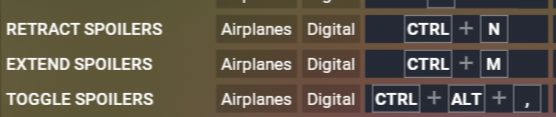
All three options work for me, with toggle just doing what it should. I also tried extending them via the switch on the panel, and it worked, and even flipped the cockpit switch back to off for me.
If those aren’t working for you for some reason you might need to resort to external mappings via SPAD or FSUIPC, for example.
Yes I have tried those mappings. The spoiler will start to move then retract to the Panel based position. I think I made a back up my overall control settings a while back. Will track reverting and see. Thanks!
Update: I have tried resettings control files. Tested another aircraft with a speed brake and no problem at all. Tested the Legacy using the same control profile from the other aircraft that worked. Still a problem in the Legacy. And funny enough, I still have the nav lights showing through the wing tips. Apparently there are issues that show up on some systems and not others. Very frustrating!!
■■■■, I was ready to pull the trigger on this one but it’s not compatible with FS2020 
I’ve literally been waiting years for this plane. The RealAir Legacy in FSX was my favorite plane too
No FS 2020…
Not interested 
You’ll likely see more of this as time goes on.
As much as that is the case…happens as in the past similar versions…I get it.
The 2024 has zero allure in every way possible.
Will never buy it.
Apart from having a good Lancair Legacy 
Don’t understand how you can say that when aircraft subsystems can be simulated to a much higher fidelity. A number of developers don’t want to “dumb down” their aircraft so they will work in MSFS 2020. More work for them to do in a sim that is quickly losing popularity.
No, from my perspective you won’t see it and I have no desire to explain.
Sure you will see it with some subsystems.
I installed the update today via the Flysimware installer. I get a popup now telling me I only have one install left blah blah blah. I jumped on this as soon as it went to beta, so is this the thanks we get for helping you develop your product? If Windows fails again, that’s it for me? No more Legacy?
Simply shoot them a message to reset your activations. Many addons have a limited amount of activations.
It’s only because of very real piracy of software - it’s never an issue for anyone who buys any of his products. Not uncommon to see in some form nowadays - why many developers are going to Marketplace only - you can’t easily crack the aircraft.
I get that message every time I update it. Just ignore it.