Another thing to try is using a dedicated fixed size virtual memory cache on an SSD not used by MSFS and disabling the VM on drives that are used by it. 10GB works fine for me.
Glad to know it 

I’m helpless. Tried everything.. Only on touchdown, and its extremely annoying. With any aircraft, at any airport.
Did you try to apply the above workaround ?: Freeze/Lags while touchdown - but fps around 50 while approaching - #31 by MentalMiggy
Yes  I even tried a full reinstall..
Disabling the touchdown effects should work. Make sure that you disabled all the effects/files as I posted here Freeze/Lags while touchdown - but fps around 50 while approaching - #31 by MentalMiggy
It is enough to have one effect still active and the lags will happen.
Its important to mention that you have to disable the effects everytime you reinstall the sim or it gets a new update (SUXX).
Good luck dude
Can someone with the ability write a .bat that renames all of these so we dont have to do it every update?
Bravo
Smart… I have spent I don´t know how much time trying to found this folder
Glad to know it helped you
Hello everyone,
I’ve got a edited fix for the touchdown problem, that works for me fine. It is a edited version of the previous solution from @eduio13.
Its based on deleting them out of the folder completely and NOT just to rename the files. However, that just worked for me, when I included about 2 more files than in @eduio13 solution.
Well, here it is:
-
Search your Official folder, it is located just in the same directory as the Community folder
-
Inside Official/OneStore folder you have the two folders to find:
fs-base-effects-legacy/effects
fs-base-effects/VisualEffectLibs/Asobo/Base
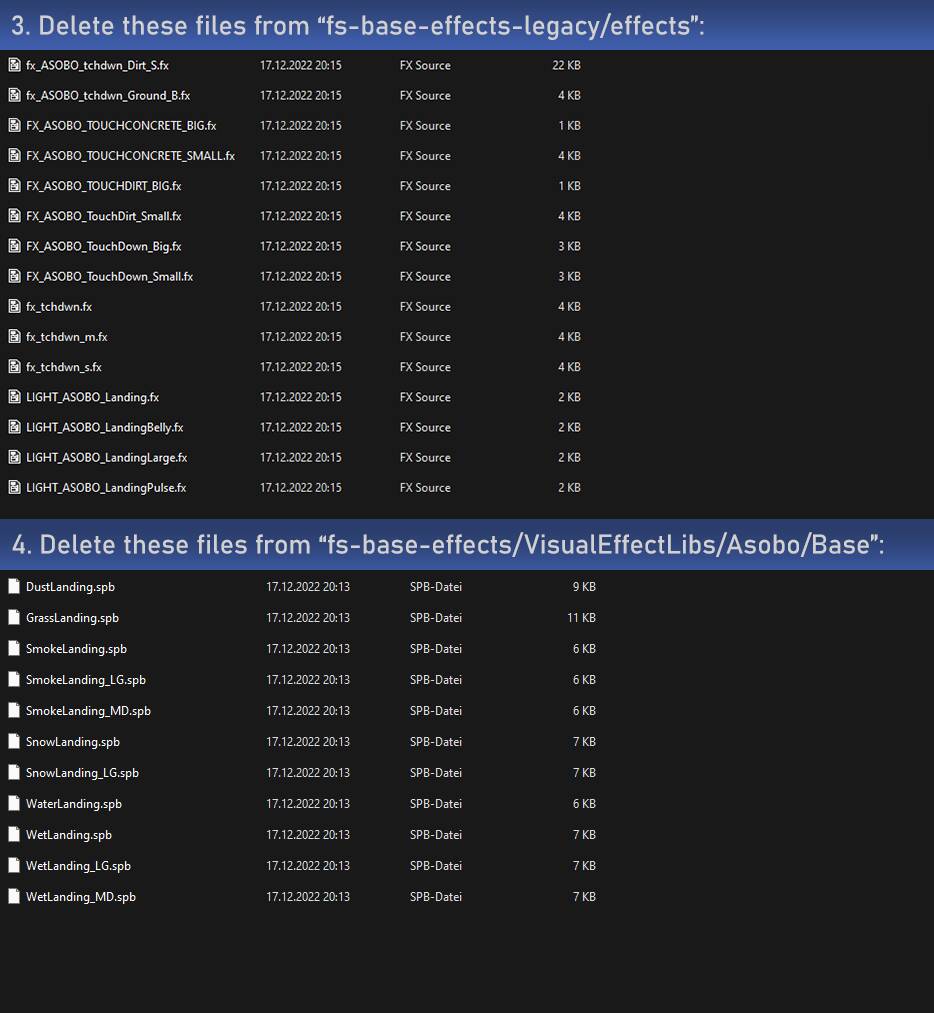
Awesome 
 its great to have an improved solution!! Thank you!!
If that goes for all aircraft then I’m hardly affected which imo can only really be due to one of two reasons. Either my 12GB Vram or because I have reasonably fast 32GB CL14@3333MHz ram (56ns). I’d be interested if this glitch could be narrowed down to one or the other.
Try to disable the airport workers, vehicles etc in the msfs settings, in order for them not to be loaded during approach.
This has not fixed my issue, even the slightest.. Still getting 2-4 second freezes and lags on touchdown. Its getting really annoying now, the best phase of flight is ruined by horrible stutters.
is Asobo triggered on this ???
You are right. It seems that the last update broke something… I have made 3 flights the last days and in every flight I had a horrible stutter when the wheels touchdown in the runway during landing.
I also get this on take off. 2-4 second stutters in the latest beta.
If you are having the stutter/lag issue during landing, please vote here Freeze during touchdown - since SU10
Its very important so Asobo puts attention to fix it!
Good news guys! 
I have been testing a lot the landing process and I realized that the laggy problem is due to the ground services loading when we approach and land, so I took on the task of searching the correct file to dissable the loading process that its afecting the sim performance and… BINGO!.. I found it so I can tell you all I have the solution for the new stuttering/lag issue during landing at any airport with any aircraft.
Here I share with all of you a brand new FIX for the lag/stutter when the wheels touchdown in the runway:
In your MSFS instalation folder search for the following folder:
Asobo-services
Then, follow the the route X:\MSFS\Official\OneStore\Asobo-services\AirportServices\Shared to find the .spf file called services and add an OFF text exactly as I show in the picture
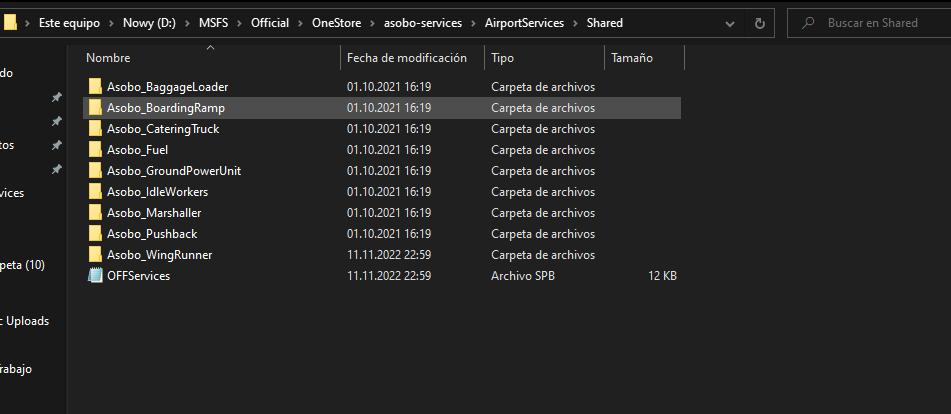
And thats it!!! of corse this fix has a negative side because when we turn off the airports ground services, we are not going to be able to see the pushback truck, the catering truck, the baggage loader, etc. but who cares… the most important its to have clean beautiful landings.
Very important:
- Dont delete the file, just rename it as I show so you can come back to the original configuration when you want just taking away the OFF text.
- To ensure this fix will work, I HIGHLY RECOMMEND to do my first fix as well Freeze/Lags while touchdown - but fps around 50 while approaching - #31 by MentalMiggy, disabling the effects.
- If you have payware airports installed using their own ground services, try to find the folder where the spf file called services is placed and disable it just in the same way as the main file. Here I show you an example with the iniBuilds San Antonio Airport (KSAT) airport
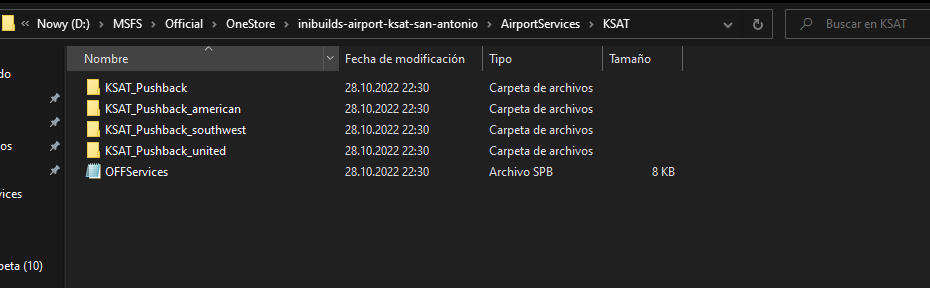
Wish you happy landings!!! 

To the Asobo Team: The simulator you have created is something fantastic and breathtaking. It would be great if you can focus a little bit more on solving these kind of issues related to the performance of the simulator… remember that not eveybody owns a NASA PC. 
Hi.thanks for your help! Does it only deactivate the Asobo groundservice? So i have GSX pro,does it work after this fix?