Indeed, It does not use the MSFS AI engine at all. All positioning of aircraft is done by PSXT (an external program) via SimConnect, 30 times per second.
Yeah I was watching a UPS 747 approaching what I thought was runway 33 (departing runway) and could see it on FR24 but was 7000 ft despite being only a few miles away. Then a sudden left turn and then approach to 7L. I initially thought it was an error, like the default where traffic will approach far too high, but it must be standard arrival for PANC.
Definitely going to keep with it. My concern is how moving around the apron will work. If they’re controlled externally then sheet they’ll just drive through me
Switch on Collision avoidance.
Despite having a good amount of injected traffic the past two days with FSLTL I have been flying around in a ghost world. With all defaults I’ve tried LAX, EGLL, MIA, ATL, OAK, etc. and I’ve had them all to myself. Usually, it’s hard to land without getting called off in those airports.
I even let the sim warm up for 30 minutes and take extra long taxis. Traffic in route looks good at least. They just don’t usually show in TACS.
How does the sim ATC handle the traffic? I can imagine constant “you were not cleared” chatter.
I’ve tried the RT/PSXT combo a few times, and it’s not for me. Two reasons: AI are not moving in a smooth way (sort of jerky) and ATC is not aware of them. I have a current subscription this month as I wanted to try it again, but nah.
1 Like
It’s always something! 
I have hope that between products like FSLTL and possible native fixes, we may see some good stuff in 2023. But for now I’m perplexed where all the live traffic is going in FSLTL. I suspect much of it is SU11 Beta issues.
There is no need to, the aircraft are representations of real live aircraft and they are controlled by live ATC. MSFS ATC will not recognise them. You may listen to live ATC channels.
I had installed AIG Manager, but then found out I did not need to install the AIG manager if all I wanted were some of the AIG Airplanes to use with FSLTL:
To test just the Airbus 380 and the Boeing 757 models, this is the folder structure I added to my community folder:
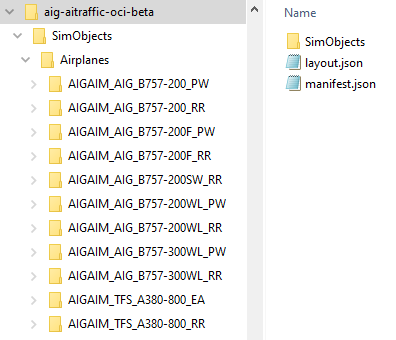
I used MSFSLayoutGenerator.exe to update the layout.json and manifest.json files for just the selected airplane models.
It worked without any CTDs but increased the loading time, so I took it out of the Community folder for now.
2 Likes
I’m sadly getting a fair few CTD’s now so have entered debugging mode and it’s not fun 
Funnlily enough it was all working well at EGLL for most of today. Now, anywhere in US I get a CTD.
But thank you for this info it could come in useflul later.
One question I have is is the data cache in FS just for scenery or does it include aircraft textures and models, because the CTD’s are weird. Doesn’t matter what I revert to either.
Just how much extra loading time are we talking?
Why are AIG files so huge as compared to FSLTL’s?
I was able to shrink FSLTL folder from 24GB to 2.2GB without any problems and models/liveries still look great in sim.
I opted out of the beta due to this. Did quite a bit of testing and posted my observations in the performance and stability threads. At the moment I’m very happy to use FSLTL in SU10.
I think anything moving at airports or on arrival must be getting pruned on SU11. A few days ago it seemed fine, so I’m really confused.
Seemed like an extra minute just for those 11 models and all their liveries. I will give them another go tomorrow at KLAX because at KSFO there were no 757s or A380s when I was testing these.
I need to try shrinking the AIG airplanes.
1 Like
I do not know, but I do not use a rolling or manual cache.
1 Like
Once I’m done downloading all the AIG flightplans (after my stupid mistake earlier today where I managed to delete everything lol), I’ll make a copy of it somewhere. Then delete all the converted FSX FAIB models and just let it live in the community folder next to the FSLTL models. Curious to see how that works out in terms of sim loading times, model matching etc.
Do you get any messages accompanying the CTDs?
Where is this setting?
Just did an early morning (real time) flight around Sydney. FSLTL injector active but there was nothing there. Then checked FR24 and there’s no arrivals or departures before 6AM. After 6AM the airport came to life.
Yup realizing this with a ton of airports in Europe and Caribbean.