Yes, I haven’t crashed in a long time (maybe once or twice existing to the main menu) but now it is consistent. Is there a thread open for the issue? Or should I start a new one? It’s annoying because after every crash we have to setup our air manager stuff again.
I may try X-plane if the crashes aren’t fixed soon. I read that you can pop out the g1000 panels there as well. I don’t know if I will enjoy it as much however. I don’t see many posts about people having ctds after the patch as I would have thought.
As long as you’re not on the beta branch (which you have to opt into), XP11 is pretty stable from what I understand. It’s nowhere near as crash happy as MSFS is currently.
Knobster and Air Manager will work, although you’ll have to rebuild your panels using the default G1000s in AM instead.
Yes. I think the default Air Manager panels were made for X-Plane. But I’d rather not bother setting up and learning another simulator unless I am pressed to do it.
1 Like
I just got my second Knobster built. I’ve had the parts for a while now, but hadn’t had the time or inclination to get it together. Is it necessary? No. Functionally speaking, a single KNobster is good enough to control all my screens. But man, is it ever nice to be able to use the FMS off the MFD and have that knob right there. Same when using the GNS units. Having a knob on the same monitor is really nice.
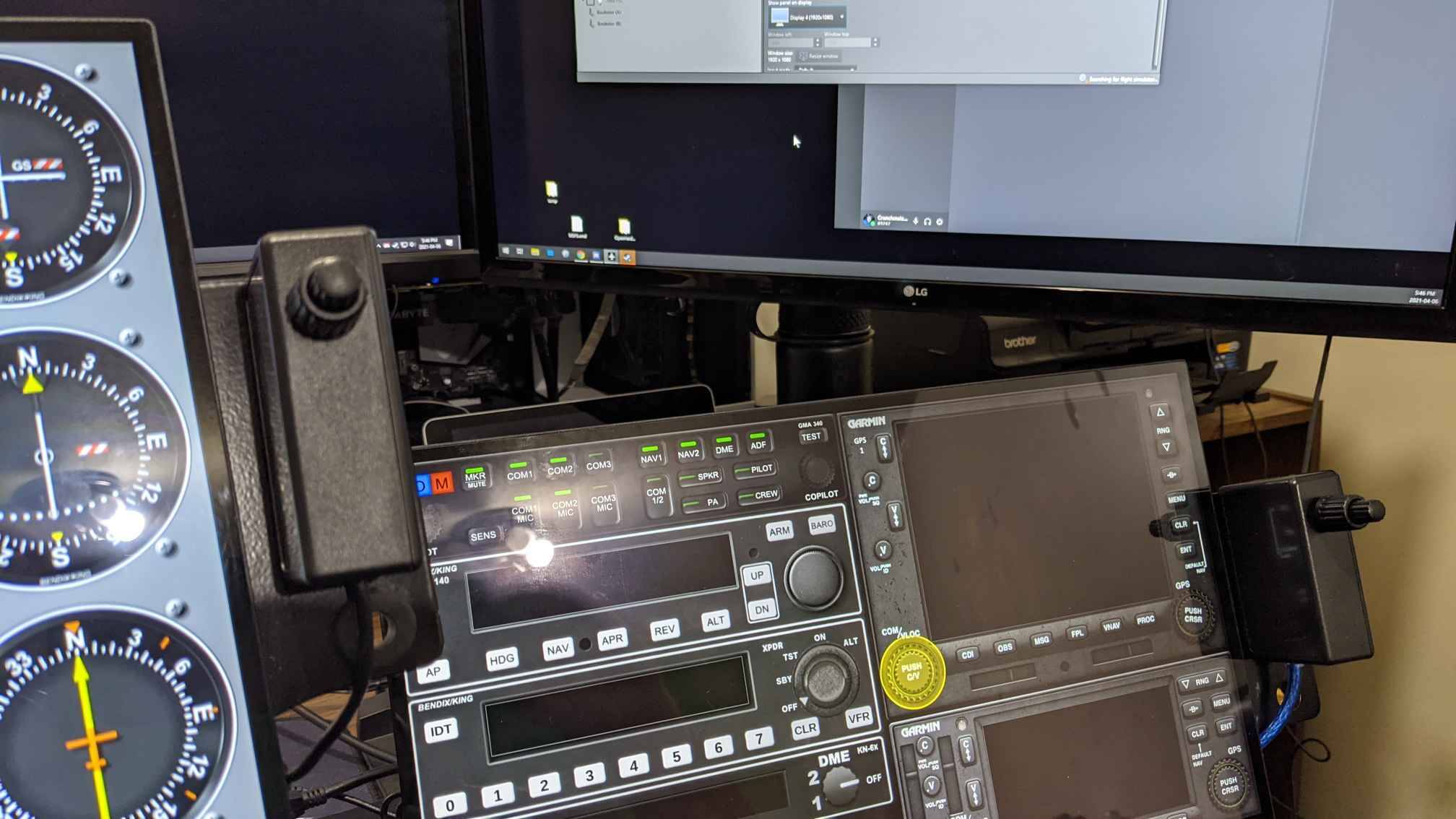
Nice. I have my 2 auxiliary screens next to each other so I just place the knobster in between them. I don’t think I will buy a second one.
Mine are close too. But I find that when I’m adjusting my Knobster on my right screen, my arm blocks my view of the left screen. I have to bend it in a weird position so I can see it. Plus, it’s much more convenient to have a knob for each screen. Especially when using the GNS. It’s nice to have the knob right beside the buttons vs jumping from one screen to another.
Necessary? Not in the slightest. But I had 2 leftover Arduinos plus the project boxes I’ll never use for anything else. For the cost of a second encoder plus a little work, I now have a more convenient setup. It’s nowhere near the game changer getting the first Knobster was by any means, but it’s nice little ease of use upgrade.
This seems soooo complicated and I can’t get the buttons to work… but they do make a nice clicking noise.
Any chance someone can make a youtube video on how to get the G1000 panels working with Airmanager 4 in MSFS?
Ken
As a thank you, I give you this:
thingiverse 4823428
A Honeycomb yoke/throttle touchscreen and knobster mount.
Literally, you’re 90% of the way there already.
Look at the very first post in this thread. It has the detailed instructions. You MUST install the Mobiflight module as described in that post for it to work. That’s all you’re currently missing.
If you DID install Mobiflight and copied the folder into your community folder, make sure you copied the right folder. If you look into the Mobiflight folder in your Community folder and see another folder instead of files, it’s incorrect. It’s that folder that needs to sit in the Community folder.
In the Community folder I have:
mobiflight-event-module
In mobiflight-event-module I have:
modules (a folder)
layout.json
manifest.json
Is this correct?
Did you use the default G1000 built into Air Manager, or download the MSFS one?
The default one in Air Manager is only X-Plane compatible. @XAxSys rebuilt it for MSFS. Youc an download it here:
I downloaded the Garmin G1000 Mobiflight one: github/jplewis01/G1000-AirMgr_Panel/releases/tag/Ver_0.03
Do I need to configure ‘events’? All this event stuff is confusing.
OK, I had imported the .siff file, but the link you sent me is a folder. How do I install it?
Are you sure you set up the correct one in Air Manager? Does the top of the G1000 bezel have a MSFS logo? If it has Garmin or X-Plane logo, you just set up the wrong one.
Weird. It says Garmin. I’ll reimport the Generic.-.G1000.Overlay.FS2020_0.03.siff and try again.
You don’t need to re-import anything. The link I sent you is the same one you already downloaded. It’s a ZIP file, not a folder.
Just clear your current bezel from your panel, add a new one, but ensure it’s the FS compatible one, and not the X-Plane one. That’s the problem. You’re trying to use the default Air Manager one that’s only X-Plane compatible.
Weird. The one I was using said FS and Mobiflight on it (Garmin) but the one that says FS and 2020 on it has the MSFS logo. Thanks, I’ll try it!!
That one should work.
It works!!! I feel so stupid. Thank you!!!
1 Like