Good question, I just checked and the weather (clouds, wind, temperature) seems to be pretty good everywhere I looked at this moment (if you take the ATIS temperature, not the one the aircraft shows, that is).
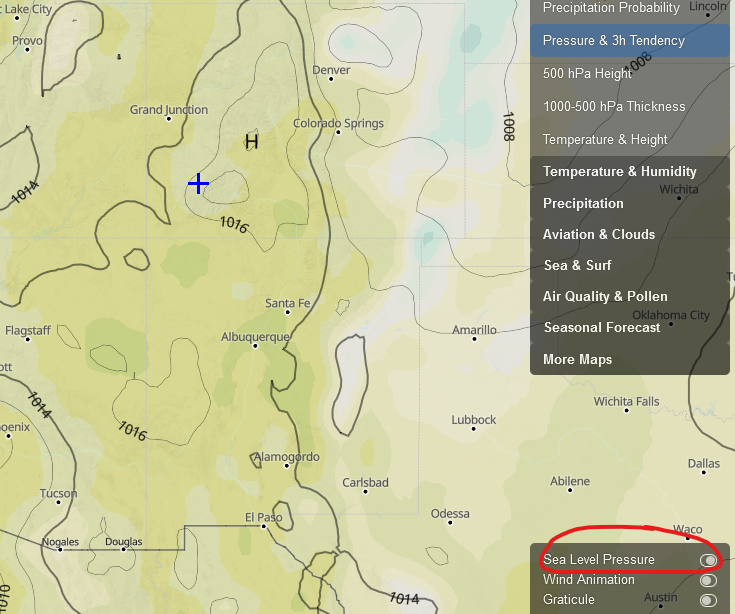
The pressure is a different topic, I suspect the data Meteoblue delivers here is not that precise everywhere. Right now, the website says 1015 hpa = 29.97 inHg which doesn’t agree with the METAR at all.
It seems like I’m getting only half the live weather data. I’m getting no clouds in all my flights, despite the fact that barometric pressure and temperatures are quite clearly updating over time.
I’m flying in India at present, so I don’t know if some parts have worse “live weather” updates..
Same here live weather on not even raining here in real life. Get in my plane clouds look correct
Winds seem correct, lake flat (errrrr) should have waves and white caps lol but thunderstorms all the way to dest. And that lasted for 3 days, one of those days there was no wind still live weather, no coulds, yet I still had lighting strikes.
Check the lighting strike website and see there hasnt been a lightstrike(s) here in almost a month.
I mean come on its a cool effect, esp at night, but I think live weather gets broke on the server somewhere.
LOL I thought that was just me. My weather/clock here always says it an hour ahead of what it really is..though a couple on nights ago, it was 3 hours ahead.
I dumped the cache and it finally went from 3 hours to 1 hour ahead.
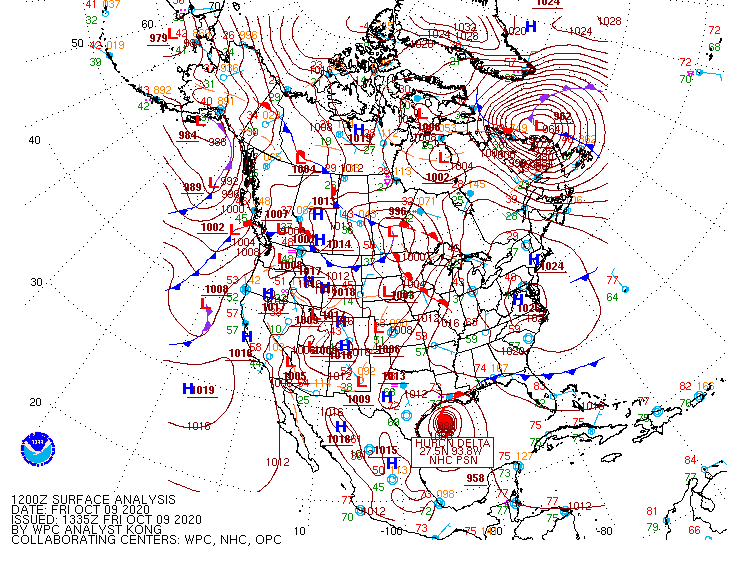
I was just setting up my flight from KAEX. The eye of hurricane Delta is currently over the land, but in the World map it is still long way from shore in the Gulf of Mexico.
So, I thought my time was not set correctly. I checked, everything is correct on my PC and in the sim.
Is the live weather behind?
Is the problem with live weather (where some users are having problems and not the others) related to time zone you have your PC set to? I am on the (UTC -5:00) Eastern Time (US & Canada) and have problems with live weather.
Just checked Meteoblue weather map:
The eye of hurricane Delta is where it should be on the Meteoblue map, but it is offshore in the Gulf of Mexico when in the sim with Live Weather.
If I rewind the time in the Meteoblue weather map to 08:00 EDT (most I can rewind on the map), the eye of hurricane Delta moves into the gulf, and it is where I see it in the sim with live weather. So, what I see on my PC as live weather in the sim, is around 15 hours behind.
P.S. Real time on my PC at the time of the observation was 23:20 EDT
So what are the common observations we’re seeing and hearing reported?
Weather appears to be significantly delayed compared to real-time weather (live weather appears to feed in what was observed hours ago)
Cloud heights are being fed in AGL instead of MSL or vice versa
Temperatures wildly inaccurate at high altitude airports; hints at a possible MSL-AGL-MSL conversion error
Live weather sometimes doesn’t work and needs to be forcibly recycled (by either forcing a custom weather, waiting a bit, and then selecting live weather again…or restarting the sim).
Lightning strikes far too often
Icing triggered too aggressively, without taking into consideration whether not the aircraft is in actual visible moisture (maybe not a weather specific issue)
I can’t confirm this. In some parts of Europe, for instance, a couple of variables (temperature, wind, pressure, ceiling, cloud coverage) seem to be okay-ish, with no significant delay. The ceiling is usually the one that doesn’t match well.
Especially in the US, however, quite often and especially for high-elevation airports there’s no match for temperature or pressure, even when looking at the conditions from the last couple of hours (or even days)–see the example from KTEX what I posted yesterday.
Maybe true, haven’t investigated that thoroughly. But yes, the ceiling is regularly not where it’s supposed to be.
Whatever the reason is, it should have been caught by their own testers before Alpha, since it is so obvious. Same thing with the pressure.
Even those workarounds don’t work reliably for me. And they don’t work at all for high-elevation airports.
I’d call the current depiction “ridiculous”. Getting lightning in 1/8 conditions (i.e. “few clouds”) with nothing hinting towards thunderstorms IRL.
I find it odd that sometimes the WX can be bang on in the sim, and other times it gets it completely wrong. No pattern. Quite random and a little more than half the time. Its not metoblues wx data as im sure that is correct, but rather the sim interpreting and something surpressing the real data.
Yesterday Hurricane Delta was coming ashore, and live on tv, they were getting hammered with pouring rain strong winds, and yet I had broken cloudy skies with some patches of low visibility. No rain in the exact area as the live broadcast. The pressure was correct but no rain. What gives? The have the makings of an awesome weather engine, and when it gets it right, its downright awesome, but the accuracy is poorly lacking. I believe this should be a marked priority.
Oh yeah and I havent seen rain since the last patch. Even when its supposed to be raining. It looks like rain outside like it should be it never hits hits the windshield, you have working wipers but nothing to wipe with them.
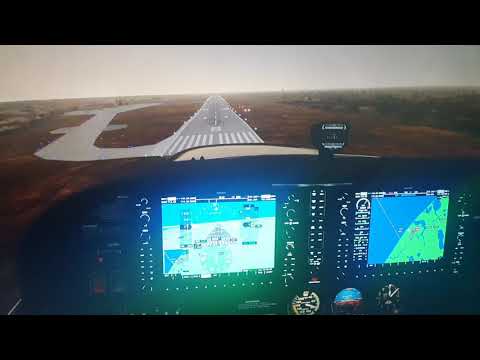
It was very gusty and unsafe for aviation, as you can notice on the short video, I flew the C172 like on the rails, a few turbulence where it’s supposed to be severe turbulence in this kind of weather but MFS2020 still allowed you, almost two months after the sim was released to fly a Cub in thunderstorm which is totally unrealistic, same other severe weather conditions!
On final I didn’t even feel the strong gust wind 33kt (just a little bit) knowing that in life half of it demands your full concentration to land safely and a big chance to divert!
If I don’t encounter severe weather conditions sure it’s getting better after the last update but it’s still unrealistic when it comes to very bad weather.
Under Xplane11/Active sky it wasn’t impossible to fly t he B737 because of those very severe weather conditions (which makes sense in terms of realism)
But with MFS2020 it’s way too gentle, so not realistic at all for this example!
Even if at PABR I had accurate temp/alti-pressure/winds but take a look at the video it feels that I’m flying on the rails on final with a C172 in this bad weather, how come? I didn’t have any turbulence (only soft one) even at 5000 ft which is impossible in reality!
Hopefully it will get fixed asap, by the way I’m glad to see that more and more users are aware about it because when I see the wish-list it looks like it’s more to satisfy gamers than others somehow, it’s not a critic it’s an observation.
I don’t know how the issues with live weather are still being investigated according to the latest bug-fix roadmap they’ve shown. It’s broken since release …
By waiting I found this mod very good so far, it seems to help the engine live weather in a better way, I had turb much more appropriated in CB and in bad conditions weather during the 3h30 flight EGPA/BIKL with the Mooney MR20… it makes the weather more alive than the native engine weather… it’s more accurate as well…
Give a try
True, great add-on, especially as freeware. Only disadvantage is injection of local METAR weather at global scale. However that cannot be changed at the moment.
Will go for Unreal Weather and REX until MSFS improves..
 (if you take the ATIS temperature, not the one the aircraft shows, that is).