Hello fellow simmers, i had a bit of issue whenever i do a mid to long haul flight the sim pauses automatically whenever there’s a message like low bandwidth pop up and the plane doesnt actually continue to fly with the notification popup. Any idea to disable that and prevent that from happening?
Last couple of days Ive been getting the following warnings when attemptijng to play.
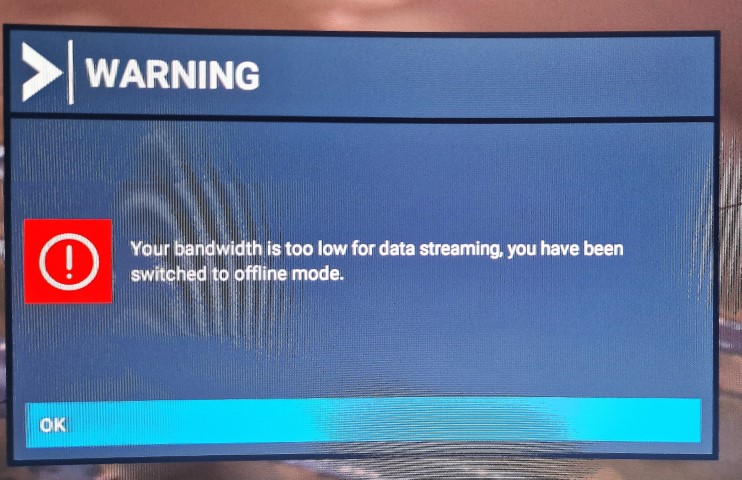
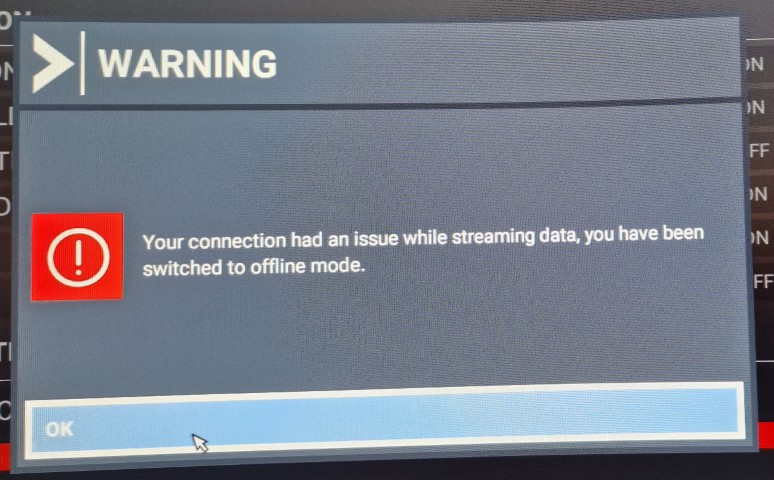

Ive tried various options, deleting cache, checking connections in general options Data etc and still getting the same issues. Ive deleted my Community folder and still this persists. My interent connection is fine, 75 down and 19 mbps upload.
Has anyone else had a similar issue and any ideas how to solve it ?
1 Like
Theres a whole thread on this already. What works here is to use a public dns service like google or cloudflare that has cleared it up for me here.
every friday night connectivity issues.
Yesterday I flew without any problem, this morning when I turned on the simulator it was without photogrammetry and without real time in everyone.
I checked connections in general options Data etc everything is fine but the problem continues
I turned everything off again this evening, nothing has been going on with it for days. It’s all frustrating!!

1 Like
I was having this problem for several days now and I realised the problem, make sure that the server your msfs is connected to is the closest server to your location. I am in south east asia and my simulator had me auto connected to NA north west with over 200000 ping for no apparent reason. Switching to my local server has solved this problem for me
This has not at all been solved. I am on a stable, 250 Mbps connection. It is reported as 3 green bars 11ms latency in Sim. I still get those errors, especially getting closer to the ground for landing. It’s significantly worse on afternoons/evenings. All of this is a clear indication that the servers have a performance/load issue. So please MS and Asobo, stop asking users to jump through hoops, get working on YOUR server performance issue.
While this is not solved, please stop the pup up window that disables flight controls. On landing, that means a crash usually. you could make a silent indication that there is a reconnection going on, bur not a requester that disables the inputs. What a strange idea in the first place.
When can we expect this to be under control MS/Asobo?
4 Likes
I had it again and again last night.. Total catastrophe. I then have problems with Bing data and photogrammetry, all of them always switch off. I have to test again. It’s so frustrating.
1 Like
And we thought the SU10 was the big fix we were wrong. when are they going to get this right!!
1 Like
Exactly I was so looking forward to SU10 and esc backfired! Really sad now we have to wait again and hope for SU11 that everything will be better then!
a note: no SU update ever can fix issues which relates to ISP or servers in the region you life.. In this case the devs can only made the handling better in case you lost the connection, as example not showing affected users that nerving modal popup.
Yes, that’s right, we also meant the Bing servers, which will also be more stable with the next update. But in the meantime it has improved again, even without an update, there must have been server problems. Now everything is back to normal for me. No more bandwidth problems at the moment.
You know, I had this problem resurfacing the other evening after a week or so without it. I flew in the XCub for an hour and a half through the mountains of South Island, New Zealand,(Pudding Hill - Mount Cook VFR) never more that 1,000’ AGL. Pretty intense scenery (ORBX Mesh), although flying fairly slow. Absolutely no problem at all. Arrived at my destination airfield, turned base leg and it started - “Connection Lost” - clicked on OK - instantly, “Reconnected”. Five seconds “Connection Lost” - clicked on OK - instantly “Reconnected”. Five seconds “Problem Streaming - You have been switched to Off Line Mode”. All of this whilst trying to negotiate a fairly tricky approach. I did get onto the ground OK, albeit a bit on the fast side and with a bit of a bounce. It had been a really satisfying flight up until that point.
Definitely NOT solved!! The decline in reporting of the issue is because people do get a bit fed up of banging their heads against a brick wall - and it’s nice when you stop!
1 Like
All I can say is don’t shoot the messenger. If it really was the MS servers these boards would be full of complaints with the same date. IMO the usual problem is an outage somewhere inbetween user and server. That or the kids upstairs playing Fortnite while watching Netflix or the wifi fridge/heating/lights/shutters/garage doors etc.
I don’t believe that I have ever said that it was the servers, I don’t have enough tech knowledge to make a judgement about the cause of these failures. However, I think that if you were to look at posts by BubbaBlitz7348, he has some objective evidence that there are large packet drops across the MS Servers. The ramifications of what he has evidence of are, again, outside my knowledge set. I posted my experience to lend voice to the band of brothers who are questioning the assertion that this problem is “solved” based on the declining number of reported incidences.
In my case my ‘kids’ are 50 and 48 years old and live 300 miles away, so Netflix or not, it would be unjust to lay the blame at their door and even my grandkids have outgrown Fortnight (or been banned from it  ). Call me old fashioned if you like, but I don’t have a wi-fi fridge or any other hi tec gadgetry and my garage door, sadly, I have to open by inserting a key and then manually pulling the doors open. Not good I know, but in these straightened times sacrifices have to be made
Don’t you worry though my friend, the safety is still on and we don’t - as a rule - shoot messengers here 
Well that’s true but you also said it’s not solved (on here solved by the way doesnt actually mean it’s solved) so I assumed you were aportioning blame. Just read the whole thread, as far as I can see there have been very few server issues lately but still Asobo get hammered every time someone’s cat walks past their router,
Apologies for misunderstanding.
I won’t claim to have read every post in the topic, but I have read a lot of them and I have posted my experiences a few times here too. I do understand what you say, in that there are likely to be as many reasons for failure as there are failures and as I said, I am not equipped to offer solutions to any of them. In my own case, it may well be exacerbated by to a not particularly good broadband connection of around 30mb/s.
It does, however, seem more than a coincidence that for me and many others the failures and subsequent (what are described as obtrusive) messages appear in the circuit and frequently on short finals at low altitude, often resulting in loss of control and a painfully unintentional contact with a hard object and termination of the flight.
Personally, I don’t mind the large notices too much as it grabs my attention and offers a big target for a quick mouse click, allowing me to retain control of the situation - most times
Solved, yeah right. However when the connection drops for a few seconds please Asobo don’t turn off Bing and PG immediately. It’s beyond stupid.
Give it at least a few minutes or make it a setting (if connection drops and is not back after x minutes or seconds then turn off Bing and PG)
2 Likes
Had this problem with the time online, I opened a ticket reporting this problem, and they responded, but it didn’t solve my problem, I did a fresh install of fs2020 and everything was fine, today it came back to the same without time worldwide.