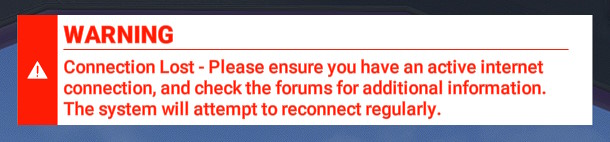
It was fine for me for a few months now, but in the past weeks I’m seeing this message more regularly again.
I honestly wouldn’t really mind the message, if it would simply leave online data on and try again in the background. Having to go into the menu after every single hiccup not only absolutely ruins immersion, I’m also mortally afraid of turning it back on, because that has crashed the sim in the past for me.
I can’t believe this is STILL a thing in 2024… Ugh

Ok, let’s go into settings
Let’s click on General Settings and wait for it to populate
We’ll find the data tab
Yup, you did turn Bing Data off
Ok, let’s turn it on

Waiting for it to do its thing
Waiting…
Waiting…
Ok, finally it’s back on.
Click to close
Click to go back to flying (different keyboard shortcut for whatever reason).
Ugh.
It doesn’t have to be so hard, or permanent.
Some QOL fixes please Asobo.
Is there a wqy to fix this? Ever since I enrolled to the SU15 Beta I can’t play. I rolled back to the live build but even so I always get this “your bandwidth is too low” error message and can’t stream Bing maps or photogrammetry.
When I’m trying to load FS, it’s KILLING my internet download/upload speeds. Shut down MSFS and my speeds are back to normal? What on earth did they do now???
Tonight, i have got this message 5 times in a row and i am not able to continue flying due to Bing data turning off. I have gone 5 months without any issues, and now it seems its back worse than before. I hope they can fix this in the next sim update in March as its unflyable at the moment.
I think I’ve had enough of this thing. 4 years it has been out. 4 years. And still ridiculous basic issues.
I get this very rarely but I did see it last weekend.
I have fiber internet (913Mbps download and 933 Mbps upload), yet I get “Your connection had an issue while streaming data. You have been switched to offline mode” every time I try to fly. This is beyond frustrating and I noticed it’s been an ongoing issue for over a year.
Any fix yet? Or do I simply delete MSFS and forget it ever existed?
Using Win 10 Pro. Never had this issue before.
Hello.
Do I ever install another program to replace the default bing maps of MSFS 2020…’
Can you go to this path and show your host file…?
C:\Windows\System32\drivers\etc
“Your bandwidth is too low” has confused many since this message was first reported.
The same message appears whether you have low or high-speed internet access. For most users, the low bandwidth message happens when the MSFS servers are not responding to requests from the client fast enough, not because of any issues with a user’s internet connection.
A better, more honest message and implementation would be:
“Your access to our cloud servers is currently compromised. We are switching you offline so you can continue your flight plan. We will keep testing the servers and automatically switch you back online as soon as possible. Thank you for being so patient.”
@AviatorCSnet
Agreed!
Since last few days, I too am experiencing this issue. As soon as I start flight, i get this message and I am moved to offline mode. No idea how to deal with it. I have a very fast fibreoptic ethernet.
I have only been switched off once offline in more than a year. I have a rather pedestrian 60 Mbps download connection, so you and many others may be experiencing your ISP throttling the connection to any MSFS cloud server URLs.
Others with fiber who see MSFS updates downloading at 3-6 Mbps solved this problem when they used a VPN with MSFS. Maybe setting up a VPN is also worth trying to see if that fixes this issue.

You need to re set the hosts file. Do a search for this and follow the instructions. it worked perfectly for me.
Thanks. Can you share a link to this info?
Some mods apparently mess with your hosts file. Not good. I think the post referred to is this one.
I have default hosts file without modifications and no addons that would have changed it.
I bought Flow Essentials (#42) at Orbx for about €12,50 where you can change servers but also a lot of other stuff. Really handy. I’m on Pc, not sure if it works on Xbox if you have that.
Your scenery looks like that because you have been switched offline, so you are seeing the offline terrain only. I’ve had this once this year so far, and something others will tell you to keep an eye out for is that when it reconnects it leaves Bing data turned off in Options/Data, so go back in there to turn it back on again.