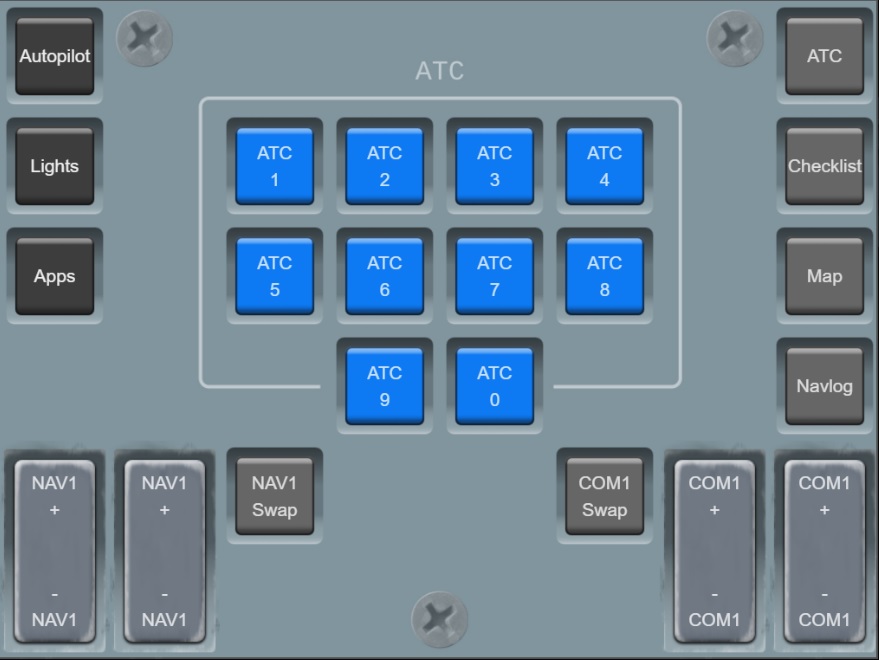
Today I have downloaded MATRIC, it looks awesome. Matric allows you to control MSFS from a Tablet or cell-phone. I was going to buy a module which are quite expensive, this may be my solution.
It’s really easy to set-up, download the app’ to your PC and Tablet or cell-phone. Let Matric do the rest.
If anyone is using this successfully, it would be great to know.
There is a small subscription of nearly 8.00GBP per year or a monthly subscription. I am ready to pay and give it a go. Here are some images for you to ponder over. There are many panel designs to download for free or simply create your own. You can even import images of buttons and add them to your own custom design. Matric can be used for many games, American Truck Simulator etc.
You can find out more about Matric here…
Charles.
Take look at the MSFS Mobile Companion App. It runs on all platforms with a web browser. It doesn’t require any programming. And it is free!
PacificSet,
Oh, thankyou for your advise. I have followed your link and yes, MSFS Mobile Companion App does look really good. I will try that first, I like the fact that it has a GPS screen too. I will end up trying them both and probably use the one best suited to the type of flying that I am doing. I don’t think 14 pence per day is a huge price to pay. Unfortunately the demo of Matric only gives you three buttons to try and there are no video’s reviewing the pay-ware product on YouTube etc.
I will have a go at making a video of Matric if I think it’s worth it, I also want to be able to use it for American Truck Simulator. The advantage of Matric is that there are tons of free overlays for many games and desktop applications.
It is not possible for me to use a tablet or phone with MSFS because TrackIR is broken. As soon as I look at my tablet TrackIR stops working and I have to start TrackIR again with a short-cut key. Very frustrating!
BRGDS.
Charles.
Flight Plan Go
This looks awesome but can only be used in the USA.
Sim Dashboard is another option (free or payware). I bought it because I can use it for MSFS and ATS and it just works.
Northcoaster,
I have not seen that one, I will have a look at that one too…
I have not used Matric yet, I do like the autopilot panel with the large dials and buttons.
Cheers!
Charles.
I don’t know Matric at all but I can say that SimDashboard allows you to either download designs from the community or to build your own custom designs. I also like the option to download multiple layouts like Comms, Autopilot, switchboard, etc. and you can just swipe between them on a single tablet.
I have made 3 or 4 screens with Matric and ended up purchasing it (it wasn’t a subscription). I’ve used it for switches but, although a radio stack is available in user uploads, I haven’t been successful at displaying frequencies. It’s probably just me, though.
Hello CurrentFoil,
With regard to Matric, thank you for the information. I am really impressed that the autopilot dials and rocker switches are animated with shadows. You have to press the HDG dial inward and rotate the dial with a finger, all the dials work like this. 
The controls are large and look great however I am still learning how to use Matric. I have now paid £6.99 for a years subscription which seems reasonable. I have yet to get it working, too tired yesterday to take it all in.
I have not been able to get it to work yet because the instructions on the website are poor. I have found a Discord page and there is someone who has designed a custom panel that works through SimConnect. I will post the instructions link page here for you. You have to download Vjoy application and set your assignments under ‘Vjoy’ which appears in MSFS after you have installed the application. The author has pictures on how to set up the Matric panel under the new ‘Vjoy’ controller option, (they appear after installing Vjoy) in MSFS. The author has also created a customised SimConnect module for Matric and a optimised panel for a tablet device.
Some of the images that I have seen of Matric being used in custom cockpit builds are very impressive. with the identical menu interface for the Garmin GPS device with MSFS. It is possible to create these yourself by importing image backgrounds of the real instrument.
I will upload the link for you shortly.
BRGDS
Charles.
Hello CurrentFoil,
I have managed to get the 7day trial version of MATRIC working with MSFS! I paid £6.99 for a trial subscription for one year which runs out tomorrow, (if I do not cancel the subscription). I have cancelled the subscription and will buy a life-time license for £10:25.
The video is s rush job. I have created a button panel for the Citation too. I have used a texture background to match the Cessna Citation. I have created my panel deck using elements from existing panels.
I am just using the MSFS hotkeys for the rotary dials and knobs. To display the LED panels you need a special version of SimConnect. Please find the instructions and links below.
MATRIC can be edited while the simulator is running, this allows me to see my changes to my panel instantly. It is important to hit the ‘Sim Refresh’ key in SimConnect after every change that you make to MATRIC. I think this software is awesome, I like the fact that I can used rotary dials and customise my design easily. I will make my panel downloadable if anyone would like to try it and edit it for yourselves.
Some of the panel buttons light up, landing gear etc.
The COMM panel is next on my target list. I will link my panels into a deck that allows the panels to be scrolled through or navigated to using a radio button.

INSTRUCTIONS
BRGDS
Charles.
That’s impressive and why I bought Matric,too. I haven’t tried one of the alternative Simconnect files yet, although I’ve stepped through the instructions three or four times. Will download one of the alternates and try again. Everything else has worked well, only decks with displays and rotary gauges don’t. If that doesn’t work I’ll try the Discord support channel. The developers are available on the channel, so the Matri c support is very good. Thanks for the video and information about what you’ve been able to do!
Hi CurrentFoil,
Here is the version of SimConnect that you need to operate MATRIC, it’s available also by the link in the ‘How to use MATRIC’ file link that I have given you above.
I am using MSFS hotkey assignments and SimConnect together. Only start SimConnect once MSFS has reached the main page MENU. Run the Android app and the MATRIC app on your PC at the same time. Make sure your firewall and anti-virus are not blocking MATRIC.Press the ‘refresh’ radio button on SimConnect to synchronise MATRIC with the flight simulator. This all works over Bluetooth too.
If you need any further help don’t be afraid to ask or PM me. I can make my panel deck available if you want to download it…
I am still editing my panel and now have added buttons to my panels to browse from one panel to another, Autopilot, Comm, Nav etc.. MATRIC certainly add a whole lot of extra immersion into controlling my aircraft.
BRGDS.
Charles.
CurrentFoil,
I think I have settled on a design for the COMMS page with all rotating dials…
Charles.
Hi Charles,
Got things working. Problem was I had an older version of the Matric Server (1.6.65) and they are now on 2.4.320. I had updated the KAL Deck to 3 but had not updated the server. The newer deck must require the newer server version! Things are working well now.
I have created a couple simple panels with Matric but will eventually work on more elaborate panels to include pitch wheels, radio dials, etc. I’d appreciate getting a copy of your deck when you’re done (no rush as I haven’t flown the Citation yet, I’m still working on the piston Cessnas).
Thanks for all your help!
Hi CurrentFoil,
I am really pleased that your MATRIC software is working, I think it’s a brilliant program. I will also create an profile for American Truck Simulator which I use occasionally.
If anyone wants to try MATRIC it’s possible to pay £0.79 a month and I am sure you can cancel the subscription anytime. My yearly subscription ends today of £6.99 and that allowed me to play with the full functionality of MATRIC for a week and I will not have to pay the £6.99, (Google Play) now. I am going to buy the life-time subscription today which is just £10.00.
I will upload my MSFS 2020 deck when it is finished so you can edit it to suit yourself.
There are some MSFS key bindings which are missing for the autopilot which is really annoying. I don’t think there is a shortcut to turn on VS in the MSFS control settings, I can turn it off. For now I have to turn it on manually. I will probably use FUSIPC and SimConnect to achieve that somehow, (I am still learning). I created a new keyboard profile to use MATRIC with.
I will PM you when my Deck is finished, otherwise I will just post here with a link. I will have to provide you with my key bindings in MSFS too.
Take care.
BRGDS
Charles.
Hello CurrentFoil,
Here is a link to a MATRIC DECK that I am working on. The DECK has rotary dials which work really well.
I have included a couple of images for you. Anyone can download and use this deck, share it if you wish and edit it too.
The DECK is optimised for a 10inch tablet and has several panel backgrounds to choose from.Turn tablet brightness down to use panels to something you like.
NEW UPDATED LINK BELOW
Charles.
Looks really nice, Charles! I will download it and give it a try. I only have a n 8" tablet, but it will probably be re-fit automatically and will work just fine. Thank you very much!
Hi CurrentFoil,
I have updated this deck and corrected a few things. I am starting on the COMM and NAV panel. I will provide a new link. This is very time consuming, I could not do this if I was not off sick from work. I am beginning to realise that Asobo’s control assignments are very confusing!  I will push it as far as I can. I am going to use push buttons for the NAV and COMMS otherwise I think I will have conflicts with other hotkey assignments if I try and use rotary dials.
Charles.
Hi Charles,
I can sympathize with you. I have set up some much simpler decks (for lights only) and it took a considerable amount of time. Also, there are so many things that can conflict with the control assignments. I ran into one with Xbox Game Bar (that I really don’t need). The Game Bar was added to my system when Windows MSFS updates started requiring the use of XBox to get them.
Hope you get well soon!
Hi CurrentFoil,
Here is a little Xmas stocking filler for anyone who want’s this
I am just finishing off my ‘panel project’ with autopilot and will make it available for download shortly. It all works except for the PAX SIGN button. The rotary and push buttons all work. This project has not been easy. The application does not require Vjoy, it uses the default MSFS hot-key assignments and should be ready to go if you start with a fresh keyboard profile. The project is supplied ‘as is’ so to speak. Edit away to your hearts content!
For anyone interested in using this panel, you will need MATRIC which costs the equivalent of three cups of coffee and a biscuit for life-time ownership and a suitable tablet, (10 inch preferred). Second-hand tablet would do the job, I am using a Fire HD 10.
There are different backgrounds to choose, Boeing grey, Brown bronze and Airbus.
Charles.