Thanks. Looks like this stick can be added without too much trouble. Waiting for a few more reports and then I’ll do a release which adds 3-4 more sticks to FFb-bridge and you can test it.
Big update dropping soon. Logitech sticks added - no idea if they will work, I can’t test myself. Hoping to hear from people with Logitech G940, Force 3D Pro, and Wingman Force 3D.
Update will be out in under an hour, making all the necessary changes to the documentation, public website, and so on.
Watch this space 
are there updates for sidewinder ff2 as well?
Yes, lots of quality of life improvements. Still working on a few last things.
Beta 14 is out!
Brief notes ( Changelog — FFB-Bridge docs for more)
- Logitech support added for three sticks - no idea if it works, need your feedback.
- App is now properly signed with a publisher identity. This also means you can find out who I am, my real-life identity, and why I built this. Please be nice
- Major polish across the app to make it nicer to user, improvements to the Diagnostics, Help, and Dashboard
- Optional support the dev page if you want to help out. Totally optional. I stand behind my promise of an amazing free app, built by a simmer for simmers.
- more to come..
Thank you all for your support. It means the world to me.
Feedback channels remain the same- email feedback@ffb-bridge.com and the feedback form on Send feedback — FFB-Bridge
Apparently this is working great - got one user report. Hope you Logitech people like it !
More than 1000 thanks to you, it worked like expected, force must be tuned to personal taste, but it worked right out the box and make me happy again.
Great work
Logitech Force 3D Pro User
So happy to hear this! It’s fun right, when these old sticks just start working? Have fun
Tried this with a Wingman Force 3D today, seems responsive, miracle for such an old stick. Had to find the old Logitech drivers - not easy to find these days. Sent a feedback email. Thanks for this app.
Thank you for the feedback. Glad to know it worked, and perhaps you could tell others where you found that driver?
Now that these sticks are showing as working (still waiting on a G940 report), the next beta will add a bunch more sticks.
I’m at the point where I’m doing final polish for a full 1.0 release. User requested features that are being added in the next release. I need to test out what I can (can’t test the various sticks), make sure it’s working, and then I think we will be ready for a full release. maybe another week or so.
-
More force-feedback sticks supported. Thinking of : Saitek Cyborg Evo Force, Saitek Cyborg 3D Force, Thrustmaster Top Gun Afterburner Force Feedback, and MOZA AB9 FFB Base (this is new!)
-
Per-aircraft profile auto-select
MSFS uses TITLE / ATC MODEL; X-Plane uses pluginless UDP aircraft identity. Users can bind the current aircraft to a profile and it will auto-load it when you fly that plane. Much requested. -
Unknown FFB stick handoff
Unsupported FFB-capable devices are detected, shown on Dashboard, and routed to ffb-probe.com instead of being driven blindly. -
Session automation
Opt-in Auto-arm when ready and opt-in disarm when sim exits. Also much requested. It should just work without having to do anything. -
Accessibility contrast pass
Raised muted/secondary text contrast for older users and cataract readability feedback. Got some great feedback from older users (65+), and trying to make things easier for everyone. -
High-speed aircraft tuning range
Raised Cruise reference (kt) from 400 to 800, fixing jets/fighters and existing A320/747 profiles. -
Editable tuning readouts
Slider values are now clickable/editable. Enter commits, Esc reverts, invalid input snaps back, and typed values clamp to slider ranges. This just makes sense when you use it. -
Percent-based normalized controls
Most 0.0..1.0 tuning values now display as 0..100%, and Force gain displays up to 300%. Real-unit values stay as knots/sec/ms. The decimals were very “developer”, not “user”. This is easier to read and understand.
If you really want a feature, email me with feedback. All these features are based on your requests.
Logitech Gaming Software version 5.10 (specifically 5.10.127)
Driver Downloads
Because this is older software, it is no longer officially supported on modern operating systems like Windows 10 or 11, but it is available through community and driver archival platforms:
-
Get the 32-bit version via Softpedia Drivers.
-
Get the 64-bit version via Softpedia Drivers.
-
Alternatively, download the compressed installer folder from the Internet Archive.
I finally had a chance to try this today, on MSFS2020 and a Cessna 172. It worked beautifully, far better than the other apps I’ve tried.
That was until I switched the autopilot on. Every time I did that, the plane went crazy, leaving me fighting to avoid a crash.
Eventually I worked out that turning down the authority and the force of autopilot stick feedback made it work well.
Thanks. Yeah the profiles do need tuning. I kinda threw some together but proper tuning needs work. One of the things I’m doing before the full launch
Continuous joystick vibration while the flaps are extended would be fantastic (with intensity adjustable via a slider in the settings), not just only a single, brief vibration when extending or retracting them. Furthermore, the vibration intensity should increase depending on the flap setting. So you can feel, when the flaps are out…
It would also be great if the tool automatically terminated and closed itself once MSFS ended and has been shut down.
Essentially just like XPForce 
Thanks!!!
Just saying - a few surprises coming up soon 
Yes, both these would be excellent additions to the app.
as an IRL pilot…YES. besides the added g forces when lowering flaps, there is usually decently heavy constant vibration so you know they’re working without even looking out the window
FFB-Bridge RC1 is out: https://ffb-bridge.com
Lots! of changes.
- Light mode
- Major improvements in flight forces. Flap drag, gear drag, and much more added, and more refined
- New HID direct mode bypasses DirectInput and talks directly to the FFBv2. Nicer feedback, would appreciate reports. Set it up under Support - Advanced Hardware
- App remembers saved profiles, automatically picks them when you start the sim with that plane
- Can auto-arm on sim start (opt-in under settings).
Lots more on the change log here: https://ffb-bridge.com/docs/changelog
I hope you all like this one. It was a lot of fun to make.
And, yes, there’s one surprise (at least) yet to come.
Feedback via the usual sources: feedback@ffb-bridge.com and https://ffb-bridge.com/feedback
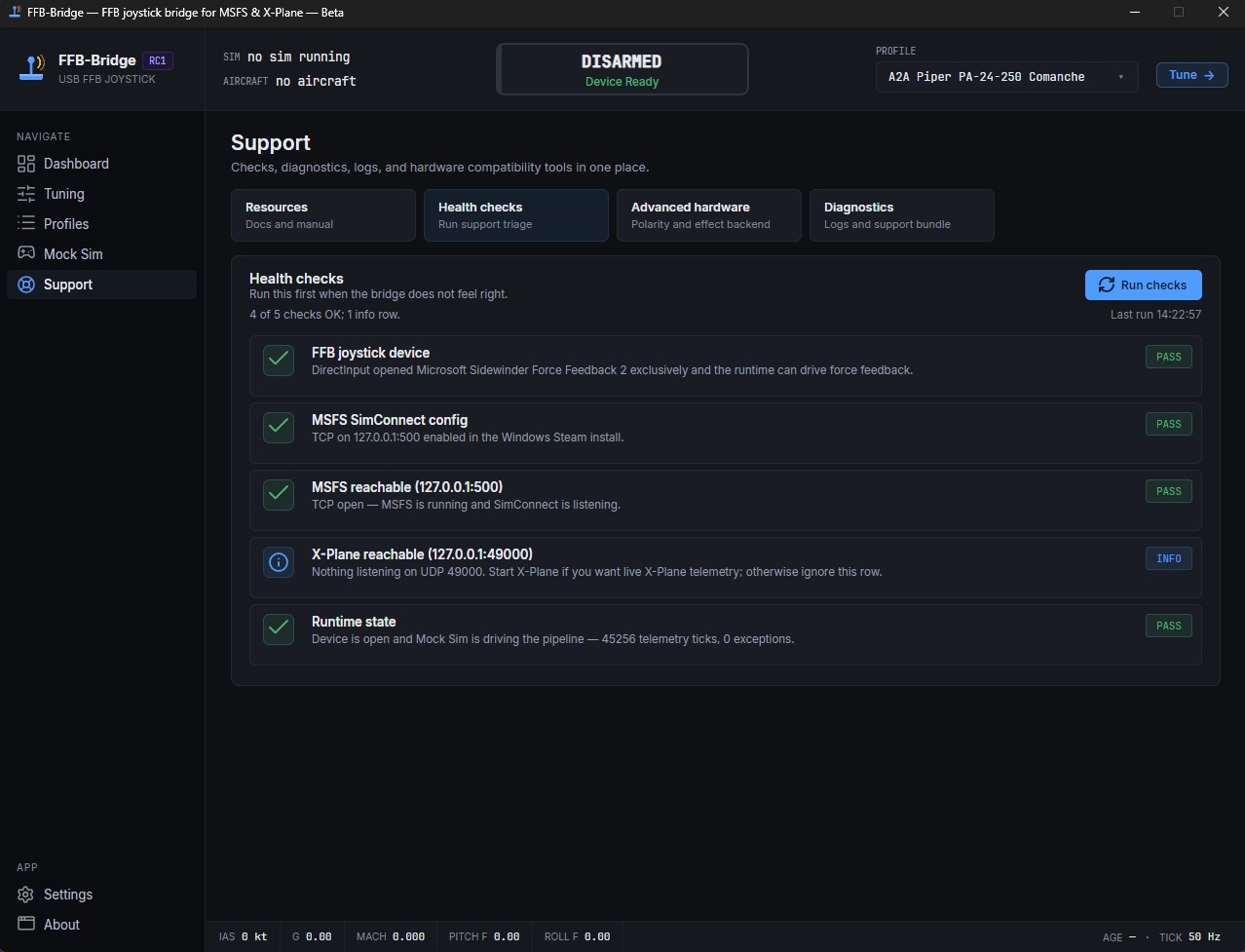
Just did a quickie test flight with FFB Bridge and I have to say I am very, very impressed. At first it was a little bit troublesome as it CTD on me a few times, but after I ran the health checks (attached image for those who need it), it ran without crashing. I had to run the SimConnect config fix and that’s what seems to have resolved the CTDs.
I was flying the A2A Comanche and used the 172 starter as a base to apply my own tweaks and adjustments. There’s a bit of a learning curve, but it’s quick once you get the hang of it and figure it out.
Highly recommend for those with MSFS FFB2 Sidewinder! That thing is a tank.
Hope to see this in space sims too as it would make them incredibly fun! (Star Wars Squadrons please!)
So just fired this up the for the first time in-sim with the Black Square Bonanza sitting on the ramp. First thing I noticed: there are forces acting on the stick to re-center it  . I expected it to be essentially limp as yokes are IRL.
Not sure where to go from here as this to me means something is set up wrong. I’m using the default C172 profile. Anyone ran into this?
2nd thing i noticed on takeoff: trim forced are upside down.