Here is a question, should you use the “Toggle” option or should you use “on” and “off” option. I am thinking that you could assign a single button to be either on or off.
Hey @Turk10mm and @LorbySI, thank you for this thread. Turns out the X-Touch Mini + Axis and Ohs was exactly what I was looking for!
Turk, I wonder if you could share your AaO template(s) with us? I feel like I’m doing alright but I still have a few problems and I’d like to see how you went about things.
For example, I’m trying to click the HDG encoder and have the heading bug set to my current heading, but it instead it sets to 0. At this point I’m not sure if I’m misunderstanding AaO, MSFS, Simconnect codes, or aircraft systems in general.
Or another example, how do you handle functions with no toggle? “toggle flight director” is an easy assignment but as far as I can tell, there’s no “toggle auto pilot” function, just separate “off” and “on” functions. How do you deal with situations like this?
Apologies if these questions are handled in the documentation - I’ve read enough to get up and running but haven’t fully absorbed all the contents just yet.
As a follow up question, are there any guides to scripting yet?
Thanks again!
I would have to take a look at the script that you are using. Was it the one that comes with AAO?
It is very rare that there is no toggle for a set of events, but their names might differ from what you expect. These Event IDs have accumulated over the last 20 years and at least three different generations of MS flightsims. You are looking for “AP_MASTER” I think.
I would recommend that you download the SDK and keep the documentation open when you are looking for events. Or take a look at the one from P3D that is accessible online (minus quite a few features, but by and large the legacy events and variables are the same.
There are many. The scripting in AAO is nothing new, it is the same that has always been used in MS FS9/FSX/P3D XML gauges. The implementation in AAO is just a reduced feature set of the same thing. I have started kind of a blog type document - but the field is so vast, that it is impossible to cover more than the basics.
1 Like
Beauty. Thank you for your help.
Tonight I flew an entire flight plan using pretty much nothing but the knobs and buttons on my X-Touch Mini - just a bit of help from the kb and hotas to fill in the gaps.
Between this and my homebrew headtracking setup, MSFS has really turned into something special.
Cheers.
2 Likes
Welp, with your help and a good night’s sleep, I figured out my major issues.
Inspired by your post, I just received my X-Touch Mini, I am trying to set it up.
Ok i’m figuring out more items here.
I used the provided HDG script, awesome! I tried to do the same for airspeed but could not find the proper variable?
I am trying to control the autopilot on the Neo, tried master AP toggle, AP ON but none seem to work… i suppose because the AP1 and AP2 functions are separate?
Thanks for your help!
(A:AIRSPEED INDICATED, Knots) (>K:AP_SPD_VAR_SET)
The “AP_MASTER” event works fine for me
1 Like
Looking forward to read about when/how to take advantage of this new functionality!
@LorbySI While waiting for the option to press to toggle between inner/outer knob, I decided to use the CARRY events, however, I have an issue where COM_RADIO_FRACT_DEC_CARRY actually increases the frequency?
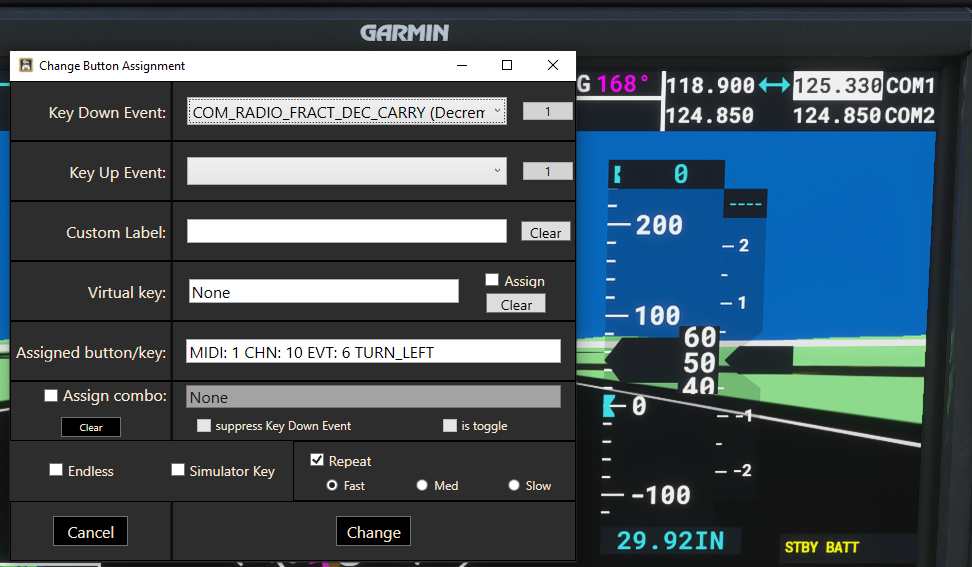
Yes, that is a known bug of MSFS. It has been reported to Asobo quite a while ago too, but it still does it.
These variables and events are not an invention of AxisAndOhs, they are the actual items that are transmitted to the simulator via its API - directly and unfiltered. Their specification is in the MSFS SDK documentation - it is advisable to keep that nearby, especially when you are using the scripting features.
No need to wait, that is not a new or native feature of the app. It is what @Turk10mm did with the features that are already available.
1 Like
Thanks, just found section 3.4.4 of the manual where this is explained.
(scratched my previous post). I redid everything and now it is working. Just a small thing, on the doc one of the two screenshots doesnt have “is toggle” checked, contrary to the screenshots on this thread above.
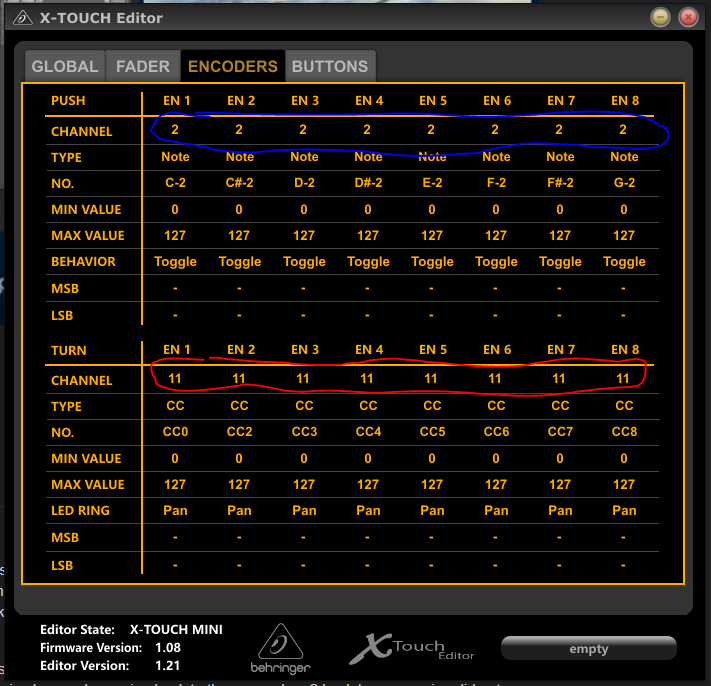
I did switch my Encoder turn event from CC to Pitch and changed all of them to have different channels (1-8).

Separately, I also noticed a behavior from my Xtouch where the TURN LEFT/RIGHT events are triggering but only after an initial CLICK event, I suppose that’s the reason why its important to change the channels?
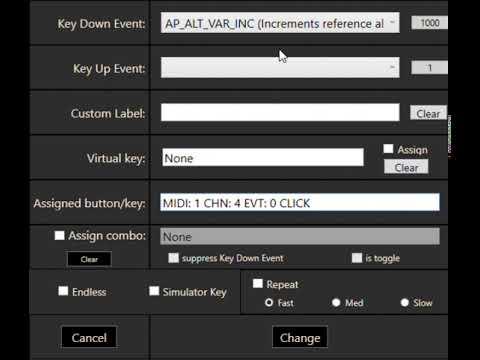
Hello @Turk10mm @LorbySI
You guys helped me getting mine working, I will contribute this one: Changing the Encoder’s TURN event channels to all different works, but leaves little room for your XTouch Mini Layer B assignment.
Instead, you can change the channel # for the Encoder PUSH, this worked for me:
1 Like
What am I doing wrong with my X-touch? Trying to assing AP_ALT_VAR_INC to one of the knobs
- I cannot change the Value “1” in the Key Down Event
Spin the mouse wheel over the box. Right half = big changes, left half = small changes.
2 Likes
To easy, Oliver 
edit: Now it is working…
Danke und Grüße aus EDDS
Ralf
Not really, sorry. I guess it depends on the plane that you are flying, if it reacts to that event or not. MSFS planes are mostly “self contained”. FLC is also available btw. (useful in the Airbus).
Be mindful that there always are several events that look like they do the same thing. It is worth exploring them. AP_ALT_HOLD vs AP_ALT_HOLD_OFF and AP_ALT_HOLD_ON etc.
Best regards sent from EDMA
1 Like
ok, I try to figure out. step by step. Thank you for your application and your support!
So, I was able to get everything working for HDG, ALT, V/S, IAS etc. Perfect 
Still struggling in some areas, I’m usually using the Citation Longitude.
-
Any chance to get the “Range” Knob for the Garmin to the x-touch?
-
Any idea how to start the engines (I’ve tried some commands I found on that - but did not work)?
-
I’m able to change the barometer on the stand-by gauge, what needs to be done to change it in the Garmin?
Is there any way to monitor what event is used while clicking a button?
MSFS cockpits and systems are mostly self-contained. A mouse click on a knob of the instruments only triggers local code in the HTML gauge, it is not connected to any simulator event. Somebody (=Asobo) would have to implement this connection to simulator events in the instrument itself. Also, many of these instruments use only local variables and don’t react at all to changes of the actual sim variables.
In the old days there was this unspoken “code” among developers that you use the simulator events and variables whenever possible. That way your gauge/system/instrument can be operated through other means than a mouse click. In MSFS that isn’t the case anymore, it is as if especially those GPS systems were programmed by a subcontractor who wasn’t familiar with legacy gauge code guidelines.
1 Like
Thanks Oliver, when I was watching the Devs talk on the [Oct/Nov Dev Q&A video] on the part that touches this subject, I remembered you had already explained this.
Their answer can be summarized that the “issue” lies mostly with third party devs having a ton of previous-gen code that simply needs to be refactored to the new platform. I would adventure my interpretation that they suggest for example, things like the disconnect you mention between WebASM avionics code and the SimConnect variables and events, is something that somewhere is possible today just somehow yet “undiscovered”(?)
(https://www.flightsimulator.com/november-5th-2020-development-update/)
1 Like