Will, then if these videos are not fluid on your computer you either have your Youtube settings wrong or there is something drastically wrong with your computer. Stop trying to blame other people for your stutters and start looking at components on your computer that are most likely causing your stutters. I would first look at upgrading your CPU. Here is a comparison between my CPU and yours which isn’t that much different with mine being slightly faster. UserBenchmark: Intel Core i5-10600K vs i7-8086K No need to get rude with your replies from someone who is trying to help you. If you persist in being rude don’t bother to reply to this post.
2 Likes
I am not being rude, and there is nothing wrong with my computer or my youtube. Just have a look at the DOZENS of threads and hundreds of posts in this very forum, not just mine, but for example this ones, among many others:
There is no use posting videos from external views, as I said, the only ones that matter are those in the vicinity of airports , cities , with 180° turns from inside the planes, and not only with the TBM, give it a try with the A320, and let alone the 747 and even worse the 787…
As already stated, my rig is perfectly capable to run a half a dozen games and more importantly also DCS at 60 FPS maxed out. My 3D mark score is better than 90% of all results, see screenshot. If this does not make clear that there is something seriously wrong with the graphics engine / loading of landscape geometry / texture of MSFS, I don’t know what will.
Too much attention has been given to useless features like fauna, POI’s etc, in detriment to what really matters, also as already stated here, and in the DOZENS of threads and hundreds of posts in this very forum.
Though, also as stated above, I see with the recent update 1.16.2.0 an improvement, less stutter. Prove that Asobo is doing something to address this matter, in spite of the fact that you, TrevKiwi,
find everything so perfect.

7 Likes
I see that you are running at 4K which could be your issue. Your CPU maybe isn’t up to spec to run at 4k and your CPU Graphics card combo is causing a bottleneck. Read this article from Toms Hardware. How Much CPU Does the GeForce RTX 3080 Need? | Tom's Hardware. Also, do your own research on Google. I haven’t got the time or the inclination to look at those other posts which could possibly have the same issue. Also, you are running on a 32" monitor in 4K and your CPU hasn’t got the grunt to run at that high resolution so in my opinion your CPU is causing the stutters. Try running at a lower resolution and not in 4K and see if that helps and if it does as I have said before your CPU most likely is the problem ie a bottleneck.
1 Like
Hello TrevKiwi,
Thanks for the suggestions, but no matter the resolution or the quality settings,
the stutterrs are always present, albeit, as mentioned, I have noticed with the recent update
1.16.2.0 an improvement.
Moreover, I have seen in your youtube video:
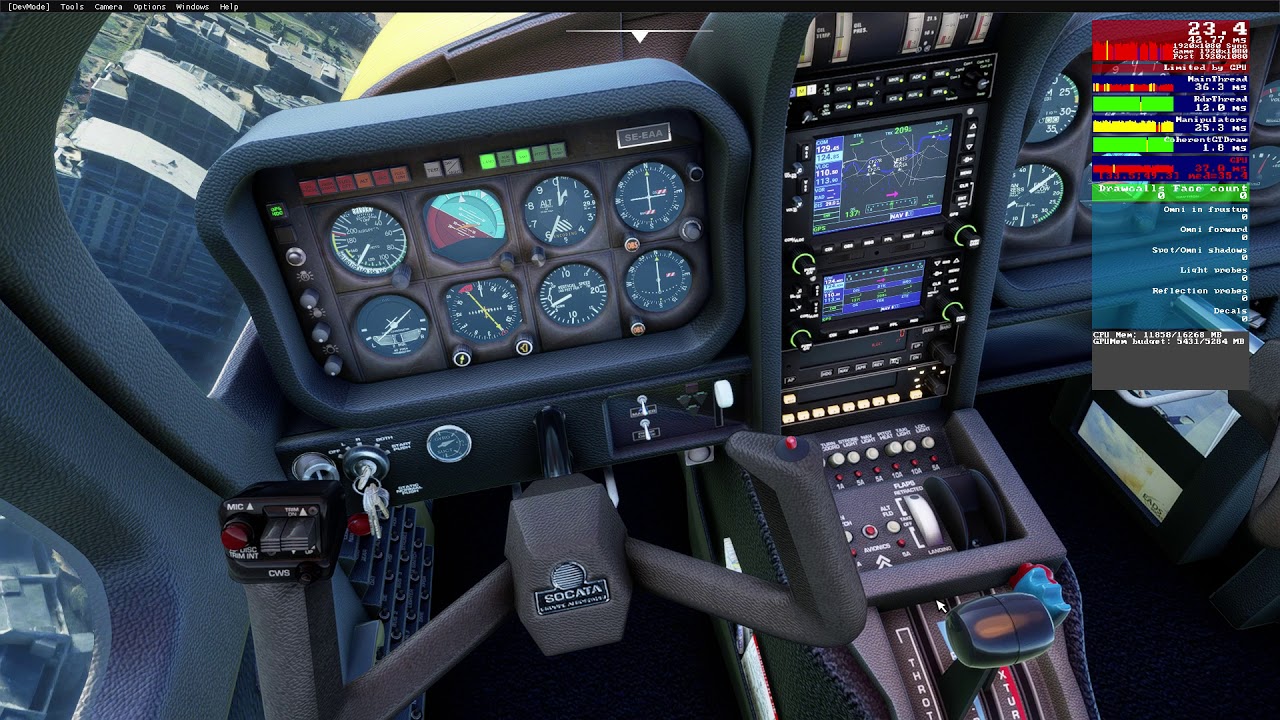

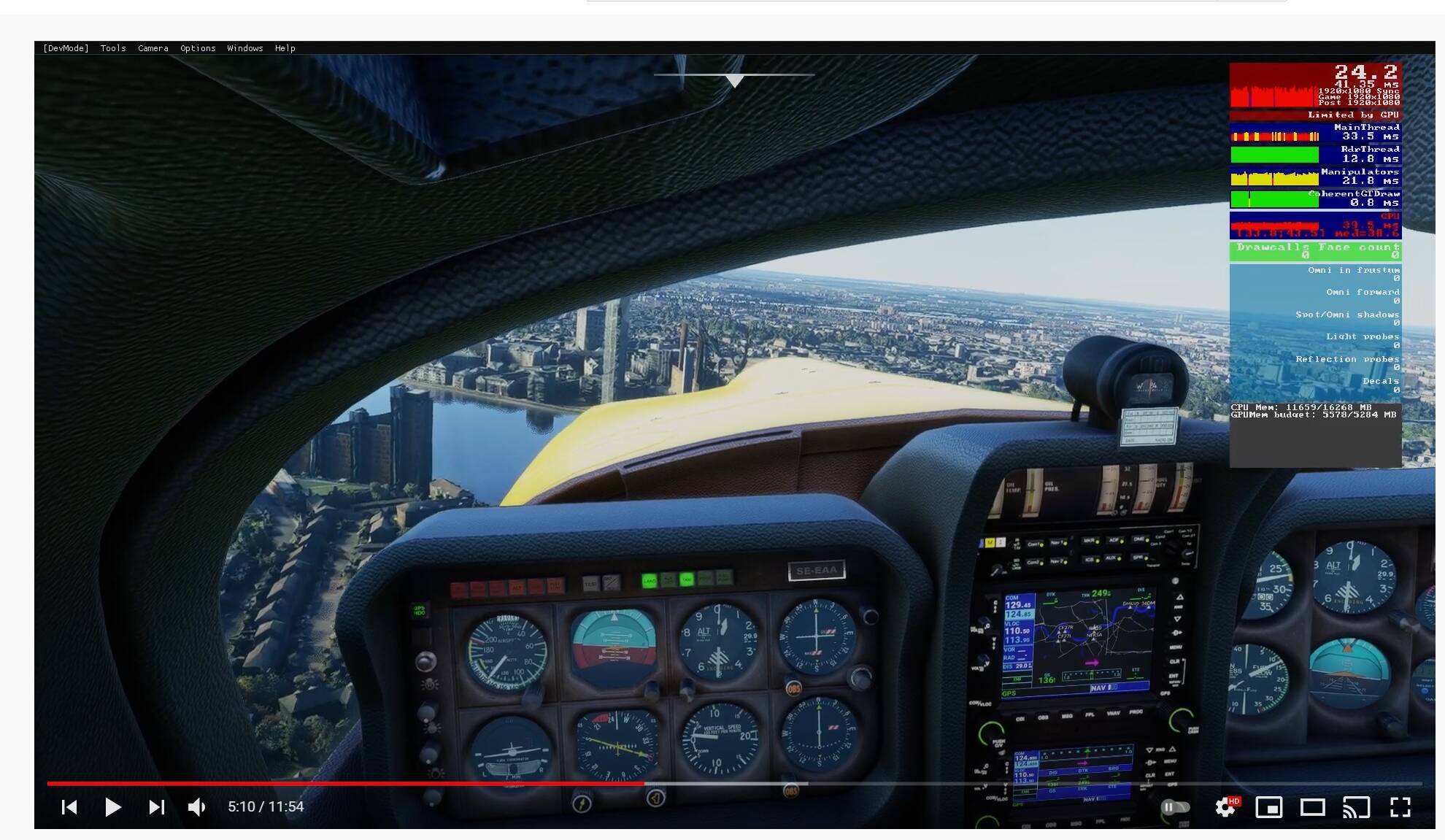
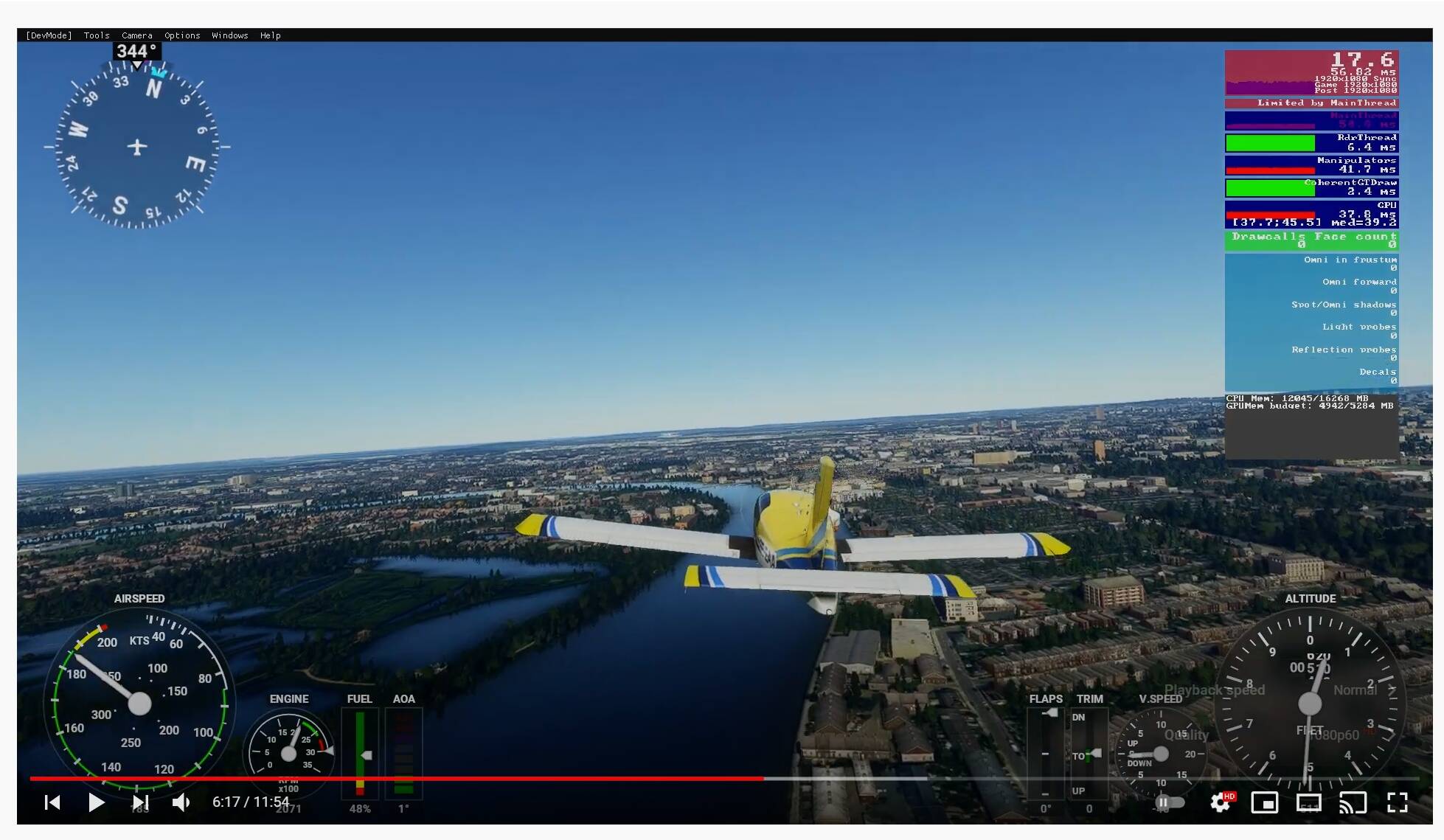
(see screenshots), which I am of course playing with Youtube settings 1080 / 60, as you can see, that the fps counter jumps from as low as 17.6 FPS up to 24.2 FPS. I don’t know how a G-sync Monitor behaves, if you have one, but I know for sure, after years of experience, dozens of games and quite a few sims too, that on a “normal” 60 Hertz monitor such a fluctuation can never display a fluid movement. Ideally, one locks the V-sync and frames to solid, fixed, 60 FPS, which results in a perfect sync to the monitor, or, if the game / sim / application graphics engine does not allow this, then to the exact half of that, 30 FPS. That’s what I do on MSFS, with decent results. Though ideally, 60 FPS would be much better.
5 Likes
I’m more than happy with the way the sim performs on my computer, those stutters in my opinion in my video are barely noticeable. One blink of the eye and you wouldn’t see it. That stutter is probably caused by some scenery loading. Your graphics card is 2 generations above mine although my CPU is slightly faster than yours and I’m more than happy with the frame rates. I think some people are expecting too much from this sim. Yes, I have been flying FS since the days of the Commodore 64 which was done by Bruce Artwick. Bruce Artwick - Wikipedia
1 Like
I’ve a Intel 11400 + RTX 3070. I noticed that the stutters are large whenever I do 90 degree turns with this Austrian 10M LIDAR mod. I noticed that it is because the MainThread is creating many many file accesses to load terrain data, not only from official folders but also the mod folders. So basically the CPU is waiting on lots of files. Please see the figure below. At higher terrain LODs say 150, I get up to 40-50 file accesses.

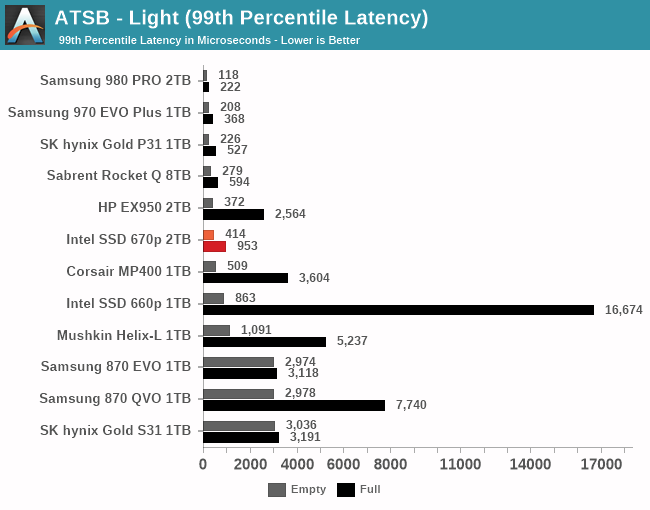
Now my Intel 660p NVMe is rather weak for high QDs (as per the Anandtech article below).
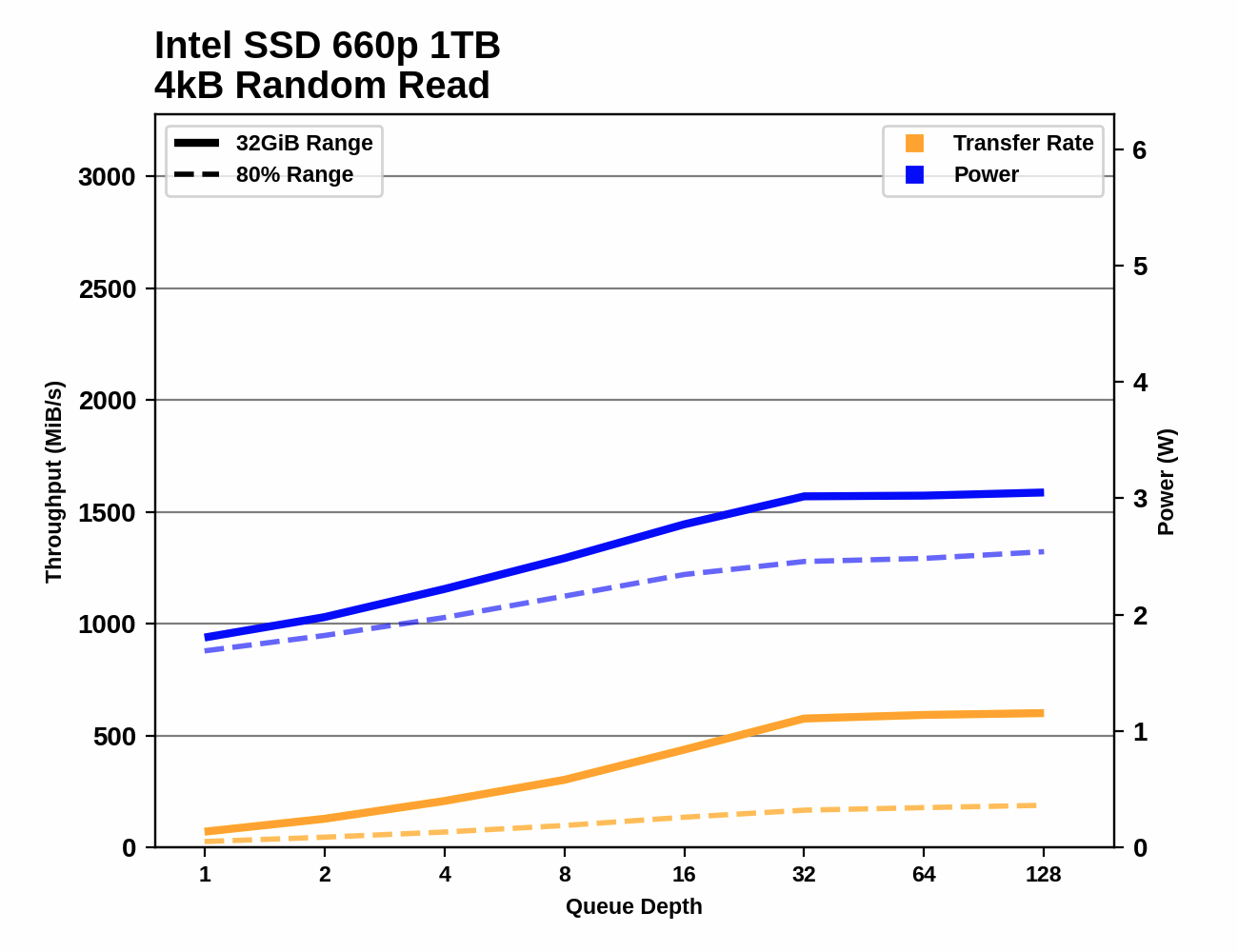
Also, it’s 99th percentile read latency is really awful at 15000 microseconds.
Now this SK Hynix P31 has probably the best rates at high QD. Also it’s 99th percentile is below 600 microseconds.
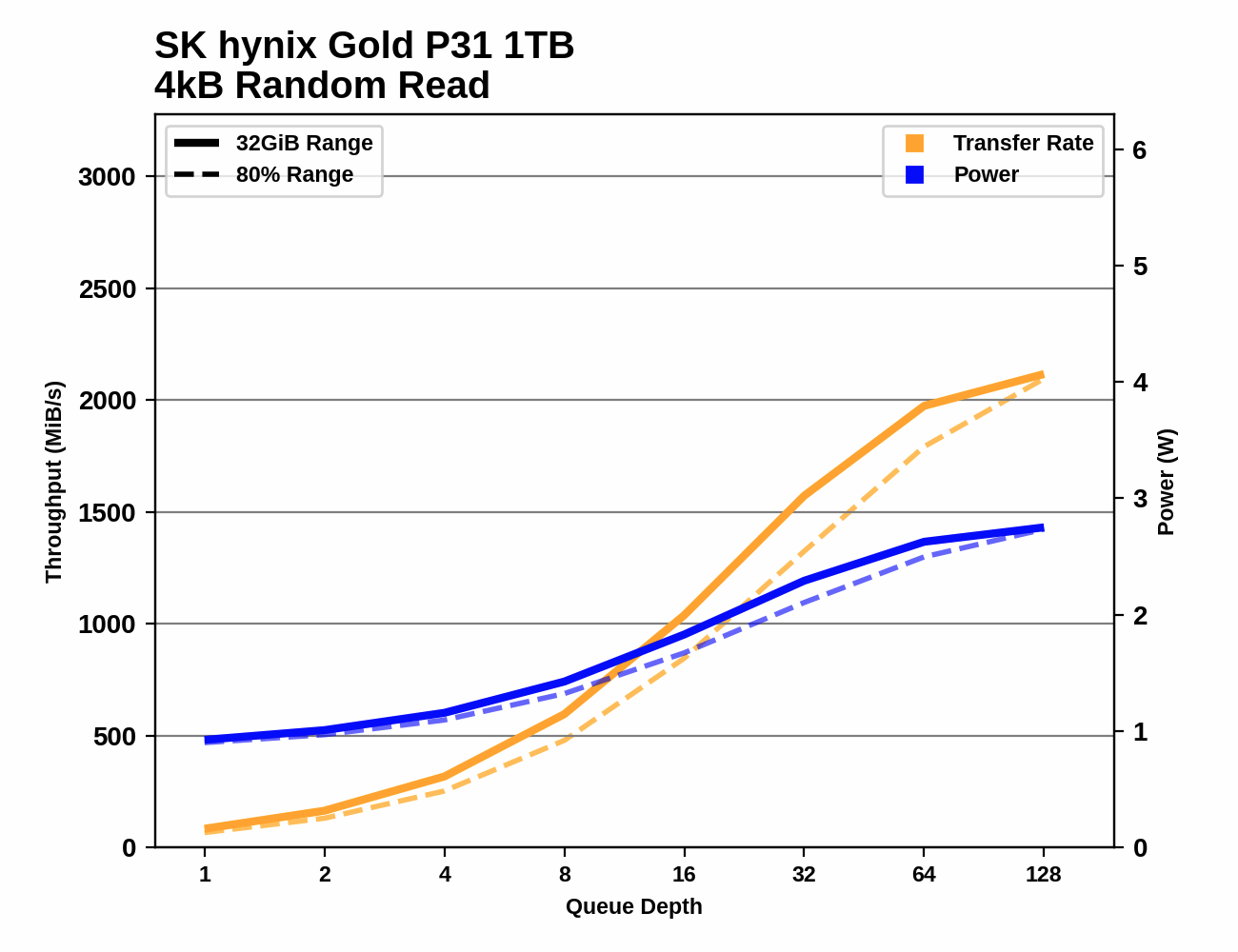
Do you guys think it’ll be better if I buy this SK Hynix P31? What do you guys think? Should I give it a try?
Edit: kept referring to P31 as P1. Watched too much Formula 1 I guess.
2 Likes
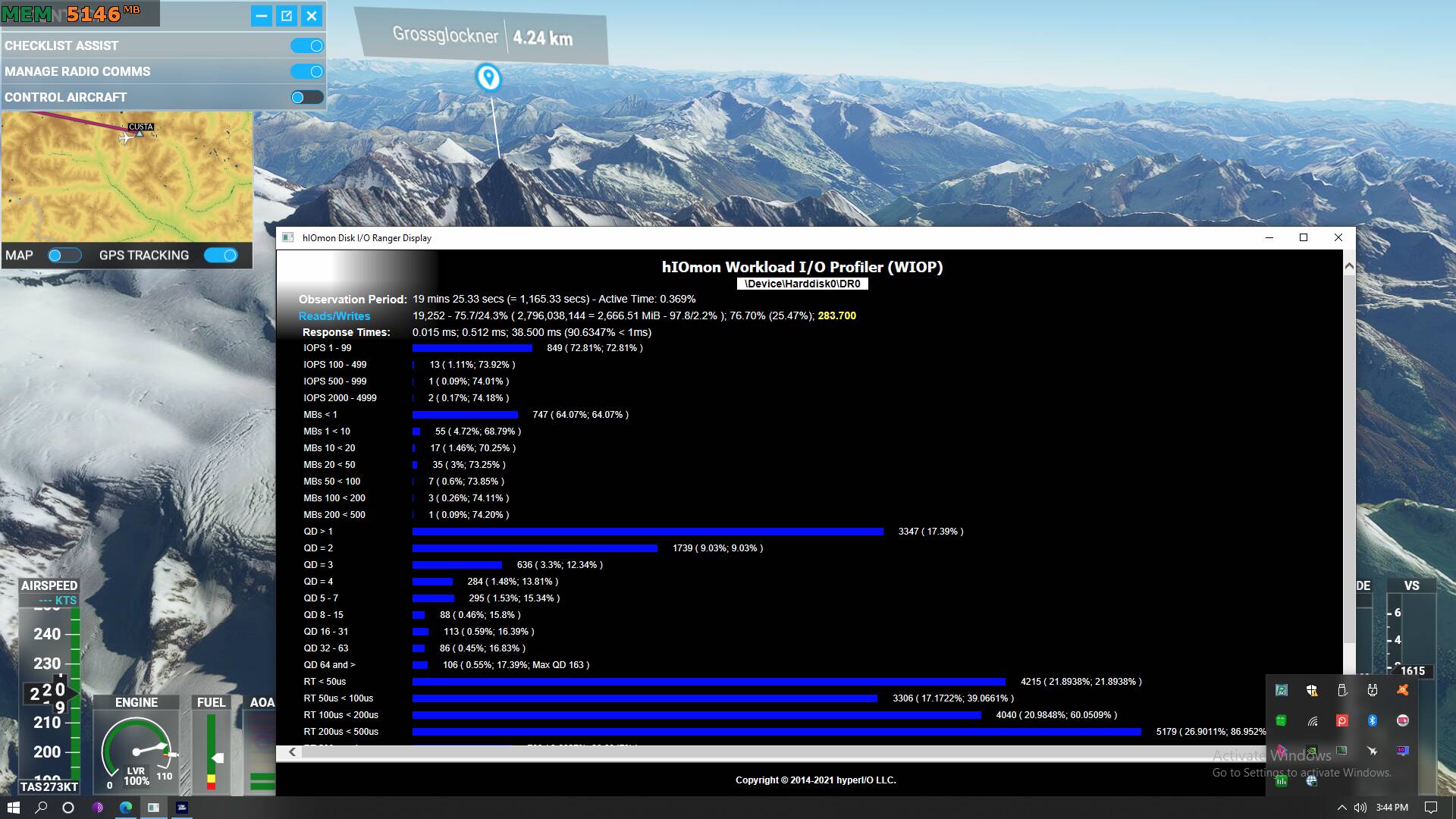
Tried to replicate the method of this article: Loading Levels In Sid Meier's Civilization V - SSD Performance In Crysis 2, World Of Warcraft, And Civilization V | Tom's Hardware
Steps to produce this:
- I loaded the game. Settings was set to Ultra.
- Sat on the runway of Innsbruck. This is to give MSFS some time to load all the assets because I didn’t want to capture data related to game loading. I was more interested in stutters caused by either VRAM swapping or SSD load times mid-flight.
- Loaded/Started the hIOmon tool and driver. This starts recording all the SSD stats.
- Took off from Innsbruck for Grossglocker.
- I did one 360 loop around in the middle of the flight path. I wanted to see if forcing asset streaming will flood the SSD with requests.
- Took this screenshot as I approach the end of my flight path.
Side note: I recorded the whole stats of the drive instead of the MSFS process only. I thought this is more realistic to capture all the competing processes that is fighting against MSFS for access to my SSD.
Most of the time. It was fairly OK stutter wise until I did this 360 loop. Before the loop, most of the QD numbers were below QD8. After that turn, I had lots more QD8 and above stats popping up. Also, I had more QD8 towards the end where I’m closer to Grossglocker.
So I can assume the SSD is a bottleneck in my situation since the drive spent more than 17.4% of the time above QD1. Btw, everyone should try out this 10m LIDAR mesh. It’s worth the stutters.
I am using a RTX3080 32Gb of RAM and i9900KF, and my experience is the same as yours, performance has improved since launch, but it is still way to far of being smooth.
The challenge is how to improve performance without a visual downgrade.
3 Likes
I completely agree, obviously.
It is well known that the devs are recoding important parts of the sim for performance reasons. We can only hope that these recodes deliver not only more fps but the smoothness we all desire, including fixing long pauses, short pauses and microstutters.
I wear a head tracker when I fly, so look out of the side windows a lot. Something is definitely not right with the animation in this sim at present as even when the fps is 40-50+, a sideways view still only looks like about 10fps with the lack of smoothness.
I’ve never quite understood why fps of even 25 can look jerky, especially in side views, considering that the eye has ‘persistence of vision’
“Persistence of vision works because the human eye and brain can only process 10 to 12 separate images per second, retaining an image for up to a fifteenth of a second. If a subsequent image replaces it in this period of time it will create the illusion of continuity.”
More about this here.
Yet we all seek fps of 50+.
2 Likes
LIDAR mesh = ??
As already said, I don’t know how a G-sync Monitor behaves, but I know for sure, after years of experience, dozens of games and quite a few sims too, that on a “normal” 60 Hertz monitor a fluctuation up - down of the FPS can never display a fluid movement. Ideally, one locks the V-sync and frames to solid, fixed, 60 FPS, which results in a perfect sync to the 60 Hertz of the monitor, or, if the game / sim / application / graphics engine does not allow this, then to the exact half of that, 30 FPS. That’s what I do on MSFS, with decent results. Though ideally, solid, fixed, 60 FPS would be much better…
3 Likes
Guys, the ONLY WAY I’ve found to almost stop the stuttering on approach is turn to 0 “GROUND AIRCRAFT DENSITY”. For solve stutter on fly, I’ve turn off “ROLLING CACHE”. Try please.
Thanks, Already tried. Have also both off.
But “almost stop the stuttering” is not good enough…
Do we have any theories on how rolling cache being disabled would help performance? Generally speaking caching improves software performance. I have mine enabled. Does disabling it increase FPS/smoothness?
Try dialing back your Terrain and Object levels of detail. I dragged mine all the way down to zero, then brought them back up to 60 after I sorted the rest out.
The only thing I can think of is the cpu needing to work harder on a graphics limited system. As I 've posted elsewhere disabling cores on my cpu gets rid of stutters most likely making my output more balanced.
This is on 8 cores though because of recording, the microstutters are barely detectable but they are there.
edit: after updating my whole system I’m now getting 10 - 15 fps more with Vsinc now off
That is not indicating a mainthread problem at all. As you can see your GPU struggling at 30ms per frame.
I never said it was a mainthread problem, just an unbalanced system. In simple terms microstutters occur when the gpu cannot handle all the data being thrown at it. Although my video has minimal stutters they are still there but if I reduced cores from 8 to 4 then everywhere that I’m not simply dropping frames would be as smooth as butter, when I try on four I did get the odd sound drop out so smooth recording would have been unlikely.
This test really only demonstrates that my cpu at stock settings is slightly too powerful for a GT1030