TenPatrol, thanks for the workaround! Can you let us know how we will later (when hopefully this issue is finally sorted) put back all the changes in your workaround to how they were, for example the following and all the others in your workaround

How are we going to know when a fixed version of Gaming Services becomes available?
After that, what are the steps of rolling back all changes?
Thanks so much for this step-by-step. Time for testing. 
Has anyone found how to shut down MFS with out going to task manager?
Thanks
Nope. Im still having to use task manager.
Same boat here! Glad I’m not alone…thought I corrupted something myself. But hey, on a positive note, I just bought the A350! Beautiful plane with the 1.0.10 update.
Mine too - same problem, task manager to close it down completely
Yeah, unusual, but experiencing the same - task manager to close it down completely.
FS 2024: After updating to SU2 this morning I was able to quit in the intended way, so it might be fixed (?)
Hi @flexxair,
Do you mean that MSFS 2020 shuts down normally after you updated MSFS 2024 to SU2?
Don’t worry, everything we disable now can be fully restored later without any issues, so there’s no need to stress about it.
I’ll be keeping an eye on both Microsoft and Microsobo releases and any patches from the Windows app developers.
One more important note: I didn’t just uninstall Gaming Services and rolled back to the older version - I actually identified the exact DLL that’s blocking MSFS from closing correctly. I’m not going to name it here (tampering with it directly can prevent games from launching), but I can tell you it lives in C:\Windows\System32\
And of course, this DLL may be one of the causes and not the main cause - only Microsobo knows.
Yes, https://forums.flightsimulator.com/t/msfs-2020-will-not-shut-down-fully/717408/725?u=tenpatrol
Using the template below will greatly help the team reproduce the issue and ease the process of fixing it. Before posting, search for an existing report. If you are not sure it’s a bug, please first report in User Support Hub.
2 tags are required - add them in the tag section next to the title above:
Feel free to delete this quote section after adding your appropriate tags.
ISSUE DESCRIPTION
Description of the issue:
MSFS 2020 when shutting down, the sim keeps running in the background and only can be closed by the task manager.
Version of sim is V 1.38.2.0
Any suggestions?
Thanks
[PC Only] Did you remove all your community mods/add-ons? If yes, are you still experiencing the issue?
FREQUENCY OF ISSUE
How often does this occur for you (Example: Just once, every time on sim load, intermittently)?
REPRODUCTION STEPS
Please list clear steps you took in order to help our test team reproduce the same issue:
YOUR SETTINGS
If the issue still occurs with no mods and add-ons, please continue to report your issue. If not, please move this post to the User Support Hub.
What peripherals are you using, if relevant:
[PC Only] Are you using Developer Mode or have you made any changes to it?
[PC, MSFS 2020 Only] Are you using DX11 or DX12?
[PC Only] What GPU (Graphics Card) do you use?
[PC Only] What other relevant PC specs can you share?
MEDIA
Please add a screenshot or video of the issue occurring.
[END OF FIRST USER REPORT]
 For anyone who wants to contribute on this issue, Click on the button below to use this template:
Do you have the same issue if you follow the OP’s steps to reproduce it?
•
Provide extra information to complete the original description of the issue:
•
If relevant, provide additional screenshots/video:
•
This is just a repeat of your msg, which was already read and understood.
Can we know now the steps to roll back your CMD and other commands in your workaround, so we have all this ready for when this is resolved?
Sorry, unclear: since I and some others experienced the same issues with 24 I posted my impression after today’s SU2 Update for 2024 which seems (!) to have it fixed
Sorry again for confusion
Did everything you mentioned worked ok for the day. Unfortunately, the Gaming Services updated the next day even with Update Apps disabled.
Same here!
The workaround propossed by the community fix the issue BUT the next time you update the Microsoft Store, Game Services is updated and broke this thing again 
Steps to Revert the Changes
In windows search bar type command prompt
Right-click Command Prompt and select run as administrator
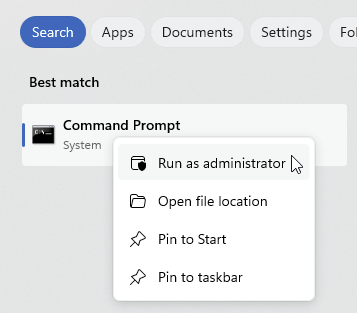
Copy and paste the following command into the Command Prompt by simply right-clicking inside the window:
reg delete "HKLM\SOFTWARE\Policies\Microsoft\WindowsStore" /v AutoDownload /fpress Enter
Copy/paste
sc config CscService start= demand
press Enter
Copy/paste
sc config DPS start= auto
press Enter
Copy/paste
sc config WSearch start= auto
press Enter
Copy/paste
sc config wuauserv start= demand
press Enter
Restart PC
In windows search bar type gpedit.msc
Right-click gpedit.msc and select run as administrator
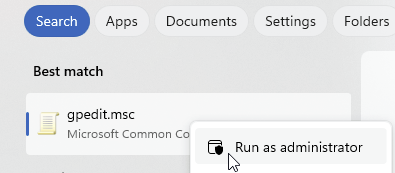
In the left pane of the Group Policy Editor, expand the following nodes in order:
Computer Configuration > Administrative Templates > Windows Components
Then scroll to the bottom of the Windows Components list and click Store
In the right pane of the Group Policy Editor, double-click Turn off Automatic Download and Install of updates
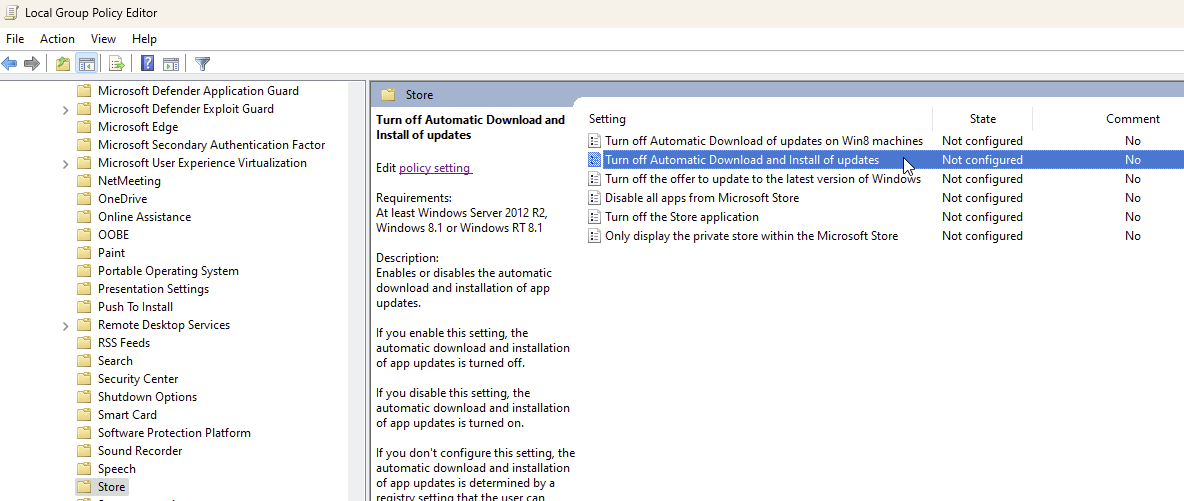
Select Not Configured, then click Apply and OK.

Restart PC
Just something to be aware of, that I certainly was not aware of.
I’ve just upgraded to an AMD9800x3D and have been running the Ryzen Master software to check the temperatures and the individual core usage when running MSFS2020 and MSFS2024
The Ryzen Master software gives all sorts of info, but I was looking particularly at temperatures (good for both sims in all stages) and core speeds (the chip is rated to boost to 5200 GHz)
When running the sim MSFS2020 was generally running at 3500 -45000 GHz speed for a couple of cores, but then much lower - more like 1200-1500 GHz or less for the other cores.
But when I ‘Quit’ MSFS2020 - but before doing the Cntrl-Alt-Delete / Task Manager routine to shut it down properly - EVERY CORE WAS RUNNING AT THE MAXIMUM RATED SPEED (c5200GHz). Every one of them. As soon as I killed it in Task Master, all reverted to normal.
Personally, I’m not happy with any software that runs every core at max and so, until MS/Asobo fix this, I think am going to ALWAYS shut MSFS2020 with the Task Manager and not use Quit in the sim at all…
Anyone else got this result? If not, then I’ll just put it down as a quirk in my setup. But if this is general - could Microsoft please take note and maybe get a bit of urgency to fix the problem?
I am having the same problem as well. I have to use Task Manager.
I had today early this morning between other updates related only with MSFS2020, one of these “mandatory updates”. 
Ok just took a couple of flights in my favorite areas, it might be me, looks a bit better and tried on the fly different settings.
CPU has to work a bit more so far I can see it as regular into this. Well lately I became less regular as bugs do not get fixed over the last six months.(!)
BUT still does not fully shut down, as I can see right now in Task Manager as my Task bar.
Will still repeat several times steps indicated from “TenPatrol” to get this problem solved, but I can see my machine is working all stable as checked in here, so I do not believe so far something gets really fixed … 
Will still do some additional tests in VR later apart from the actual HD monitor.
As I mentioned earlier in the thread, that’s what I have to do anyway, as Quit to Desktop for me just freezes the computer altogether and I can’t get to Task Manager at all, meaning a hard reboot.
I don‘t use the three-finger salute though; I just right-click the Taskbar which is easier. And you can pin Task Manager to the Taskbar, which makes it easier still.
No ill effects, by the way. The first couple of times I used System File Checker and CHKDSK (for the drive I keep the packages on) and no errors whatsoever.