Does that mean the fixes Carenado submitted are still not processed?
Which fixes did Carenado make?
Anyway, no fix for the panel lights, right?
■■■■ there are no passenger turboprops! The ATR is a mess and so is the 340 
9 Likes
@VillaJota Good afternoon. I am curious if this is still working for you, because try as I may, I cannot replicate your success. Obviously, based on your pictures, it can work, I just haven’t been able to get it to display. Are you using the online flight planner or the in-sim EFB flight planner? Would you be willing to list out the step-by-step process you are using to achieve this? I have been using the PMS GTN 750 for this with success at getting the flight plan into the box, but not on the ND, and in trying to use your solution as an alternative, I am coming up empty handed.
Thanks in advance for any insight you are willing to offer. Thank you and cheers:)
You’re completely right, @NorthlandAir , it does not work in free flight. I have made all my flights with the 340B in career mode, and it works fine:
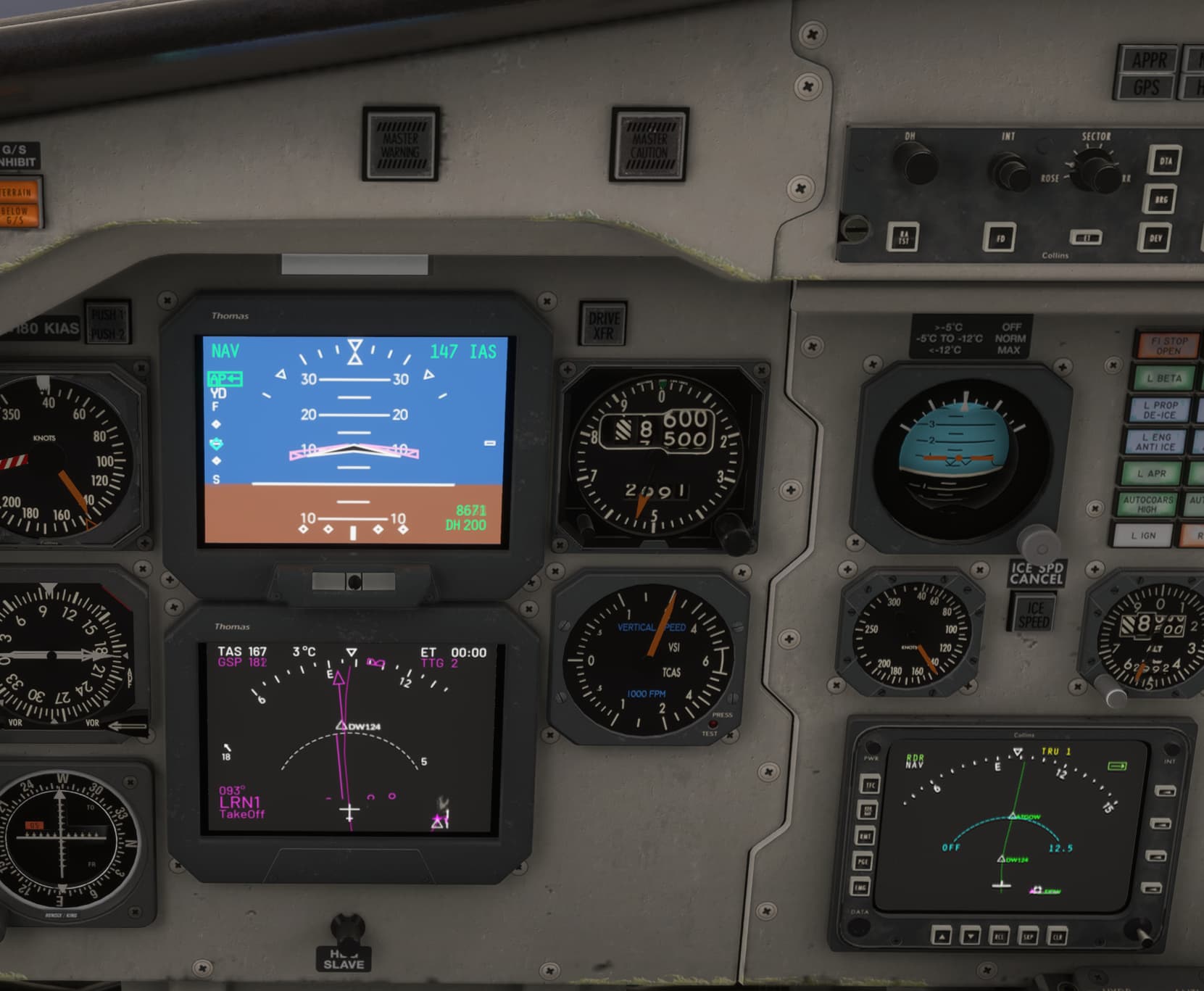
But In free flight I have not been able to make it work. It’s weird that something that works fine in career mode does not work in free flight, because normally is otherwise, but here it is.
In career mode you just load the mission, the plan is there and you can see it in the PFD and the MFD. Be careful not to modify anything in EFB before the aircraft is ready to go, because there’s another bug that destroys the aircraft dropping it to the ramp if you modify the EFB before the flight starts. Once the passengers are in and you’re ready to taxi, you can modify the plan in the EFB and then reload it into ATC and avionics. It will show in the PFD and MFD. I’ve done a lot of missions with the 340B using this sequence.
In free flight I’ve created the flight plan with Simbrief and then imported it into the EFB and completed it with arrival and approach, then send to avionics and ATC - I use FSHud in free flight but I’ve sent it to ATC anyway. The flight plan appears in UNS and is flyable, but it does not appear in the PFD and MFD. So you’ll be able to fly your plan, but you won’t see it in PFD or MFD and you’ll have to watch your progress in UNS.
1 Like
Yeah, Carenado finally updated the plane to have the 2024 version of the UNS-1 instead of thr 2020 version, so it’s a lot easier to manually enter flight plans now - works nearly identically to the Just Flight UNS-1, although it doesn’t have the advisory VNAV and Working Title said they don’t plan to implement it.
Cheers RP, I was wondering. I need to get in and fly her again and see for myself the anomalies VillaJota is referring to.
Those bugs are ugly but there’s another one that annoys me a lot: it doesn’t catch the altitude set in autopilot. You must be very careful and watch the altitude specially in descents.
It’s a pity because I really like this plane, even with all the bugs. If only they could give it some attention we could have a great plane for missions. And I want to fly it in cargo missions too.
1 Like
It does only in VS mode. Not sure if this the same IRL. In my case, cockpit lights not working bans the plane from any night flight. The plane is seriously bugged 10 months after release.
2 Likes
There is a YS-11 out now, and I’m commissioning a livery for the older RAA version. Should be fun!
4 Likes
Thanks for confirming this, I am in the same boat. I use the PMS GTN 750 to import from Simbrief and it simultaneously loads in the UNS as well, just not on the ND. It is still very usable as the flight plan shows up on the map display of the GTN750, so I am still able to get from point A to point B without issues. I don’t use career mode, only free flight. Thanks again, cheers.
I climb using FLC/IAS and it will capture ALT perfectly every time. I normally initiate the climb at about 180 to keep the climb attitude under 20 degrees and then slowly dial it back to about 160 where it climbs just fine all the way up to any altitude, up to and including 25k. This is free flight though, not career, I do not use career mode so I cannot say if the same applies to that. It seems that there are different bugs between career mode and free flight, which is beyond my comprehension to understand or explain, Cheers.
1 Like
I was getting ready to do the same, but I’ll join yours instead, once I see it on .to. I do like the older livery the best, I was never a fan of their modern livery on the YS11. Cheers
Was that a SU4 update or a generic patch on Thursday?
Ohh it’s been a while, It was an SU3 fix at the latest.
1 Like
Apologies if this was posted before, but I found this video super fascinating. Saab 340 – Design quirks & onboard a very special flight
It does desperately make me wish Microsoft/Carenado would give this plane the attention it deserves.
8 Likes
What a great video. Really well done and super interesting.
1 Like
Is the EHSI (ND) talking to the EFB instead of UNS1? It is showing the LPATH when I set the waypoints in the EFB.
LPATH will only show up at the screens after ATC responses to your IFR Clearence Request. Somehow the geniuses at Carenado have linked up the LPATH with ATC instead of UNS.
I confirm this. Incredible. So I cannot use this aircraft in free flight with FSHud if I want to see the flight plan on screens.
I’ve not been able to replicate this. Climbing with FLC/CLIMB ignores my set altitude as in VS mode. I’ll try again but maybe there’s something I’m missing.